
其他
完整应用

deepseek-harness
deepseek-ai
DeepSeek Harness: Everything is a Plugin.
PROJECT TOPICS
INSTALL REFERENCE
dsh plugin --profile web add github:DamonBao/dsh-codex-provider-plugin
该命令指向仓库当前默认分支;尚无绑定当前 commit 的完整验证结果。
PROJECT README
English | 中文
An independently published OpenAI Codex provider for DeepSeek Harness, installable with dsh plugin add. It uses ChatGPT OAuth, registers openai-codex through the native Harness LLM service, and adds browser and device-code sign-in controls to the Web Settings UI.
This package does not modify the deepseek-harness source tree and does not run Codex as a subagent. Codex models use the normal Harness agent loop, tools, permissions, sessions, streaming, and compaction pipeline.
This plugin uses pi-ai's
openai-codexprovider to access the ChatGPT Codex backend. It is not an OpenAI Platform API-key integration. OpenAI controls endpoint behavior, model availability, and quotas, which may change. Use it only in ways permitted by your account and applicable terms.
One npm package ships two runtime faces:
openai-codex LLM adapter, stores OAuth state through the Harness credential provider, fetches account usage, and exposes a plugin-owned, loopback-only Connection RPC.dsh.client manifest and registers a native Settings page. It receives only validated, secret-free authentication and usage snapshots; tokens and account ids never enter the browser.Harness currently exposes Settings sections as a flat list and the Models page has no external content slot. The plugin therefore stays on an independent OpenAI Codex page ordered immediately after Models, rather than patching Harness or injecting brittle DOM content.
cordis.patch.yml inserts one self-owned plugin row. The package neither imports nor modifies @deepseek-ai/dsh-api-remotes, so installation requires no static Remote registration in Harness.
Model ids, contextWindow, and maxTokens come directly from pi-ai's Codex catalog. Harness reads them through its normal ctx.llm.resolveModelInfo() path, so session context budgets and automatic compaction need no provider-specific integration.
dsh plugin --profile web add @jcy2387/dsh-codex-provider-plugin
dsh webThis plugin uses ChatGPT OAuth, not an
OPENAI_API_KEYor OpenAI Platform API key.
The settings page looks like this:
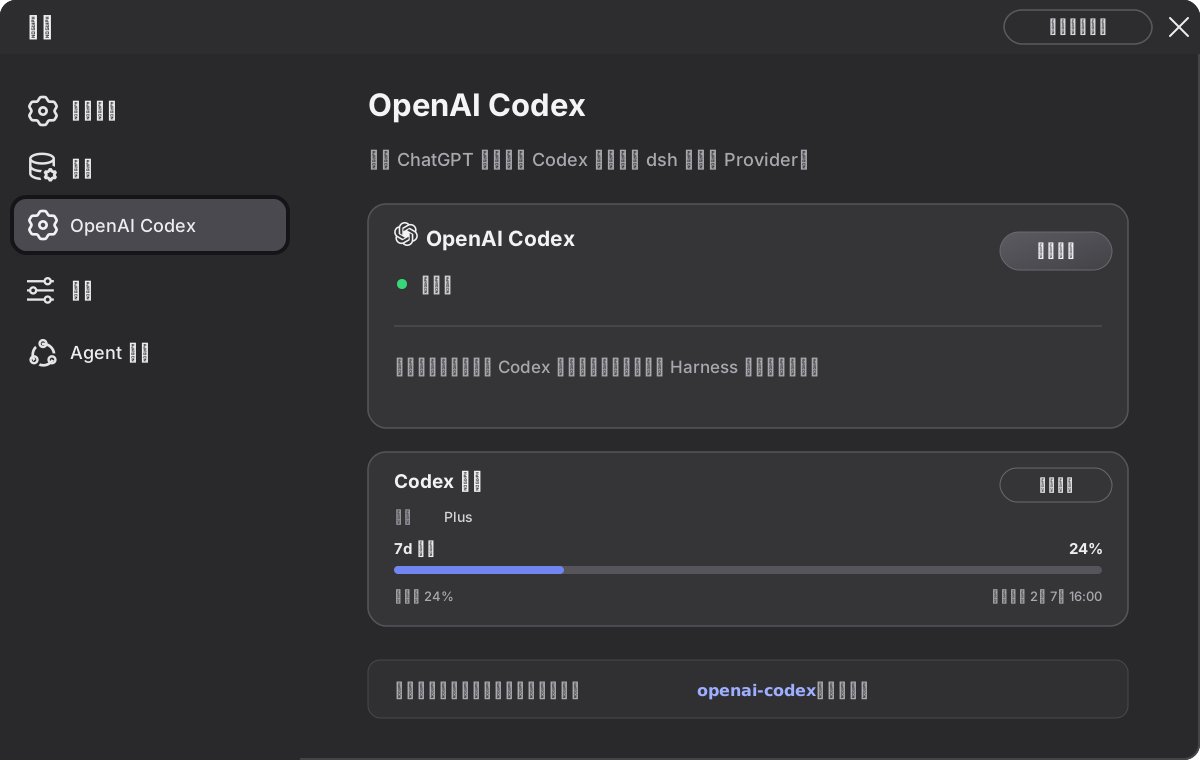
dsh web.openai-codex in the normal model picker. Installing the plugin does not change the default model.Browser sign-in requires the browser and dsh Host to run on the same machine. Device-code sign-in may need to be enabled in ChatGPT security settings or workspace permissions. Your account or workspace must have Codex access; model availability and quotas are controlled by OpenAI. Usage comes from OpenAI's account-scoped ChatGPT endpoint and may change with that service.
Plugins are installed independently for each dsh profile. Upgrade this plugin in the web profile to the newest published version:
dsh plugin --profile web update @jcy2387/dsh-codex-provider-plugin --latestTo install an exact version instead:
VERSION="$(npm view @jcy2387/dsh-codex-provider-plugin version)"
dsh plugin --profile web add "@jcy2387/dsh-codex-provider-plugin@$VERSION" --save-exact
Verify the installed version, restart dsh web, and force-refresh the browser so it does not reuse the previous client bundle:
dsh plugin --profile web list @jcy2387/dsh-codex-provider-plugin --depth 0When running from a deepseek-harness source checkout, prefix these commands with pnpm.
pnpm install
pnpm run check
dsh plugin --profile web add link:/Users/baojie/Documents/Projects/github/dsh-codex-provider-plugin
dsh web
From a deepseek-harness source checkout, prefix the last two commands with pnpm:
pnpm dsh plugin --profile web add link:/Users/baojie/Documents/Projects/github/dsh-codex-provider-plugin
pnpm dsh web
Open Settings → OpenAI Codex, then choose browser sign-in or device-code sign-in. Installation only adds a provider; it does not change the default model. Select a model under openai-codex through the normal model picker.
Every field is optional:
- id: llm-openai-codex
  config:
    credentialRef: OPENAI_CODEX_OAUTH
    transport: auto
    streamIdleTimeoutMs: 300000
    ipv6CallbackBridge: true
    proactiveRefresh: true
proxyMode: autocredentialRef: reference used by the Harness credential provider for serialized OAuth state.transport: sse, websocket, websocket-cached, or auto.timeoutMs: provider request timeout.websocketConnectTimeoutMs: WebSocket connection timeout.streamIdleTimeoutMs: maximum idle interval while waiting for the next stream chunk.retryPolicy: standard Harness LLM retry configuration.ipv6CallbackBridge: temporarily bridge [::1]:1455 to pi-ai's 127.0.0.1:1455 listener during browser sign-in. Enabled by default; disable it when PI_OAUTH_CALLBACK_HOST is explicitly managed by the deployment. The IPv4 port-availability check remains active when only the bridge is disabled.proactiveRefresh: refresh the access token in the background a few minutes before it expires, so the first request after expiry never pays the token round-trip. Enabled by default; disable it to fall back to purely lazy, request-driven refresh.proxyMode: auto (default) reads HTTPS_PROXY / HTTP_PROXY / ALL_PROXY, then falls back to the macOS system proxy, Windows current-user proxy, Linux GNOME GSettings, or KDE kioslaverc; environment reads only environment variables; off installs no plugin proxy dispatcher.HTTP(S)_PROXY variables. Linux TUN needs no extra wiring.openai.com and chatgpt.com; every other Harness request stays on the previous dispatcher. A custom Host dispatcher is preserved and takes precedence. localhost, 127.0.0.1, and [::1] always bypass the proxy.HTTPS_PROXY, or use TUN.openai-codex section of $DSH_HOME/settings.yaml, above the composition-level proxyMode default. After saving, the page explicitly asks you to restart dsh web; the running dispatcher is intentionally not hot-switched.Proxy configuration is read when the plugin starts. Restart dsh web after changing the environment or system proxy.
pi-ai rotates expired access tokens under a double-checked credential lock, and the plugin persists every rotated credential back into the Harness credential store. Two behaviors sit on top of that:
invalid_grant), the Settings status flips to Sign-in expired with a reconnect action instead of failing requests silently. Any later successful refresh — from the timer or from a request — flips the state back to Connected automatically. Refresh errors stay in the Host log; only the secret-free state crosses RPC.The Settings UI reports a stable diagnostic code without returning OAuth responses or tokens to the browser:
| Code | Meaning and next check |
|---|---|
CODEX_AUTH_ACCOUNT_ACCESS |
OpenAI did not issue usable Codex credentials. Check MFA, the selected ChatGPT workspace, and workspace Codex permissions. |
CODEX_AUTH_BROWSER_CALLBACK |
The Host did not receive a valid authorization code. Keep browser and Host on the same machine, do not restart dsh during sign-in, and check whether the browser blocks localhost:1455. |
CODEX_AUTH_BROWSER_CALLBACK_PORT |
The Host could not listen on localhost:1455. Stop another dsh/Codex login or the application occupying that port, then retry. |
CODEX_AUTH_BROWSER_CALLBACK_TIMEOUT |
No callback arrived within ten minutes. Start a new login without restarting dsh during the flow, or use device-code sign-in. |
CODEX_AUTH_DEVICE_CODE_DISABLED |
Enable device-code sign-in in personal ChatGPT security settings or workspace permissions. |
CODEX_AUTH_NETWORK |
Check the Host's proxy, DNS, TLS trust, and firewall access to OpenAI authentication services. |
CODEX_AUTH_TOKEN_EXCHANGE |
Authorization returned but credential exchange failed. Retry, then check the Host clock and proxy. |
CODEX_AUTH_UNSUPPORTED_REGION |
Browser authorization completed, but the Host network exits from a country or region OpenAI does not support. Use a Host network that complies with OpenAI availability and terms, then start a new login. |
CODEX_AUTH_UNKNOWN |
Test official Codex sign-in on the same Host to separate an account/environment failure from a plugin compatibility issue. |
Browser sign-in redirects to http://localhost:1455/auth/callback, so it is suitable only when the browser and dsh Host run on the same machine. Before starting pi-ai, the plugin verifies that 127.0.0.1:1455 is available and fails immediately with CODEX_AUTH_BROWSER_CALLBACK_PORT when another process owns it. While browser login is active, it also opens an IPv6-only [::1]:1455 listener that relays the exact callback path and query server-side to pi-ai on IPv4, then returns pi-ai's response and closes when the attempt ends. This avoids a second browser redirect that a proxy, PAC, or localhost security policy could intercept. It never listens on a LAN address. A browser flow with no callback ends after ten minutes instead of occupying the login state indefinitely. Full provider errors stay in the Host log; the browser receives only the diagnostic codes above. For a headless Host, use device-code sign-in after enabling it for the account or workspace. See OpenAI Codex authentication.
The plugin includes the provider, OAuth lifecycle, native Settings UI, model catalog, compaction metadata, and Codex usage display. The Host calls https://chatgpt.com/backend-api/wham/usage with the refreshed OAuth credential, validates the response, and sends only plan, window percentages, reset timestamps, and optional credit balance over its loopback-only RPC. The UI renders only windows present in the response, so it does not assume a five-hour limit.
pnpm install
pnpm run typecheck
pnpm test
pnpm run build
pnpm run publint
Build outputs:
lib/index.js: Host plugin.lib/client.cjs: loader-compatible browser plugin with inline CSS Modules.lib/types/**: Host and browser declarations.cordis.patch.yml: profile layer activated by the dsh.bundle manifest.CLASSIFICATION EVIDENCE
系统优先读取 GitHub Topics,再与站内分类词典和词根规则比对。当前命中: 无有效分类标签。
deepseek-ai
DeepSeek Harness: Everything is a Plugin.

walkinglabs
Harness engineering beginner tutorial, from 0 to 1

anywhere-labs
为 DeepSeek Harness (DSH) 插件生态打造的现代化桌面端解决方案。万物皆「插件」,桌面本身也是「插件」。