
模型与 MCP
待识别

rea
morluto
Reverse engineer anything with agents, from app behavior down to native binaries.
PROJECT TOPICS
INSTALL REFERENCE
dsh plugin --profile web add github:DM-Odyssey/dsh-session-manager
该命令指向仓库当前默认分支;尚无绑定当前 commit 的完整验证结果。
PROJECT README
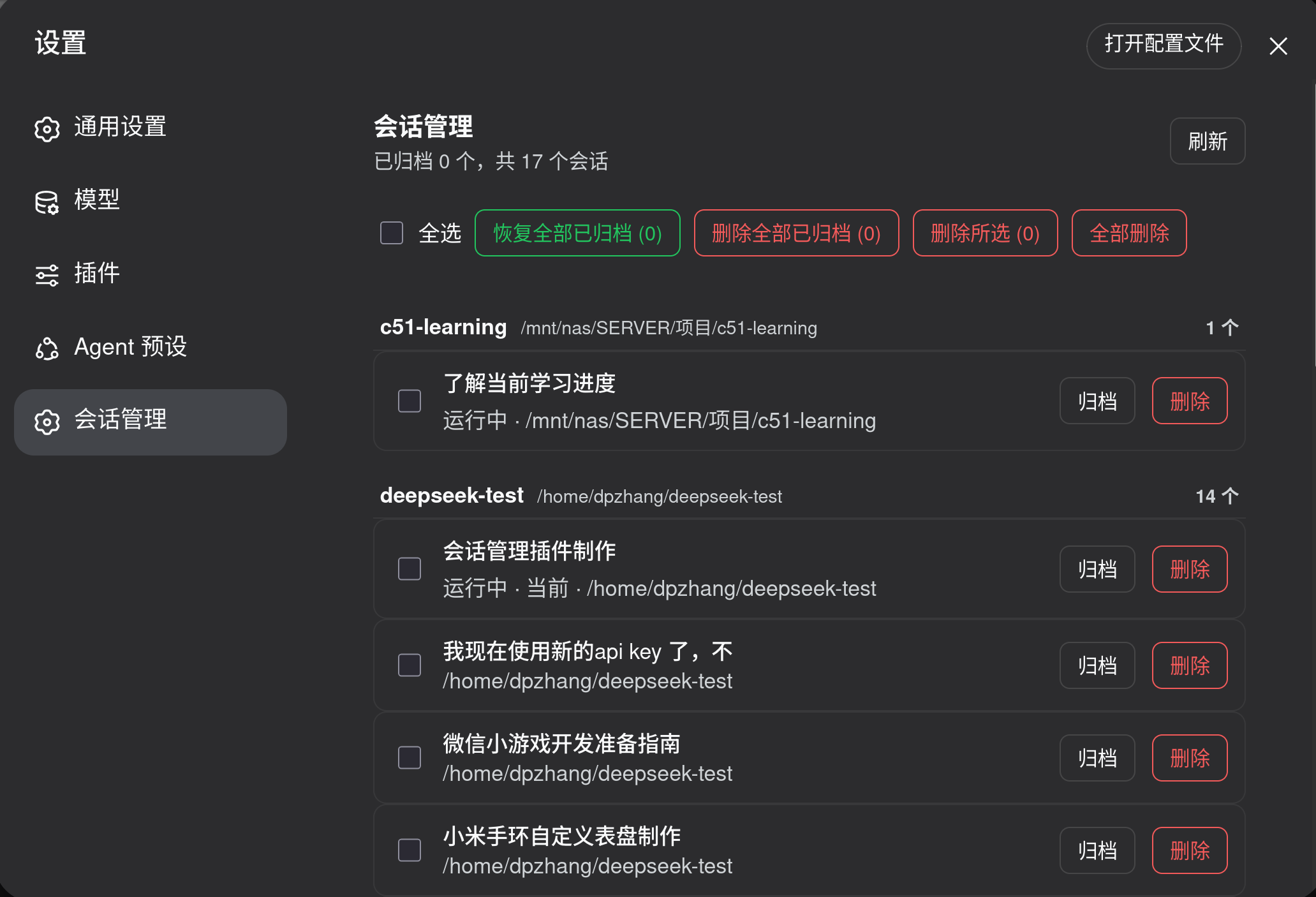
DeepSeek Harness 的部署级插件:在 Web 设置的「会话管理」页中,统一管理所有会话 —— 支持恢复归档、删除会话、按工作区分组、多选/全部批量操作。作为部署级插件常驻,进程重启后自动加载。
host/archived-sessions-changed 帧实时同步所有浏览器)。.session-manager-state.json,插件/进程重启后不复活。「会话管理」设置页(按工作区分组、多选、批量操作):
dsh-session-manager/
├── readme.md                      # 本文档
├── LICENSE
├── package.json                   # 项目根元信息(可选)
├── packages/
│   ├── session-manager/           # Host 服务  @deepseek-ai/dsh-session-manager
│   │   ├── src/{index.ts, types.ts}
│   │   ├── tsconfig.json / tsdown.config.ts
│   │   └── scripts/rewrite-remote-zod.mjs   # 构建后处理(见下)
│   └── client-ui-session-manager/ # 浏览器设置页  @deepseek-ai/dsh-client-ui-session-manager
│       ├── src/{index.ts, client/index.ts}
│       └── tsconfig.json / tsdown.config.ts
└── dist/                          # 构建产物(lib/,可被部署直接拷贝安装)
    ├── session-manager-lib/
└── client-ui-lib/SessionManagerService extends TypertRemoteService,通过 @Remote 暴露
list / restore / restoreMany / archive / deleteSession / deleteSessions / deleteAllArchived。
直接操作 workspace 存储域(归档集合 + 工作区记账)、调用持久化层定位并删除会话日志、维护待删队列。
Remote 贡献随包的 ./typert 由 typert-loader 自动注册。settings.section 的「会话管理」页,通过 ctx.remote.sessionManager.* 调用 Host。
Remote namespace 由 dsh-api-remotes 统一挂载(平台标准路径)。前置:Node 18+、pnpm 9+;已在 dsh 仓库工具链内构建(typert 生成、client bundle 依赖其 tsdown 配置)。
# 在 dsh 仓库根目录(含本插件源码的 checkout)执行
pnpm install
pnpm build:lib:host     # Host 构建 + typert(生成 typert.host.js / typert.remote-client.js)
# 然后对 session-manager 的产物执行一次远程层 zod 重写(让浏览器 bundle 内联 zod):
node packages/session-manager/scripts/rewrite-remote-zod.mjs
pnpm build:lib:client   # 客户端 bundle
每次 Host 重建后都需重跑 rewrite-remote-zod.mjs(它把生成的 remote-client 由 import { z } from 'zod'
改写为 zod 具名导入,配合 tsdown 的 zod ESM alias,避免本仓库 rolldown 把 zod 留成外部 require("zod")
导致模块表缺失)。构建产物在 dist/(本项目已含一份当前构建结果)。
当前插件的 Host/Client 依赖 dsh 的运行时与构建环境,且 Remote 跨端挂载依赖平台共享包
dsh-api-remotes(子包尚未发布到 npm registry),因此不支持“从远端一条 dsh plugin add
命令直接装上并立即可用”。正确做法是:先把仓库拉取(clone)到本地,再从本地目录安装
(此路径已验证可用)。
从 GitHub
git clone git@github.com:DM-Odyssey/dsh-session-manager.git
cd dsh-session-manager在 clone 出的项目根目录(package.json 是一个带 dsh.bundle.patch 的 bundle 包)执行:
dsh plugin --profile web add "$PWD"
# 等价于:dsh plugin --profile web add /absolute/path/to/dsh-session-manager
dsh plugin ... add 会在 profile 里 pnpm add 这个 bundle 及其两个子包
(packages/session-manager、packages/client-ui-session-manager,以 file: 本地依赖解析),
并把识别为 bundle 的包自动加入 dsh.profile.bundles;启动时 bundle 自带的 cordis.patch.yml
作为一层补丁挂载 session-manager 与 client-ui-session-manager 两行。无需手工 patch/symlink。
npx @deepseek-ai/dsh web重启后打开 设置 → 会话管理 即可使用。
备注:若子包后续发布到 npm/GitHub Packages,可把 bundle 的
dependencies从file:改为 registry 版本,并调整 Remote 挂载方(当前依赖dsh-api-remotes),届时才能真正“远程一下装”。 在此之前请使用“拉取下来安装”。
若不便用 dsh plugin add,也可手工放置:把两个子包的 lib+package.json 拷到
~/.local/lib/node_modules/@deepseek-ai/dsh/node_modules/@deepseek-ai/<包名>/,写
~/.dsh/profiles/web/cordis.patch.yml(两行 insert,见下),并确保 profile 的
node_modules/@deepseek-ai/<包名> 是指向全局包的符号链接,重启。
dsh plugin --profile web remove @dm-odyssey/dsh-session-manager   # 或 pnpm remove
# 或:编辑 ~/.dsh/profiles/web/package.json,把该 bundle 从 dsh.profile.bundles 移出并删除依赖
rm -f ~/.dsh/profiles/web/cordis.patch.yml
# 重启 dsh web删除立即在所有页面隐藏会话;磁盘日志冷会话当场删除、运行中的在停止后(刷新页面或 60 秒扫描)自动清除。
session.jsonl[.zstd] 所在目录)。<workspace>/.session-manager-state.json;删除该文件即重置记录。rm ~/.dsh/profiles/web/cordis.patch.yml
rm -rf ~/.dsh/profiles/node_modules/@deepseek-ai/dsh-session-manager \
~/.dsh/profiles/node_modules/@deepseek-ai/dsh-client-ui-session-manager
rm -rf ~/.local/lib/node_modules/@deepseek-ai/dsh/node_modules/@deepseek-ai/dsh-session-manager \
~/.local/lib/node_modules/@deepseek-ai/dsh/node_modules/@deepseek-ai/dsh-client-ui-session-manager
# 重启 dsh webMIT。
CLASSIFICATION EVIDENCE
系统优先读取 GitHub Topics,再与站内分类词典和词根规则比对。当前命中: deepseek-harness。
morluto
Reverse engineer anything with agents, from app behavior down to native binaries.

deepseek-ai
DeepSeek Harness: Everything is a Plugin.

nexu-io
The 1st Collaborative AI Design Agent Workspace. Local-first and open source. Create motion, prototypes, websites, apps, dashboards, presentations, images, and videos with your team and AI agents. Share work, exchange feedback, and iterate together in one workspace.