
文件与数据
渠道适配

WeKnora
Tencent
Open-source LLM knowledge platform: turn raw documents into a queryable RAG, an autonomous reasoning agent, and a self-maintaining Wiki.
PROJECT TOPICS
INSTALL REFERENCE
dsh plugin --profile web add github:DDDMUC/dsh-free-search
该命令指向仓库当前默认分支;尚无绑定当前 commit 的完整验证结果。
PROJECT README
DeepSeek Harness 免费搜索插件 —— 无需 API key,零成本,多引擎可切换。 一个给 DeepSeek Harness (dsh) 添加多引擎搜索 provider 的插件,注册进 ctx.web seam。内置 web_search 工具自动选用,支持网页设置页切换引擎、配置 API key、一键测试所有引擎、弹出式命令切换引擎。
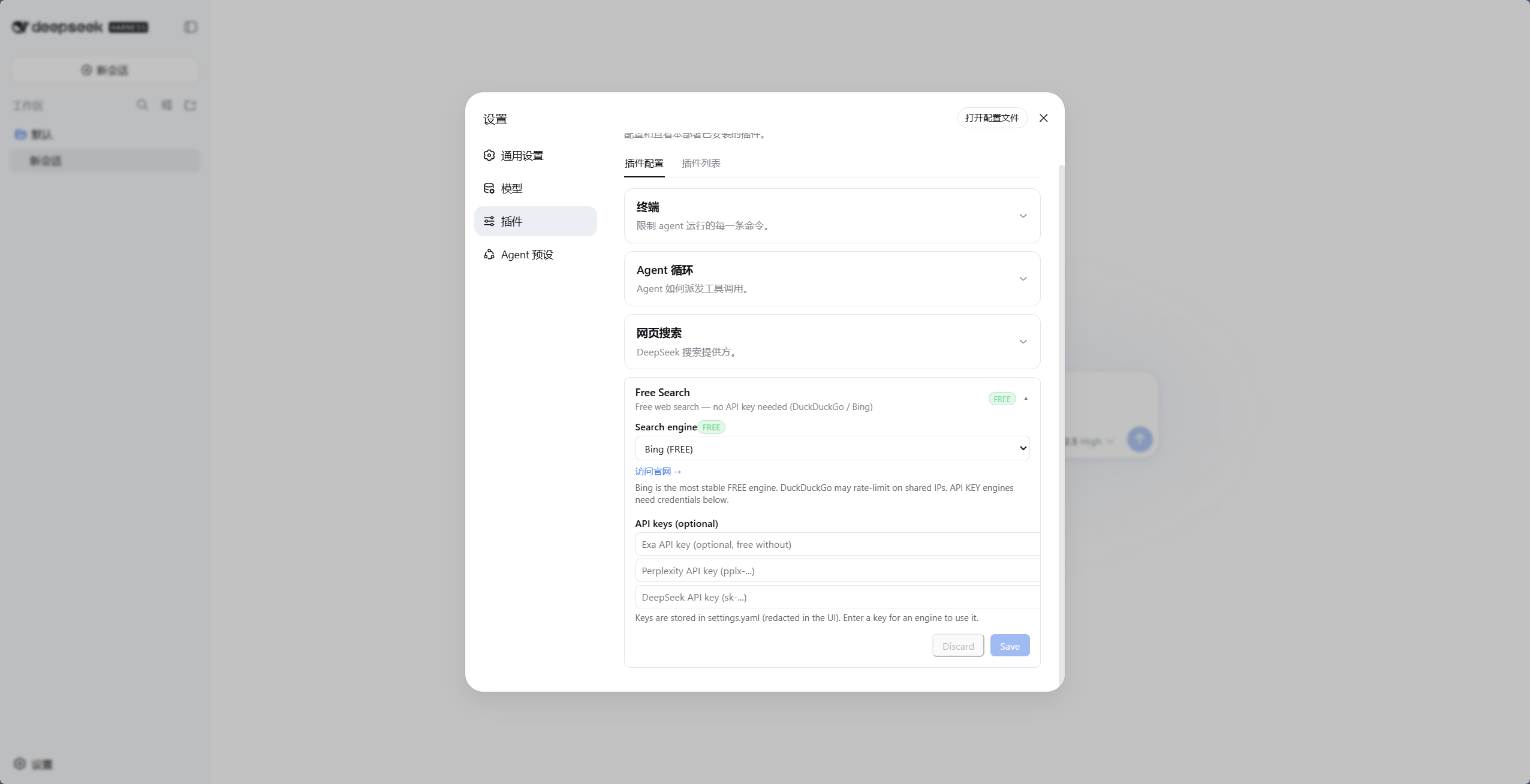
dsh 默认的搜索 provider 依赖 DeepSeek 官方 API key(DEEPSEEK_API_KEY)。如果你:
web_search 工具),……那么内置搜索必然失败,agent 会告诉你"无法联网"。
这个插件提供多个免费引擎 + 自动回退,彻底摆脱 DeepSeek 官方 key 的依赖。
zhihu_global/zhihu_site,经知乎开放平台 MCP)、OpenAI / Gemini / Claude 模型内置搜索plugins.row.config,DSH 0.1.7-rc.1+)/free-search-engine,弹出引擎选择窗口,点选即切换(等效设置页 + 保存)free_search_test 工具让 agent 一键测试所有引擎;设置页也有"测试引擎"按钮(直测当前引擎,不走回退链,付费引擎无 key 会明确报错)advanced_search / multi_search / 引擎测试都不再用它),并可用 ↑↓ 调整全局回退顺序(一键恢复默认)Multi Search:web_search 按查询语言并发对应语言池的全部已启用引擎(不再是前 3 个;中文/英文池可在设置页编辑,每池最低 2 个引擎)、按 URL 合并去重、跨源命中的结果优先(代价是成倍消耗额度;multi 失败会自动退回单引擎回退链)Note: perplexity unavailable or failed, using exa.);失败按类别处理:额度/鉴权失败→本会话冷却该引擎,反爬→短退避,超时/5xx/限流→同引擎重试一次,解析失败/0 结果→不冷却(详见下文「失败分类与引擎冷却」)advanced_search 工具支持 timeRange:固定档、自定义相对值、绝对日期三种形式(详见下方逻辑说明)<untrusted-web-content> 边界内(正文里自带的同名标记会被剥离,防止提前闭合);核心 web_search / web_fetch 由 DSH 核心自带同类提示(External web content follows...);所有 snippet 统一清洗并截断到 300 字符FREE 徽章,付费引擎带橙色 API KEY 徽章dsh-web-fetch-http provider,纯 JS,零额外依赖)research 抓过的正文(node:sqlite 持久缓存,存储 7 天;node:sqlite 不可用时自动降级为 no-op,免 flag 需 ≥ 22.13,22.5–22.12 需 --experimental-sqlite)WebSearchProvider seam 接口,与官方插件共存如果这个插件帮到了你,欢迎给仓库点个 ⭐(GitHub)——星标是开发者继续维护的最大动力,感谢支持!
| id | 引擎 | 费用 | 说明 |
|---|---|---|---|
auto |
Auto 智能路由 | 动态 | 根据查询语言/时间条件自动选路(含中文优先 Bing/Baidu/Aliyun/AnySearch,英文优先 Bing/Exa/Tavily;时间过滤优先支持引擎),末尾全量回退 |
ddg |
DuckDuckGo HTML | 免费 | 偶发限流(反爬),解封自动恢复 |
ddg-lite |
DuckDuckGo Lite | 免费 | 轻量版,同上 |
bing |
Bing | 免费 | 默认引擎,最稳定,中文优化(zh-CN) |
anysearch |
AnySearch AI | 免费 | AI 搜索,无 key(匿名额度) |
searxng |
SearXNG 元搜索 | 免费 | 多实例自动切换,支持自定义实例 |
exa |
Exa | 免费 | 无 key 也可用(MCP 匿名),配 key 提升额度 |
tavily |
Tavily | 免费 | 无 key 也可用(keyless 匿名),配 key 提升额度 |
keenable |
Keenable | 免费 | 无 key 也可用(MCP 匿名),配 key 提升额度 |
firecrawl |
Firecrawl | 免费 | 无 key 也可用(官方免 key 匿名额度),配 key 提升限额 |
parallel |
Parallel | 免费 | 无 key 也可用(官方 MCP 匿名额度),配 key 提升额度并支持精确时间过滤 |
perplexity |
Perplexity | 付费 | 需 PERPLEXITY_API_KEY |
serpbase |
SerpBase | 付费 | 需 SERPBASE_API_KEY(serpbase.dev,注册送 100 次免费额度) |
serply |
Serply | 付费 | 需 SERPLY_API_KEY(serply.io,新账户 30 天内 2,500 次免费额度);Google 网页结果,按设置页语言本地化 |
deepseek-official |
DeepSeek 官方 | 付费 | 需 DEEPSEEK_API_KEY |
you |
You.com | 付费 | 需 YOUCOM_API_KEY(you.com/platform/api-keys,注册即送免费额度) |
baidu |
百度千帆 AI 搜索 | 额度 | 需 BAIDU_API_KEY(千帆 AI 搜索,每日赠 50 次,超额按量后付费);中文全网,支持时间过滤 |
kimi |
Kimi(Moonshot)联网搜索 | 付费 | 需 MOONSHOT_API_KEY(basic 约 ¥0.01/次),返回带正文 chunks 的中文结果;无免费额度,适合显式选用或作质量升级池,不建议放进默认并发池 |
kimi |
Kimi(Moonshot)联网搜索 | 付费 | 需 MOONSHOT_API_KEY(basic 约 ¥0.01/次),返回带正文 chunks 的中文结果 |
aliyun |
阿里云百炼 EnhancedSearch | 付费 | 需 DASHSCOPE_API_KEY(MCP search_pro,约 ¥0.03/次,新用户 200 次免费包);中文全网带来源 hostname |
doubao |
火山引擎联网搜索(豆包搜索) | 免费额度 | 需 DOUBAO_SEARCH_API_KEY(联网搜索控制台开通,每月 500 次免费,超出按量付费);中文时效内容强,支持时间/站点过滤,返回千字级摘要 |
zhihu_global |
知乎全网搜索(开放平台 MCP) | 免费额度 | 需 ZHIHU_API_KEY;每日 5,000 次试用额度(试用结束需另行开通);支持时间过滤(publish_time);无 key 时自动跳过 |
zhihu_site |
知乎站内搜索(开放平台 MCP) | 免费额度 | 需 ZHIHU_API_KEY;每日 5,000 次试用额度(与 zhihu_global 共享);不支持时间过滤 |
zhihu_global |
知乎全网搜索(开放平台 MCP) | 付费 | 需 ZHIHU_API_KEY;支持时间过滤(publish_time);无 key 时自动跳过 |
zhihu_site |
知乎站内搜索(开放平台 MCP) | 付费 | 需 ZHIHU_API_KEY;不支持时间过滤 |
openai |
OpenAI 模型内置搜索 | 付费 | 需 OPENAI_API_KEY;走 Responses API 的 web_search 工具,返回带引用的回答。按次计费,仅在显式选中时使用(不参与自动回退/auto);默认 gpt-6-luna,模型与端点可配(openaiModel / openaiBaseUrl) |
gemini |
Gemini Grounding with Google Search | 付费 | 需 GEMINI_API_KEY(兼容 GOOGLE_API_KEY);走官方推荐的 Interactions API(POST /v1beta/interactions,tools:[{type:"google_search"}]),从 steps[].content[].annotations 取引用。按次计费,仅在显式选中时使用;默认 gemini-3.8-flash,模型与端点可配(geminiModel / geminiBaseUrl) |
claude |
Claude 服务端 web_search | 付费 | 需 ANTHROPIC_API_KEY;结果来自 web_search_tool_result。按次计费,仅在显式选中时使用;默认 claude-sonnet-5-5,模型与端点可配(claudeModel / claudeBaseUrl) |
bing(免费且最稳定),安装后开箱即用。「免费 / 付费」二分不足以决定谁该进默认池——真正的约束是额度模型:有没有免费量、有多少、用超了怎么算。按这个口径分五档(配置并发池时按这档选,能避免整池并发时额度翻倍):
| 档位 | 引擎 | 超出后 |
|---|---|---|
| ① 无限免 key | ddg / ddg-lite / bing / searxng / anysearch |
— |
| ② 匿名额度(不配 key 也能跑) | exa / tavily / keenable / firecrawl / parallel |
配 key 提额 |
| ③ 免费额度(需 key) | zhihu_global / zhihu_site(每日 5,000 次试用)、doubao(每月 500 次)、baidu(每日 50 次)、aliyun(新用户 200 次包) |
按量后付费 |
| ④ 付费升级(需 key 才有产出) | serpbase(注册送 100 次)/ serply(30 天 2,500 次)/ you / perplexity / deepseek-official / kimi |
按量 / 按次 |
| ⑤ 按次计费(模型内置,显式-only) | openai / gemini / claude |
按 token + 每次搜索 |
选默认池的经验:① 打底 + ③ 打主力;② 可以进但要知道它在烧匿名额度;④ 只在你确实需要该源时显式选用;⑤ 永不入池。完整的逐引擎额度事实与默认池提案见 docs/engine-quota-tiers.md。
v1/search REST 接口提供匿名的公共搜索额度,无需注册或 API key。额度有限流(适合日常搜索),但作为免费引擎之一,与其他免费引擎互相回退,体验稳定。mcp.exa.ai/mcp)支持匿名调用,不配 key 也能用;配置 EXA_API_KEY 后可获得更高额度。x-tavily-access-mode: keyless 头走 keyless 匿名额度,不配 key 即可用;配置 TAVILY_API_KEY 后走账号档,额度更高、结果质量更稳定。api.keenable.ai/mcp)匿名调用;配置 KEENABLE_API_KEY 后走 REST API(api.keenable.ai/v1/search),额度更高、按组织限流。/v2/search 端点无需 key 即可使用(官方文档明确说明,有匿名限流);配置 FIRECRAWL_API_KEY 后可提高限额。支持 tbs 时间过滤(qdr:h/d/w/m/y 与自定义日期区间)。git clone https://github.com/DDDMUC/dsh-free-search.git
dsh plugin --profile web add /path/to/dsh-free-search然后重启:
dsh web插件加载后自动接管搜索(运行时接管,不改配置层):
web.searchProvider 未设置,或仍是 DSH 出厂默认的官方搜索 deepseek-official 时,自动切换为本插件的 provider(id 固定为 ddg);不再往配置里写 searchProvider: ddg:静态覆盖曾导致"悬空引用"——patch 是整段覆盖 config,一旦插件那一行被停用或跳过(比如在插件管理器里关掉),配置仍指向 ddg 而没有任何东西注册它,于是每次搜索都失败:
Error: configured web provider "ddg" is not registered现在没有这层覆盖:插件被停用时 web.searchProvider 保持官方默认(deepseek-official),搜索至少还能走官方通道;插件启用时由上面的运行时接管切到 ddg。
如果你曾按旧文档手动在
profiles/<profile>/cordis.patch.yml里加过下面这段,而插件没有启用,就会看到上面那条错误——删掉这段即可(或重新启用插件):
# 可选,通常不需要:只有你想强制指定时才加。
# DSH 0.1.2+ 的 patch 是"整段覆盖 config",必须保留 fetchProvider。
- id: web
  config:
    searchProvider: ddg
    fetchProvider: http
searchProvider: ddg —— 本插件的 provider id(固定值),不是"使用 DuckDuckGo 引擎";用哪个引擎由设置页的 provider 字段决定(bing/baidu/auto/…)。fetchProvider: http —— 官方网页抓取(web-fetch-http),手动声明时必须保留。同作者的姊妹插件:在设置页里可视化创建/编辑 Agent 预设——分段提示词、15 项能力开关、内置「鲸鱼娘 / 梁神模式」模板,不用手写 YAML。两者搭配:free-search 解决"AI 联网搜索"、preset-workbench 解决"AI 人设能力编排",都是纯免费、开箱即用。
dsh plugin --profile web add github:DDDMUC/dsh-preset-workbench如果你觉得 preset-workbench 也有用,同样欢迎给它的仓库点个 ⭐。🙏
插件对 @deepseek-ai/dsh-settings 和 @deepseek-ai/dsh-tools 使用 peerDependencies,这是刻意的:DSH 运行时必须使用安装树中的唯一实例。请通过 dsh plugin --profile <profile> add ... 安装插件,不要把 DSH 核心包复制进 profile 的本地 node_modules;重复副本会导致工具调度器失效。
安装后打开配置页(DSH 0.1.7-rc.1+):
free-search → 点击组件行 web-search-free(行内"配置"入口)配置页提供:
~/.dsh/.credentials.yaml(如 DEEPSEEK_API_KEY: sk-...,与官方 LLM provider 一致,一处管理所有 key)。插件读取优先级:凭据中心 > 设置页 > 环境变量,设置页填的 key 仅作为遗留兼容。Discard 只撤销尚未保存的编辑platform_search 工具按此过滤)
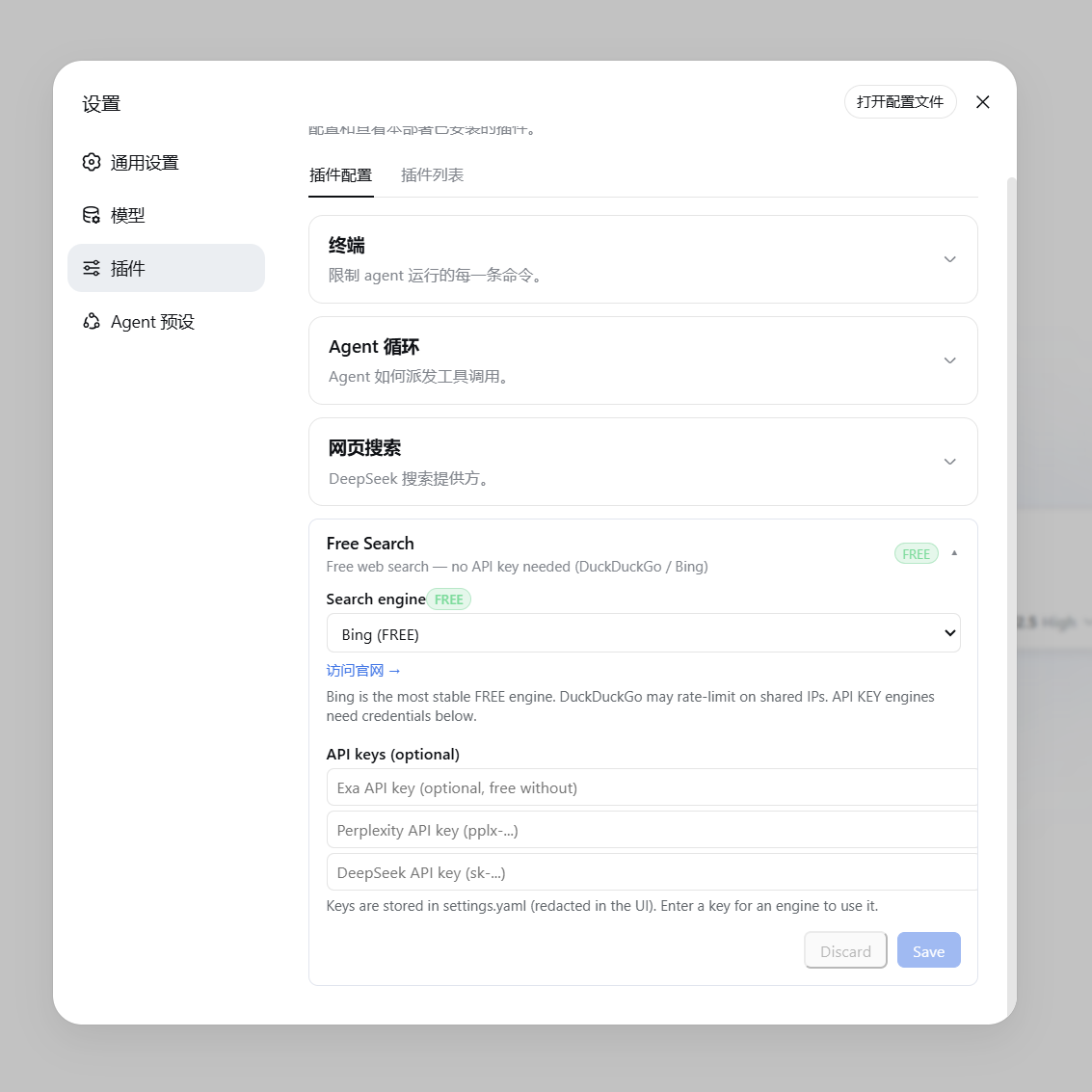
▲ 免费引擎(显示绿色 FREE 徽章与官网链接) |
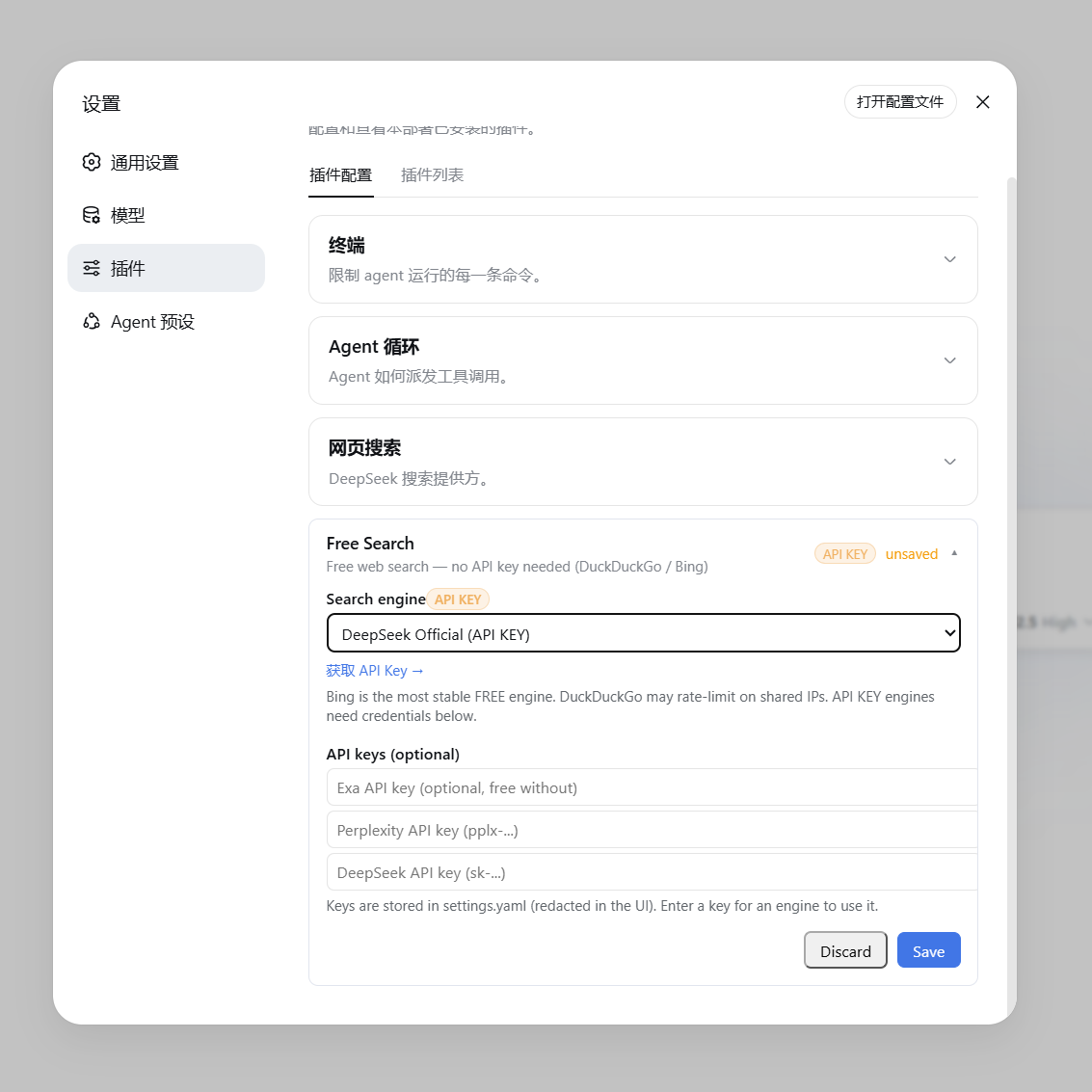
▲ 付费/API Key 引擎(显示橙色 API KEY 徽章与获取链接) |
不用进设置页也能切换引擎:在聊天框输入 /free-search-engine,弹出引擎选择窗口(和 /model 选模型一样的交互),点选即切换,当前引擎会标记出来。等效于设置页切换 + 保存,且界面语言跟随设置页(中文/英文)。
命令只改首选引擎配置,搜索仍走 web_search + 统一回退链:即使首选引擎挂了也会自动换其他引擎,永不直接失败。系统提示词同步刷新。
设置页有这些块(都会保存进条目 config):
web_search 回退链、Auto 智能路由、advanced_search、multi_search 和引擎测试中全局排除;至少要保留一个引擎。bing / baidu / aliyun / anysearch,默认英文池 bing / exa / tavily;禁用/冷却/缺 key 的引擎运行时自动跳过。Multi Search:选中后 web_search 会并发查询查询语言对应池的全部已启用引擎(不再是前 3 个),URL 去重合并、跨源命中的结果排前面。注意整池并发会成倍消耗额度(池里含按额度计费引擎时尤其注意);Multi 失败时会自动退回普通单引擎回退链并在结果里注明。回退链不再把所有失败一视同仁,而是先给失败分类(issue #36):
quota(额度/预算耗尽,HTTP 402 / NO_MORE_CREDITS / SerpBase 免费额度用尽):立即切换,并把该引擎在本进程内冷却——后续搜索不再尝试它,避免反复撞墙;auth(401/403、key 无效或未配置):同上,冷却到本会话结束(改好 key 重载插件即恢复);bot-wall(如 DDG 反爬挑战):冷却一小段(默认 60s)后再自动放回链中;transient(超时 / 5xx / 网络 / 429 限流):同一引擎重试一次再回退,避免一次抖动就丢掉好引擎;invalid-response(解析失败 / 结构变化 / 返回 0 结果):照常回退,但归类为插件侧问题,不冷却引擎。回退结果的 Note: 现在会给出具体类别,例如 Note: exa is out of quota, using doubao.、Note: perplexity is misconfigured (API key rejected), using doubao.、Note: bing failed (transient), using doubao.。free_search_test 也会为每个失败引擎附上类别(failureClass)。
冷却只作用于本进程(重载插件或重启即清空),且对配置的首选引擎同样适用:若它正在冷却,本轮会跳过并回退,结果里注明 is cooling down;冷却中的引擎一旦成功即自动解冻。
fallbackOn 控制哪些失败类别允许触发回退:默认勾选全部六类,即当前的「搜索永不直接失败」;取消某类后,遇到该类失败会停下并把该引擎的错误报出,不再换引擎(例如去掉 invalid-response:首选引擎返回空/解析失败时直接报错,而不是静默退回低质引擎)。设为空数组 [] 则任何失败都立即中止。注意缺 key、被禁用、不支持时间过滤不算失败,无论怎样都照常换引擎。设置页有对应勾选框,也可在 config 写 fallbackOn: [quota, auth, bot-wall, transient, invalid-response, unknown]。
DSH 0.1.7-rc.1 起,配置跟随 profile 的插件条目保存:设置页与 /free-search-engine 都会写入当前 profile 的 cordis.patch.yml 中 web-search-free(dsh-free-search)条目的 config。
旧版 ~/.dsh/settings.yaml 的 free-search: 段不会被 DSH 核心自动导入(核心的 importLegacyDocument 只为 ui-developer-tools / ui-onboarding / shell 三个段提供了映射),原文件在导入其它段后会被改名为 settings.yaml.imported,该段的值只留在那里。插件会在启动时检测 settings.yaml.imported(或仍存在的 settings.yaml)中的 free-search: 段,把可识别的字段一次性补种进当前 profile 的条目 config(写一次后不再重复,可在启动日志看到 free-search: migrated N field(s)…)。如果你想手动处理,也可以照着 settings.yaml.imported 里的值在插件页行配置中填一遍。
# profiles/<profile>/cordis.patch.yml 中该条目的 config:
provider: bing              # ddg / ddg-lite / bing / searxng / anysearch / exa / tavily / keenable / firecrawl / parallel / perplexity / serpbase / serply / deepseek-official / you / baidu / kimi / aliyun / doubao / openai / gemini / claude / auto / multi
fallbackOn: [quota, auth, bot-wall, transient, invalid-response, unknown]   # 允许触发回退的失败类别;[] = 任何失败都立即中止(默认全部)
lang: zh                    # 设置页界面语言(zh / en)
bingMarket: zh-CN           # Bing 市场
region: cn-zh               # DuckDuckGo 区域(可选)
searxngInstances:           # 自定义 SearXNG 实例(可选)
  - https://your-instance.example
exaApiKey: ...              # 或通过设置页填写
tavilyApiKey: ...           # 或通过设置页填写
keenableApiKey: ...         # 或通过设置页填写
firecrawlApiKey: ...        # 或通过设置页填写
parallelApiKey: ...         # 或通过设置页填写
perplexityApiKey: ...
serpbaseApiKey: ...         # 或通过设置页填写
serplyApiKey: ...           # 或通过设置页填写
deepseekApiKey: ...对 agent 说"测试一下所有搜索引擎",它会调用 free_search_test 工具,逐个测试并报告:
Search engine test:
- ddg: FAIL - DuckDuckGo is rate-limited right now (anti-bot challenge, usually temporary) - Bing works
- bing: OK (2 results, e.g. "DeepSeek Harness developer preview...")
- exa: FAIL - EXA_API_KEY not configured让 agent 搜"最近一周的新闻"、"这个月的发布"、"最近 3 天的消息"、"7 月以来的更新",它会调用 advanced_search 工具,带 timeRange 参数。该工具同样走统一回退链,且可显式指定 engine,返回结构同 web_search。
timeRange 支持三种形式:
| 形式 | 示例 | 含义 |
|---|---|---|
| 固定档 | day / week / month / year |
分别 = 1 / 7 / 30 / 365 天 |
| 自定义相对值 | 12h、3d、2mo、1y |
最近 12 小时 / 3 天 / 2 个月 / 1 年 |
| 绝对日期 | 2026-07-01 |
该日期(含)之后发布的结果 |
各引擎对 timeRange 的处理逻辑:
| 引擎 | 参数 | 是否精确 | 说明 |
|---|---|---|---|
| Exa | startPublishedDate |
✅ 精确 | 自定义天数转成 ISO 日期(N 天前),绝对日期原样传入 |
| Keenable | published_after |
✅ 精确 | 相对值原样传(12h/3d/2mo/1y),绝对日期原样传 |
| Tavily | time_range |
⚠️ 近似 | 只认固定档,自定义天数自动映射到最近似档位 |
| Firecrawl | tbs |
⚠️ 近似 | 固定档映射到 qdr:d/w/m/y;绝对日期用 cdr:1,cd_min:M/D/YYYY(精确) |
| Parallel | source_policy.after_date(有 key 时精确);无 key 走 MCP,无日期参数,改为把窗口写进 objective 作为新鲜度提示(软过滤) |
✅ 精确 / ⚠️ 软过滤 | 自定义天数转成 ISO 日期(N 天前),绝对日期原样传入 |
| SearXNG | time_range |
⚠️ 近似 | 同上 |
| DuckDuckGo / Lite | df |
⚠️ 近似 | 同上 |
| Bing / AnySearch | — | ❌ 忽略 | 无对应参数 |
"最近似档位"映射规则:≤2 天 → day,≤14 天 → week,≤90 天 → month,否则 year。例如 3d 在 Tavily 上按 day 处理,2mo 按 month 处理。
引擎链优先级:当带 timeRange 搜索时,支持时间过滤的引擎(tavily / exa / keenable / firecrawl / parallel / searxng / ddg / ddg-lite)会排到引擎链前面,确保过滤真正生效——即使首选引擎是 bing(不支持过滤),也会先尝试支持过滤的引擎。
示例对话:"帮我搜最近 3 天关于 DSH 的新闻" → agent 调用 advanced_search,timeRange: "3d"。
当需要对重要问题做多源交叉验证、避免单一引擎偏差或单源死锁时,可以让 agent 调用 multi_search 工具:
engines 列表),各引擎独立解析 API Key 与容错(缺 key 引擎自动跳过,不阻断其他引擎)。seenIn 命中来源清单(如 [seen in: bing, exa])。<untrusted-web-content> 数据边界,正文 snippet 统一清洗。搜索到 URL 后,可以让 agent 读取网页全文(如"打开第一个链接看看内容")。web_fetch 工具已启用(官方 dsh-web-fetch-http provider):
web_fetch 无 SSRF 防护,agent 理论上可访问内网地址——按需使用让 agent 搜特定平台,如"在 GitHub 上搜 deepseek harness"、"看看 B站有什么相关视频"、"V2EX 上关于 dsh 的讨论"。platform_search 工具支持:
| 平台 | 用途 |
|---|---|
github |
GitHub 仓库搜索(API,免费无 key) |
v2ex |
V2EX 热门/相关主题 |
bilibili |
B站视频/内容搜索(公开接口) |
reddit |
Reddit 帖子/讨论搜索(公开 JSON API;部分网络环境可能被 Reddit 反爬拦截) |
hn |
Hacker News 技术社区讨论(Algolia 官方 API) |
stackoverflow |
Stack Overflow 技术问答(Stack Exchange 官方公开 API) |
wikipedia |
维基百科词条(中文环境用 zh.wikipedia.org,lang: en 时切换 en.wikipedia.org) |
npm |
npm 包搜索(registry 官方 API) |
youtube |
YouTube 视频搜索(抓 results 页 ytInitialData,免 key) |
vimeo |
Vimeo 视频搜索(抓搜索页内嵌数据;抓不到时退回网页搜索 site:vimeo.com,免 key) |
公开 API 或免 key 抓取,零外部依赖、无需任何 key。youtube / vimeo 需要先在设置页「平台搜索」里勾选启用。
让 agent 找视频:"找几个关于 X 的视频"、"有没有 Y 的教学视频"。video_search 跨站搜索:
| 源 | 说明 |
|---|---|
bing |
Bing Videos(抓 bing.com/videos/search 的 vrhm 元数据,免 key) |
ddg |
DuckDuckGo Videos(vqd + v.js,免 key) |
默认两个源都试、失败互相回退,返回 url / title / snippet(来源站点、时长等)。免 key 抓取,对方改版可能失效;要按站点搜(YouTube / Vimeo / B站)请用 platform_search。
research 让 agent 一次调用拿到带出处的证据包:多引擎并发搜索 → 候选重排 → 分层抓取正文 → 段落选窗 → Markdown 简报。适合"需要多源核验的问题",可替代 agent 自己串联 web_search + web_fetch。
question(问题原文)、depth(抓取正文的篇数,1–5,默认 3;自动取整并夹到该区间)。sources 检索结果、documents 抓到的正文(每条含 kind、text_origin、tier、published、fetched_at、engine_hits 等字段)、notes 执行注记、estimatedTokens 粗估 token。DEADLINE_MS)与 12 次搜索调用上限(SEARCH_REQUESTS_MAX);到点取消在途请求、排队任务不再启动,并返回已拿到的部分结果,在 notes 里记 deadline_hit 或 budget_exhausted。snippets only)。<untrusted-web-content> 内。无 key 时的降级行为(基本路径仍可用,不会因缺 key 中断):
| 未配置的 key | 影响 |
|---|---|
SILICONFLOW_RERANK_API_KEY |
跳过候选重排与段落模型打分,改用轻筛排序;抓取前语义簇标记也跳过。notes 记录降级路径 |
DECISION_MODEL_API_KEY / DECISION_MODEL_URL |
决策模型整体关闭(decide() 直接返回 null),意图判定、充分性闸门、改写挑选全部走规则版。两者需同时配置才生效 |
EXA_API_KEY / FIRECRAWL_API_KEY / CRAWL4AI_API_KEY |
分层抓取自动跳过对应层,其余层照常 |
决策模型端点默认关闭(
DECISION_MODEL_URL默认为空串):不配置就不会外呼第三方端点。需要时自行指定DECISION_MODEL_URL。
cache_search 全文检索 research 抓过的正文,用来"回头看之前查到什么",不必重新抓取。
query(检索词)、limit(返回条数上限,默认 8,最大 20)。url / title / excerpt / fetched_at,同样包在 <untrusted-web-content> 内。~/.cache/dsh-free-search/research.db,可用环境变量 RESEARCH_CACHE_DIR 换成别的目录(指向备份盘、或想随项目走时用)。清理方式:删除该目录即可,没有后台任务残留、没有注册表项。缓存 7 天后过期,查询时惰性清理,过期行不占检索结果。node:sqlite 不可用时降级:无法加载 node:sqlite 时缓存整体禁用(no-op)——research 正常运行,cache_search 返回空数组,插件不会因此报错。node:sqlite 自 v22.13.0 / v23.4.0 起免 flag;22.5–22.12 需以 --experimental-sqlite 启动,否则同样走 no-op。tools/ 目录附带了一个本地切换小工具(零依赖):
启动搜索引擎切换器.cmd(Windows)——双击启动本地 Node 服务(http://127.0.0.1:4789)并自动打开浏览器选择页面switch-engine.html —— 选择页面:显示当前引擎,点选新引擎,一键写入配置server.mjs —— 本地服务,负责读写 ~/.dsh/profiles/web/cordis.patch.ymlswitch-engine.ps1 —— 无界面命令行版:powershell -File tools/switch-engine.ps1 -Engine bing切换后重启 dsh web 生效。
配置卡片挂在左侧「插件」页的
plugins.row.config行配置插槽(dsh 自带),配置读写走插件自建 bridge,不依赖 dsh-web-ui,插件可独立使用。
DuckDuckGo 等引擎可能需要代理才能访问,而 Node.js 的 fetch 默认不走系统代理。需要给 dsh 进程设置(Node 24+):
export NODE_USE_ENV_PROXY=1
export HTTPS_PROXY=http://127.0.0.1:7897   # 你的代理地址
export HTTP_PROXY=http://127.0.0.1:7897
Windows 用户:桌面快捷方式已内置此配置(set NODE_USE_ENV_PROXY=1&& set HTTPS_PROXY=...)。
lib/index.js:host 端。实现 WebSearchProvider(id / available() / search()),统一引擎路由 + 自动回退(付费引擎优先,免费兜底);解析 timeRange(固定档/相对值/绝对日期)并透传给各引擎;在 web-search-free 条目上声明可编辑配置(.volatile())并自带设置页(plugins.row.config);提供 /api/dsh-free-search-settings 读写桥 + raw-search 调试接口;注册 free_search_test、platform_search、video_search、advanced_search、multi_search 工具;动态注入引擎清单到系统提示词(设置变更时自动刷新)。lib/client.js:浏览器端。React 配置卡片(引擎选择 + key 输入 + 连通测试 + 中英切换),挂载到左侧「插件」页的 plugins.row.config 行配置插槽;注册 /free-search-engine 弹出式切换命令(commandUi popupSelect,与 /model 同机制)。cordis.patch.yml:插件 loader 配置。
dsh's default search provider relies on the official DeepSeek API key (DEEPSEEK_API_KEY). If you:
web_search tool),...then the built-in search will inevitably fail, and the agent will tell you "I cannot access the internet."
This plugin provides multiple free search engines with automatic fallback, completely freeing you from relying on DeepSeek's official key.
zhihu_global/zhihu_site, via the Zhihu open-platform MCP), and the model-based OpenAI / Gemini / Claude searchesplugins.row.config) on the sidebar Plugins page (DSH 0.1.7-rc.1+)/free-search-engine in the chat: a picker opens with all engines; click one to switch (equivalent to the settings page + save)free_search_test for the agent to check all engines in one call; the settings UI also has a "Test engine" button that tests the selected engine directly (no fallback chain; paid engines without a key report an explicit error)Multi Search as the engine: web_search queries every enabled engine of the query's language pool concurrently (no longer top 3; zh/en pools editable in the settings UI, minimum 2 engines each), merges/deduplicates URLs and prioritizes cross-source hits (costs more quota; a failed multi run automatically falls back to the single-engine chain)Note: perplexity unavailable or failed, using exa.). Failures are classified: quota/auth failures cool the engine down for the session, anti-bot walls back off briefly, timeout/5xx/rate-limit failures retry the same engine once, and parse errors / 0 results are reported without cooling it down (see "Failure-aware fallback" below). Search never fails outright.advanced_search tool supports timeRange: fixed tiers, custom relative values, or an absolute date (details below)advanced_search / platform_search / free_search_test) is wrapped in an explicit <untrusted-web-content> boundary (look-alike tags inside the text are stripped to prevent early closure); the core web_search / web_fetch tools carry DSH core's own notice (External web content follows...); every snippet is cleaned and capped at 300 charactersFREE badge, while paid engines show an orange API KEY badge in the settings UIweb_fetch) — Allows the agent to read full webpage contents (official dsh-web-fetch-http provider, pure JS, zero extra dependencies)platform_search) — Search GitHub / V2EX / Bilibili / Reddit / Hacker News / Stack Overflow / Wikipedia / npm / YouTube / Vimeo (public APIs or keyless scraping, zero extra dependencies)video_search) — Find videos across the web via Bing Videos + DuckDuckGo Videos (keyless, mutual fallback), returning video links with titles and publisher/duration metadataresearch) — Concurrent multi-engine search → candidate rerank → tiered body fetch → window selection → an evidence pack with provenance as Markdown; every model component (rerank / embedding / decision model) is optional and silently falls back to the rule path when missing or failingcache_search) — Full-text search over the bodies research already fetched (node:sqlite persistent cache, 7-day retention; degrades to a no-op whenever node:sqlite is unavailable — unflagged from 22.13, while 22.5–22.12 needs --experimental-sqlite)WebSearchProvider seam interface, coexisting seamlessly with official pluginsIf this plugin has been helpful, a ⭐ on GitHub would mean a lot — it's the biggest motivation for the developer to keep maintaining it. Thank you!
| id | Engine | Cost | Description |
|---|---|---|---|
auto |
Auto Smart Routing | Dynamic | Smartly routes engines based on query language/time filter (Chinese queries prioritize Bing/Baidu/Aliyun/AnySearch, English queries prioritize Bing/Exa/Tavily; time filters prioritize time-capable engines), with full fallback |
ddg |
DuckDuckGo HTML | Free | Occasional rate limits (anti-bot challenges); recovers automatically |
ddg-lite |
DuckDuckGo Lite | Free | Lightweight version; same rate-limit behavior as above |
bing |
Bing | Free | Default engine, most stable, optimized for Chinese (zh-CN) |
anysearch |
AnySearch AI | Free | AI search, no key needed (anonymous quota) |
searxng |
SearXNG Meta Search | Free | Multi-instance automatic failover; supports custom instances |
exa |
Exa | Free | Usable without a key (anonymous MCP); configure a key for higher quota |
tavily |
Tavily | Free | Usable without a key (keyless anonymous); configure a key for higher quota |
keenable |
Keenable | Free | Usable without a key (anonymous MCP); configure a key for higher quota |
firecrawl |
Firecrawl | Free | Usable without a key (official keyless anonymous quota); configure a key for higher limits |
parallel |
Parallel | Free | Works without a key (official MCP anonymous quota); a key raises limits and enables precise time filtering |
perplexity |
Perplexity | Paid | Requires PERPLEXITY_API_KEY |
serpbase |
SerpBase | Paid | Requires SERPBASE_API_KEY (serpbase.dev, 100 free queries on signup) |
serply |
Serply | Paid | Requires SERPLY_API_KEY (serply.io, 2,500 free credits for the first 30 days); Google web results localized to the settings language |
deepseek-official |
DeepSeek Official | Paid | Requires DEEPSEEK_API_KEY |
you |
You.com | Paid | Requires YOUCOM_API_KEY (you.com/platform/api-keys, free tier on signup) |
baidu |
Baidu Qianfan AI Search | Quota | Requires BAIDU_API_KEY (Qianfan AI Search, 50 free calls/day then pay-as-you-go); Chinese web-wide, supports time filtering |
kimi |
Kimi (Moonshot) Web Search | Paid | Requires MOONSHOT_API_KEY (basic ~¥0.01/call); returns Chinese results with body chunks; no free quota, so prefer explicit selection or the escalation pool over the default concurrent pool |
kimi |
Kimi (Moonshot) Web Search | Paid | Requires MOONSHOT_API_KEY (basic ~¥0.01/call); returns Chinese results with body chunks |
aliyun |
Aliyun Bailian EnhancedSearch | Paid | Requires DASHSCOPE_API_KEY (MCP search_pro, ~¥0.03/call, 200 free calls for new users); Chinese web-wide with source hostnames |
doubao |
Volcano Web Search (Doubao) | Free quota | Requires DOUBAO_SEARCH_API_KEY (open it in the Web Search console; 500 free queries/month, pay-as-you-go beyond); strong for fresh Chinese content, supports time/site filters, returns long summaries |
zhihu_global |
Zhihu web-wide search (open-platform MCP) | Free quota | Requires ZHIHU_API_KEY; 5,000 calls/day trial quota (paid access after the trial); supports the time filter (publish_time); skipped automatically when no key is set |
zhihu_site |
Zhihu site search (open-platform MCP) | Free quota | Requires ZHIHU_API_KEY; 5,000 calls/day trial quota (shared with zhihu_global); time filtering not offered |
zhihu_global |
Zhihu web-wide search (open-platform MCP) | Paid | Requires ZHIHU_API_KEY; supports the time filter (publish_time); skipped automatically when no key is set |
zhihu_site |
Zhihu site search (open-platform MCP) | Paid | Requires ZHIHU_API_KEY; time filtering not verified, so it is not offered |
openai |
OpenAI built-in web search | Paid | Requires OPENAI_API_KEY; uses the Responses API web_search tool and returns a cited answer. Billed per search, explicit selection only (never picked by the fallback chain or Auto); default gpt-6-luna, model/endpoint configurable (openaiModel / openaiBaseUrl) |
gemini |
Gemini grounding with Google Search | Paid | Requires GEMINI_API_KEY (falls back to GOOGLE_API_KEY); uses the recommended Interactions API (POST /v1beta/interactions, tools:[{type:"google_search"}]) and reads citations from steps[].content[].annotations. Billed per search, explicit selection only; default gemini-3.8-flash, model/endpoint configurable (geminiModel / geminiBaseUrl) |
claude |
Claude server-side web_search | Paid | Requires ANTHROPIC_API_KEY; results come from web_search_tool_result. Billed per search, explicit selection only; default claude-sonnet-5-5, model/endpoint configurable (claudeModel / claudeBaseUrl) |
bing (free and most stable), ready to use out of the box after installation.Note: perplexity unavailable or failed, using exa.). Search never fails outright because of engine issues.The free/paid binary is not what decides who belongs in a default pool — the real constraint is the quota model: is there a free allowance, how much, and what happens past it. Five tiers (pick concurrent pools from these, so a full-pool run does not silently multiply quota):
| Tier | Engines | Past the allowance |
|---|---|---|
| ① Unlimited, no key | ddg / ddg-lite / bing / searxng / anysearch |
— |
| ② Anonymous quota (runs without a key) | exa / tavily / keenable / firecrawl / parallel |
key raises the quota |
| ③ Free quota (key required) | zhihu_global / zhihu_site (5,000/day trial), doubao (500/month), baidu (50/day), aliyun (200-call starter pack) |
pay-as-you-go |
| ④ Paid upgrade (needs a key to return anything) | serpbase (100 free on signup) / serply (2,500 for 30 days) / you / perplexity / deepseek-official / kimi |
per call / per query |
| ⑤ Per-call billing (model built-in, explicit-only) | openai / gemini / claude |
per token + per search |
Rule of thumb for a default pool: ① as the floor + ③ as the workhorse; ② is allowed but remember it burns anonymous quota; ④ only when you actually want that source; ⑤ never enters a pool. Per-engine facts and a default-pool proposal live in docs/engine-quota-tiers.md.
v1/search REST endpoint provides anonymous public search quota without registration or an API key. Quota is rate-limited (fine for daily queries), but as one of the free engines with mutual fallback it stays reliable.mcp.exa.ai/mcp) supports anonymous requests, so it works without a key; configuring EXA_API_KEY grants a higher usage quota.x-tavily-access-mode: keyless header — it works without a key; configuring TAVILY_API_KEY switches to the account tier for higher quota and more stable results.api.keenable.ai/mcp); configuring KEENABLE_API_KEY switches to the REST API (api.keenable.ai/v1/search) for higher quota and organization-scoped rate limits./v2/search endpoint works without a key out of the box (the official docs state "No API key needed to get started", with anonymous rate limits); configuring FIRECRAWL_API_KEY raises the limits. Supports tbs time filtering (qdr:h/d/w/m/y and custom date ranges).git clone https://github.com/DDDMUC/dsh-free-search.git
dsh plugin --profile web add /path/to/dsh-free-searchThen restart:
dsh webThe plugin takes over search at runtime once loaded (it does not touch the config layer):
web.searchProvider is unset, or still the shipped default deepseek-official, it switches to this plugin's provider (id: ddg);It no longer writes searchProvider: ddg into the config layer. A static override used to create a dangling reference: a patch replaces the whole row config, so when the plugin's row was disabled or skipped (e.g. switched off in the plugin manager) the config still said ddg while nothing registered it, and every search failed with:
Error: configured web provider "ddg" is not registeredWithout that override, a disabled plugin leaves web.searchProvider at the shipped default (deepseek-official) so search still works through the official provider; when the plugin is enabled the runtime takeover above points it at ddg.
If you previously added the snippet below by hand to
profiles/<profile>/cordis.patch.ymland the plugin is not enabled, you will see that error — just remove the snippet (or re-enable the plugin):
# Optional; normally unnecessary — only to force a specific provider.
# Since DSH 0.1.2 a patch REPLACES the whole entry config: keep fetchProvider.
- id: web
  config:
    searchProvider: ddg
    fetchProvider: http
searchProvider: ddg — this plugin's fixed provider id, not "use the DuckDuckGo engine"; the engine is chosen by the provider field in settings (bing / baidu / auto / …).fetchProvider: http — the official web-fetch provider; keep it when declaring the row by hand.A sister plugin by the same author: a visual workbench for creating/editing agent presets right inside Settings — sectioned prompts, 15 capability toggles, and built-in "Whale Girl / Liangshen Mode" templates, no YAML needed. Pair them up: free-search gives your AI web search, preset-workbench shapes its persona & capabilities — both free and zero-config.
dsh plugin --profile web add github:DDDMUC/dsh-preset-workbenchIf preset-workbench is useful to you too, a ⭐ on its repo is always welcome. 🙏
This plugin intentionally specifies @deepseek-ai/dsh-settings and @deepseek-ai/dsh-tools as peerDependencies: the DSH runtime must use a single instance from the installation tree. Always install the plugin using dsh plugin --profile <profile> add .... Do not copy DSH core packages into a profile-local node_modules, as duplicate copies can break the tool scheduler.
After installation, open the config page (DSH 0.1.7-rc.1+):
free-search → click the web-search-free component row (the row's "configure" entry)The config page provides:
~/.dsh/.credentials.yaml (e.g. DEEPSEEK_API_KEY: sk-..., same as the official LLM providers — one place for all keys). Resolution order: credentials center > settings page > environment variable; the settings-page fields remain for backward compatibility.Discard only cancels unsaved editsplatform_search tool (disabled platforms are skipped).|
▲ Free Engine (shows green FREE badge and official website link) |
▲ Paid / API Key Engine (shows orange API KEY badge and link to get an API key) |
You can also switch the engine right from the chat — no need to open the settings page. Type /free-search-engine: a picker opens with all engines (the same interaction as /model for selecting a model). Click one to switch; the current engine is marked. Equivalent to switching and saving in the settings page, and the language follows the settings page (Chinese/English).
The command only changes the preferred engine; search still goes through web_search + the unified fallback chain — even if the preferred engine fails, it automatically switches to others, never failing outright. The system prompt refreshes accordingly.
The settings page has these blocks (all saved into the entry config):
advanced_search, multi_search and engine tests. At least one engine must remain enabled.bing / baidu / aliyun / anysearch, en bing / exa / tavily; disabled/cooling/keyless engines are skipped at runtime.Multi Search in the engine dropdown: web_search then queries every enabled engine of the query's language pool concurrently (no longer top 3), merges/deduplicates URLs and prioritizes cross-source hits. Running a whole pool multiplies quota usage (mind engines billed per credit); if a multi run fails it automatically falls back to the single-engine chain and says so in the result note.The fallback chain no longer treats every failure the same way — it classifies them first (issue #36):
quota (HTTP 402 / NO_MORE_CREDITS / SerpBase free quota exhausted): fail over immediately and put the engine on a process-wide cooldown, so later searches stop hammering an engine that cannot succeed;auth (401/403, invalid or missing key): same — cooled for the rest of the session (reload the plugin after fixing the key);bot-wall (e.g. the DDG anti-bot challenge): cools down for a short while (60s by default), then rejoins the chain;transient (timeout / 5xx / network / 429 rate limit): the engine is retried once before advancing, so a single blip does not drop a good engine;invalid-response (parse failure / schema change / 0 results): still fails over, but is reported as a plugin-side issue and does not cool the engine down.The Note: line now names the class, e.g. Note: exa is out of quota, using doubao., Note: perplexity is misconfigured (API key rejected), using doubao., Note: bing failed (transient), using doubao.. free_search_test also reports the class per failed engine (failureClass).
Cooldowns are per-process (reloading the plugin or restarting clears them) and apply to the configured preferred engine too: if it is cooling down, this run skips it, fails over and says is cooling down. An engine that succeeds is automatically un-cooled.
fallbackOn decides which failure classes are allowed to trigger a fallback: by default all six are checked, i.e. today's "search never fails outright". Unchecking a class makes such a failure stop the search and surface that engine's error instead of trying another engine (e.g. drop invalid-response and a preferred engine that returns nothing/parses badly fails loudly rather than silently handing you a lower-quality engine's results). An empty array [] aborts on any failure. Note that missing keys, disabled engines and unsupported time filters are not failures and always advance. There is a matching checkbox group in the settings page, and you can also write fallbackOn: [quota, auth, bot-wall, transient, invalid-response, unknown] in the config.
Since DSH 0.1.7-rc.1 the configuration is stored with the profile's plugin entry: the settings page and /free-search-engine both write the config of the web-search-free (dsh-free-search) entry in the active profile's cordis.patch.yml.
The old free-search: section of ~/.dsh/settings.yaml is not imported by the DSH core (importLegacyDocument only maps ui-developer-tools / ui-onboarding / shell); the file is renamed to settings.yaml.imported after the other sections are imported, and the section's values stay there. The plugin detects that section in settings.yaml.imported (or in a still-present settings.yaml) at startup and seeds the recognized fields into this entry's config once (watch for free-search: migrated N field(s)… in the startup log). You can also migrate manually by copying the values from settings.yaml.imported into the plugin row config.
# config of that entry in profiles/<profile>/cordis.patch.yml:
provider: bing              # ddg / ddg-lite / bing / searxng / anysearch / exa / tavily / keenable / firecrawl / parallel / perplexity / serpbase / serply / deepseek-official / you / baidu / kimi / aliyun / doubao / openai / gemini / claude / auto / multi
fallbackOn: [quota, auth, bot-wall, transient, invalid-response, unknown]   # failure classes allowed to trigger fallback; [] = abort on any failure (default: all)
lang: zh                    # settings UI language (zh / en)
bingMarket: zh-CN           # Bing market
region: cn-zh               # DuckDuckGo region (optional)
searxngInstances:           # Custom SearXNG instances (optional)
  - https://your-instance.example
exaApiKey: ...              # Or configure via the web settings UI
tavilyApiKey: ...           # Or configure via the web settings UI
keenableApiKey: ...         # Or configure via the web settings UI
firecrawlApiKey: ...        # Or configure via the web settings UI
parallelApiKey: ...         # Or configure via the web settings UI
perplexityApiKey: ...
serpbaseApiKey: ...         # Or configure via the web settings UI
serplyApiKey: ...           # Or configure via the web settings UI
deepseekApiKey: ...Tell the agent "Test all search engines", and it will call the free_search_test tool to check each engine sequentially and report back:
Search engine test:
- ddg: FAIL - DuckDuckGo is rate-limited right now (anti-bot challenge, usually temporary) - Bing works
- bing: OK (2 results, e.g. "DeepSeek Harness developer preview...")
- exa: FAIL - EXA_API_KEY not configuredadvanced_search)Ask the agent for "news from the last week", "releases this month", "updates from the last 3 days", or "posts since July", and it will call the advanced_search tool with a timeRange parameter. It uses the same unified fallback chain, can force a specific engine, and returns the same shape as web_search.
The timeRange parameter accepts three forms:
| Form | Example | Meaning |
|---|---|---|
| Fixed tier | day / week / month / year |
= 1 / 7 / 30 / 365 days |
| Custom relative | 12h, 3d, 2mo, 1y |
last 12 hours / 3 days / 2 months / 1 year |
| Absolute date | 2026-07-01 |
results published on or after that date |
How each engine handles timeRange:
| Engine | Parameter | Precise? | Notes |
|---|---|---|---|
| Exa | startPublishedDate |
✅ precise | custom days become an ISO date (N days ago); absolute dates pass through |
| Keenable | published_after |
✅ precise | relative values (12h/3d/2mo/1y) and absolute dates pass through |
| Tavily | time_range |
⚠️ approximate | only fixed tiers; custom days map to the nearest tier |
| Firecrawl | tbs |
⚠️ approximate | fixed tiers map to qdr:d/w/m/y; absolute dates use cdr:1,cd_min:M/D/YYYY (precise) |
| Parallel | source_policy.after_date with a key (precise); without a key the MCP path has no date parameter, so the window is written into the objective as a freshness hint (soft filter) |
✅ precise / ⚠️ soft | custom days become an ISO date (N days ago); absolute dates pass through |
| SearXNG | time_range |
⚠️ approximate | same as above |
| DuckDuckGo / Lite | df |
⚠️ approximate | same as above |
| Bing / AnySearch | — | ❌ ignored | no corresponding parameter |
Nearest-tier mapping rule: ≤2 days → day, ≤14 days → week, ≤90 days → month, otherwise year. For example, 3d becomes day on Tavily, and 2mo becomes month.
Engine-chain priority: when a timeRange is present, engines that support time filtering (tavily / exa / keenable / firecrawl / parallel / searxng / ddg / ddg-lite) are moved to the front of the fallback chain, so the filter actually takes effect — even if the preferred engine is bing (which does not support filtering), a filtering-capable engine is tried first.
Example: "Find DSH news from the last 3 days" → agent calls advanced_search with timeRange: "3d".
multi_search)When you need cross-source verification to prevent biases or fail-safes from a single engine, the agent can call multi_search:
engines). Each engine independently resolves API keys and handles errors (missing keys are skipped without failing the batch).seenIn counts), with cross-hit results placed at the top.<untrusted-web-content> safety wrapper and trims snippets.web_fetch)After searching, the agent can read full webpage content (e.g., "Open the first link and summarize it"). The web_fetch tool is enabled by default (official dsh-web-fetch-http provider):
web_fetch does not have SSRF protection; the agent could theoretically access internal network addresses. Use as needed.platform_search)Ask the agent to search specific platforms (e.g., "Search GitHub for deepseek harness", "Find related videos on Bilibili", or "Discussions about dsh on V2EX"). The platform_search tool supports:
| Platform | Purpose |
|---|---|
github |
GitHub repository search (public API, free, no key required) |
v2ex |
V2EX hot / relevant topics |
bilibili |
Bilibili video / content search (public API) |
reddit |
Reddit posts / discussions (public JSON API; may be blocked by Reddit anti-bot in some network environments) |
hn |
Hacker News tech community discussions (official Algolia API) |
stackoverflow |
Stack Overflow Q&A (official public Stack Exchange API) |
wikipedia |
Wikipedia articles (zh.wikipedia.org for Chinese; switches to en.wikipedia.org when lang: en) |
npm |
npm package search (registry official API) |
youtube |
YouTube video search (scrapes the results page ytInitialData, keyless) |
vimeo |
Vimeo video search (scrapes the search page's embedded data; falls back to web search site:vimeo.com, keyless) |
These rely on public endpoints or keyless scraping, with zero external dependencies and no API keys. youtube / vimeo must first be enabled in Settings → Platform search.
video_search)Ask the agent to find videos: "find some videos about X", "any tutorials for Y". video_search searches across the web:
| Source | Notes |
|---|---|
bing |
Bing Videos (scrapes the vrhm metadata on bing.com/videos/search, keyless) |
ddg |
DuckDuckGo Videos (vqd + v.js, keyless) |
Both sources are tried by default with mutual fallback, returning url / title / snippet (publisher, duration, etc.). Keyless scraping — may break if the site changes its markup; to search a specific site (YouTube / Vimeo / Bilibili) use platform_search.
research)research gives the agent an evidence pack with provenance in a single call: concurrent multi-engine search → candidate rerank → tiered body fetch → window selection → Markdown brief. Use it when a question needs multi-source verification, instead of chaining web_search + web_fetch yourself.
question (the question itself) and depth (how many bodies to fetch in full, 1–5, default 3; rounded and clamped to that range).sources (search hits), documents (fetched bodies, each with kind, text_origin, tier, published, fetched_at, engine_hits and more), notes (execution notes) and estimatedTokens.DEADLINE_MS) and a cap of 12 search calls (SEARCH_REQUESTS_MAX). When time is up, in-flight requests are cancelled, queued work does not start, and the partial results collected so far are returned with deadline_hit or budget_exhausted recorded in notes.snippets only).<untrusted-web-content>.Behavior without keys (the basic path stays usable and never breaks over a missing key):
| Key not configured | Effect |
|---|---|
SILICONFLOW_RERANK_API_KEY |
Candidate rerank and window model scoring are skipped in favor of light filtering; the pre-fetch semantic cluster tagging is skipped too. The fallback path is recorded in notes |
DECISION_MODEL_API_KEY / DECISION_MODEL_URL |
The decision model is fully off (decide() returns null immediately): intent judging, the sufficiency gate and rewrite picking all use the rule path. Both must be set for it to run |
EXA_API_KEY / FIRECRAWL_API_KEY / CRAWL4AI_API_KEY |
The corresponding tier of the fetch chain is skipped; the other tiers still run |
The decision-model endpoint is off by default (
DECISION_MODEL_URLdefaults to an empty string): no third-party endpoint is called unless you configure one.
cache_search)cache_search full-text searches the bodies research already fetched, so you can look back at earlier findings without re-fetching.
query (text to look for) and limit (max entries, default 8, up to 20).url / title / excerpt / fetched_at, also wrapped in <untrusted-web-content>.~/.cache/dsh-free-search/research.db; set RESEARCH_CACHE_DIR to relocate it (a backup drive, or wherever you want it to travel with). To clear it: delete that directory — there is no background job and nothing left in the registry. Entries expire after 7 days and are pruned lazily on query, so stale rows never reach your results.node:sqlite unavailable: when node:sqlite cannot be loaded, the cache is disabled entirely (no-op) — research still runs, cache_search returns an empty array, and the plugin never errors out over it. node:sqlite is unflagged from v22.13.0 / v23.4.0; 22.5–22.12 needs --experimental-sqlite, otherwise it takes the same no-op path.tools/)The tools/ directory includes a lightweight, zero-dependency switcher:
启动搜索引擎切换器.cmd (Windows) — Double-click to launch a local Node server (http://127.0.0.1:4789) and automatically open the engine selector page in your browser.switch-engine.html — The selector UI: displays current engine status and allows one-click switching.server.mjs — The local backend service responsible for reading/writing ~/.dsh/profiles/web/cordis.patch.yml.switch-engine.ps1 — Headless PowerShell script: powershell -File tools/switch-engine.ps1 -Engine bing.Restart dsh web after switching to apply changes.
The settings card mounts into the official
plugins.row.configcomponent-row slot on the sidebar Plugins page (built into DSH), and configuration reads/writes go through the plugin's own bridge. Nodsh-web-uidependency — the plugin can be used standalone.
Engines like DuckDuckGo may require a proxy. Since Node.js fetch does not use the system proxy by default, set the following environment variables for the dsh process (Node 24+):
export NODE_USE_ENV_PROXY=1
export HTTPS_PROXY=http://127.0.0.1:7897   # Your proxy address
export HTTP_PROXY=http://127.0.0.1:7897
Windows users: The desktop shortcut already includes this configuration (set NODE_USE_ENV_PROXY=1&& set HTTPS_PROXY=...).
lib/index.js: Host side. Implements WebSearchProvider (id / available() / search()), unified engine routing + auto-fallback (paid engines first, free as fallback); parses timeRange (fixed tiers / relative values / absolute dates) and forwards it to each engine; declares its editable config as volatile fields on the web-search-free composition entry and ships its own settings page (plugins.row.config); provides the /api/dsh-free-search-settings read/write bridge + raw-search debug endpoint; registers the free_search_test, platform_search, video_search, and advanced_search tools; dynamically injects the engine list into system prompts (auto-refreshes on settings change).lib/client.js: Browser side. React configuration card (engine select, key inputs, connectivity test, and Chinese/English toggle), mounted into the official plugins.row.config component-row slot on the sidebar Plugins page; registers the /free-search-engine popup switch command (commandUi popupSelect, the same mechanism as /model).cordis.patch.yml: Plugin loader configuration.MIT
safeSearch:off(引擎默认,不加参数)/ moderate / strictoff:不额外过滤,保持引擎自身默认行为;需要时在「设置 > 插件 > Free Search」切换CLASSIFICATION EVIDENCE
系统优先读取 GitHub Topics,再与站内分类词典和词根规则比对。当前命中: web-search。
Tencent
Open-source LLM knowledge platform: turn raw documents into a queryable RAG, an autonomous reasoning agent, and a self-maintaining Wiki.

liustack
The first vision plugin for DeepSeek Harness, and the vision bridge for every text-only coding agent. Paste an image, get structured JSON evidence (OCR, layout, semantics). | 全网最强 DeepSeek Harness 外挂视觉插件,为 DeepSeek、GLM 等纯文本模型外挂视觉能力,粘贴图片即得结构化 JSON 证据(OCR、版面、语义)。

dream-num
An open-source Office workspace where people and AI agents create, collaborate, and review together.