
Agent 与会话
插件

nuwa-skill
alchaincyf
你想蒸馏的下一个员工,何必是同事。蒸馏任何人的思维方式——心智模型、决策启发式、表达DNA。Distill how anyone thinks.
PROJECT TOPICS
INSTALL REFERENCE
dsh plugin --profile web add github:DDDFXYqiming/dsh-layered-memory
该命令指向仓库当前默认分支;尚无绑定当前 commit 的完整验证结果。
PROJECT README
English | 中文
Layered memory carries rules, facts and operating procedures from one session into the next. Rules live in rules.md, facts under second-level headings in facts.md, and procedures in sops/*.md. All three use {namespace, kind, key} and the same memory tools, with sources and restorable history.
dsh plugin --profile web add github:DDDFXYqiming/dsh-layered-memory "github:DDDFXYqiming/dsh-layered-memory#path:/lib/status"Both specifiers are required because the bundle contributes two components: the memory plugin and the input-area status service. pnpm blocks exotic subdependencies, so the status package has to be declared as a direct dependency or a fresh install only gets the first component.
Desktop runs the same install through its bundled dsh command with the desktop profile. For local development, run npm run build, link the repository and lib/status, and point the profile at them.
The basic memory_search/list/read/write/update tools are available in each session. Load the memory skill or call memory_activate({mode:"common"}) to add the status and conflict tools; management operations use mode:"manage". User configuration controls access through memoryAccess and subagentMemoryAccess, with child agents read-only by default.
Entries are addressed by the entry object returned from search, list or create. Reuse that object instead of rebuilding it from a title. Use kind: "rule" for ongoing requirements, fact for known findings, and sop for reusable procedures. A rule can cite the original user instruction as its evidence.
memory_write({
  namespace: "my-project",
  kind: "fact",
  topic: "Preview command",
  content: "Run pnpm dev to start the preview.",
  evidence: "The command started successfully and the page loaded."
})
// Reuse the returned entry for later calls.
memory_read({entry, full: true})
memory_update({entry, content: "A revised finding", evidence: "New verification"})
memory_activate({mode: "manage"})
memory_history({entry})
memory_rollback({entry, snapshot_id: "Choose a returned snapshot id"})| Task | Tools |
|---|---|
| Find and read | memory_search, memory_list, memory_read |
| Create and update | memory_write, memory_update |
| Inspect evidence | memory_expand |
| Restore history | memory_history, memory_rollback |
| Archive and restore visibility | memory_archive |
| Share and migrate | memory_promote, memory_namespace |
| Process candidates | memory_pending, memory_accept, memory_discard |
| Inspect and maintain | memory_stats, memory_index, memory_maintain, memory_review |
Search covers active entries in the current and global spaces. Pass include_archived:true to reach archived content, then read the returned entry. A read reports its line range, total lines, revision, completeness and the next line offset. Use rule for an individual rule; rules, index and policy remain read-only views of the complete rule layer, index and management guidance. Existing index rules migrate on the first namespace initialization, and the index rule section is generated from active rule entries.
The Web sidebar carries a “Memory” entry that opens a standalone page: the entry list on the left, the detail on the right. Search, filter by type, show archived entries, edit content and evidence in place, archive and restore, and review history snapshots with a rollback. Interface text follows the host language, and entry types show as Rule/Fact/Skill or 规则/事实/经验 depending on it. The data channel and the page rules live in the memory page contract.
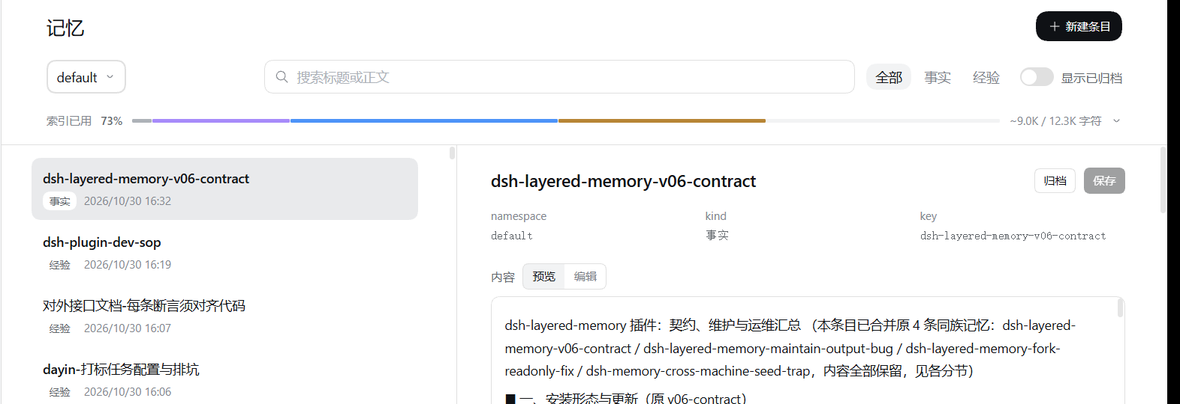
The “Index used” line under the toolbar reports how much of the L1 index is taken and how many characters are used against the budget. Expanding it breaks the index into header, rules, facts and skills; hovering a section explains what it holds and how much it takes.

The bundle also ships a separate Memory status component. Its line at the bottom of the Web composer shows the current session's review progress, the number of real changes or the reason the last run did not finish; clicking it opens run records and read-only history.

- id: dsh-layered-memory
  config:
    defaultNamespace: ''
    autoNamespace: true
    progressive: true
    l1MaxChars: 12288
    globalL1MaxChars: 2048
    indexTargetRatio: 0.9
    memoryAccess: write
    subagentMemoryAccess: read
    autoPending: false
    turnReviewEnabled: true
    turnReviewMinEvidence: 6
    turnReviewReasoningEffort: ''
    maintenanceMaxTokens: 16384
    maintenanceMaxCalls: 64
    maintenanceMaxWrites: 6
    maintenanceTimeoutSeconds: 300
    maintenanceCooldownMinutes: 30
    reflectionMode: notify
Automatic namespaces come from the workspace identity or the canonical root path; branches of one repository share the project memory and existing namespaces have to be migrated explicitly. default is the global space, included in project indexes and default searches. Character budgets cover index entries and manual rules together, and the full files stay readable through the tools.
The main agent reads and updates notes during its task while a background review checks the relevant notes for omissions, contradictions and duplication. End-of-turn review is on by default, batch maintenance runs under reflectionMode: auto, and index pressure work targets a watermark: the target character count is l1MaxChars × indexTargetRatio. Scheduling, budgets and checkpoints are covered in automatic maintenance.
memory_read.l1MaxChars and the global one by globalL1MaxChars, and over budget the hottest entries come first. The index sits in a stable prefix, so a write that changes it invalidates the cached tokens after it. See the design notes.reflectionMode: auto runs invoke subagents. Budgets apply per maintenance run rather than per session.memory_activate adds the optional ones. Historical activation restores the tool mode only.default and project spaces.index.txt always holds the full active directory. Going over budget neither deletes nor archives entries; it only trims the view injected into the prompt.None.
CLASSIFICATION EVIDENCE
系统优先读取 GitHub Topics,再与站内分类词典和词根规则比对。当前命中: memory。
alchaincyf
你想蒸馏的下一个员工,何必是同事。蒸馏任何人的思维方式——心智模型、决策启发式、表达DNA。Distill how anyone thinks.

freestylefly
Prompt as Code | GPT Image 2 / 2.5 提示词与案例库,530+ 个案例、20+ 套工业级模板与可复用 Skills,新增 2.5 同提示词对比专区,附完整提示词与生成记录,持续更新。

titanwings
Distilly — Distill how they think into reusable Skills for any Agent or Bot. Formerly Colleague Skill(原同事 Skill).