dsh-agent-memory
Cross-session long-term memory plugin for DeepSeek Harness (DSH).
中文文档
What it does
Remembers facts, preferences, decisions, and lessons across sessions, so a new session starts with what earlier sessions already learned. Storage lives in $DSH_HOME/storages/memory.json (plain JSON — inspectable, git-friendly). No MCP servers, no vector database, no embedding API, no extra runtime dependencies.
Features
- Cross-session persistence — write in session A, recall in session B; new sessions pick up where old ones left off.
- Relevance-threshold injection — before each model step, the plugin recalls memories matching the user's current message, filters by minimum relevance score (
injectMinScore), and injects up to injectCount that pass the threshold. Low-relevance memories are discarded — you only pay for what actually matters.
- Multi-dimensional relevance — scoring combines semantic similarity, task relevance, pattern matching, causal linkage, and recency (not just keyword overlap). A memory is used when ≥2 dimensions match, reducing noise from coincidental keyword hits.
- Anti-decay rules — the protocol section includes self-reinforcing rules: task-start recall re-reads core rules, recurring mistakes auto-solidify as lessons, and language drift triggers self-correction.
- Self-correction loop — when the same error (same code/message) fires repeatedly (
lessonizeAfter, default 2), the plugin nudges the agent to write it as an importance-3 lesson; the lesson then auto-injects on related topics, preventing recurrence. User corrections are covered by the memory protocol (write the lesson right away).
- Built-in hygiene — capacity cap with lowest-value eviction first; near-duplicate entries merge instead of piling up (Jaccard ≥ 0.7); optional TTL expiry; deleting importance-3 records requires an explicit confirm.
- Chinese-friendly search — Chinese text is indexed by bigrams plus single-char fallback plus a BM25 term-frequency signal, English by words, plus exact substring matching. Works without a tokenizer or any ML dependency.
- No unrelated association — weak matches (pure single-char coincidence, filler-only queries like "ok了吗") score zero and are never injected; only substring/tag/bigram-strength matches surface. Saves tokens on short chatter.
- Optional semantic channel — a second, independent scorer: a locally-trained sentence encoder running through ONNX. Dormant until you point
semanticModelDir at a model you trained yourself (no model ships with the plugin). Once present it fuses with lexical scoring. See Semantic retrieval.
- Explainable recall — every recall hit carries
reasons (substring/tag/bigram/BM25/importance/recency/access signal breakdown), so both you and the agent can audit why a memory surfaced.
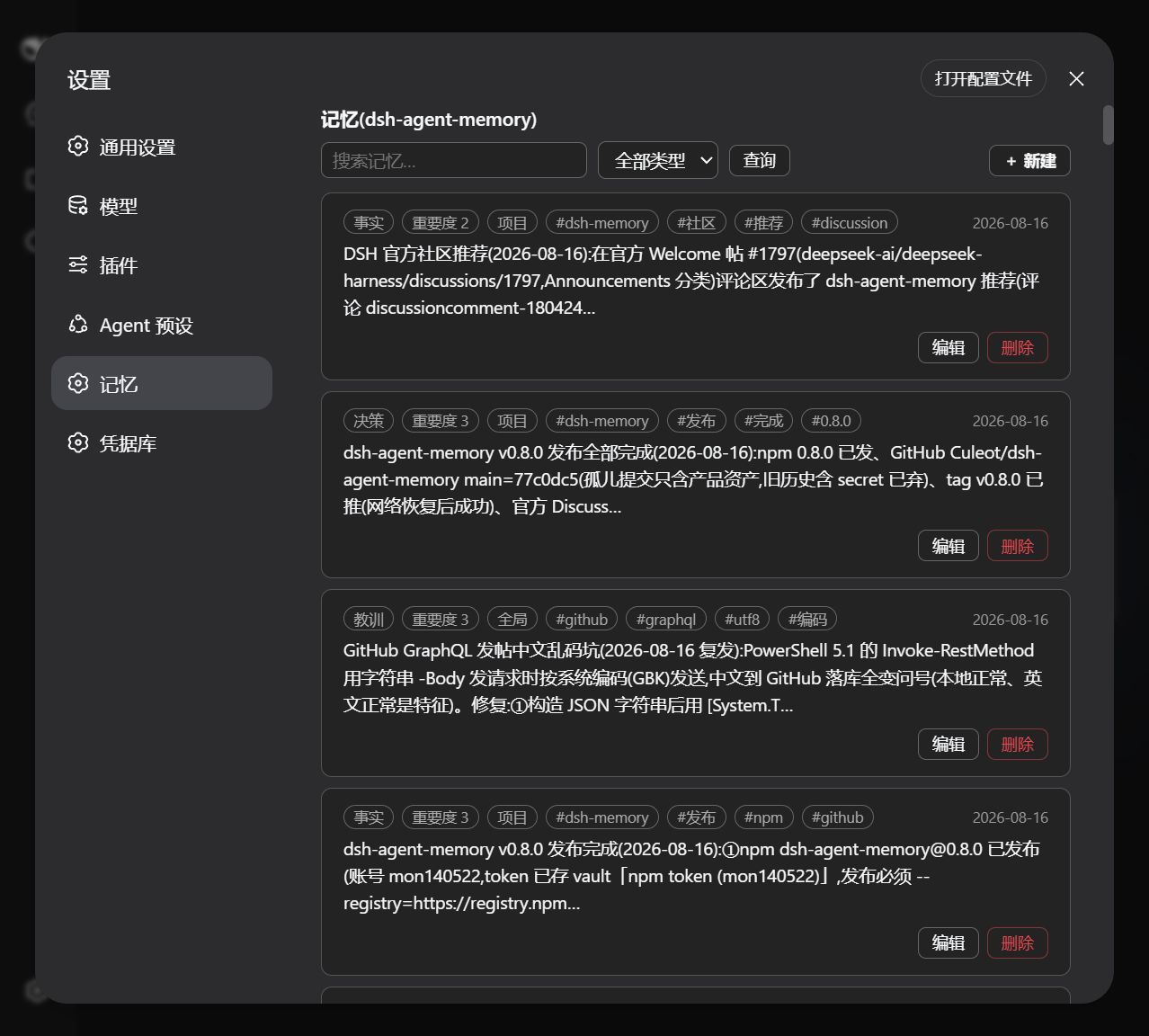
- Memory panel (Web UI) — a top-level "记忆" entry in Settings with stats, search, kind filters, and direct create / edit / delete of memories; changes apply immediately, dark mode included.
- memory_sediment — batch-persist facts/decisions/lessons at session wind-down (≤3 entries per call, cooldown-guarded); the agent summarizes what it already has in context, so there is zero extra model cost.
- Native integration — uses DSH's own storage domain (
ctx.storageDomain), tool registry, and agent lifecycle hooks, so it stays compatible with official releases.
Tools
| Tool |
Purpose |
memory_remember |
Store a durable memory (content, kind, tags, scope, importance, optional TTL). |
memory_recall |
Search memory by keywords; ranks by relevance, importance, recency, past usage. |
memory_index |
Browse the inventory with kind/tag/scope filters, paginated, title-level. |
memory_forget |
Delete by id or tags; importance-3 records need confirm: true. |
memory_import |
Import memories from a JSONL/JSON file through the write chain (not by editing the store file) — safe bulk loading. |
memory_reload |
Reopen the store from disk after an external edit; merges external changes without a restart. |
memory_sediment |
Batch-persist several memories at once (session wind-down), with an entry cap and cooldown guard. |
Kinds: fact | preference | decision | lesson | todo | note. Scopes: user (applies everywhere) or project (this project only).
Semantic retrieval (optional) — you train the model yourself
No model file ships with this plugin. Lexical scoring on its own is complete and needs nothing else; the semantic channel is a second opinion you can add later.
It is worth adding, but not for the reason you'd expect. On a 382-query held-out set built from a real memory bank:
| Channel |
MRR |
Recall@1 |
| lexical only |
0.7248 |
63.4% |
| semantic only |
0.7121 |
61.3% |
| both, fused |
0.8432 |
76.4% |
Read the middle row again: semantic alone loses to lexical. No single model you could download makes retrieval better by itself. The gain comes from fusing two channels that fail in different places — lexical owns exact terms, paths and command names; semantic owns paraphrase.
Why no model is bundled
- Size — 393 MB base model + 391 MB trained + 486 MB quantized ONNX. That is not something to put in an npm package.
- It would be the wrong model anyway — a retriever learns what your queries and your memories look like. Ours are Chinese technical notes queried as keyword stacks (
语音插件 语音播报 speak tts). Yours almost certainly differ, and a mismatched retriever is a silent downgrade.
- Optional means optional — a missing
@huggingface/transformers, a missing model directory, or a failed vector computation all degrade quietly to lexical scoring and record why. A memory plugin that refuses to start because an optional accelerator is misconfigured would be worse than having no accelerator at all.
Full walkthrough
See training/README.md — environment setup, downloading the base model, held-out splitting, two-track training-pair generation, contrastive training, ONNX export with a correctness check, and wiring the result into the plugin.
The short version:
pip install torch transformers onnxruntime numpy huggingface_hub

python training/prep.py                              # split the memory bank, hold out 20%
python training/gen_data.py --kw-per 4 --llm-per 6   # build query/memory pairs
python training/train.py --epochs 30 --batch 32      # contrastive training
python training/export_onnx.py                       # → work/model-onnx/
Then, in your profile: pnpm add @huggingface/transformers, point semanticModelDir at work/model-onnx, restart DSH.
All six scripts in training/ take their paths from environment variables (MEM_TRAIN_WORK, MEM_TRAIN_MEMORY, MEM_TRAIN_BASE, MEM_TRAIN_LLM), so they run from any directory. An NVIDIA GPU helps (RTX 4080 Laptop 12 GB: ~2.4 min for 306 memories × 30 epochs) but CPU works — just slower. Budget ~2 GB of disk.
External-modification protection
The store file is loaded once at startup and written as a whole by the running process (single-writer model). To prevent an in-process write from silently wiping external edits:
- every write checks the file fingerprint first — a mismatch (another process or a script edited it) refuses the write with a clear error instead of overwriting;
memory_import is the supported way to bulk-load data (goes through the write chain, file and memory stay in sync);- if you still edit
memory.json by hand or copy it in, call memory_reload to merge it back (or restart).
Troubleshooting: panel reports HTTP 405
A transport failure for /dsh-memory-read/…: HTTP 405 in the memory panel means the RPC
channel was never mounted — the request fell through to the SPA static fallback, which
only serves GET/HEAD. Root cause is in DSH 0.1.5-rc.2 itself: connection.rpc.handle()
resolves webServer from the calling context to register its route, and throws
cannot get property "webServer" without inject when that lookup fails, silently dropping
the channel (still unfixed in 0.1.6-alpha.2). This plugin therefore tries the official
handle() first and, on failure, registers its own prefix routes through
ctx.inject(['connection', 'webServer']), reusing connection.requestRejection() for the
Host/Origin fence and browser authentication.
A DSH restart is required — routes are mounted at startup. Verify with:
curl -i -X POST http://127.0.0.1:3080/dsh-memory-read/stats # 401 = route mounted (no cookie), 405 = stale process
Repeat suppression
Per-step injection skips when the recalled set is unchanged from the previous step, so consecutive messages about the same topic don't re-inject the same block — the「相关记忆」notice appears on topic change, not on every message.
Install & enable
# 1. Add the dependency to your profile
cd ~/.dsh/profiles/<name>
npm install dsh-agent-memory
# 1. add the dependency to your profile
cd ~/.dsh/profiles/<name>
pnpm add dsh-agent-memory@file:/path/to/dsh-agent-memory
# 2. add one row to your agent preset (~/.dsh/.agent-presets/<preset>/agent.cordis.yml)
- id: memory
  name: 'dsh-agent-memory'
# 3. restart DSH — the four tools appear in new sessions
No preset? Mount it on the host plane instead, in ~/.dsh/profiles/<name>/cordis.patch.yml:
- insert:
    - id: memory
      name: 'dsh-agent-memory'
Requires the storage trio already present in the profile (dsh-storage, dsh-storage-json, dsh-storage-domain — the web profile ships with it).
Configuration
All options are optional.
Store
| Option |
Default |
Meaning |
maxRecords |
400 |
Capacity cap; lowest-value records evicted first. |
maxContentChars |
2000 |
Max content length per record. |
mergeSimilarity |
0.7 |
Near-duplicate merge threshold. |
recencyHalfLifeDays |
90 |
Freshness half-life, in days. |
protocolSection |
true |
Inject the memory protocol prompt section. |
recallContentMax |
400 |
Max content chars returned per recall hit. |
Injection
| Option |
Default |
Meaning |
injectEnabled |
true |
Per-step injection of relevant memories (via agent/pre-step). |
injectCount |
3 |
Max memories injected per step (0 disables). |
injectMinScore |
1.0 |
Minimum relevance score to inject (0 = no threshold, just rank). |
injectMaxChars |
120 |
Max chars per injected memory summary. |
injectBudgetRatio |
0.5 |
Inject only candidates scoring within this fraction of the top hit — a query with one obvious answer injects one memory, not three (0 = off, historical floor-and-cap behaviour). |
noMatchThreshold |
0.18 |
Below this top score, recall returns noMatch and injects nothing. Offering a weak memory is not neutral — it spends attention and misleads. |
Ranking
| Option |
Default |
Meaning |
boostSlope |
0.1 |
Importance boost slope: 1 + (importance − 1) × slope. |
Semantic channel (needs a model you trained — see above)
| Option |
Default |
Meaning |
semanticEnabled |
true |
Master switch; a no-op while semanticModelDir is empty. |
semanticModelDir |
'' |
Directory holding config.json, tokenizer.json, onnx/*.onnx. Empty = channel off. |
semanticCacheDir |
'' |
Vector-cache directory. Empty = $DSH_HOME/storages/memory-semantic. |
semanticWeight |
0.3 |
Semantic weight in the fusion: relevance = w × semantic + (1 − w) × lexical. |
semanticMin |
0.5 |
Cosine floor below which a semantic score doesn't count as a match. |
Lessons & sediment
| Option |
Default |
Meaning |
lessonizeEnabled |
true |
Auto-nudge to solidify repeated errors as lessons. |
lessonizeAfter |
2 |
Same error fingerprint occurrences before nudging. |
sedimentMaxEntries |
3 |
Max memories per memory_sediment call. |
sedimentCooldownMs |
300000 |
Cooldown between sediment calls (5 min). |
Uninstall & troubleshooting
- Uninstall:
pnpm remove dsh-agent-memory in the profile, delete the preset/patch row. Data stays in memory.json and is restored on reinstall.
- Tools missing: check the row exists, the dependency is installed, and DSH was restarted.
- Storage errors: the memory plugin needs the storage trio; add it to the patch if your profile lacks it.
- Corrupted
memory.json: it is plain JSON — fix it by hand or delete it (deleting resets memory).
Development
npm install && npm run build && npm test   # build + 31 unit tests
npm run smoke                              # real-machine headless round-trip check
License
MIT


