
模型与 MCP
待识别

rea
morluto
Reverse engineer anything with agents, from app behavior down to native binaries.
PROJECT TOPICS
INSTALL REFERENCE
dsh plugin --profile web add github:CloudSen/dsh-browser-annotation
该命令指向仓库当前默认分支;尚无绑定当前 commit 的完整验证结果。
PROJECT README
English | 简体中文
Native, lightweight element comments inside the built-in Browser — with live attribute edits and numbered hoverable tags, no screenshots or provider replacement.
Click an element in a DSH Browser tab, write a comment in the compact field that appears beside it, and confirm. The comment becomes a numbered tag in the current Session's message input. Open the settings to adjust the element's attributes or styles on the live page; applied changes are included in the comment sent to the agent.
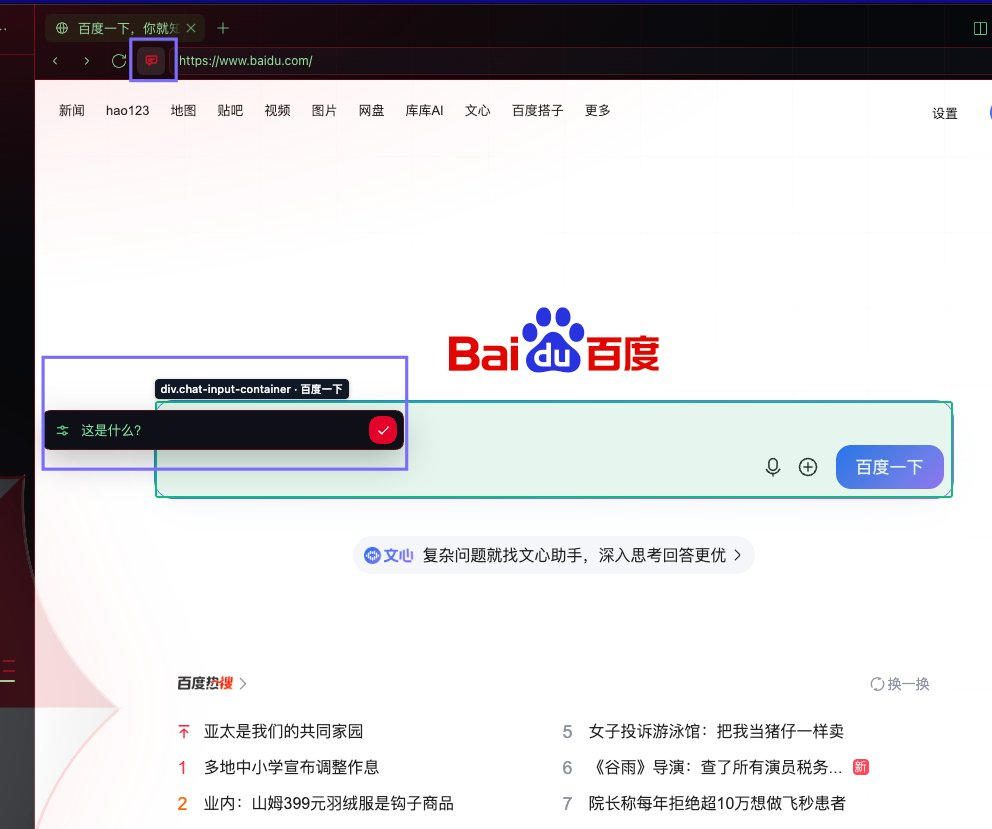
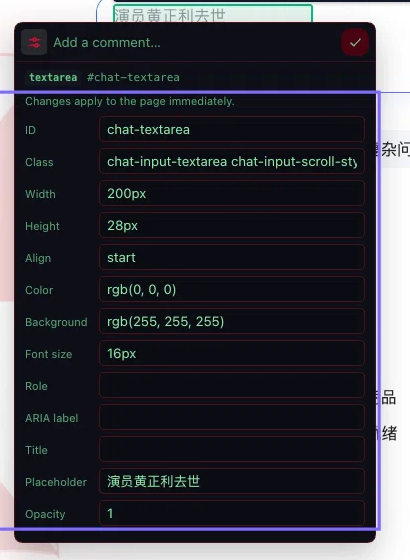
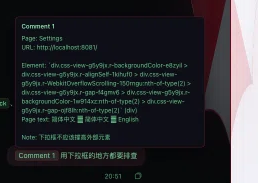
Comment 1, Comment 2; 评论1, 评论2 in Chinese); the page element gets a numbered pin. Hover the tag to preview the full comment and element details. Keep clicking elements to add more comments — each one becomes another numbered tag in the input. After the message is sent, the next comment starts again at 1, and the previous pins are cleared. The toolbar control itself shows no count badge.px appended. Every applied change is listed in the inserted comment under Changes, so the agent sees both the comment and the adjusted attributes.The toolbar annotate button stays active while annotating; click it again (or press Esc while picking) to stop and remove the pins. Reloading or navigating the page leaves annotation mode, so a refresh never drops you back into picking. Press Esc in the comment field to cancel that element and keep picking.
DSH has no built-in element-annotation feature, but the community market has several plugins in this space. These are the closest matches, and where this plugin differs:
| Plugin | What it does | Where this plugin differs |
|---|---|---|
| dsh-web-annotation | Annotate elements, blank places or regions in the native Browser; batch screenshots and a report into the next message; does not replace official providers. | This plugin supports elements and dragged regions but does not take screenshots or write report files. It puts one tag per comment in the composer and records attribute edits in the comment. |
| dsh-web-pick | Element and region picker in the Desktop Browser; a small note box opens beside each pick; the batch is inserted into the draft with cropped screenshots. | This plugin also supports drag-to-select regions, but takes no screenshots. It adds live attribute/style editing and numbered tags instead. |
| dsh-webannotate | Comment on elements in the built-in Browser; send the batch with one cropped screenshot per note. | This plugin keeps everything in the composer tags and sends the structured comment without attachments. |
| dsh-web-annotator | Comments or questions after clicking or dragging in the existing Browser; sends marked screenshots or DOM location details. Replaces the official Browser, Chat and Layout providers while enabled. | This plugin keeps the official Browser/Chat/Layout providers and adds one toolbar button. It does not replace the surface it lives in. |
| dsh-redline | Visual review in the harness browser: comments, live style changes with rollback, a free-form annotation canvas, and a screenshot per pin. | This plugin records attribute edits as part of the comment and has no canvas, rollback or screenshots. |
| dsh-annotate | Pick browser elements and send structured visual feedback to the agent. | This plugin is specifically the native Browser toolbar flow with numbered composer tags and live attribute editing. |
| dsh-element-lens | Insert an element's selector, computed styles and HTML as removable chips in the draft. | This plugin adds a comment and editable attributes; it does not insert the element's HTML. |
| dsh-annotator | Pick elements on a real Chrome, Edge or ego lite page, comment and screenshot them, then insert a reference chip. | This plugin works inside the built-in Browser webview, with no external Chrome or debugging port. |
Choose another plugin if you need screenshots or cropped attachments, frame capture, source/component mapping, a free-form canvas, or style rollback. This plugin is deliberately narrow: one native toolbar control, a comment per element, optional live attribute edits, and numbered tags.
<webview>. The plugin finds that frame and, only while annotating, runs a self-contained picker/marker script through the webview's executeJavaScript. The script has no access to Electron, Node, or DSH objects, and it removes its overlay and listeners when you stop.data-sidebar-browser-frame and on the Sidebar tab markers data-sidebar-right-tab / data-sidebar-right-session. It reads them and inserts one button before the Browser address field; it does not change any other toolbar node. A DSH toolbar change can make the toolbar insertion fail, in which case the floating fallback appears until the plugin is updated.Published as dsh-browser-annotation on npm:
dsh plugin --profile desktop add dsh-browser-annotationInstall this directory as a local bundle from Plugins → Add plugin, or with the plugin_manager install_bundle action. Disable or remove the bundle to remove the control; the Browser itself is unchanged.
MIT © CloudSen
CLASSIFICATION EVIDENCE
系统优先读取 GitHub Topics,再与站内分类词典和词根规则比对。当前命中: deepseek-harness。
morluto
Reverse engineer anything with agents, from app behavior down to native binaries.

deepseek-ai
DeepSeek Harness: Everything is a Plugin.

nexu-io
The 1st Collaborative AI Design Agent Workspace. Local-first and open source. Create motion, prototypes, websites, apps, dashboards, presentations, images, and videos with your team and AI agents. Share work, exchange feedback, and iterate together in one workspace.