

模型与 MCP
待识别

rea
morluto
Reverse engineer anything with agents, from app behavior down to native binaries.
PROJECT TOPICS
INSTALL REFERENCE
dsh plugin --profile web add github:Chriszzx/dsh-bookshelf
该命令指向仓库当前默认分支;尚无绑定当前 commit 的完整验证结果。
PROJECT README
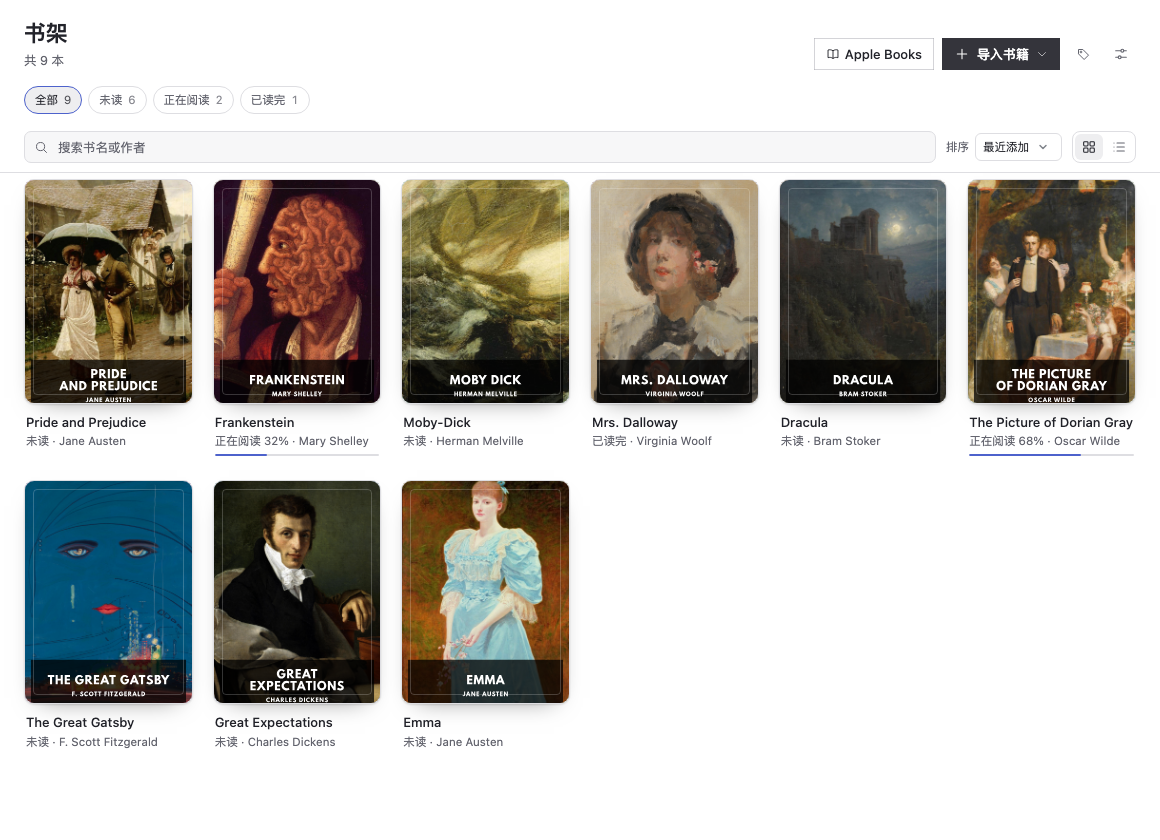
A local PDF and EPUB bookshelf and reader for the DeepSeek Harness Web GUI. It integrates reading, annotations, speech synthesis, and page-level AI discussions into a native sidebar workspace.
DeepSeek Harness Web GUI 的本地 PDF / EPUB 书架与阅读器,将阅读、标注、语音合成与页面级 AI 讨论整合在原生的侧栏工作区中。



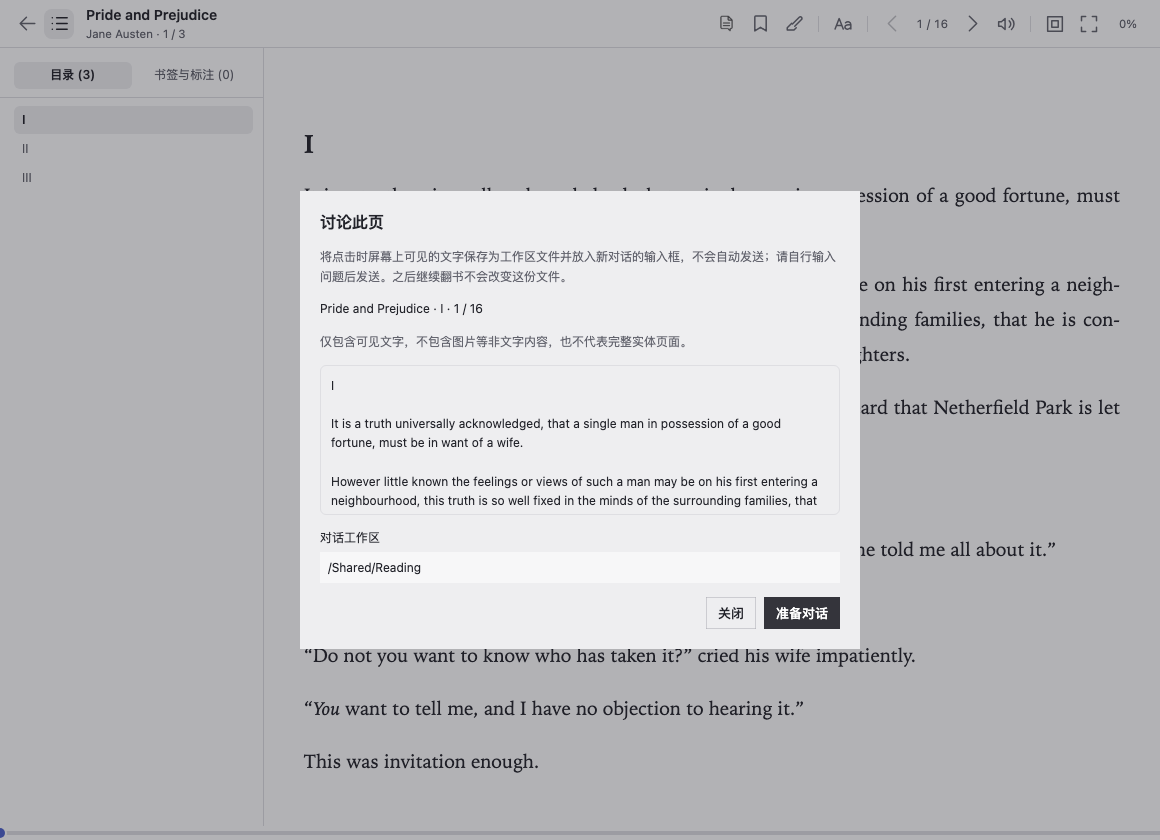
@file reference.
页面级 AI 讨论:将当前可见页面快照保存至工作区,并附带 @file 引用直接发起原生对话。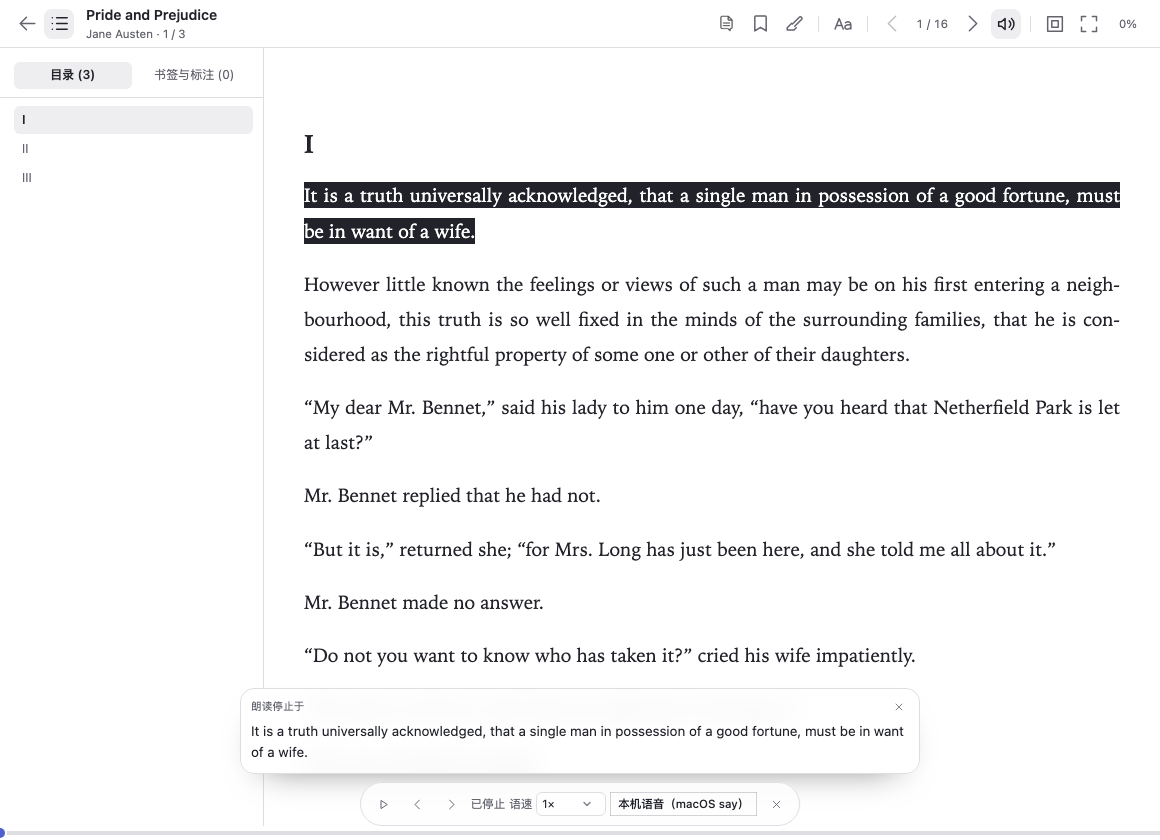 |
 |
 |
 |
See the gallery for more screenshots.
更多截图见图集。
Requires DSH >=0.2.0-rc.2 <0.3.0 and Node ^22.19.0 || >=24.0.0 on macOS or Windows.
需要 DSH >=0.2.0-rc.2 <0.3.0 与 Node ^22.19.0 || >=24.0.0,支持 macOS 与 Windows。
dsh plugin --profile web add github:Chriszzx/dsh-bookshelfDSH installs the plugin directly from GitHub. Restart the profile to open Bookshelf in the sidebar. To install a specific release, append its tag to the repository spec, for example github:Chriszzx/dsh-bookshelf#v0.6.4.
DSH 直接从 GitHub 安装插件。重启该 profile 后,从侧栏打开书架。要安装指定版本,可在仓库地址后加标签,例如 github:Chriszzx/dsh-bookshelf#v0.6.4。
Releases also provide a .tgz and SHA-256 checksum. Install a downloaded package with dsh plugin --profile web add ./dsh-bookshelf-X.Y.Z.tgz. Releases · Changelog
也可下载 Release 中的 .tgz 和 SHA-256 校验文件,使用 dsh plugin --profile web add ./dsh-bookshelf-X.Y.Z.tgz 安装下载的包。版本发布 · 变更记录
Shelf & Organization. Import via file picker, drag-and-drop, or folder links. Manage titles with search, sorting, custom tags, and reading statuses (Unread, Reading, Finished), in either cover or list view. Each entry shows the title, author and status, with a percentage while reading. Both views use the filename for a missing title and “Unnamed author” for a missing author.
书架与整理。 支持文件选择、拖拽或文件夹链接导入。提供搜索、排序、自定义标签与阅读状态(未读 / 正在阅读 / 已读完),可在封面与列表间切换。两种视图均显示书名、作者和阅读状态,在读时显示百分比。书架以文件名补全缺失的书名,以「未命名作者」补全缺失的作者。
Reader & Annotations. EPUBs open in paginated single-page or adaptive spreads with a table of contents. EPUB typography follows the publication, including unencrypted, unobfuscated regular, bold and italic faces. Missing faces fall back automatically. Changing the text size preserves heading and quotation hierarchy. Choose a reading font or switch back to the publisher’s font in reading settings. PDFs support zoom and single-page or continuous views. A failed state load offers a retry that restores the saved position and bookmarks. Separate windows can add or remove bookmarks and annotations independently. Select text to copy with citation, read aloud, or apply custom highlights and underlines; bookmarks and annotations share a searchable, sortable sidebar.
阅读与标注。 EPUB 支持单页或自适应跨页阅读和目录跳转,默认采用原书字体与排版层级,支持原书中未经加密或混淆的常规、粗体和斜体字面。缺失字面时自动回退,调字号后仍保留标题与引文层级,可在阅读设置中更换正文字体或恢复原书字体。PDF 支持缩放、单页和连续视图。读取记录失败时可重试找回进度与书签。在两个窗口中分别增删书签和标注,也会保留各自的修改。选中文本即可带出处复制、朗读或添加高亮与下划线;所有标注与书签统一汇总在可搜索、可排序的侧栏中。
Live Read-Aloud. Floating frosted-glass controls for play/pause, sentence stepping, speed, and voice selection. Supports offline system voices (say on macOS, SAPI on Windows), Edge TTS (keyless), DeepSeek TTS, and OpenAI-compatible endpoints, with automatic language matching by default.
实时朗读。 底部毛玻璃控制栏提供播放/暂停、上下句切换、语速与音色选择。支持离线系统音色(macOS say、Windows SAPI)、Edge 语音(免 Key)、DeepSeek 语音及 OpenAI 兼容接口,默认按书籍语言自动匹配音色。
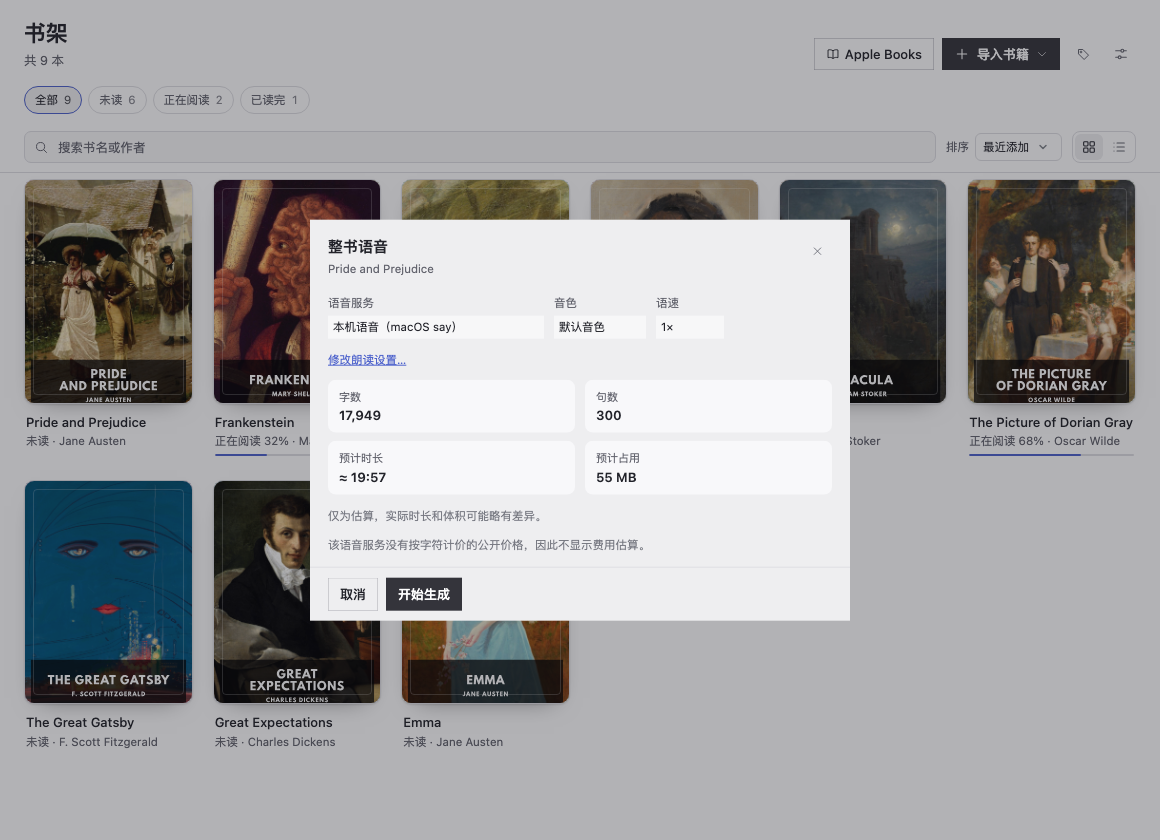
Whole-Book Audio. Render an entire book into a single audio file (WAV or MP3) in the background via the book's More menu. Review the character count, duration and file size before confirming. DeepSeek also shows estimated cost. Repeating the same confirmed request reuses the existing task.
整书语音合成。 通过书籍「更多」菜单在后台将整书合成为单个音频文件(WAV 或 MP3)。确认前可预览字数、时长与体积,选择 DeepSeek 时还会显示预计费用。重复启动同一次已确认的估算会复用已有任务。
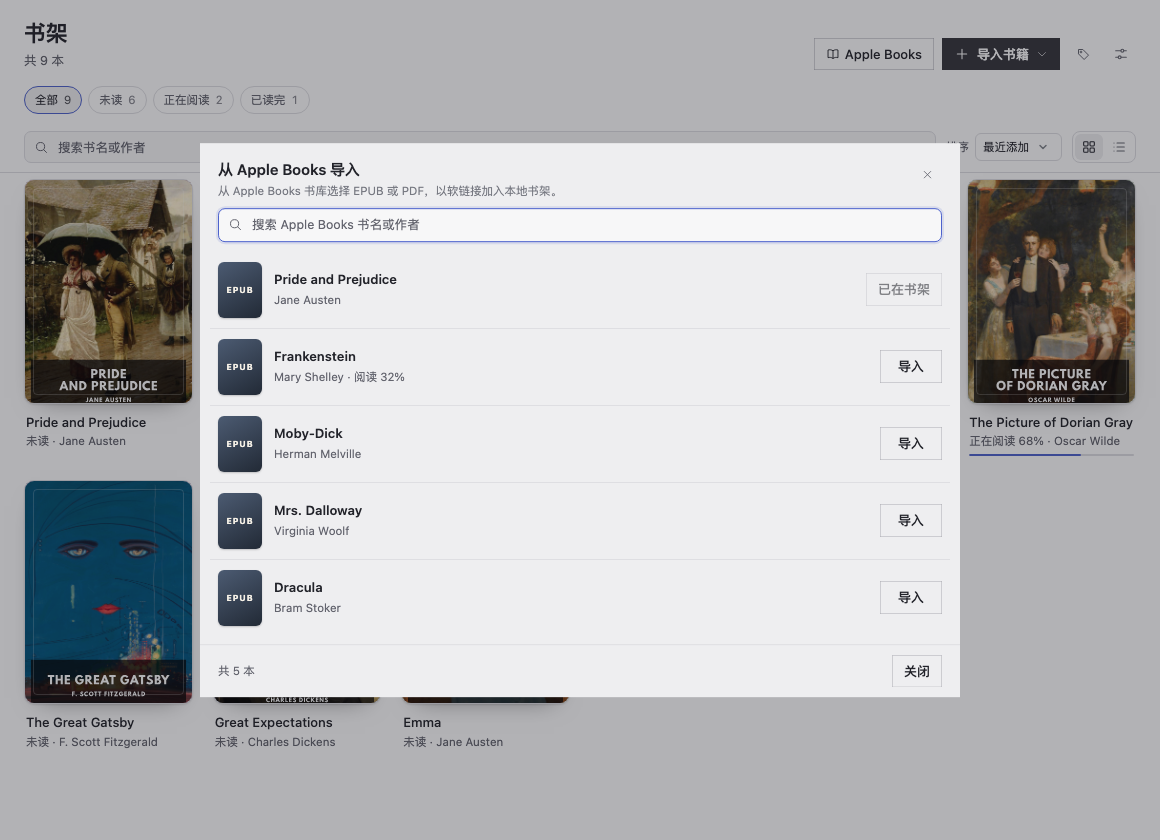
Page Discussion & Apple Books. The folded-page discussion button captures visible text into your target workspace and opens a native DSH chat pre-filled with @file. On macOS, Apple Books links local EPUB and PDF assets directly into the shelf.
页面讨论与 Apple Books。 点击工具栏的折角书页图标即可「讨论此页」,将当前可见文本保存至目标工作区,并打开预填 @file 的原生对话。在 macOS 上可通过「Apple Books」直接将本地书库中的 EPUB 与 PDF 链接至书架。
Since 0.6.4, bookshelf HTTP routes require DSH Connection to admit the caller before any operation. This protects book files, reading state, and configured speech services with DSH's Host/Origin and authentication checks.
从 0.6.4 起,书架的 HTTP 路由在处理请求前统一通过 DSH Connection 准入,使用 DSH 的 Host、Origin 和身份检查保护书籍文件、阅读状态与已配置的语音服务。
All state resides under $DSH_HOME/bookshelf: library.json, state.json (progress, bookmarks, annotations), tags.json, tts.json, tts-secrets.json (mode 0600, write-only to UI), tts-cache/ (512 MB LRU), and tts-scratch/ (10-minute TTL for uncached selections). API keys may also be supplied via DEEPSEEK_API_KEY or BOOKSHELF_TTS_OPENAI_KEY.
所有数据均保存在 $DSH_HOME/bookshelf 下:library.json、state.json(进度、书签、标注)、tags.json、tts.json、tts-secrets.json(0600 权限,前端不回显)、tts-cache/(512 MB LRU)及 tts-scratch/(选区朗读临时音频,10 分钟过期)。API Key 也可通过环境变量 DEEPSEEK_API_KEY 或 BOOKSHELF_TTS_OPENAI_KEY 提供。
Reading, annotations, Apple Books indexing, and system voices run completely offline. Cloud TTS providers receive text only when invoked. Deleting a book from the shelf never touches original source files.
阅读、标注、Apple Books 索引与系统音色完全离线运行;云端语音服务仅在调用时接收对应文本。从书架删除书籍绝不会影响原始文件。
node scripts/run-checks.mjs all     # syntax + unit/API + browser regressions
node tests/run-browser.mjs tts-playback
Requires Chrome and local React UMD fixtures; automated tests never contact external TTS endpoints. See the development guide for local installation, validation, and releases.
测试需 Chrome 与本地 React UMD 依赖,自动化测试不请求外部语音服务。本地安装、验收和发布流程见开发文档。
MIT.
CLASSIFICATION EVIDENCE
系统优先读取 GitHub Topics,再与站内分类词典和词根规则比对。当前命中: deepseek-harness。
morluto
Reverse engineer anything with agents, from app behavior down to native binaries.

deepseek-ai
DeepSeek Harness: Everything is a Plugin.

nexu-io
The 1st Collaborative AI Design Agent Workspace. Local-first and open source. Create motion, prototypes, websites, apps, dashboards, presentations, images, and videos with your team and AI agents. Share work, exchange feedback, and iterate together in one workspace.