dsh-skin-tomorrow-night-blue
Tomorrow Night Blue skin for the DeepSeek Harness (DSH) Web GUI.


English | 中文
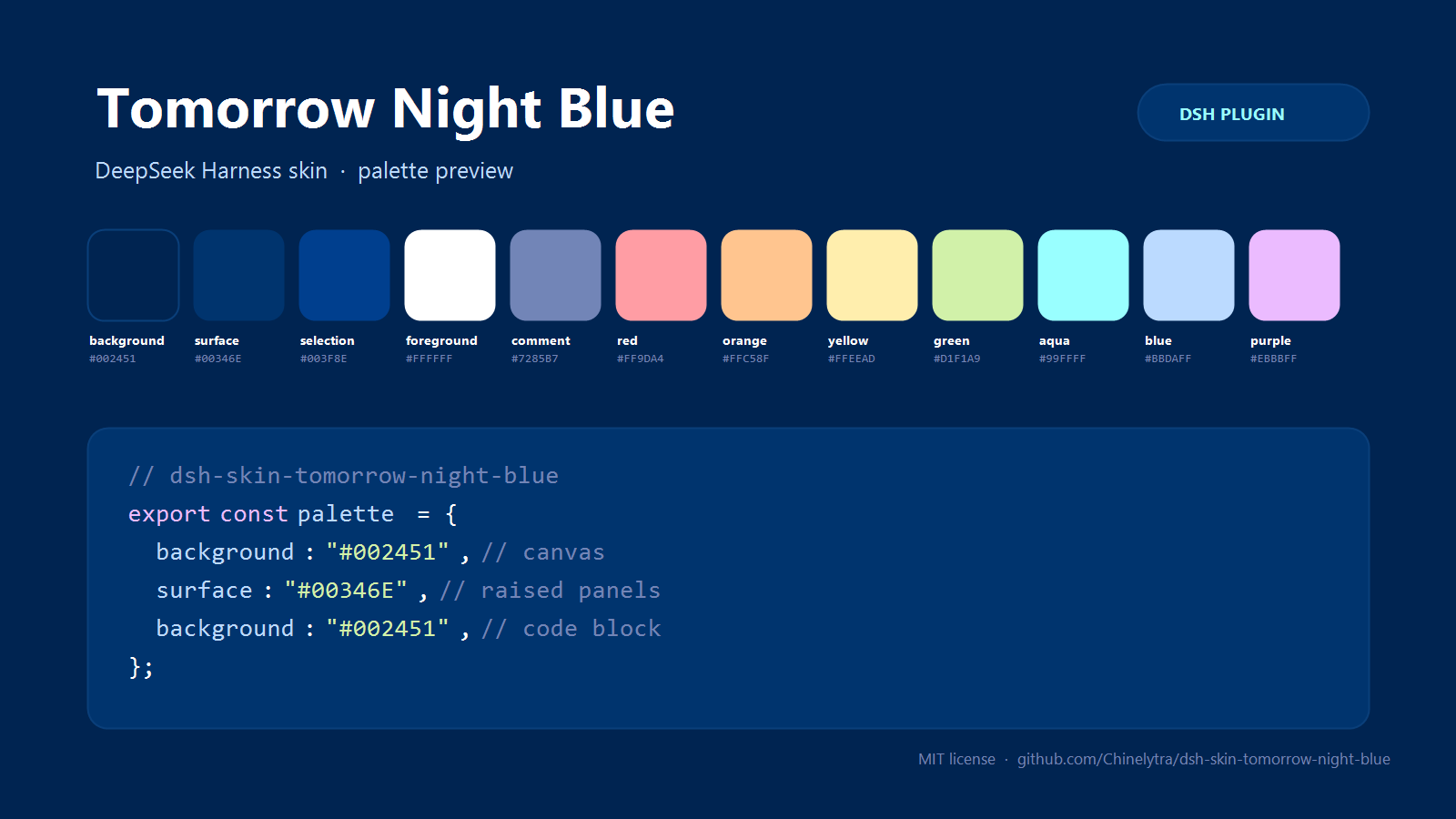
One skin, the whole interface: the classic deep-blue Tomorrow Night Blue
palette (Chris Kempson's Tomorrow Theme)
mapped onto DSH's design tokens and code-highlighting colors — canvas, sidebar,
panels, menus, buttons, conversation bubbles, markdown, diffs, scrollbars, focus
ring, and syntax highlighting in code blocks.
Unofficial community skin. Not affiliated with DeepSeek.
Install
Install into the profile that runs your GUI — web for dsh --profile web,
desktop for the DSH Desktop app.
From GitHub:
dsh plugin --profile web add github:Chinelytra/dsh-skin-tomorrow-night-blue
From the release tarball (prebuilt, no build step):
dsh plugin --profile web add https://github.com/Chinelytra/dsh-skin-tomorrow-night-blue/releases/latest/download/dsh-skin-tomorrow-night-blue.tgz
From a local checkout:
dsh plugin --profile web add link:/absolute/path/to/dsh-skin-tomorrow-night-blue
DSH applies profile changes live; if the palette does not appear immediately,
restart DSH once (the browser half loads with the app shell).
What it does
- *113 `--dsw-alias-` design tokens** — application canvas, raised layers,
overlays, borders, labels, brand/link/button colors, interactive and state
colors, markdown, diff, file-diff, scrollbar, focus ring, toast, tooltip, menu
and product-specific surfaces (sidebar, bubble, composer, selector, tips).
- 11 Shiki syntax roles — comments, keywords, strings, numbers/constants,
functions, parameters, punctuation and links in fenced code blocks match the
theme instead of keeping the stock Shiki palette.
- First paint is already blue — the host half injects the same declarations
into every served
index.html through the webserver's structured
index-inject rows, so a browser page does not flash the default palette
while its scripts load.
- No dependencies, no network, no settings namespace — one stylesheet and
one token layer; disable or remove the bundle to get the stock look back.
Palette
| Role |
Color |
|
Role |
Color |
| Background |
#002451 |
|
Red |
#FF9DA4 |
| Current line / raised surface |
#00346E |
|
Orange |
#FFC58F |
| Selection / nested surface |
#003F8E |
|
Yellow |
#FFEEAD |
| Foreground |
#FFFFFF |
|
Green |
#D1F1A9 |
| Comment |
#7285B7 |
|
Aqua |
#99FFFF |
|
|
|
Blue |
#BBDAFF |
|
|
|
Purple |
#EBBBFF |
Tomorrow Night Blue has no official light counterpart, so the skin keeps this
palette in both appearance modes and aligns the appearance setting to dark on
first use.
How it works
This is a two-half DSH plugin (all standard DSH plugin metadata, no custom
wiring):
| Half |
File |
Role |
| Host |
index.js |
Pushes one structured style row into webserver/index-inject so served pages paint the skin before scripts run. |
| Client |
lib/client.js |
Appends one <style> element with the token + Shiki declarations and registers it with the app's __ModuleLoader__ bundle format. |
src/palette.mjs is the single source of truth: a 15-anchor palette expanded
into the --dsw-alias-* surface. build-client.mjs serializes that derivation
into the browser bundle; verify.mjs re-derives it offline and exercises both
halves against stubs.
The declarations are !important on purpose: DSH's layout presenter writes the
composed alias tokens as inline custom properties on <body>, and only an
important stylesheet declaration outranks inline style. A fixed skin must win
that cascade; a theme that wants to stay configurable should use the
ctx.theme.overrideTokens layer instead.
Compatibility
- DSH Web GUI 0.2.x (developed and tested against
0.2.2-rc.1, DSH
Desktop profile; the same client bundle serves dsh --profile web).
- Node.js
>=20 for the build/verify scripts (runtime needs no build).
- While enabled, the skin's
!important layer takes precedence over token
layers from other skin plugins (for example dsh-opencode-palette). Disable
this bundle to hand the cascade back to them.
Known limitations
- The skin overrides alias tokens (plus the Shiki syntax roles). A few
auxiliary surfaces in DSH are painted from design-system static tokens
(for example some file-change/diff card headers keep a neutral dark fill) and
therefore stay as the stock theme draws them — the same boundary every
token-layer skin works within.
- Tomorrow Night Blue is a dark palette; the skin keeps it under both
appearance modes by design.
Disable / uninstall
- Settings → Plugins → turn off or remove
dsh-skin-tomorrow-night-blue.
- CLI:
dsh plugin --profile <profile> remove dsh-skin-tomorrow-night-blue
Development
node build-client.mjs   # regenerate lib/client.js from src/palette.mjs
node verify.mjs         # offline checks: palette, host injection, bundle load
verify.mjs requires no DSH runtime: it derives the token surface, calls the
host apply with a fake context and a captured injection table, then loads the
built bundle through the real window.__ModuleLoader__ factory shape against a
DOM stub.
License & attribution
MIT © Chinelytra. See LICENSE.
The palette is transcribed from Tomorrow Theme by Chris Kempson
(chriskempson/tomorrow-theme,
MIT). This repository is an independent DSH skin and is not affiliated with or
endorsed by the Tomorrow Theme project or DeepSeek.


