

模型与 MCP
待识别

rea
morluto
Reverse engineer anything with agents, from app behavior down to native binaries.
PROJECT TOPICS
INSTALL REFERENCE
dsh plugin --profile web add github:ChenYichener/dsh-nce
该命令指向仓库当前默认分支;尚无绑定当前 commit 的完整验证结果。
PROJECT README
English · 简体中文


144 New Concept English Book 1 lessons in one DSH sidebar panel — read a lesson, drill its words, then have your own model grade the exercise paper. One command is the whole setup: no build step, no textbook files to hunt down, no second account to log into.
dsh plugin --profile <profile> add dsh-nceRestart dsh web (or the desktop app) — the 144-lesson dataset arrives with the
optional dsh-nce-data package, so the panel is populated on first open. No
textbook files to supply, no build step.
| First open gives you | 144 lessons (video / text + vocabulary / grammar / fillable practice), Anki-style SRS cards, a mistake notebook, an IPA reference, and worksheets graded by your default model |
| Good fit if | you're studying Book 1 and want one page per lesson plus a paper you actually fill in |
| Not a fit if | you want Books 2–4 (not covered), a standalone web app (this is a DSH panel), or a deck you can export to Anki (SRS here is in-panel only) |
If this saves you a few evenings, a star is the only signal I get that it's worth maintaining — it also tells the next person searching "dsh plugin" that this one is used.
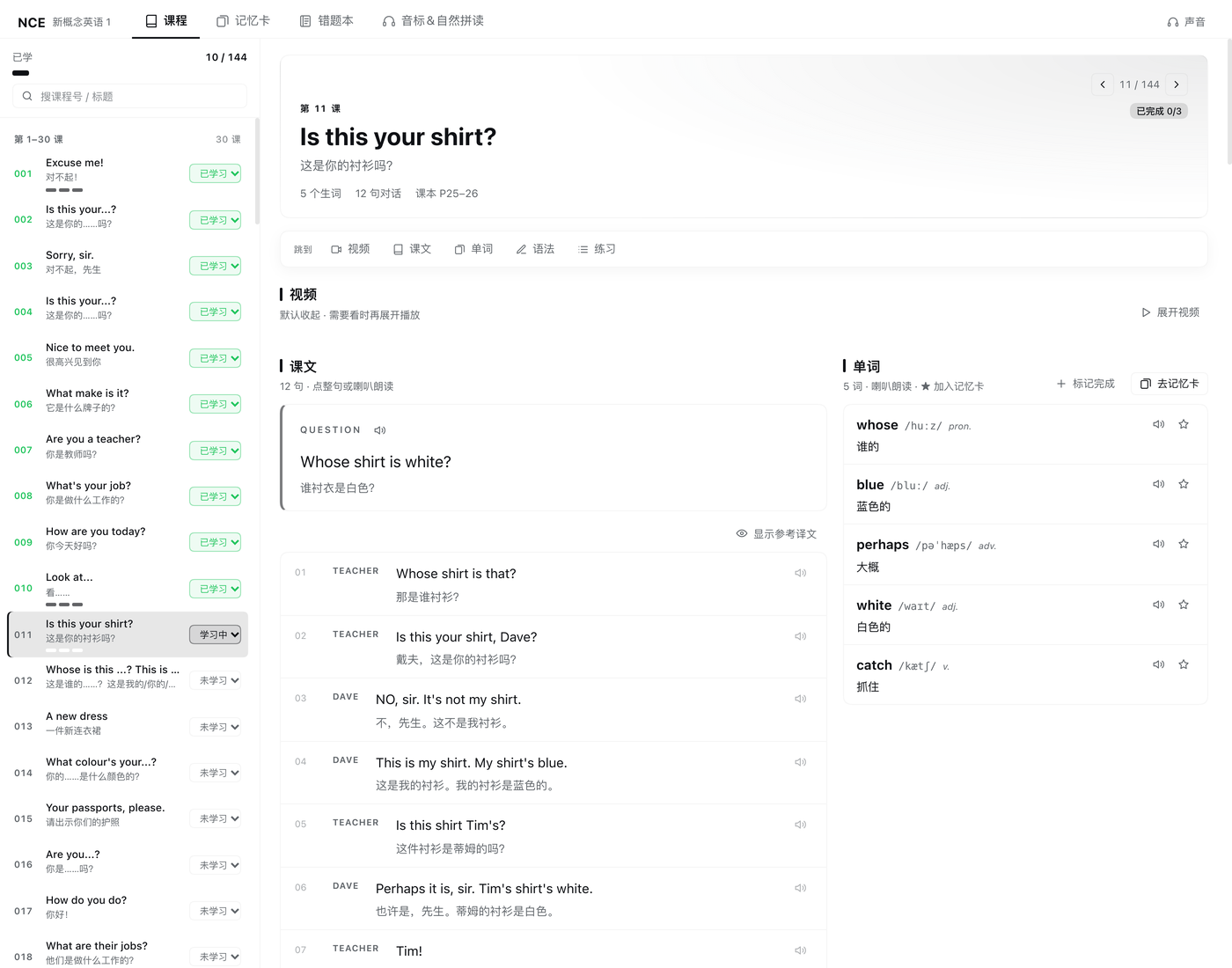
已学 x / 144), search, four lesson groups, a status
dropdown (not started / learning / done) and current-lesson highlight. Three step
dots per lesson (words / grammar / exercise) show where you stopped; the panel opens
on your last lesson or the next unfinished one and collapses to one column when narrow.Video / Text / Words / Grammar / Practice. Video is collapsed by default; expanding loads an embedded Bilibili
player mapped to the right part, and a custom Bilibili / YouTube URL can be saved per
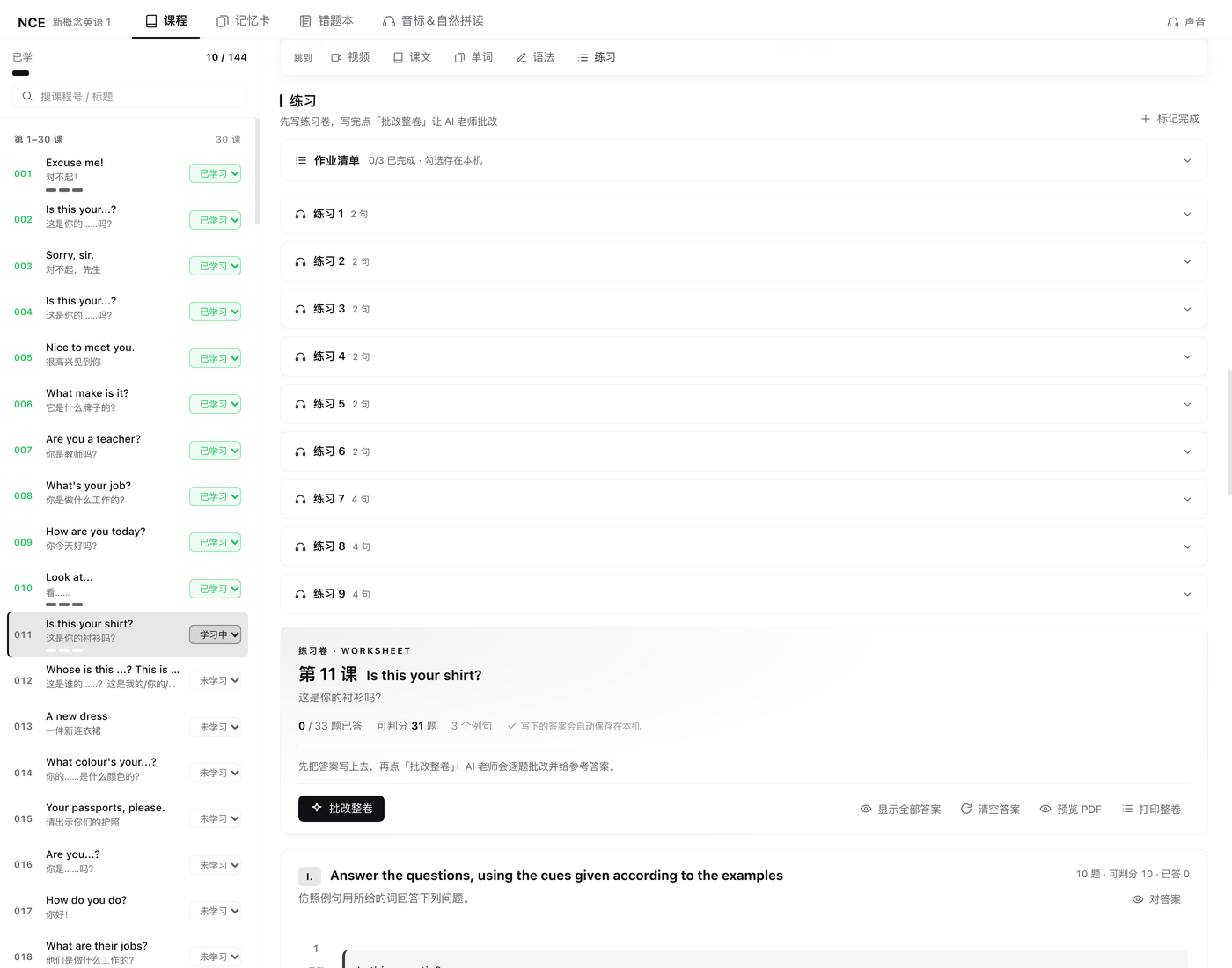
lesson with the built-in one restorable at any time.Enter / Shift+Enter move between blanks; drafts autosave to localStorage per
lesson and survive lesson switches and a DSH restart.correct / close / wrong plus a comment and reference answer, the score
is AI-correct / total, and every verdict can be overridden by hand. Without a default
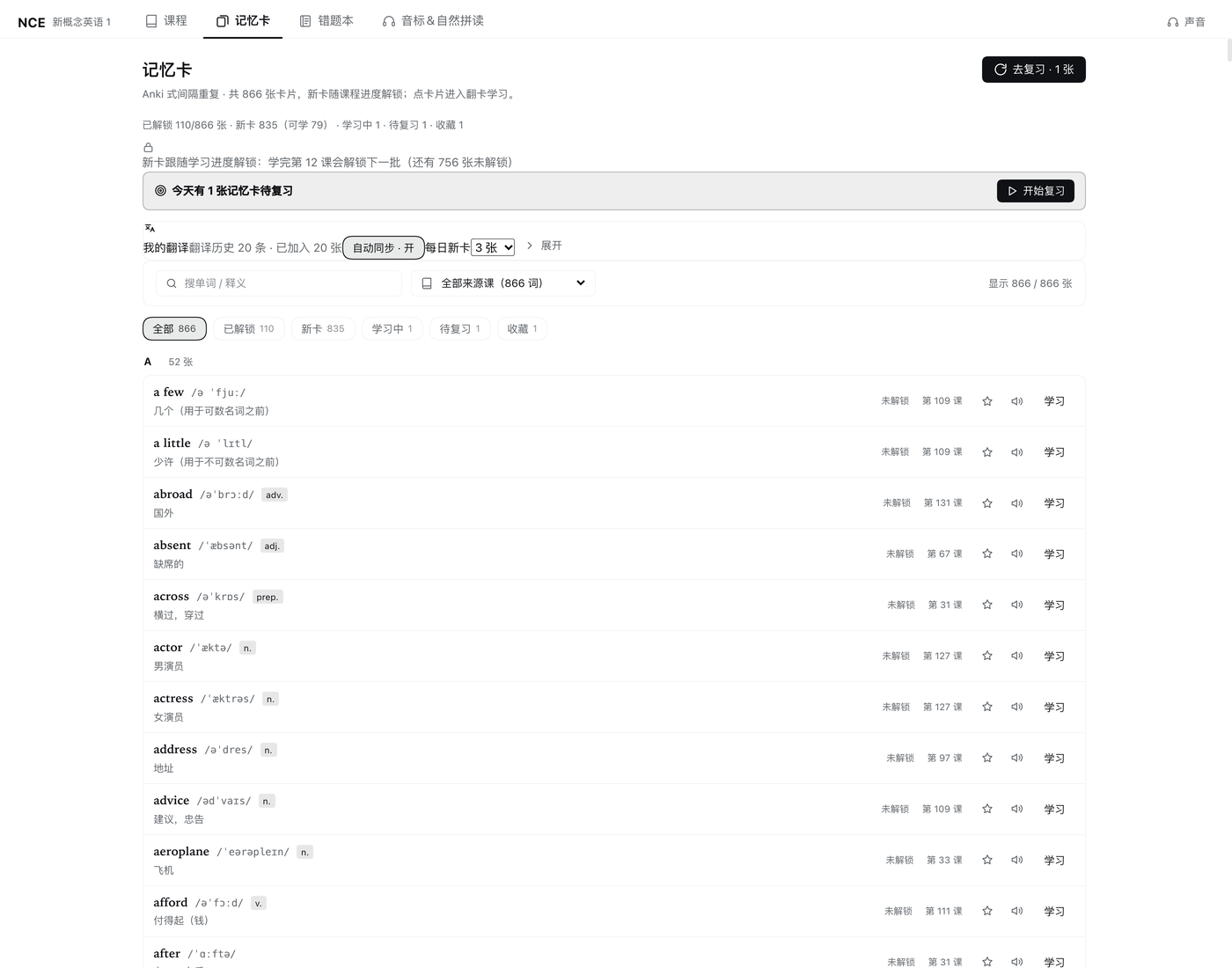
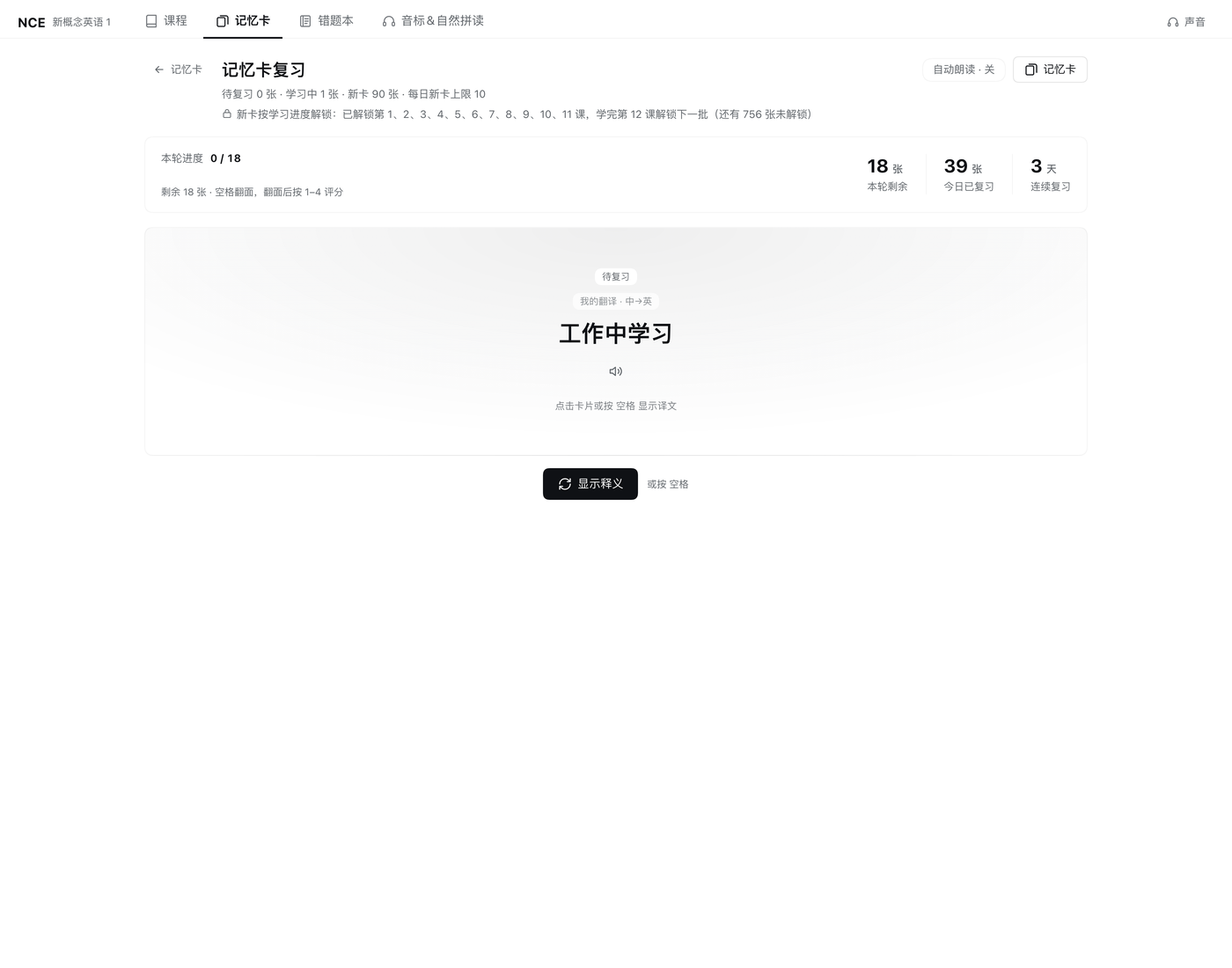
model (or on failure) it degrades to deterministic system grading with a header note.Space flips, 1–4 grade — Anki-aligned Again (1 min) / Hard (10 min) / Good
(tomorrow) / Easy (4 days) — with new / learning / due counters and daily limit.~/.dsh/dsh-translate/history.json, default 3/day).say, then browser speech;
the voice menu sets voice, speed, auto-read, and preview.dsh plugin --profile <profile> add dsh-nceThe lesson dataset is pulled in automatically as the optional dsh-nce-data package.
dsh plugin --profile <profile> add github:ChenYichener/dsh-ncegit clone https://github.com/ChenYichener/dsh-nce.git
dsh plugin --profile <profile> add /path/to/dsh-nceOpen the Plugins page, choose "install from local directory", and pick the repo folder.
Restart dsh web (or the desktop app) after installing so the host half is loaded;
after that, client-only changes need a page refresh, while host-half or dataset changes
need a DSH restart because both are cached in the host process.
| Requirement | Notes |
|---|---|
| DeepSeek Harness | Plugin manifest (dsh.bundle patch + dsh.client); developed and tested with DSH 0.2.2-rc.1 and its dsh web / desktop web surface |
| Node.js | ≥ 20 on the machine running DSH; the host uses node:sqlite and falls back to JSON when unavailable |
| macOS (optional) | /usr/bin/say is the offline read-aloud fallback; other platforms use browser speech |
| dsh-translate (optional) | Adds the Edge neural voices and imports translation history as sentence cards |
| Dataset | Installed automatically as the optional dsh-nce-data package |
The lesson data ships as a separate package, dsh-nce-data, so the plugin code stays
free of textbook content. Resolution order:
DSH_NCE_DATA_DIR if setdata/ next to the plugin (local builds)dsh-nce-data packageIf none is present the panel still mounts and shows a Retry button instead of failing
hard. To use your own dataset, point DSH_NCE_DATA_DIR at a directory holding
index.json that follows docs/DATA-CONTRACT.md, and build one
from material you own:
NCE_CONTENT_DIR=/path/to/nce-content npm run build:data
npm run build:phonetics   # IPA / phonics reference; needs no textbook data
See docs/DATA-QUALITY.md for how the dataset is extracted and
verified. The dataset is provided for personal study; if you are a rights holder and
want it removed, open an issue and the dsh-nce-data package will be unpublished —
the plugin itself is code-only and keeps working with your own dataset.
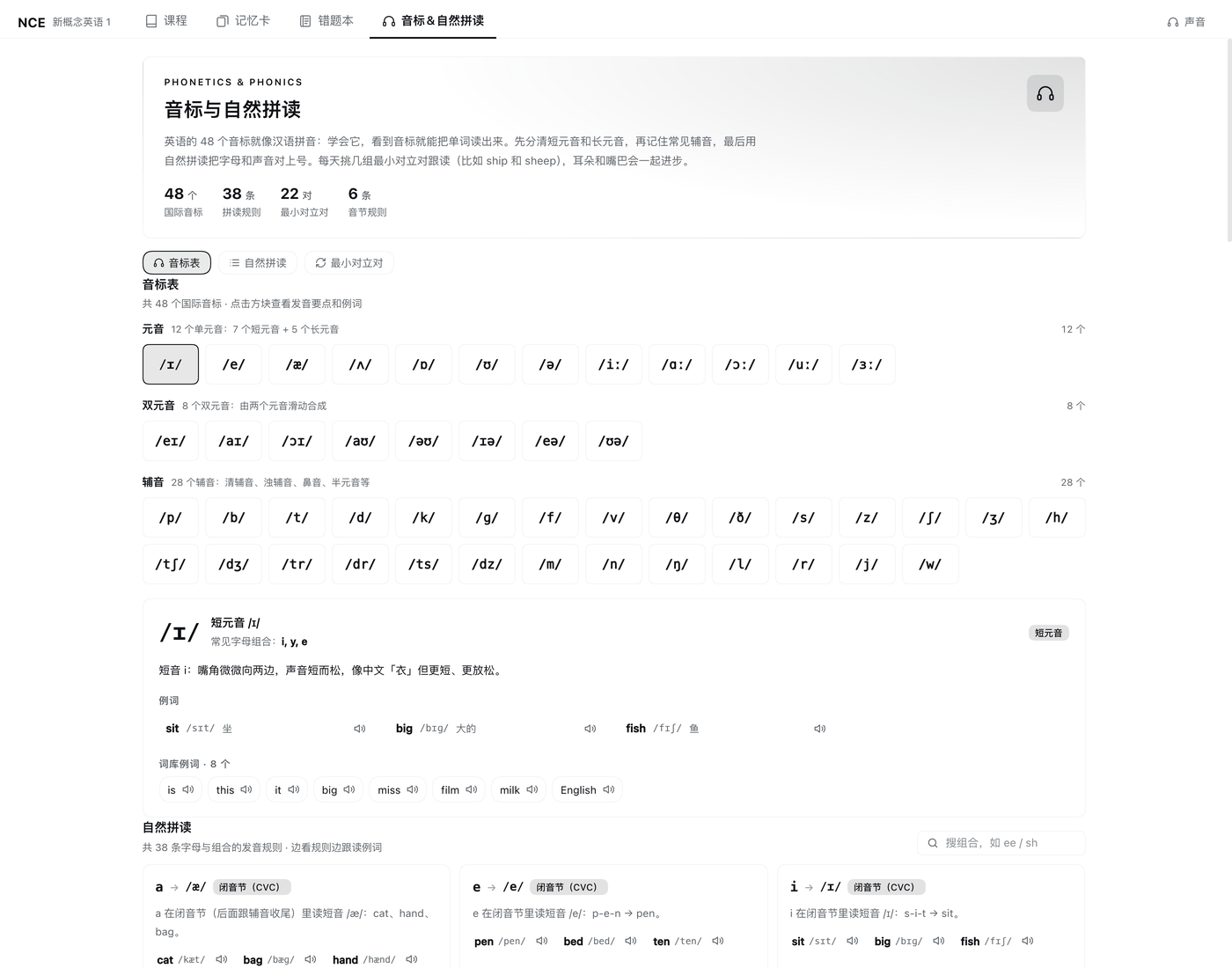
Open NCE in the DSH sidebar. Four destinations: 课程 (Course) / 记忆卡
(Flashcards) / 错题本 (Mistakes) / 音标&自然拼读 (IPA & phonics), plus a 声音
(Voice) menu in the top right.
| Action | How |
|---|---|
| Open a lesson | Pick it in the left list; the right pane switches instantly |
| Follow the lesson | Sticky anchor bar jumps between video / text / words / grammar / practice |
| Expand the video | Click the video section header or the "Video" anchor (collapsed by default) |
| Read aloud / change voice | Click a dialogue line or press Enter / Space; voice and speed live in the voice menu |
| Mark progress | Lesson status in the list, or a section's "mark complete" switch |
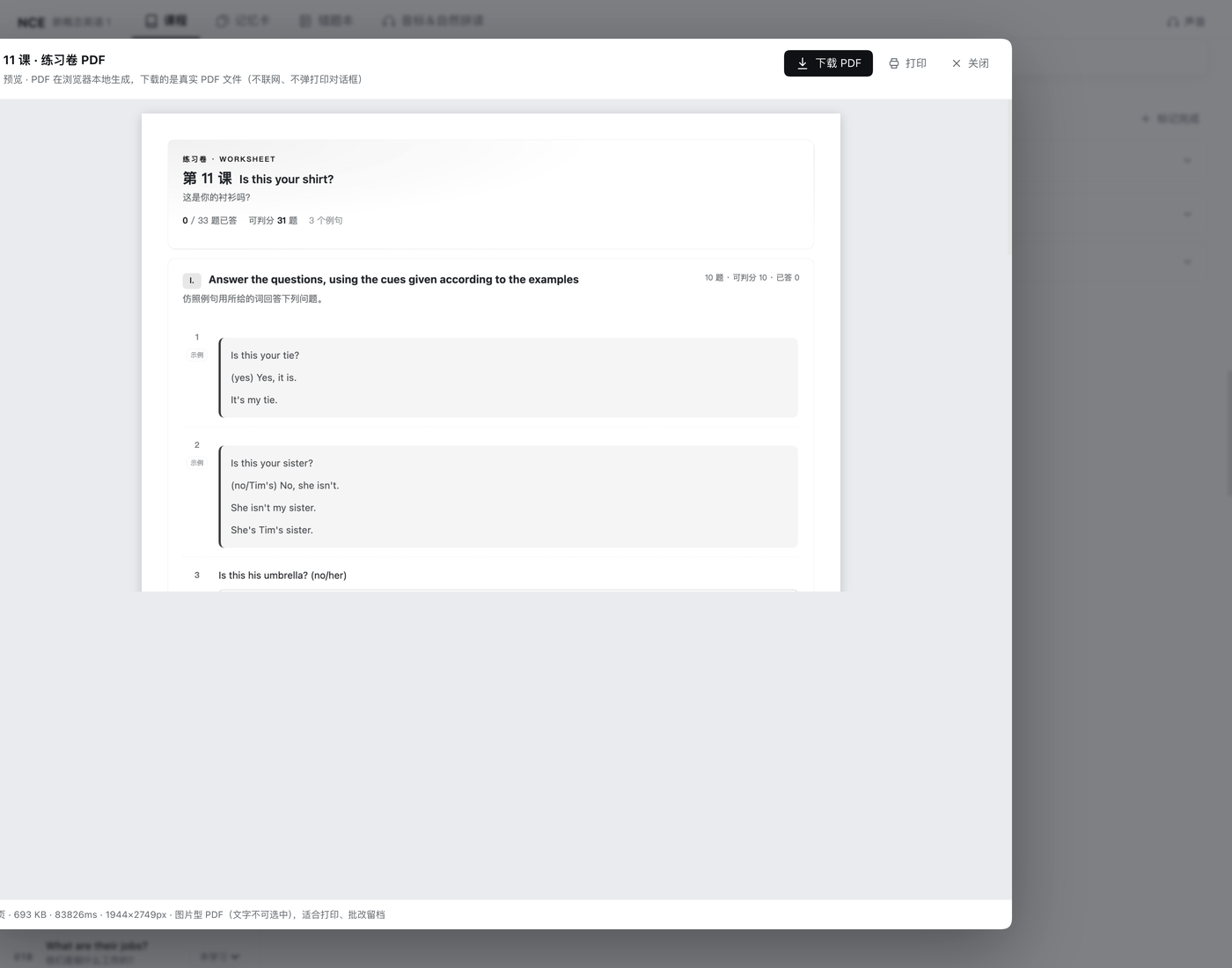
| Flashcards / paper | Space flips a card and 1–4 grade it; Enter / Shift+Enter move through paper blanks |
| Course list + one-page lesson | Fillable paper with grading | Flashcards |
|---|---|---|
|
 |
 |
| SRS review (four grades) | IPA & phonics | Local A4 PDF preview |
|---|---|---|
 |
 |
 |
cordis.patch.yml inserts one plugin row; index.js is a thin
composition root that wires src/host/ (clean architecture: domain rules →
application use cases with injected ports → infrastructure SQLite/JSON/data/
speech/LLM adapters → http transport) and mounts POST /dsh-nce/api/<op> on the
host web server.client.js is generated from src/client/NN-*.js fragments by
scripts/build-client.mjs; fragments are concatenated in ascending two-digit layer
order and may only reference earlier layers. React and the host theme come from the
DSH module table.{ ok: true, ... } or { ok: false, error })
behind a loopback Host fence. Lesson status, SRS cards, streak, and saved video URLs
live in SQLite (node:sqlite, WAL) with a JSON fallback; paper drafts, homework,
mistakes, and UI preferences live in browser localStorage. AI grading uses the
profile's default model through the host LLM gateway; no API key is stored.Deeper contracts: PLUGIN-ARCH · API-CONTRACT · PERSISTENCE · LEARNING-FLOW · EXERCISE-PAPER · DATA-CONTRACT · DATA-QUALITY.
| What | Where |
|---|---|
| Learning progress (status, SRS, streak, video URLs) | ~/.dsh/dsh-nce/nce.sqlite (+ -wal / -shm), legacy ~/.dsh/dsh-nce/progress.json |
| Paper drafts / homework ticks / mistakes / UI state | localStorage → dsh-nce/paper/v1/lesson-<n>, dsh-nce/homework/v1/lesson-<n>, dsh-nce/mistakes/v1, dsh-nce/nav\|scroll\|ui\|prefs/v1/* |
| Read-aloud cache / translation history (read-only) | ~/.dsh/dsh-translate/tts-cache/ (or ~/.dsh/dsh-nce/tts-cache/), ~/.dsh/dsh-translate/history.json |
| Course content | Read-only; resolved from DSH_NCE_DATA_DIR, a local data/, or the dsh-nce-data package |
Nothing is uploaded by default: progress, drafts, and the mistake notebook stay on the
local machine. Data leaves it only for features that need the network — the Bilibili
video embed, Microsoft Edge voices, and AI grading (sent to the model configured in
your DSH profile). The plugin repository ships no personal data; the lesson dataset
lives in the separate dsh-nce-data package.
There is no config file: daily new-card limits, the translation-card limit, voice,
speed, and auto-read live in the panel UI and are stored in localStorage; host routes,
state directory, and body limits are fixed in src/host/config.js. NCE_CONTENT_DIR is
a build-time variable for npm run build:data only — the running plugin never reads it.
npm run build              # regenerate client.js from src/client fragments
npm run build:check        # fail if client.js is stale (writes nothing)
npm run check:architecture # layering / fragment order / dead code / doc paths guard
npm test # full suite, rebuilds client.js first| Command | What it covers |
|---|---|
npm run test:data |
data hygiene, IPA validity, OCR-junk guards |
npm run test:paper, test:paper-ui |
exercise-paper parser/grading engine against the real 144-lesson data, plus paper UI states |
npm run test:ai-grade, test:explain |
AI-grading / explanation input sanitising, prompts, model-output parsing |
npm run test:host-domain, test:lesson-page |
SRS, progress and unlock rules, one-page lesson layout |
npm run test:mistakes, npm run smoke:api |
mistake notebook store/page; every /dsh-nce/api op with an isolated HOME |
npm test runs all of the above (12 steps) and boots the host API against a temporary
HOME, so your real learning data is never touched. Build the dataset first
(npm run build:data) — data-dependent steps fail without it, which is expected for a
fresh clone.
dsh-nce/
├── index.js                 # host composition root; mounts /dsh-nce/api
├── src/host/                # domain / application / infrastructure / http layers
├── client.js                # browser bundle (generated by scripts/build-client.mjs — do not edit)
├── src/client/              # layered fragments, concatenated in NN order
│   └── generated/           # generated fragments (Bilibili part map)
├── scripts/                 # data/client builds, architecture guard, data checks, tests
├── locale/{en,zh}.json      # plugin manager title and description
├── docs/                    # architecture, API, data, persistence and paper contracts
└── data/ # local dataset build output — gitignored, never published| Symptom | Fix |
|---|---|
| Course list shows a load error | Install the dsh-nce-data package (or set DSH_NCE_DATA_DIR) and restart DSH |
| Code changes do nothing | Host half (index.js, src/host/) is cached — restart dsh web; client changes need npm run build + page refresh |
| No sound | Check the voice menu; non-macOS needs browser speech, and online Edge voices need the translation plugin plus network |
| AI grading says unavailable | The profile has no default model (or the call failed); the paper falls back to system grading and verdicts can be overridden manually |
| Video area is blank | The embed needs network access to Bilibili; save a custom URL if the built-in one is unavailable |
| Where is my progress / how do I reset it? | ~/.dsh/dsh-nce/nce.sqlite; backup and reset commands are in PERSISTENCE |
say read-aloud fallback is macOS-only, other platforms fall back to browser speech.dsh 0.2.x; a change to that manifest
or to the client module table could require a plugin update. The textbook dataset is
platform-independent and resolved at runtime from the three locations listed above.| Plugin | What it does |
|---|---|
| dsh-book | Markdown draft library + AI copywriting workspace for Xiaohongshu / WeChat / generic posts |
| dsh-notify | Native desktop notification when a session finishes while DSH is in the background |
| dsh-pomodoro | Distraction-free Pomodoro timer in the sidebar |
| dsh-translate | Chinese/English translation workbench with an always-on AI tutor and neural read-aloud |
| dsh-nce | New Concept English Book 1 study panel (lessons, SRS flashcards, mistake notebook) |
MIT © 2026 chenyichen. The plugin code is MIT-licensed and does not include any textbook content: the lesson dataset is compiled locally from material the user owns. New Concept English and the related books, exercises, and audio are the property of their respective authors and publishers; the embedded video player streams third-party videos from Bilibili. Use the plugin only with content you are entitled to use.
CLASSIFICATION EVIDENCE
系统优先读取 GitHub Topics,再与站内分类词典和词根规则比对。当前命中: deepseek-harness。
morluto
Reverse engineer anything with agents, from app behavior down to native binaries.

deepseek-ai
DeepSeek Harness: Everything is a Plugin.

nexu-io
The 1st Collaborative AI Design Agent Workspace. Local-first and open source. Create motion, prototypes, websites, apps, dashboards, presentations, images, and videos with your team and AI agents. Share work, exchange feedback, and iterate together in one workspace.