

模型与 MCP
待识别

rea
morluto
Reverse engineer anything with agents, from app behavior down to native binaries.
PROJECT TOPICS
INSTALL REFERENCE
dsh plugin --profile web add github:CheeseEri/dsh-sidebar-dock
该命令指向仓库当前默认分支;尚无绑定当前 commit 的完整验证结果。
PROJECT README
DeepSeek Harness 左侧栏入口的收纳盒:一键收起 / 展开全局入口,拖动排序,把常用插件钉在收起后仍然可见的位置。

DeepSeek Harness 的左侧栏会堆着越来越多的全局入口(各类插件页、归档会话、设置入口……),装得越多越挤成一列。
dsh-sidebar-dock 给它们加了一个「收纳盒」:平时一键收起只留常用项,需要时向下展开;顺序、常用、首次打开时的默认状态都由你自己定。
| 展开(默认) | 收起后 |
|---|---|
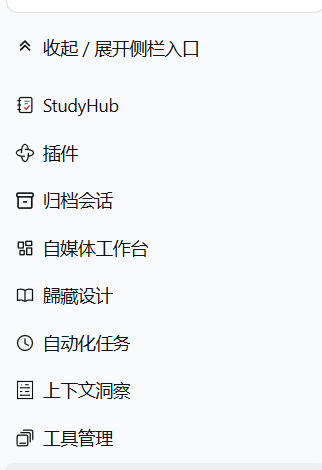 |
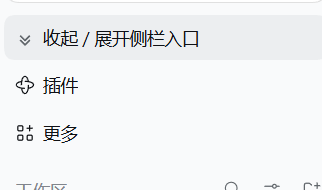 |
管理器页(顺序、常用、首次打开时):
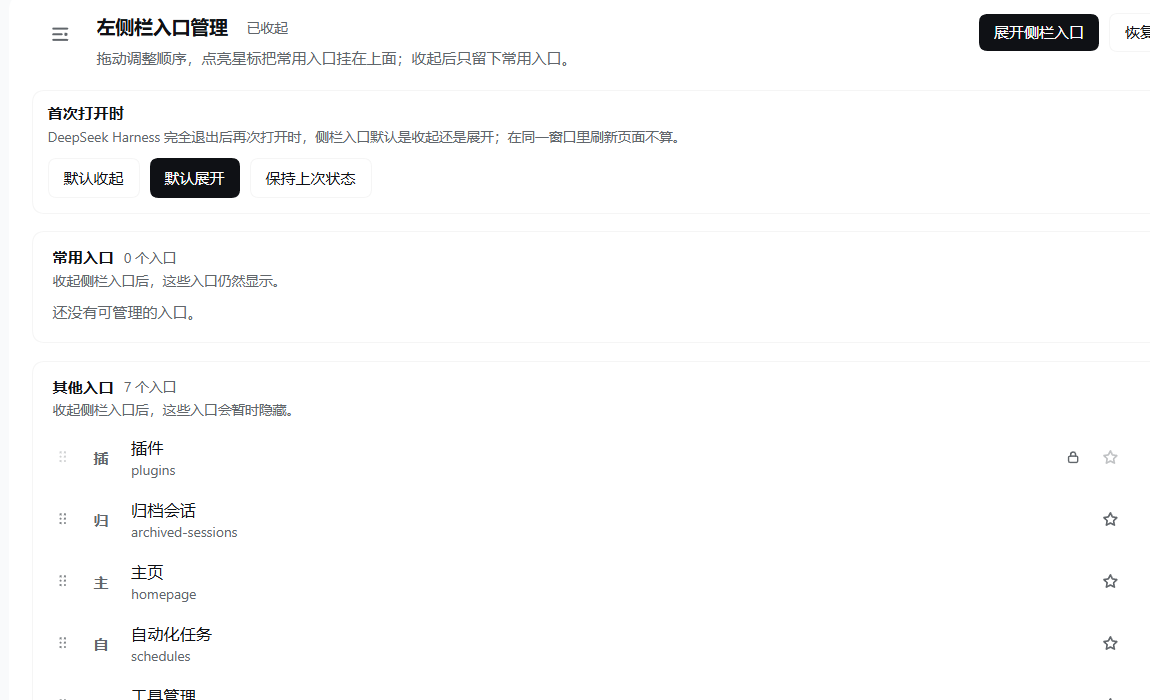
插件、这一行本身),其余入口带动画向下收起;再点一下按原顺序向下展开。管理器页头部也有同样的开关。默认收起(出厂值)、默认展开、保持上次状态。这里的「第一次打开」指完全退出 DeepSeek Harness 桌面版后再进入;在同一个窗口里刷新页面不算新的一次启动,不会被重新摆一遍。插件 入口与「收起 / 展开侧栏入口」行永远不会被收起,避免把开关藏起来。data-sdsem-* 标记,插件停用 / 卸载后立即还原。dsh plugin --profile desktop add github:CheeseEri/dsh-sidebar-dock装好后完全退出并重新打开 DeepSeek Harness(或重新加载 desktop profile)。卸载:
dsh plugin --profile desktop rm dsh-sidebar-dock仓库名与包名都是
dsh-sidebar-dock(卸载时用包名)。
dsh plugin --profile desktop add link:D:/path/to/dsh-sidebar-dock也可以在 Harness 的 插件 页面里安装该目录,bundle patch 会把插件插入 profile 的配置树。装好后刷新页面。
偏好写入浏览器 localStorage,键 dsh-sidebar-dock:prefs:
{
  "v": 1,
  "order": ["studyhub", "plugins", "archived-sessions"],
  "favourites": ["studyhub"],
  "collapsed": false,
  "onLaunch": "collapsed"
}onLaunch:collapsed / expanded / remember。sessionStorage 的 dsh-sidebar-dock:launched 记住「这个窗口已经处理过启动状态」,所以刷新不会重复应用;会话存储随窗口结束清空,下次启动重新按 onLaunch 摆一次。侧边栏的全局入口由宿主 dsh-client-ui-sidebar 渲染,顺序来自各插件注册的 order,宿主没有提供重排或分组 API。因此本插件采取「官方插槽 + 可逆 DOM 增强」的混合方案:
sidebar.panellist(「入口管理」行、order: 100 +「收起 / 展开侧栏入口」行、order: -1000 置顶)与 main(key = dsh-sidebar-dock 的管理器页)。style.order、style.display、max-height、opacity 和 data-sdsem-* 标记,不新增或删除宿主节点,卸载时全部清除。aria-label 与槽位 label 对齐,其次按宿主相同的 (order, 注册顺序) 兜底。max-height + opacity 过渡约 200ms,结束后才落 display:none;展开相反。开关行本身不参与动画,只做一次箭头翻转。applyLaunchMode(),所以冷启动那一刻侧栏就已经是收起 / 展开好的,不会先展开再收。已知限制:
aria-label 对齐可能需要适配;届时插件会退化为「不改动」而不是报错。.
├── package.json # 插件清单(name 为 dsh-sidebar-dock)
├── cordis.patch.yml # bundle patch:把插件插入 profile 配置树
├── icon.svg
├── lib/
│ ├── index.js # 宿主侧入口(空 apply)
│ └── client.js # 客户端:侧栏增强 + 管理器页
├── locale/
│ ├── zh.json
│ └── en.json
├── docs/ # README 用截图(展开态 / 收起态 / 管理页)
├── LICENSE
├── .gitignore
└── README.md# 本地目录安装(改完重启 Harness 即生效)
dsh plugin --profile desktop add link:D:/path/to/dsh-sidebar-dock插件通过 window.__ModuleLoader__.load({ id, factory(require) {...} }) 注册客户端模块,文件是纯 CommonJS 风格、无构建步骤。
dsh-sidebar-dock is a DeepSeek Harness sidebar plugin: collapse / expand the global sidebar entries with an animation, reorder them by dragging, pin frequently used ones so they stay visible when collapsed, and choose how the sidebar looks on the first launch after quitting the app (collapsed, expanded, or remember last). All changes are reversible inline styles on the host's own rows — no host code is patched.
CLASSIFICATION EVIDENCE
系统优先读取 GitHub Topics,再与站内分类词典和词根规则比对。当前命中: deepseek-harness。
morluto
Reverse engineer anything with agents, from app behavior down to native binaries.

deepseek-ai
DeepSeek Harness: Everything is a Plugin.

nexu-io
The 1st Collaborative AI Design Agent Workspace. Local-first and open source. Create motion, prototypes, websites, apps, dashboards, presentations, images, and videos with your team and AI agents. Share work, exchange feedback, and iterate together in one workspace.