开发工具
待识别

treg
superdesigndev
OpenRouter for agent tools. Join community here: https://discord.gg/6mQYYfFMAn

Chang-Tong/dsh-unified-context
Unified context for DeepSeek Harness (dsh): migrate pi/opencode/codex/claude-code/WorkBuddy sessions, share AGENTS.md, skills, project & agent memory through symlinks, and migrate automations. 统一上下文,一份上下文给所有 Harness。
PROJECT TOPICS
INSTALL REFERENCE
dsh plugin --profile web add github:Chang-Tong/dsh-unified-context
该命令指向仓库当前默认分支;尚无绑定当前 commit 的完整验证结果。
PROJECT README
English · 简体中文



DSH Unified Context (dsh-unified-context, 统一上下文) migrates pi, opencode, codex, claude-code, and WorkBuddy (Tencent) into DeepSeek Harness (dsh): sessions and chat history, the full context the model actually saw (AGENTS.md / CLAUDE.md / CODEBUDDY.md, skills, project and per-agent memory, project files), and scheduled automations. Context is shared through symlinks — one real copy, every harness reading it — never copied per harness. Sessions appear in the session list and resume with the full history; custom agents and mode prompts become discoverable dsh skills; a one-click Sync button in the composer runs the whole migration.


 →

pi · opencode · OpenAI Codex · Claude Code · WorkBuddy → DeepSeek Harness
| Resource | Link |
|---|---|
| 中文文档 | README.zh.md |
| npm package | dsh-unified-context |
| Source code | github.com/Chang-Tong/dsh-unified-context |
/link-context makes every harness read one shared AGENTS.md/CLAUDE.md/CODEBUDDY.md and one shared skill hub through symlinks: one real copy, no per-harness duplication, divergent copies reported instead of overwritten.<project>/.agents/memory/; agent memory (Codex layout) converges on ~/.agents/agent-memory/<agent>/. Default policy is authority (one harness wins, others link), with an opt-in merge index that references notes in place. A small generated block in the project AGENTS.md points dsh at the memory notes so they are read on demand.$DSH_AGENTS_HOME/skills, with provenance recorded in frontmatter (metadata.source / metadata.kind)./import-all and shows the result inline — sessions, skills, context links, and paused automations.cwd (created on demand); /attach-workspaces retro-fits existing imports.pi-<uuid> / oc-<id> / codex-<id> / claude-<id>); re-imports skip what already exists.node:zlib zstd, node:sqlite) plus dsh platform modules.| Harness | What the migration carries |
|---|---|
| pi |
sessions, agents / mode prompts → dsh skills, instructions & skills context |
| opencode |
sessions (SQLite), agents → dsh skills, instructions & skills context |
| OpenAI Codex |
sessions, AGENTS.md context, automations |
| Claude Code |
sessions, CLAUDE.md context, project & per-agent memory |
| WorkBuddy (Tencent) |
sessions with real tool results, CODEBUDDY.md + skills, project memory, automations |
| DeepSeek Harness |
the target: resumable sessions, one shared context, scheduled tasks |
Every harness answers "where does the model's context live?" differently: the transcript here, the instructions file there, skills in another directory, long-term memory somewhere else, automations in a third format. Switch harnesses and the model does not get worse — it gets amnesia, because half of what it knew never came along. Importing the chat transcript alone closes maybe half of that gap.
DSH Unified Context closes the rest:
AGENTS.md / CLAUDE.md / CODEBUDDY.md converge on one canonical file; every harness reads the same bytes through a symlink.AGENTS.md so dsh reads notes on demand instead of bloating every prompt.The design choice that makes it trustworthy: links, not copies. Every shared piece has exactly one real copy; everything else points at it. Fix a note in any harness and every harness sees the fix; there is nothing to re-sync by hand and nothing that silently forks. A re-run is a no-op; divergent copies are reported, never overwritten; delete a symlink and the old layout comes back.
Migration should feel like moving into a furnished apartment, not buying the furniture again.
Taken from a clean Docker demo environment (English UI) with sample pi / codex sessions.
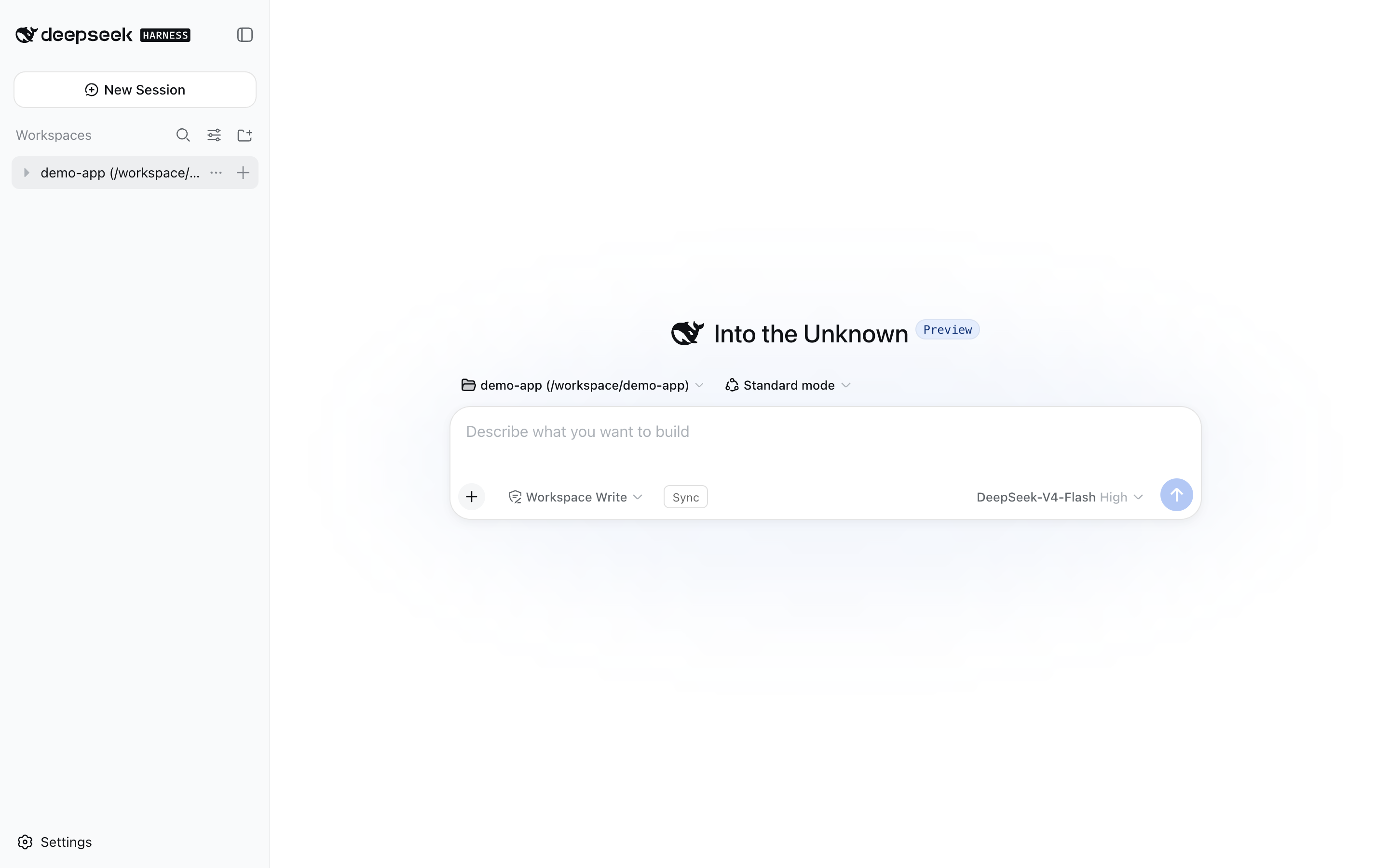
The dsh web UI with the Sync button in the composer tool row:
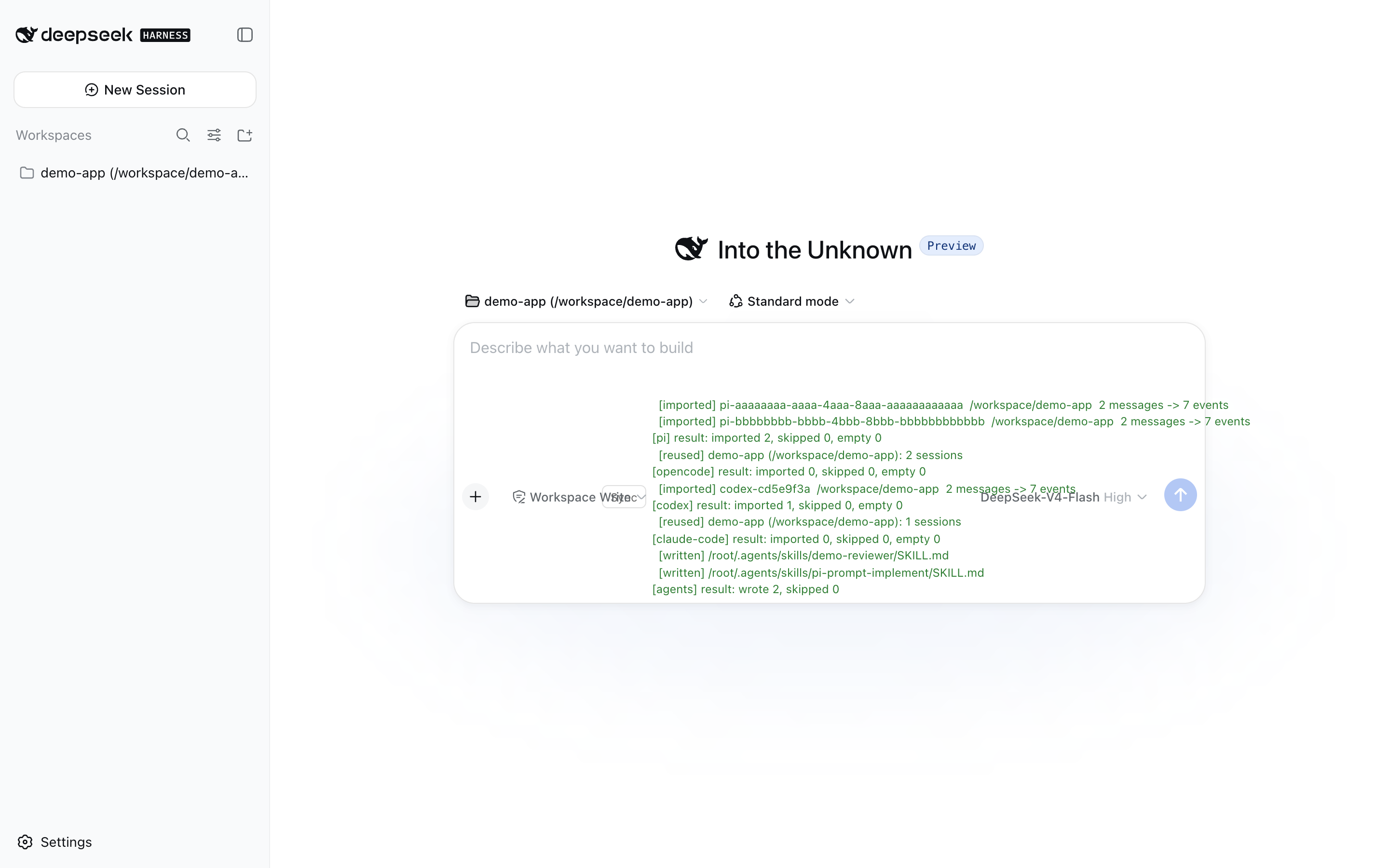
Clicking Sync runs the full import and shows the result inline:
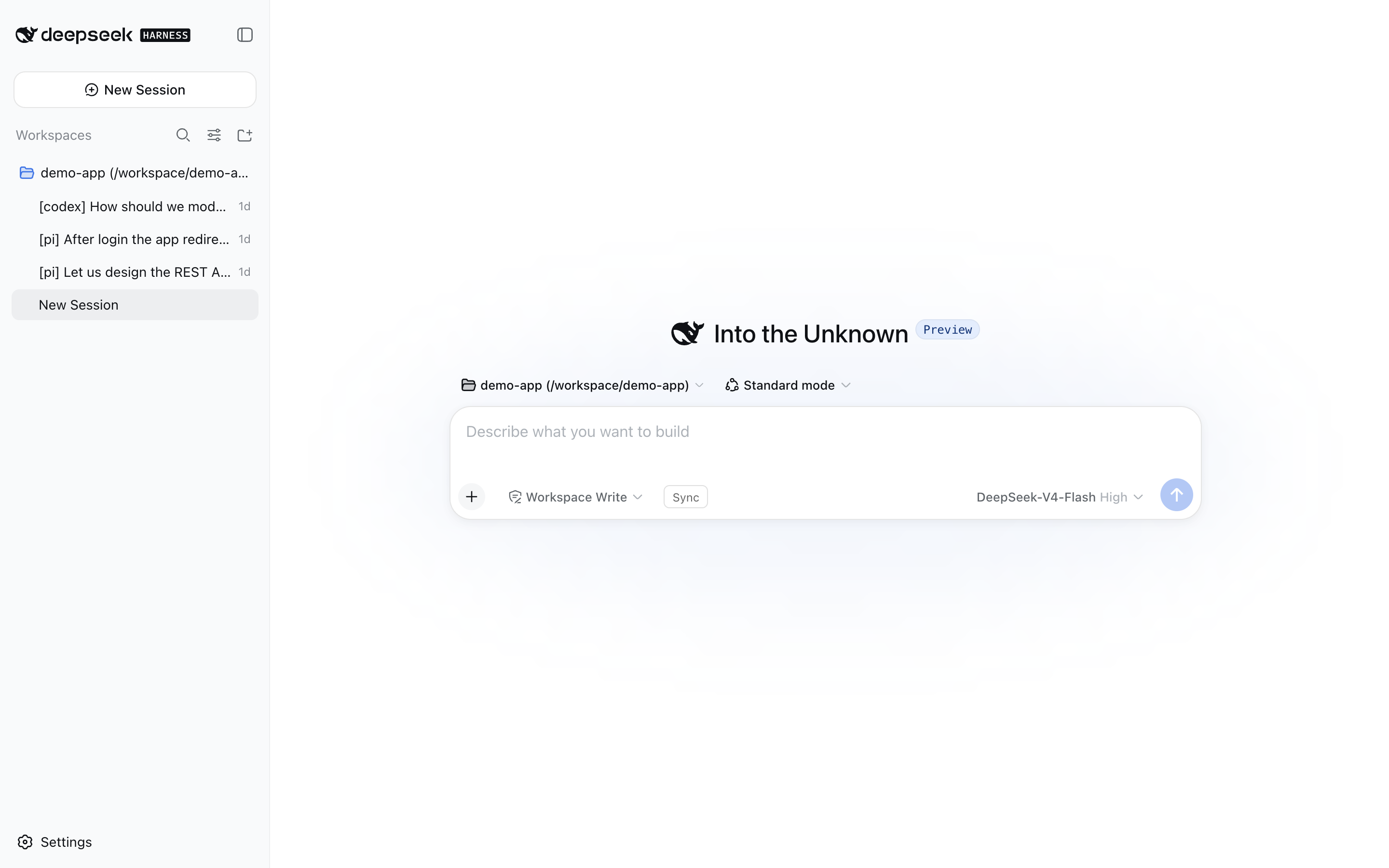
Imported sessions land in a workspace matching their original project folder, with source-tagged titles ([pi], [opencode], [codex], …):
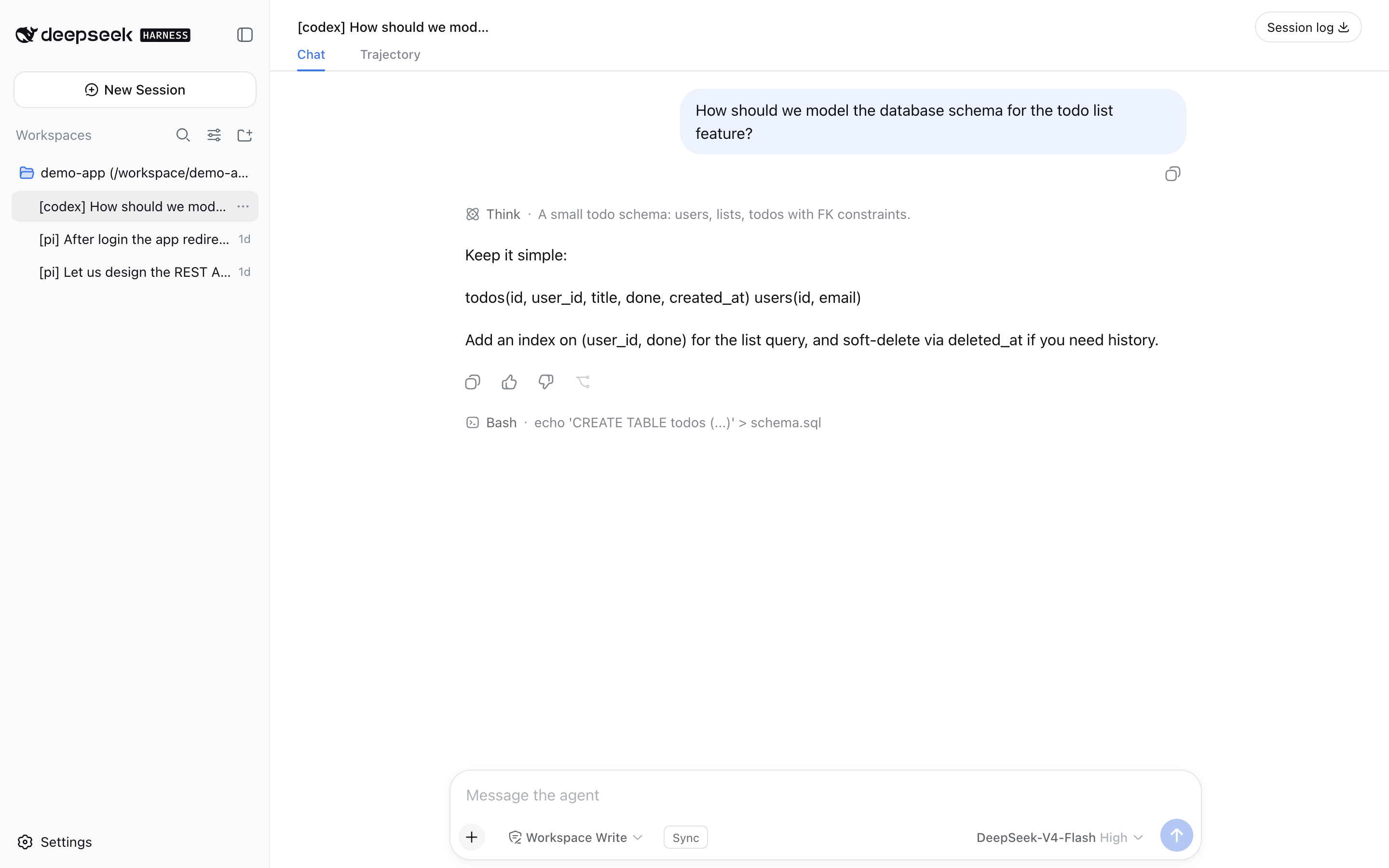
An imported session opens like a native dsh session — text, reasoning, and tool calls are preserved, and you can keep talking:
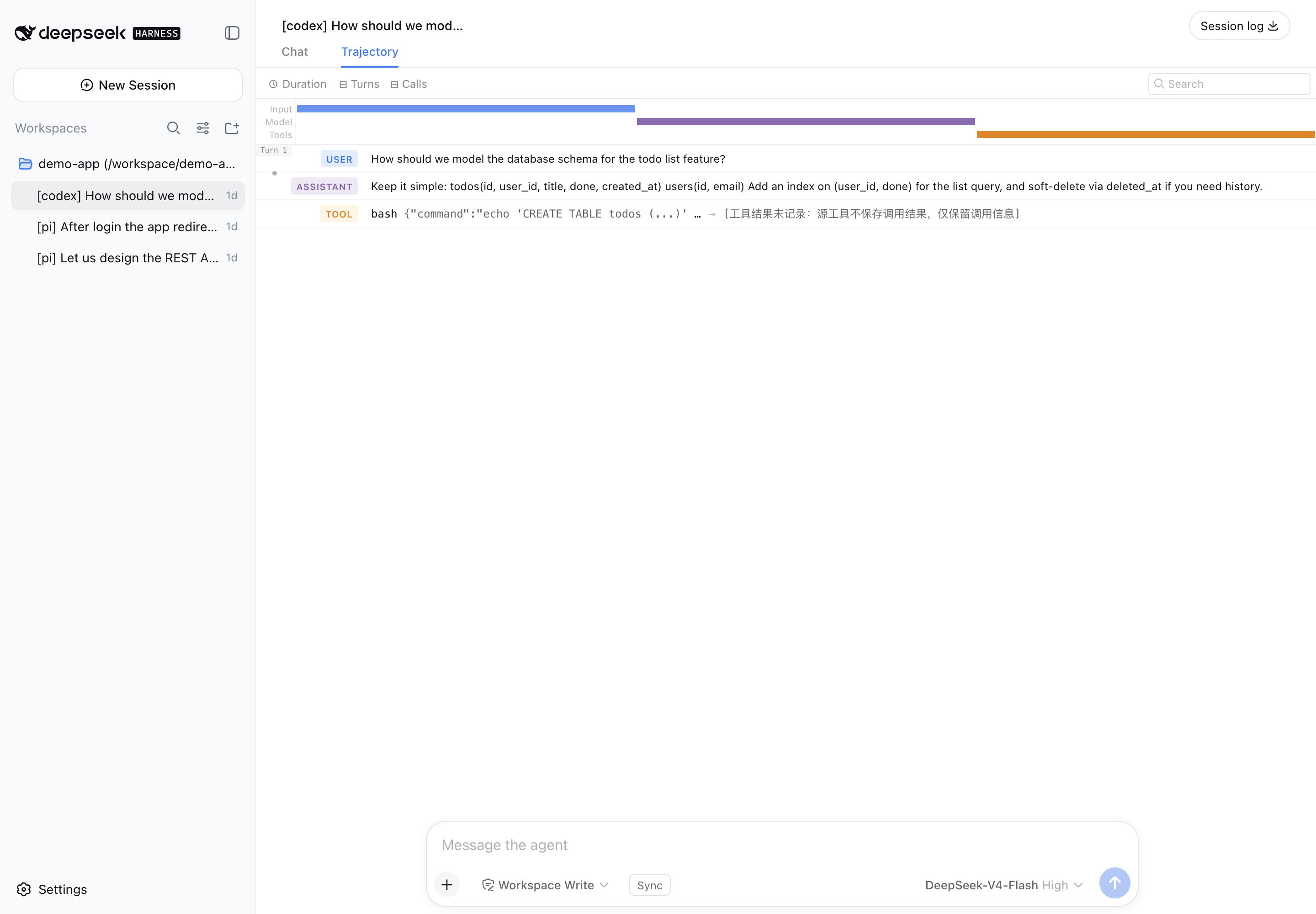
Tool calls survive the import as real trajectory entries — the Trajectory tab renders a card per call (here a bash call from the imported codex session):
The plugin is published on npm as dsh-unified-context and declares a dsh.bundle, so the official one-command installer activates it automatically. The previous dsh-import-agents package (0.3.1) remains available for old checkouts.
dsh plugin --profile web add dsh-unified-contextdsh plugin add installs the package and appends it to the profile's bundle list (the layer is active — no manual config). Then restart dsh web and refresh the page.
Every
pnpmverb works throughdsh plugin --profile <name>— e.g.dsh plugin --profile web remove dsh-unified-contextuninstalls.
The <spec> argument is a standard pnpm package spec:
| Source | Command |
|---|---|
| npm (latest) | dsh plugin --profile web add dsh-unified-context |
| npm (exact / range) | dsh plugin --profile web add dsh-unified-context@0.5.0 · @^0.5 |
| GitHub (short) | dsh plugin --profile web add github:Chang-Tong/dsh-unified-context |
| GitHub (pinned commit) | dsh plugin --profile web add github:Chang-Tong/dsh-unified-context#<sha> |
| Git URL | dsh plugin --profile web add git+https://github.com/Chang-Tong/dsh-unified-context.git · #v0.2.4 |
| Local checkout | cd <checkout> && dsh plugin --profile web add . or file:/path/to/dsh-unified-context |
| Dev link | dsh plugin --profile web add link:/path/to/dsh-unified-context |
| Tarball | dsh plugin --profile web add ./dsh-unified-context-0.2.4.tgz (or an https://… URL) |
Notes:
., ../plugin, and their file: / link: forms) are anchored to the invoking directory — add . from a plugin checkout installs that checkout.prepare script, which pnpm ≥ 10 blocks until allowed: the first add fails with an allowBuilds hint — copy the printed key into the profile's pnpm-workspace.yaml and re-run. Installing a built tarball or a local checkout needs no allowance.dsh.bundle join the layer stack automatically; bundle-less packages install as plain dependencies (one-time warning).dsh web — the host plugin registers its slash commands at startup; the client bundle (the Sync button) is served automatically./import-all answers in the input.# optional sanity checks
npm view dsh-unified-context version # latest published version
pnpm list dsh-unified-context # installed in the profileDisable the session-start migration prompt with
config: { offerOnStart: false }on the inserted row. Source paths and defaults are overridable the same way — see Configuration.
/import-all in the input. This runs the complete migration: sessions from all five sources, agents → skills, shared context links, and paused automation tasks.Everything is idempotent — run it as often as you like; already-imported sessions are skipped, existing links are reused, and identical automation tasks are not duplicated.
| Command | What it does |
|---|---|
/import-pi [options] |
Import pi sessions |
/import-opencode [options] |
Import opencode sessions |
/import-codex [options] |
Import codex sessions |
/import-claude-code [options] |
Import claude-code sessions |
/import-workbuddy [options] |
Import WorkBuddy sessions |
/import-agents |
Convert pi/opencode agents & prompts into dsh skills |
/link-context [--project DIR] [--dry-run] [--push] [--memory=authority\|merge\|off] [--authority=harness] |
Share one AGENTS.md/CLAUDE.md/CODEBUDDY.md, skill hub and long-term memory across harnesses with symlinks (never copies) |
/import-automations [--only id] [--activate] [--dry-run] |
Migrate Codex + WorkBuddy automations into dsh scheduled tasks (paused by default) |
/import-all [options] |
All of the above (5 session sources + agents + context links + paused automations) |
/attach-workspaces |
Attach imported sessions to cwd-matched workspaces (retro-fit) |
Options: --limit N · --project <substr> · --since <iso|ms> · --no-tools · --tools-as-text · --tool-truncate N · --context-project DIR · --push · --activate
node import.mjs all                    # dry-run preview (writes nothing)
node import.mjs all --apply            # sessions + skills + shared context links
node import.mjs sessions codex --apply --limit 20        # one source at a time
node import.mjs sessions workbuddy --apply               # WorkBuddy sessions
node import.mjs agents --apply         # agents/prompts → skills only
node import.mjs context --apply        # share AGENTS.md/CLAUDE.md/CODEBUDDY.md + skills
node import.mjs context --push --apply # also link hub skills into every harness root
node import.mjs context --project-dir ~/work/app --apply # project-level unification
node import.mjs context --memory=merge --apply           # merged memory index (references, no copies)
node import.mjs context --authority=workbuddy --apply    # pick which harness memory wins
node import.mjs automations            # plan Codex/WorkBuddy automations (paused)
node export.mjs                        # export sessions as Markdown for any agent to read
import.mjs defaults to dry-run; pass --apply to write.all = five session sources + agents + context links (with --apply) + the automation plan. Creating automation tasks needs the running host — use /import-automations in dsh.context links one shared copy instead of copying: no-op on re-runs, conflicts are reported and left untouched; --push opts into bidirectional skill parity.export.mjs writes $DSH_HOME/exports/<source>/<session-id>.md (--source, --project, --limit, --since, --out, --no-reasoning, --no-tools).flowchart LR
subgraph sources["Local data"]
PI["pi sessions<br/>~/.pi/agent/sessions"]
OC["opencode sessions<br/>~/.local/share/opencode/opencode.db"]
CX["codex sessions<br/>~/.codex/sessions"]
CC["claude-code sessions<br/>~/.claude/projects"]
WB["WorkBuddy sessions<br/>~/.workbuddy/projects"]
AG["agents & prompts"]
CTX["context<br/>AGENTS.md / CLAUDE.md / CODEBUDDY.md<br/>skills / project config"]
AU["automations<br/>codex TOML + WorkBuddy SQLite"]
end
subgraph plugin["dsh-unified-context"]
R["readers<br/>pi / opencode / codex / claude / workbuddy"]
C["convert<br/>turn structure + tool events<br/>(real tool results when recorded)"]
W["write<br/>dsh JSONL / ctx.sessionPersistence"]
S["skills<br/>SKILL.md bundles"]
L["context linker<br/>one shared copy + symlinks"]
A["automation planner<br/>rrule → dsh schedule"]
end
subgraph dsh["DeepSeek Harness"]
SL["session list & resume"]
TR["trajectory & tool cards"]
SK["ctx.skills.list()"]
SC["scheduled tasks"]
end
PI --> R
OC --> R
CX --> R
CC --> R
WB --> R
AG --> S
CTX --> L
AU --> A
R --> C --> W --> SL
W --> TR
S --> SK
L --> SK
A --> SCThe importer is a pure converter: lib/ parses each source format into a normalized message stream, then emits the exact dsh JSONL event layout (checksummed zstd frames, project-dir encoding) — byte-for-byte the format the dsh persistence backend reads back with its own list / load / prepare.
Sessions. Each user message opens a turn (turn/start + user/message); following assistant messages join it with increasing step numbers; every turn closes with turn/end. pi thinking → dsh reasoning blocks. pi toolCall, opencode tool, claude tool_use, codex tool_use, WorkBuddy function_call → tool-call content blocks plus paired tool/call + tool/result events: the trajectory UI renders call cards, and the tool/result answers every tool_calls so OpenAI-compatible APIs accept resumed requests. WorkBuddy also stores the real result (function_call_result), which is preserved; the other formats only keep the call, so their tool/result carries a clearly marked placeholder. WorkBuddy's injected <system-reminder> context is stripped and only the actual <user_query> turn is imported. --tools-as-text switches to plain text (no trajectory cards); --no-tools drops tool calls. Mechanical records (step-start, patch, compaction, …) are skipped.
Agents & prompts → skills. Written to $DSH_AGENTS_HOME/skills/<name>/SKILL.md (default ~/.agents/skills/), discoverable via ctx.skills.list(). Name conflicts are renamed <name>-<source> (e.g. k3-reviewer-opencode); existing bundles are only completed, never clobbered; identical content is skipped; frontmatter records metadata.source / metadata.kind.
Context. Instructions and skills are not converted; they are linked to one canonical copy (see Context parity). The migration never writes a second copy into a harness workspace.
Automations. Codex automation.toml files and WorkBuddy's automations SQLite database are planned into dsh scheduled tasks (see Automations).
Switching harnesses must not change what the model sees. The chat transcript is only one layer of context; the importer migrates the rest too — and does it by linking, not copying:
| Context layer | What it is | How the migration handles it |
|---|---|---|
| Conversation | user/assistant messages, reasoning, tool calls, tool results | imported into dsh sessions (real results preserved where recorded) |
| Instructions | AGENTS.md, CLAUDE.md, CODEBUDDY.md — global and per project |
one canonical file; every harness path is a symlink to it |
| Skills | <name>/SKILL.md bundles and flat <name>.md skills |
one shared hub (~/.agents/skills); harness-only skills are adopted through links, identical copies become links |
| Project config | opencode.json, .claude/settings.json, .pi/settings.json, .codex/config.toml, .workbuddy/settings.json, … |
never copied: every harness opens the same project directory, so the files already stay in place (their formats remain harness-native) |
Where each harness reads context:
| Harness | Global instructions | Global skills | Project instructions | Project skills |
|---|---|---|---|---|
| dsh | $DSH_HOME/AGENTS.md |
~/.agents/skills (hub) |
AGENTS.md / CLAUDE.md |
.agents/skills |
| codex | ~/.codex/AGENTS.md |
~/.codex/skills |
AGENTS.md |
.codex/skills |
| claude-code | ~/.claude/CLAUDE.md |
~/.claude/skills |
CLAUDE.md |
.claude/skills |
| pi | ~/.pi/agent/AGENTS.md |
~/.pi/agent/skills |
AGENTS.md / CLAUDE.md |
.pi/skills |
| opencode | ~/.config/opencode/AGENTS.md |
~/.config/opencode/skills (also reads ~/.agents/skills and ~/.claude/skills) |
AGENTS.md |
.opencode/skills |
| WorkBuddy | identity files SOUL.md / IDENTITY.md / USER.md / MEMORY.md (harness-native, not unified) |
~/.workbuddy/skills |
CODEBUDDY.md / .codebuddy/CODEBUDDY.md / AGENTS.md |
.workbuddy/skills / .codebuddy/skills |
Rules the linker follows:
~/.agents for global context, <project>/.agents/skills for project context) holds the canonical file/directory; every harness read-path becomes a relative symlink to it.--push additionally links the hub's skills back into every harness root for full bidirectional parity (opencode is skipped because it already reads ~/.agents/skills; that would load skills twice).--project DIR / --context-project DIR, default: the current conversation's directory) unifies AGENTS.md / CLAUDE.md / CODEBUDDY.md and converges .agents / .claude / .codex / .pi / .workbuddy project skill roots. It never fabricates a harness root that the project does not already use.Run it from the GUI with /link-context (dry-run with --dry-run), or from the CLI with node import.mjs context [--apply] [--push] [--project-dir DIR].
Memory is a separate context layer with two scopes:
| Scope | Native sources | Canonical store |
|---|---|---|
| Project | Claude Code ~/.claude/projects/<encoded>/memory/; WorkBuddy <project>/.workbuddy/memory/ |
<project>/.agents/memory/ |
| Agent | Codex ~/.codex/agent-memory/<agent>/; Claude Code ~/.claude/agent-memory/<agent>/ (per agent — Codex's layout is the reference) |
~/.agents/agent-memory/<agent>/ |
Policies (--memory):
authority (default) — one real directory wins (project: Claude, then WorkBuddy; agent: Codex, then Claude; override with --authority=<harness>); the other harness path becomes a symlink to it. Non-empty, divergent memory is reported as a conflict and left untouched instead of being merged.merge — <project>/.agents/memory/MEMORY.md becomes a generated index that references every harness's memory notes in place (absolute paths, no copies); no directory is replaced. Agent memory remains authority.off — do not touch memory.dsh has no independent memory reader, so a small marked block (<!-- dsh-unified-context:memory:begin -->) is generated in the project AGENTS.md (the file every harness reads) pointing at .agents/memory/; notes are read on demand instead of inflating every prompt. Content outside the marked block is never modified.
Codex's agent-memory is per agent, not per project, so it converges at ~/.agents/agent-memory/<agent>/ instead of being folded into project memory. The whole memory layer is idempotent and opt-out (--memory=off).
Scheduled work migrates too:
| Source | Location | Mapping |
|---|---|---|
| Codex | ~/.codex/automations/<id>/automation.toml |
name → task title, prompt unchanged, rrule → DTSTART;TZID=Asia/Shanghai + RRULE, target: cron → a fresh conversation in the recorded cwds[0]; heartbeat → the migrated Codex conversation (codex-<thread-id>) when it was imported, otherwise one reused conversation |
| WorkBuddy | ~/Library/Application Support/WorkBuddy/automations/automations.db |
recurring rows → a fresh conversation in the recorded cwd; model/WeChat-push/skill selection are not carried |
Everything is imported paused by default: pause (or delete) the source automation first, then resume the dsh task from the Automation tasks page. /import-automations --activate arms active sources directly. Before resuming, verify the translated schedule — the reference time is the next occurrence after import, not the original creation time (relevant for INTERVAL>1 rules).
Not carried: the source model and reasoning effort (the scheduled conversation uses the dsh preset default), notification policy / WeChat push, per-automation skill selection, and historical run records. node import.mjs automations prints the plan without writing; task creation needs the running host (/import-automations).
| Key | Default | Meaning |
|---|---|---|
offerOnStart |
true |
Ask about migration when a new top-level session starts |
piRoot |
~/.pi/agent/sessions |
pi session root |
piAgentRoot |
~/.pi/agent |
pi agents & prompts root |
opencodeDb |
~/.local/share/opencode/opencode.db |
opencode SQLite path |
opencodeConfig |
~/.config/opencode |
opencode agents root |
codexRoot |
~/.codex/sessions |
codex session root |
claudeRoot |
~/.claude/projects |
claude-code projects root |
workbuddyRoot |
~/.workbuddy |
WorkBuddy data root (sessions, skills) |
workbuddyAutomationsDb |
~/Library/Application Support/WorkBuddy/automations/automations.db |
WorkBuddy automations SQLite database |
codexHome |
~/.codex |
Codex config root (automations/ is read from here) |
timeZone |
Asia/Shanghai |
time zone used when translating automation RRULEs |
skillsRoot |
$DSH_AGENTS_HOME/skills |
skills output root |
toolTruncate |
1000 |
tool-call arguments truncation (chars) |
The migration prompt only fires for brand-new top-level sessions (startup, not subagents) that have a cwd and unimported history. Per-project decisions and the global agents decision are stored in $DSH_HOME/unified-context-state.json; headless environments without a UI provider silently skip the prompt.
verify.mts — mounts the real dsh JSONL backend + skill provider on staged output (node --import tsx/esm ../dsh-unified-context/verify.mts <sessions-root> <skills-root> from the dsh checkout) → expects SESSIONS ALL PASS / SKILLS ALL PASS.plugin/plugin-test.mts — end-to-end: loads the plugin on a real cordis context, runs the commands and the session-start migration offer, asserts idempotency and state persistence.scripts/e2e-commands.mjs — manual end-to-end for the new commands: mounts the plugin on a real cordis command runtime and invokes /link-context (apply in an isolated fake HOME, then a real-HOME dry run) and /import-automations (in-memory schedule: created paused, re-run created 0 skipped 11).tests/ — Vitest component tests for the Sync button (sync-button.spec.tsx, sync-button-hide.spec.tsx), reader tests (opencode-reader.spec.ts, workbuddy-reader.spec.ts), context-linker tests (context.spec.ts), automation tests (automations.spec.ts, workbuddy-automations.spec.ts), memory tests (memory.spec.ts), real-tool-result conversion (convert-tool-result.spec.ts), plus attach-workspaces.spec.ts.macos-latest, Node 22): pnpm install → pnpm run build → npx vitest run.pnpm install # devDependencies (esbuild, vitest)
pnpm run build # rebuild lib/client.js (Sync button bundle)
npx vitest run # component testsWhy does Sync say "new imports 0, skipped N"? Idempotency working as intended: those sessions were imported before, so they are skipped. Nothing is duplicated.
Tool call results are missing — why?
pi, opencode, codex, and claude-code store only the call, so their imports keep the calls as tool-call blocks with a clearly marked placeholder tool/result (the trajectory still renders cards, and resumed requests stay API-legal). WorkBuddy records real results, and those are imported verbatim.
Does context migration duplicate files into every harness?
No. /link-context creates one canonical copy plus symlinks; identical existing copies are replaced with links, and divergent copies are reported as conflicts (left untouched) instead of being overwritten. Pull-only is the default; --push opts into linking hub skills into every harness root.
Why are migrated automations paused?
To avoid double execution while the source automation (Codex/WorkBuddy) is still active. Pause or delete it in the source harness, then resume the dsh task. --activate skips the paused default if you have already disabled the source.
Are WorkBuddy's SOUL.md / MEMORY.md migrated?
Not into the shared instruction files: they are WorkBuddy-native identity/memory files with no single-file dsh equivalent, and they remain where WorkBuddy reads them. WorkBuddy skills and the project CODEBUDDY.md are part of the shared context.
Will it keep asking me to migrate?
Only while unimported sessions exist, and only per project. Once you decline or an import completes, the decision is remembered in $DSH_HOME/unified-context-state.json.
Why do I need to refresh after a dsh restart? The old page's RPC connection is gone after a restart; commands (and the Sync button) fail until you refresh.
Node version requirement?
Node ≥ 22.19 — same baseline as dsh (node:sqlite, zstd via node:zlib).
MIT — see LICENSE.
CLASSIFICATION EVIDENCE
系统优先读取 GitHub Topics,再与站内分类词典和词根规则比对。当前命中: developer-tools。
superdesigndev
OpenRouter for agent tools. Join community here: https://discord.gg/6mQYYfFMAn

T-Auto
A toolkit for low-level operations in DSH, designed to reduce token usage and task execution time / DSH 底层操作工具插件,旨在减少 Token 消耗与任务耗时

crafter-station
A public gallery of animated pets for Codex, Claude Code, DeepSeek Harness, Hermes, OpenCode, Gemini CLI, and more.