
模型与 MCP
待识别

rea
morluto
Reverse engineer anything with agents, from app behavior down to native binaries.
PROJECT TOPICS
INSTALL REFERENCE
dsh plugin --profile web add github:CY-W-2000/dsh-lan-access
该命令指向仓库当前默认分支;尚无绑定当前 commit 的完整验证结果。
PROJECT README
A DSH bundle that opens two extra network surfaces for DeepSeek Harness — every switch applies immediately from Settings → LAN access, no save button. 为 DeepSeek Harness 多开两个网络入口,全部在「设置 → 局域网访问」里即时开关、即时生效,无需保存。
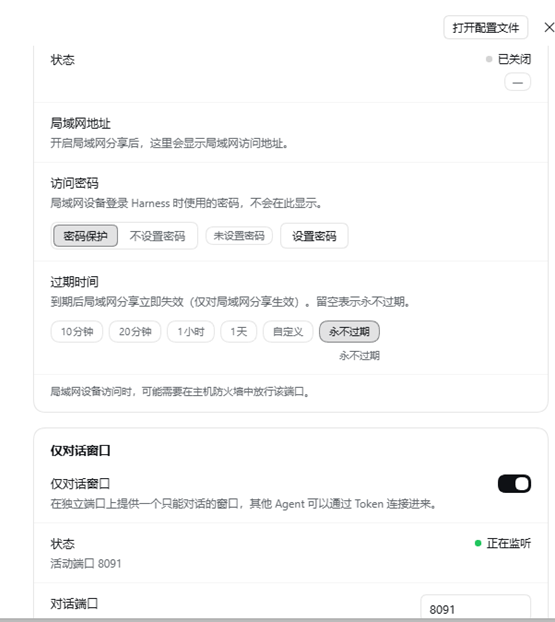
127.0.0.1:<端口> 再监听一份 DSH Web 界面,本机浏览器直接访问,不需要密码。0.0.0.0,局域网内其他设备可用完整 DSH 界面:可选密码保护(scrypt 加盐哈希、可修改/清空),也可显式选择不设置密码(需确认安全警告);两种模式都支持过期时间快捷选项(10 分钟 / 20 分钟 / 1 小时 / 1 天 / 自定义 / 永不过期)。局域网设备看到的设置页始终是只读的。所有配置保存在 $DSH_HOME/lan-access/state.json(Windows:C:\Users\<你>\.dsh\lan-access\state.json,仅当前用户可读写),不会把数据发送到本机以外。
dsh plugin add https://github.com/CY-W-2000/dsh-lan-access安装后在 DSH 中重新挂载/重启该插件(视版本而定),打开 设置 → 局域网访问 即可。
127.0.0.1:<端口>,无密码。0.0.0.0,设置页会列出可分享的局域网地址。127.0.0.1 端口不受影响。8091),页面 chat.html 自带样式脚本、无外部依赖。Authorization: Bearer <token>,可在设置页轮换,轮换后旧链接立即失效。/api/* 返回 403(/api/health 仍可探活并报告 expired: true)。| 接口 | 作用 |
|---|---|
GET /api/health |
健康检查 + expired 标记(无需鉴权) |
GET /api/info |
服务信息、鉴权模式、生效工作区、工作区列表、过期时间 |
POST /api/conversations |
在生效工作区新建对话 |
POST /api/conversations/:id/messages |
发送一条消息并等待本轮回复 |
GET /api/conversations/:id |
读取对话记录 |
GET /api/conversations |
列出通过该接口创建的对话 |
POST /api/conversations/:id/cancel |
取消当前生成 |
回复结构为 { reply: { text, reason }, reason, pendingInput, running, conversation }。若主机端需要工具审批,接口返回 reason: "input-required",在主机处理后再用 GET 读取。
0600。index.js — Host 入口:持久化配置、设置 API、HTTP/WebSocket 反向代理、监听器生命周期。chat-host.js — 仅对话监听:鉴权/过期、chat.html 托管、对话 API(通过 DSH sessionController)。client.js — 设置页(Cordis 客户端模块);chat.html — 独立对话页面。127.0.0.1:<port> for local tabs/scripts; no password.0.0.0.0 so other devices can use the full DSH UI. Choose password protection (scrypt-hashed, rotatable) or explicitly no password behind a blocking warning; both support expiry presets (10 min / 20 min / 1 h / 1 day / custom / never). LAN visitors always get a read-only settings page.State lives in $DSH_HOME/lan-access/state.json (Windows: C:\Users\<you>\.dsh\lan-access\state.json, user-only permissions); nothing leaves the machine.
dsh plugin add https://github.com/CY-W-2000/dsh-lan-accessRemount/restart the plugin if your DSH build asks, then open Settings → LAN access.
127.0.0.1:<port> without a password.0.0.0.0; Settings lists the LAN URLs to share.8091), self-contained chat.html with no external dependencies.Authorization: Bearer <token>, rotatable; old links stop working after rotation./api/* return 403 (/api/health still reports expired: true).| Endpoint | Purpose |
|---|---|
GET /api/health |
liveness + expired flag (no auth) |
GET /api/info |
service info, auth mode, effective workspace, workspace list, expiry |
POST /api/conversations |
create a conversation in the effective workspace |
POST /api/conversations/:id/messages |
send one message and wait for the turn's reply |
GET /api/conversations/:id |
read the transcript |
GET /api/conversations |
list conversations created through this API |
POST /api/conversations/:id/cancel |
cancel the running turn |
Replies are { reply: { text, reason }, reason, pendingInput, running, conversation }. If the host needs tool approval the call returns reason: "input-required"; handle it on the host and read the result with GET.
0600.index.js — host entry: persisted config, Settings API, HTTP/WebSocket reverse proxy, listener lifecycle.chat-host.js — chat-only listener: auth/expiry, chat.html hosting, conversation API through DSH's sessionController.client.js — the Settings page (Cordis client module); chat.html — the standalone chat window.CLASSIFICATION EVIDENCE
系统优先读取 GitHub Topics,再与站内分类词典和词根规则比对。当前命中: deepseek-harness。
morluto
Reverse engineer anything with agents, from app behavior down to native binaries.

deepseek-ai
DeepSeek Harness: Everything is a Plugin.

nexu-io
The 1st Collaborative AI Design Agent Workspace. Local-first and open source. Create motion, prototypes, websites, apps, dashboards, presentations, images, and videos with your team and AI agents. Share work, exchange feedback, and iterate together in one workspace.