
其他
完整应用

deepseek-harness
deepseek-ai
DeepSeek Harness: Everything is a Plugin.
PROJECT TOPICS
PROJECT README
English | 中文
A DeepSeek Harness plugin that brings Claude Code's ! gesture to DSH, split into two modes:
| Command | Behavior |
|---|---|
/! <command> |
Run a shell command, analyze its output. Inspired by Claude Code's ! prefix — runs the command in the session workspace and delivers the output to the model for immediate analysis. |
/terminal |
Open an interactive terminal popup. Closing never sends anything to the model — if the session received input, the transcript persists and the panel jumps to a history tab (new entry pre-selected) where you can reference it into the model on demand. |
Note: DSH's input trigger system only supports / and @ as trigger characters, so we use /! instead of a bare ! prefix.
Requires the dsh CLI and Node >= 22.
# from a registry / npm
dsh plugin --profile web add dsh-shell-command

# from a local checkout (live link for development)
dsh plugin --profile web add "link:/path/to/dsh-shell-command"
Restart the web surface once (dsh web) so the host-side command loads. It appears in the input / menu automatically.
/! commandType in the input box:
/! df -hThe command runs immediately, and the output is delivered to the model for analysis. You'll see a message like:
Shell Command Output
Command:df -h
[output here]
The model then analyzes the disk usage and may suggest actions if issues are found.
/terminal session/terminal in the input boxpwd
ls -la
git status/! <command> — Single-command analysisRuns the command in your session workspace and immediately delivers the output to the model for analysis. This is the DSH equivalent of Claude Code's ! prefix.
When to use:
/! git status, /! npm test/! df -h, /! free -h, /! top -bn1 | head -20/! find . -name "*.log" -mtime -1Examples:
/! git log --oneline -10
# → Model summarizes recent commits and may spot patterns

/! npm run build
# → Model analyzes build output, flags warnings or errors

/! ps aux | grep node
# → Model explains running Node processes
Technical details:
maxOutputBytes, tail retained) and formatted for analysiscommand/run/command/done)/terminal — Interactive terminalAn interactive PTY popup (persistent shell, live WebSocket stream). Best for:
How it works:
Closing the terminal never sends anything to the model automatically:
<workspace>/.dsh-shell-transcripts/, panel jumps to History tab with the new entry pre-selectedYou decide later whether to reference it for analysis (see History Tab workflow below).
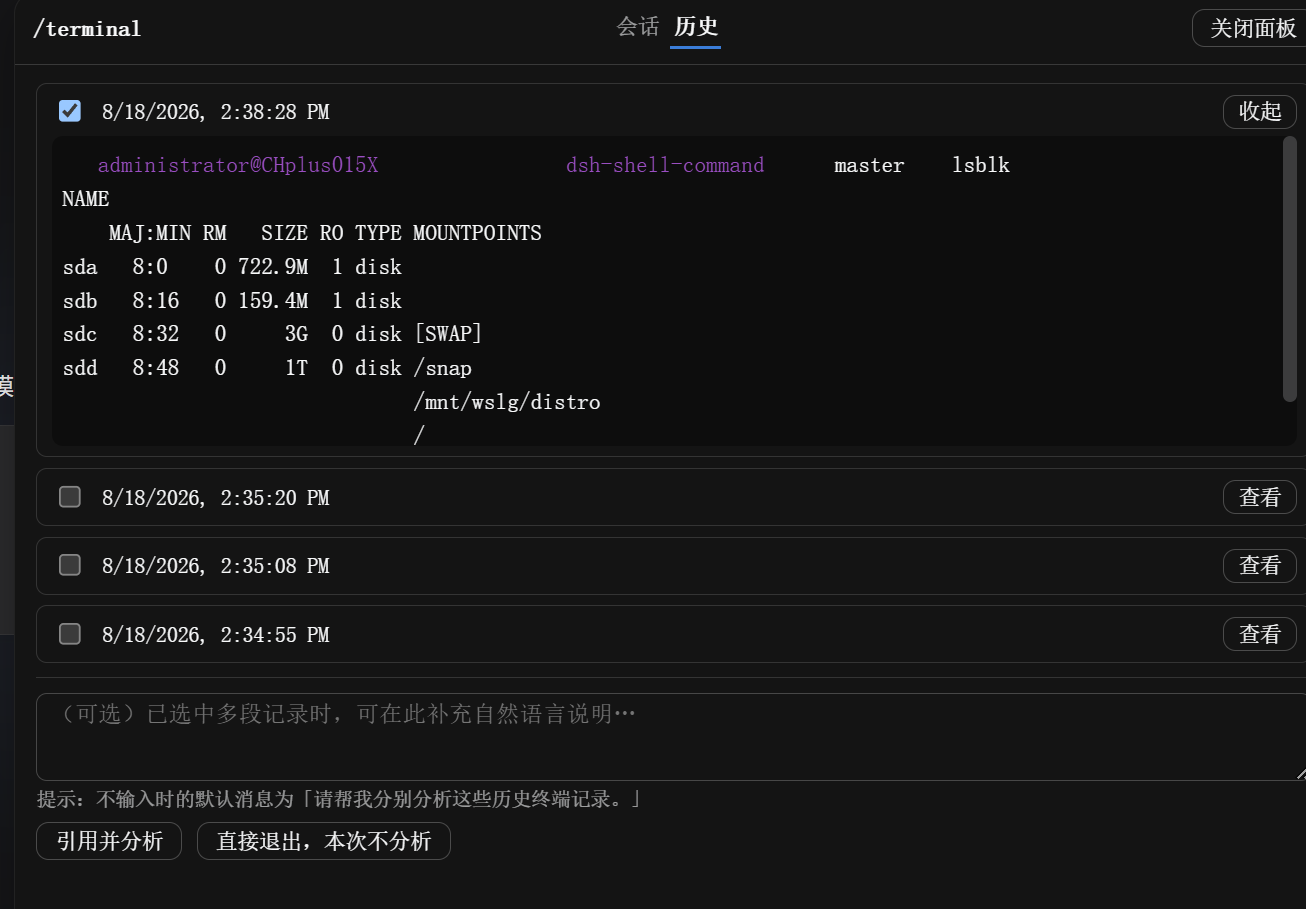
When you close a terminal session that received input, the panel automatically switches to the History tab:
UI Elements:
Typical workflow:
1. Close a terminal session (click "退出")
2. Panel stays open, jumps to History tab
3. Just-closed entry is pre-selected and auto-expanded
4. Review the transcript preview
5. (Optional) Select additional historical entries for comparison
6. (Optional) Add context in the notes field: "Why did the second run fail?"
7. Click "引用并分析" → Model analyzes selected transcripts
   OR click "直接退出,本次不分析" → Panel closes, nothing sent to model
Advanced usage:
Storage:
<workspace>/.dsh-shell-transcripts/<sessionId>-<timestamp>-<counter>.log + .meta.json sidecarterminalTranscriptKeep).dsh-shell-transcripts/ to your .gitignore/!You: The build is failing. Let me check...
You: /! npm run build
[Output shows a TypeScript error]
Model: The error indicates a missing type import in auth.ts line 42.../terminalYou: /terminal
Terminal: $ npm test
[tests fail]
Terminal: $ cat test/integration.spec.js | grep -A5 "failing test"
Terminal: $ ls -la test/fixtures/
Terminal: $ echo $NODE_ENV
[Found the issue: missing fixture file]
Terminal: [Click "退出"]
[Panel jumps to History tab, entry auto-selected]
You: [Add note: "Why did this test fail?"]
You: [Click "引用并分析"]
Model: Based on the transcript, the test failed because test/fixtures/user-data.json is missing...[Run 1: /terminal → install dependencies → check build time → exit]
[Run 2: /terminal → same steps with cache enabled → exit]
[Run 3: /terminal → same steps with different Node version → exit]
[In History tab]
You: [Select all 3 entries]
You: [Add note: "Which configuration is fastest and why?"]
You: [Click "引用并分析"]
Model: Comparing the three build runs: Run 2 was 3x faster due to npm cache.../! for single commands where you want immediate feedback; use /terminal for exploratory workflows/terminal but don't type anything, it won't create a history entry (by design)Configure through the profile's cordis.patch.yml (the web settings UI does not expose third-party plugin settings):
- insert:
    - id: shell-command
      name: dsh-shell-command
      config:
        shell: ''            # '' → /bin/bash (POSIX) or cmd.exe (Windows)
        shellArgs: []        # [] → -lc (POSIX) or /d /s /c (Windows)
        timeoutMs: 60000     # hard deadline; process tree is terminated on expiry
        maxOutputBytes: 32768  # output tail retention for /! command
        graceMs: 3000
        analysisPrompt: ''   # '' → built-in prompt; supports {command} {cwd} {output}
        terminalEnabled: true
        terminalMaxTranscriptBytes: 1048576   # in-memory transcript cap (tail)
        terminalTranscriptDir: '.dsh-shell-transcripts'
terminalTranscriptKeep: 10agent.session.header.cwd)ctx.subprocess seam when present: scrubbed environment (no DEEPSEEK_API_KEY/DSH_* leak), tree-scoped SIGTERM → grace → SIGKILL termination. Falls back to node:child_process with a scrubbed environment otherwisemaxOutputBytes, tail retained) for the /! commandcommand/run), and there is no sandbox approval step — it runs with the host's own privileges, exactly like typing in your own terminalnode test/unit.mjs # pure parse/format tests, no dependencies
node test/smoke.mjs # full apply() + handler against a mock context
node test/smoke-terminal.mjs # terminal registry + hasInput tracking + history-reference RPC (mock)The smoke test imports the real @deepseek-ai/* peers; outside a profile, link them once:
mkdir -p node_modules/@deepseek-ai
ln -s "$HOME/.dsh/profiles/node_modules/@deepseek-ai/"* node_modules/@deepseek-ai/Q: When should I use /! vs /terminal?
A: Use /! for single commands where you want immediate AI analysis (status checks, quick diagnostics). Use /terminal for interactive workflows where you need to run multiple commands and decide later what (if anything) to analyze.
Q: Why didn't my terminal session appear in History?
A: Empty sessions (no input received) don't persist. If you opened /terminal but didn't type any commands, it won't create a history entry. This is by design to avoid clutter.
Q: Where are the history transcripts stored?
A: In <workspace>/.dsh-shell-transcripts/, one .log file per session plus a .meta.json sidecar. Add this directory to your .gitignore. Old entries are automatically pruned (default: keep last 10 per session).
Q: Can I delete history entries manually?
A: Yes, just delete the .log and .meta.json files from .dsh-shell-transcripts/. The History tab reads from disk on each open.
Q: Why doesn't vim/htop/ncurses work in /terminal?
A: The current terminal is line-oriented (scrollback + input line), not a full VT100/xterm emulator. Full terminal emulation (using xterm.js) is planned for a future release — it requires introducing a build pipeline.
Q: Do the arrow-key command recalls persist across sessions?
A: The ↑/↓ history is client-side and resets when you close the browser tab or the panel. It's scoped to the current terminal window, not saved to disk.
Q: What's the difference between "引用并分析" and just asking about the commands in chat?
A: "引用并分析" sends the actual command transcripts (output, timestamps, exit codes) to the model as structured data. Asking in chat relies on your description, which may miss details. Use reference-and-analyze when you want the model to see the raw output.
Q: Can I reference transcripts from a previous DSH conversation?
A: No. Terminal history is session-scoped. Each DSH conversation has its own .dsh-shell-transcripts/ namespace, and the History tab only shows entries from the current session ID.
Q: What happens if output is very long?
A: Both /! and /terminal bound output size (maxOutputBytes / terminalMaxTranscriptBytes). When exceeded, the tail is retained (not the head). This ensures recent output is always visible.
Q: Why does /! say "No model request exists yet"?
A: /! requires an active model conversation. Send at least one message to the model first (starting the conversation), then /! will work. This prevents a UI rendering timing issue.
/! output is delivered as a plugin-sourced message (visible in the conversation)@deepseek-ai/dsh 0.1.0-rc.x; pin peers and re-verify on DSH upgradesWe're planning several enhancements for future releases:
Contributions are welcome! Feel free to:
MIT
CLASSIFICATION EVIDENCE
系统优先读取 GitHub Topics,再与站内分类词典和词根规则比对。当前命中: 无有效分类标签。
deepseek-ai
DeepSeek Harness: Everything is a Plugin.

anywhere-labs
为 DeepSeek Harness (DSH) 插件生态打造的现代化桌面端解决方案。万物皆「插件」,桌面本身也是「插件」。

walkinglabs
Harness engineering beginner tutorial, from 0 to 1