
模型与 MCP
待识别

rea
morluto
Reverse engineer anything with agents, from app behavior down to native binaries.
PROJECT TOPICS
INSTALL REFERENCE
dsh plugin --profile web add github:CAOGGL/dsh-port-token
该命令指向仓库当前默认分支;尚无绑定当前 commit 的完整验证结果。
PROJECT README
DSH(DeepSeek Harness)Web 界面插件:右下角常驻一把钥匙——点开就能看到本实例正在监听的端口、远程访问令牌和连接地址,再点一下收起。
A DeepSeek Harness Web GUI plugin: a key in the bottom-right corner that shows the port this instance is listening on, the remote-access token, and the URL to connect with — one click open, one click closed.
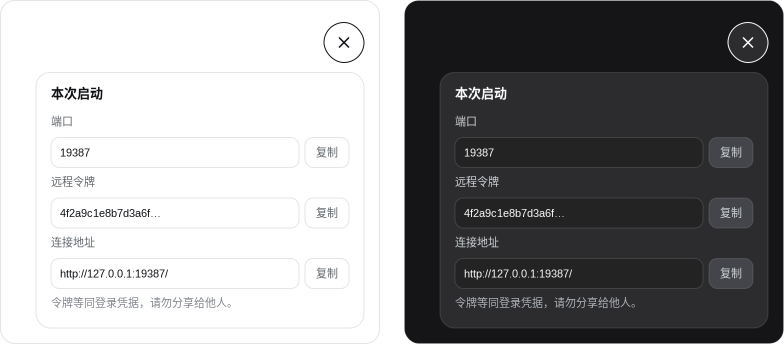
端口、远程令牌、连接地址,每行各带独立复制按钮,复制后短暂显示「已复制」Esc、或点面板旁边的空白处都能收起ctx.webServer.port,用 --port 0 让系统分配也能显示正确ctx.connection.authenticatedUrl(),与 dsh web 启动打印的 ?token= 完全一致GET /dsh-port-token/info 由 ctx.connection.admit(req) 把关,和 /api 同一道 Host/Origin 栅栏与会话校验——无 Cookie 返回 401、跨站来源 403、非 GET 返回 405、响应带 no-store方法 A:桌面端自带命令(推荐)
desktop 这个 profile 由 Electron 应用独占管理,npm 装的 dsh 命令会被直接拒绝,要用桌面端自带的那条:
$dsh = "$env:LOCALAPPDATA\Programs\DeepSeek Harness\resources\runtime\cli\bin\dsh.cmd"
& $dsh plugin --profile desktop add github:CAOGGL/dsh-port-token
重启 DeepSeek Harness 生效(bundle 在启动时组合)。
方法 B:装本地检出(开发用)
& $dsh plugin --profile desktop add link:C:\path\to\dsh-port-token-pluginprofile 直接读工作副本,改完刷新页面即可看到,不用重装。
方法 C:其他 profile
desktop 以外的名字用 npm 版 CLI 即可(需要 pnpm 在 PATH 上):
dsh plugin --profile web add github:CAOGGL/dsh-port-token| 操作 | 结果 |
|---|---|
| 点钥匙 | 面板打开,钥匙旋转成叉号 |
再点一次 / 按 Esc / 点面板旁边的空白 |
收起,叉号转回钥匙 |
点某行的 复制 |
只复制这一项,按钮短暂显示 已复制 |
dsh web 启动时打印一次带令牌的地址,页面拿它换 HttpOnly Cookie 后就被重定向到干净地址,令牌再也到不了页面脚本;--port 0 时端口也只有宿主进程知道。所以插件分成两半:lib/index.js 提供一个路由,lib/client.js 渲染徽标。详见 实现原理。
& $dsh plugin --profile desktop remove dsh-port-token然后重启。profile 里的依赖和 bundles 条目会一并清除,profile 目录之外没有改动。
/api 同级栅栏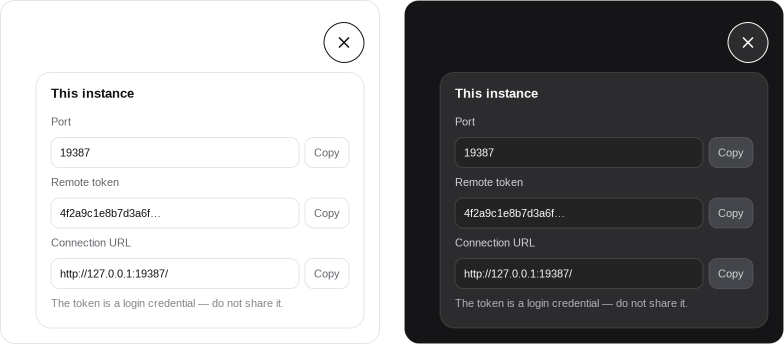
Port, Remote token, Connection URL — each with its own copy button that briefly reads CopiedEsc, or click beside the panel to closectx.webServer.port), so it is still correct when the harness was started with --port 0ctx.connection.authenticatedUrl(), identical to the ?token= printed by dsh web at startupGET /dsh-port-token/info is admitted by ctx.connection.admit(req), the same Host/Origin fence and browser-session check that guards /api — no cookie gets 401, a foreign origin 403, other verbs 405, and responses carry no-storeOption A — the command the Desktop app ships (recommended)
The desktop profile belongs to the Electron app, and the npm dsh CLI refuses to touch it. Use the one bundled with the installation:
$dsh = "$env:LOCALAPPDATA\Programs\DeepSeek Harness\resources\runtime\cli\bin\dsh.cmd"
& $dsh plugin --profile desktop add github:CAOGGL/dsh-port-token
Restart DeepSeek Harness — bundles are composed at boot.
Option B — install a local checkout (for development)
& $dsh plugin --profile desktop add link:C:\path\to\dsh-port-token-pluginThe profile reads the working copy, so edits show up after a page reload, with no reinstall.
Option C — any other profile
Every name except desktop works with the npm CLI, provided pnpm is on PATH:
dsh plugin --profile web add github:CAOGGL/dsh-port-token| Action | Result |
|---|---|
| click the key | the panel opens and the key rotates into a cross |
click it again, press Esc, or click beside the panel |
it closes and the cross becomes the key |
click Copy on a row |
that one value is copied; the label reads Copied for a moment |
dsh web prints a token-bearing URL once at startup; the page trades it for an HttpOnly cookie and is redirected to a clean URL, so page script can never read the token again — and with --port 0 only the host process knows the port. Hence two halves: lib/index.js serves one route, lib/client.js draws the badge. Details: how it works.
& $dsh plugin --profile desktop remove dsh-port-tokenThen restart. The dependency and its bundle entry are removed; nothing outside the profile directory is touched.
/apiCLASSIFICATION EVIDENCE
系统优先读取 GitHub Topics,再与站内分类词典和词根规则比对。当前命中: deepseek-harness。
morluto
Reverse engineer anything with agents, from app behavior down to native binaries.

deepseek-ai
DeepSeek Harness: Everything is a Plugin.

nexu-io
The 1st Collaborative AI Design Agent Workspace. Local-first and open source. Create motion, prototypes, websites, apps, dashboards, presentations, images, and videos with your team and AI agents. Share work, exchange feedback, and iterate together in one workspace.