
模型与 MCP
待识别

rea
morluto
Reverse engineer anything with agents, from app behavior down to native binaries.
PROJECT TOPICS
INSTALL REFERENCE
dsh plugin --profile web add github:C4Hy0/dsh-browser-bridge
该命令指向仓库当前默认分支;尚无绑定当前 commit 的完整验证结果。
PROJECT README


A DeepSeek Harness plugin and a Chromium extension that let an agent drive the browser you are already signed into. The agent opens a tab, reads it, and acts on it through the DevTools Protocol. It does not start a second browser, copy cookies, or ask you to paste a token by hand: the extension discovers the local host plugin and pairs with it.
Ten tools cover reading, input, waiting, screenshots, pixel sampling, network and console observation, and script evaluation. The host plugin listens on one local port and serves the extension zip and a small dashboard on the plugin page.
.crx.dsh plugin --profile web add /absolute/path/to/browser-bridgeThe row is host-only. It listens on 127.0.0.1:8791 by default and registers the
ten tools.
extension/ when you click, so there is no build step. The plugin page
screenshot under Screenshots shows the card.manifest.json at its top level.chrome://extensions (or edge://extensions), turn on Developer mode,
choose Load unpacked, and select that folder.127.0.0.1 ports 8791-8811 and connects to the first
host that answers. For a host on another port, paste the pairing link from the
plugin page into the popup field and press Pair.bsb_browsers then lists the browser. The label is the product token from the
user agent plus the full build, for example Chrome/157.0.8103.38.
Extension changes: replace the files in the folder you loaded and press reload on
the extension card in chrome://extensions. Host changes: toggle the bundle or
restart DSH, then check /browser-bridge/api/build, which reports the build that
is actually running.
The plugin page in DSH, showing connected browsers and the extension download:
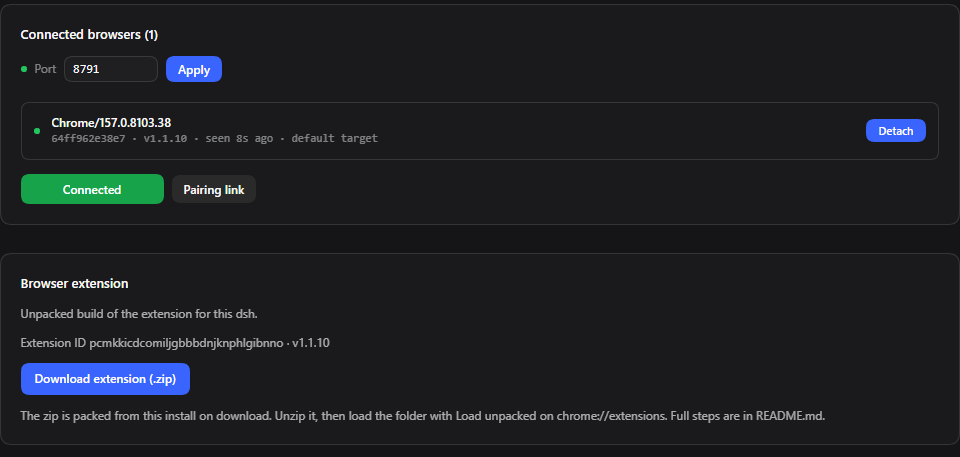
The lamp and the word beside it carry the connection state. A failed pairing turns the Pair button red until the field changes.
The band at the bottom encodes the browser id. With no id yet, the strip is a single quiet rule instead of a pattern.
| State | Preview |
|---|---|
| Never connected, before an identity exists (flat band) |  |
| Checking, before the first status read |  |
| Not connected |  |
| Reconnecting, amber lamp |  |
| Connected, green lamp |  |
| Pairing failed, red button |  |
| Tool | What it does |
|---|---|
bsb_browsers |
Lists connected browsers, the default target, and whether each one is polling. Start here when a call reports no browser. |
bsb_open |
Opens a URL and makes it the tracked tab. The new tab stays in the background unless activate: true. |
bsb_tabs |
Lists, adopts, reloads, or closes tabs. |
bsb_read |
Reads the page. mode: "text" returns visible text, interactive elements with @eN refs, and viewport data; "rows" returns selector matches as structured rows; "html" returns one element's outerHTML. |
bsb_act |
Performs one input action: click, hover, type, set, select, key, wheel, scroll, drag, drop, upload, or drive for canvas steering. key takes a named key, held keys, steps, or text to send one real key event per character. It also has forceActive and releaseActive for pages whose frame clock has stopped. |
bsb_wait_for |
Waits for a selector, text, URL, enabled control, settled box, JS expression, network request, or a fixed delay. |
bsb_capture |
Saves screenshots, selector contact sheets, or a recording to disk and returns file paths for read_image. |
bsb_pixels |
Samples an element as a colour grid or at exact points. Reads only; useful for canvas boards and maps that a DOM query cannot address. |
bsb_observe |
Records the page's own network requests, console messages and exceptions, or samples an element over time. |
bsb_eval |
Evaluates JavaScript and returns the value. Runs in a read-only isolated world by default; world: "main" opts into the page's own world. Also installs document-start scripts (installOnNewDocument) that run before every new document of the tab. |
Every page tool accepts frame (a frame id, URL substring, or index) and
browser (a browser id, id prefix, or label substring). bsb_act performs one
action per call. The tool schemas carry the full parameter lists.
A bundled skill, browser-bridge, holds the workflow playbook: tool choice, the
read/act/wait loop, canvas and WebGL pages, iframes, network debugging, and
recovery. It registers from the skill catalog when the plugin loads, so there is
no project skill file to copy.
The row in cordis.patch.yml:
config:
  port: 8791
bind: '0.0.0.0'| Key | Default | Effect |
|---|---|---|
port |
8791 | Listener port. The extension probes 8791-8811 on connect. A port outside that range still works when the pairing link is pasted. |
bind |
0.0.0.0 |
Address to listen on. Use 127.0.0.1 for this machine only. |
advertise |
auto | Address written into the pairing URL. Defaults to the first private IPv4. |
Port changes made from the plugin page are stored in
<dsh home>/browser-bridge/settings.json and outrank the profile config. Reset
removes the override.
| Symptom | Cause and fix |
|---|---|
| "Manifest file is missing or unreadable" | You selected a folder above the one that contains manifest.json. |
| "Pairing failed. Check the link and try again." | The link did not reach a bridge. Open /discover in a tab, check the port, and for a LAN peer check the firewall. The extension service worker console shows the specific error. |
| Remote browser cannot find the bridge | Expected. The sweep only probes 127.0.0.1; paste the pairing link. |
bsb_browsers is empty |
No extension is polling. Reload the extension and check its card for errors. |
| "browser is not connected" | The worker was suspended or the browser closed. It reconnects on the next alarm or when the popup opens. |
| Dev routes return 404 | The dev routes are always registered; a 404 means the plugin is not loaded or the port is wrong. Check /browser-bridge/api/build. |
chrome.debugger..crx files with
CRX_REQUIRED_PROOF_MISSING, so the plugin does not produce one.MIT. See LICENSE.
CLASSIFICATION EVIDENCE
系统优先读取 GitHub Topics,再与站内分类词典和词根规则比对。当前命中: deepseek-harness。
morluto
Reverse engineer anything with agents, from app behavior down to native binaries.

deepseek-ai
DeepSeek Harness: Everything is a Plugin.

nexu-io
The 1st Collaborative AI Design Agent Workspace. Local-first and open source. Create motion, prototypes, websites, apps, dashboards, presentations, images, and videos with your team and AI agents. Share work, exchange feedback, and iterate together in one workspace.