
模型与 MCP
待识别

rea
morluto
Reverse engineer anything with agents, from app behavior down to native binaries.
PROJECT TOPICS
INSTALL REFERENCE
dsh plugin --profile web add github:Broklam/dsh-spend-tracker
该命令指向仓库当前默认分支;尚无绑定当前 commit 的完整验证结果。
PROJECT README


Estimate what the chat you have open has spent so far, and where that spend went.
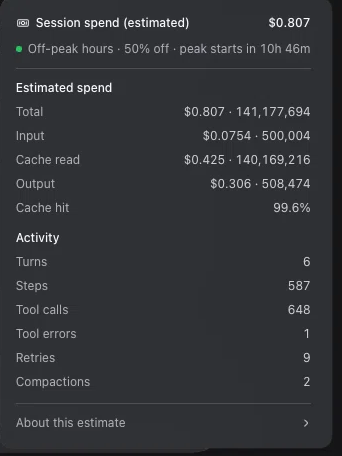
Session spend is a DeepSeek Harness plugin. It adds one estimated spend reading to the composer statistics row under the input box, beside the built-in turns/steps and token readings. Click the reading for a breakdown by token bucket, cache hit, activity count, and model.

The estimate follows DeepSeek's published prices: each request is priced at the peak or off-peak rate for the time its usage settled, the panel names the rate that applies right now, and the price table refreshes itself from DeepSeek's published pricing page.
A single reading: ≈$0.67. The ≈ marks an estimate. A session with no provider-reported usage shows nothing; a session on a model with no configured price shows its token count instead, so an unknown price never reads as zero spend.
Clicking the reading opens a panel with:
| Section | Rows |
|---|---|
| Rate status | Peak or off-peak right now, the off-peak discount when it applies, and when the rate next changes; hidden when offPeak: false |
| Estimated spend | Total, input, cache read, cache write, output, reasoning, cache hit |
| Activity | Turns, steps, tool calls, tool errors, retries, compactions |
| By model | Spend and tokens per model, when more than one was billed |
Warnings stay visible at the bottom of the panel: unpriced usage, or a truncated model list. Everything else — that the figure is an estimate rather than a bill, how much off-peak rates saved, and how fresh the price table is — sits behind a collapsed About this estimate row, so it stays out of the way until you open it.
A row appears when it has data; turns, steps, and tool calls are always shown. Escape, a click outside, or activating another stats control closes the panel. The panel is measured once when it opens and stays put while values update, so a busy session cannot move it; long content scrolls inside it, with the title and rate status kept above the scroll area.
Requirements: DeepSeek Harness 0.2.2-rc.1 up to, but not including, 0.3.0, with the web UI. The Desktop app and dsh web both include it.
The Desktop app runs the desktop profile. To install from a terminal instead, name that profile:
dsh plugin --profile desktop add dsh-spend-tracker                                  # npm, once published
dsh plugin --profile desktop add github:Broklam/dsh-spend-tracker                   # this repository
dsh plugin --profile desktop add ./dsh-spend-tracker                                # a local clone
Once the package is published to npm, Plugins → Add plugin installs it by package name without a terminal.
# npm, once published
dsh plugin --profile web add dsh-spend-tracker

# this repository
dsh plugin --profile web add github:Broklam/dsh-spend-tracker

# a local clone
dsh plugin --profile web add ./dsh-spend-tracker
The package ships plain JavaScript, so no build step or install-build permission is involved. After installing, open a chat with at least one completed model call; the reading appears after the first settled response. Disable the row to remove the reading and stop the statistics.
Spend is computed from token counts and a price table in units of your currency per million tokens. The bundled table holds the official DeepSeek rates for the two models the DeepSeek providers ship in their built-in catalog. Peak and off-peak are the published values; off-peak is half of peak:
| Model | Tier | Input (cache miss) | Cache read | Cache write | Output |
|---|---|---|---|---|---|
deepseek-flash |
Peak | 0.30 | 0.006 | 0.30 | 1.20 |
deepseek-flash |
Off-peak | 0.15 | 0.003 | 0.15 | 0.60 |
deepseek-v4-pro |
Peak | 1.32 | 0.044 | 1.32 | 3.96 |
deepseek-v4-pro |
Off-peak | 0.66 | 0.022 | 0.66 | 1.98 |
DeepSeek publishes three rates: cache-hit input, cache-miss input, and output. The cache-write column repeats the cache-miss rate because that is what a written prefix is billed at; DeepSeek's usage records report no separate cache-write tokens. The bundled rates are DeepSeek's US-dollar prices; currencySymbol and decimals change only how amounts are displayed. To bill in another currency, replace the table.
Override or extend the table in your profile's cordis.patch.yml:
- id: spend-tracker
  name: dsh-spend-tracker
  config:
    currencySymbol: '$'
    decimals: 4
    pricing:
      # A new route needs all four rates: no other model's numbers are borrowed.
      openai/gpt-5:
        input: 1.25
        cacheRead: 0.125
        cacheWrite: 1.25
        output: 10
      # A shipped model may set only the rates you want to change.
      deepseek-flash:
        output: 1.30
    # Prices every route no `pricing` key matches. Must be complete; omit the
    # key, or set it to null, to leave unmatched models unpriced.
    defaultPricing:
      input: 1
      cacheRead: 0.1
      cacheWrite: 1
      output: 4
Keys match as provider/model first, then as a bare model id, so one deepseek-flash entry covers every provider that serves it. A field you set overrides the live table; a field you leave out follows it, including refreshed prices. Another route inherits from defaultPricing when it is set and must supply all four rates otherwise. An entry without the rates it needs is ignored with a warning in the host log; a route with no bundled rates stays unpriced, while a shipped model keeps its bundled rates. The off-peak rate always follows the peak rate you set, at the published discount.
DeepSeek's billing page defines peak hours as 01:00–04:00 and 06:00–10:00 UTC, Monday through Friday, excluding Chinese public holidays. Every other hour is off-peak at half the peak rate, including weekends and Chinese public holidays in full.
The plugin classifies each usage settlement by its own UTC timestamp, so a session that spans a boundary pays the right rate on each side of it. The panel's status line reads the current clock, not the last model response, so it keeps ticking while you read it.
Weekday Chinese public holidays for 2026 and 2027 are bundled. offPeak.holidays replaces that list, so supply every date you need, including years already bundled.
- id: spend-tracker
  name: dsh-spend-tracker
  config:
    # fraction taken off the peak rate: 0.5 means half price.
    offPeak:
      discount: 0.5
      windows:
        - days: [1, 2, 3, 4, 5]   # 0 = Sunday … 6 = Saturday, UTC
          start: '01:00'
          end: '04:00'
        - days: [1, 2, 3, 4, 5]
          start: '06:00'
          end: '10:00'
      holidays: ['2028-01-03']    # replaces the bundled Chinese list
offPeak: false turns time-of-day pricing off and bills everything at the peak table. Any offPeak block you write also stops the refresh from replacing the schedule, because the schedule is then yours.
The Host fetches the public pricing document through DeepSeek Harness's web capability, or through the process's own HTTP client when no web provider is available. The fetch runs once when the plugin loads and then every refreshHours (6 by default). It replaces the bundled prices for every model the page still lists with a complete peak and off-peak price; a model the page no longer lists keeps its bundled price. That same fetch also takes the page's footnote as the peak windows and discount unless you configured offPeak yourself.
- id: spend-tracker
  name: dsh-spend-tracker
  config:
    pricingSource: deepseek   # 'off' stops the fetch and keeps local prices
    refreshHours: 6           # integer 1-168
    pricingUrl: https://api-docs.deepseek.com/quick_start/pricing.md   # https only
An invalid option is reported in the host log and replaced by its default. The request carries fixed headers (a dsh-spend-tracker user agent and an Accept header) and nothing else. If the fetch fails or the page is unreadable, the current table stays in place, the failure is written once to the host log, and the refresh is retried after 15 minutes (up to three times) before it settles back into its normal period.
Refreshed prices apply when a session's value is next recomputed — normally its next activity, or when it is reopened. An idle open session keeps its last reading until then.
tokens × price ÷ 1,000,000 for each of input, cache read, cache write, and output, summed over the models the session used. The price is the peak or off-peak rate for that usage settlement's UTC time.This is an estimate, not an invoice. Search and fetch calls, file parsing, speech, subscription plans, bonus credit, and currency conversion are not modelled.
The plugin reads the configured pricing page (DeepSeek's by default) over HTTPS — once when it loads and then every refreshHours — with fixed request headers and no session content, credential, or identifier. It has no account, telemetry, or update channel. Everything else stays local: it folds usage that is already in the session log you control, and the result lives in memory and in the local projection cache. Set pricingSource: 'off' to make it fully offline.
| Item | Detail |
|---|---|
| DeepSeek Harness | >=0.2.2-rc.1 <0.3.0 (declared in engines.dsh) |
| Profiles | Desktop and web |
| UI surfaces | Composer dock entry spend in conversation.composer.dock |
| Dependencies | None at runtime; React and React DOM come from the app |
| Permissions | Outbound HTTPS GET to the configured pricing URL (default api-docs.deepseek.com); no tools, no shell, no files outside the profile |
| Disable | Turn the row off; the reading disappears and the statistics stop |
session events ──► sessionSpend projection (Host) ──► wire view ──► composer dock reading + panel (Browser)
                        ▲
DeepSeek pricing page ──┘  (pricing.js parses the rate table and peak windows)
index.js registers the sessionSpend session projection and the background price refresh.projection.js is the pure fold: usage events in, per-tier token, call, and activity totals out; spend is derived when the value is rendered.pricing.js holds DeepSeek's peak windows, the bundled holiday calendar, and the parser for the published pricing markdown.client.js registers the reading and its panel, with the live rate-status line and English and Simplified Chinese copy.node --check index.js && node --check projection.js && node --check pricing.js && node --check client.js
node --test test/*.test.mjsThe tests cover peak and off-peak classification (including weekends, holidays, and window boundaries), the pricing-page parser and its fallbacks, retry bills, per-tier replacement, per-model attribution, unpriced models, compaction calls, activity counters, live repricing, the refresh registration and its fallbacks, the browser placement and status helpers, state validation, the wire contract, and that the English and Chinese copy tables stay in sync. They run against a fixture of the pricing page fetched on 2026-11-16, so a layout change on DeepSeek's side shows up as a parser warning instead of a silently mispriced table. There are no runtime dependencies to install.
https://broklam.github.io/dsh-spend-tracker/index.json. Open Plugins, switch on Custom plugin indexes under Experimental plugins, then choose Discover → Add index source and paste that URL. The index lives in marketplace/index.json and pins each listed release to its commit.dsh-plugin. After the npm publish, install by package name from Plugins → Add plugin, or add this index source under Discover.docs/PUBLISHING.md covers both submission paths step by step, including the npm release that makes the package available from the Plugins page.
CLASSIFICATION EVIDENCE
系统优先读取 GitHub Topics,再与站内分类词典和词根规则比对。当前命中: deepseek、deepseek-harness。
morluto
Reverse engineer anything with agents, from app behavior down to native binaries.

deepseek-ai
DeepSeek Harness: Everything is a Plugin.

nexu-io
The 1st Collaborative AI Design Agent Workspace. Local-first and open source. Create motion, prototypes, websites, apps, dashboards, presentations, images, and videos with your team and AI agents. Share work, exchange feedback, and iterate together in one workspace.