
模型与 MCP
待识别

rea
morluto
Reverse engineer anything with agents, from app behavior down to native binaries.
PROJECT TOPICS
INSTALL REFERENCE
dsh plugin --profile web add github:Bobnemimimmi/dsh-visible-action-row
该命令指向仓库当前默认分支;尚无绑定当前 commit 的完整验证结果。
PROJECT README
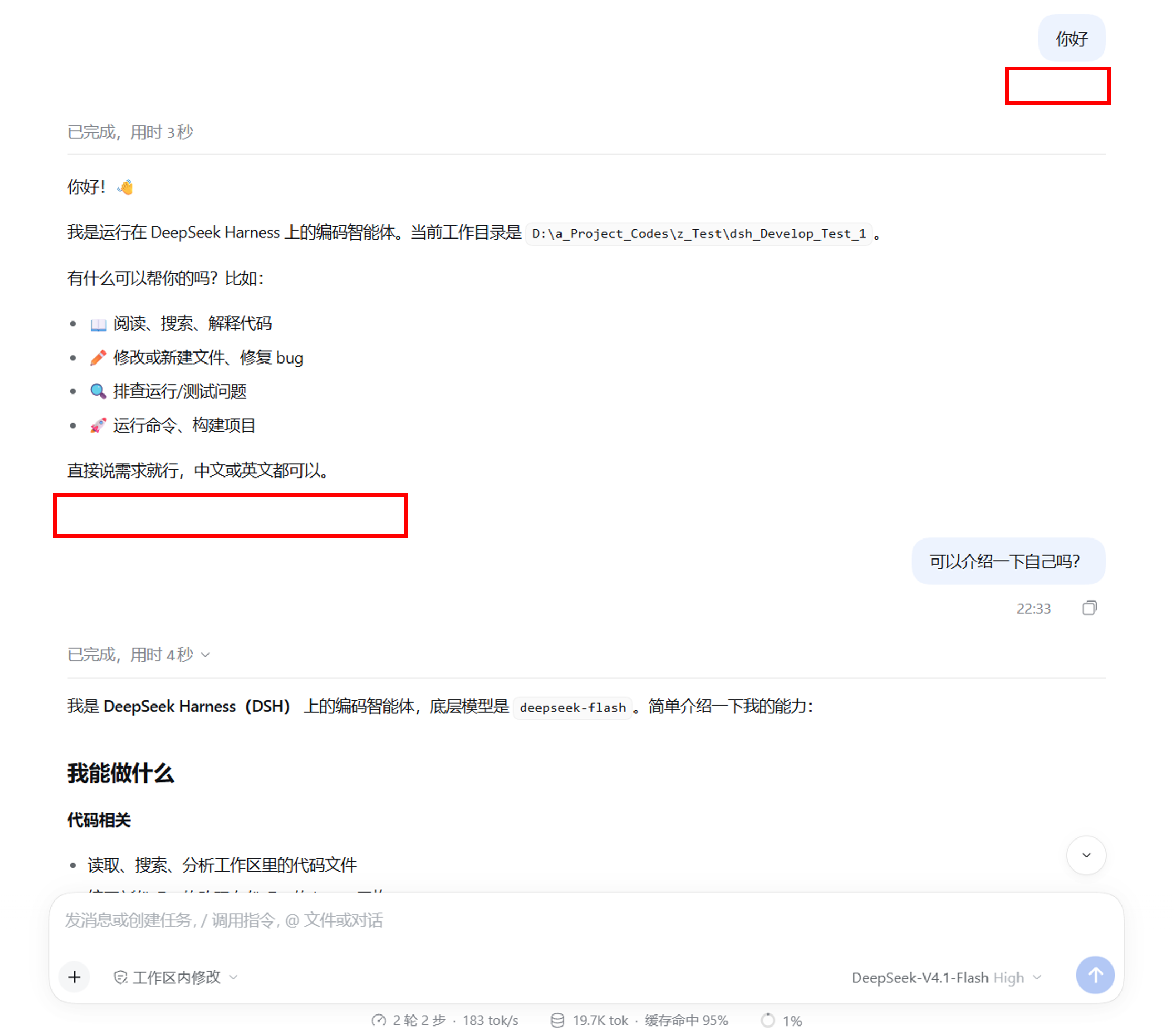
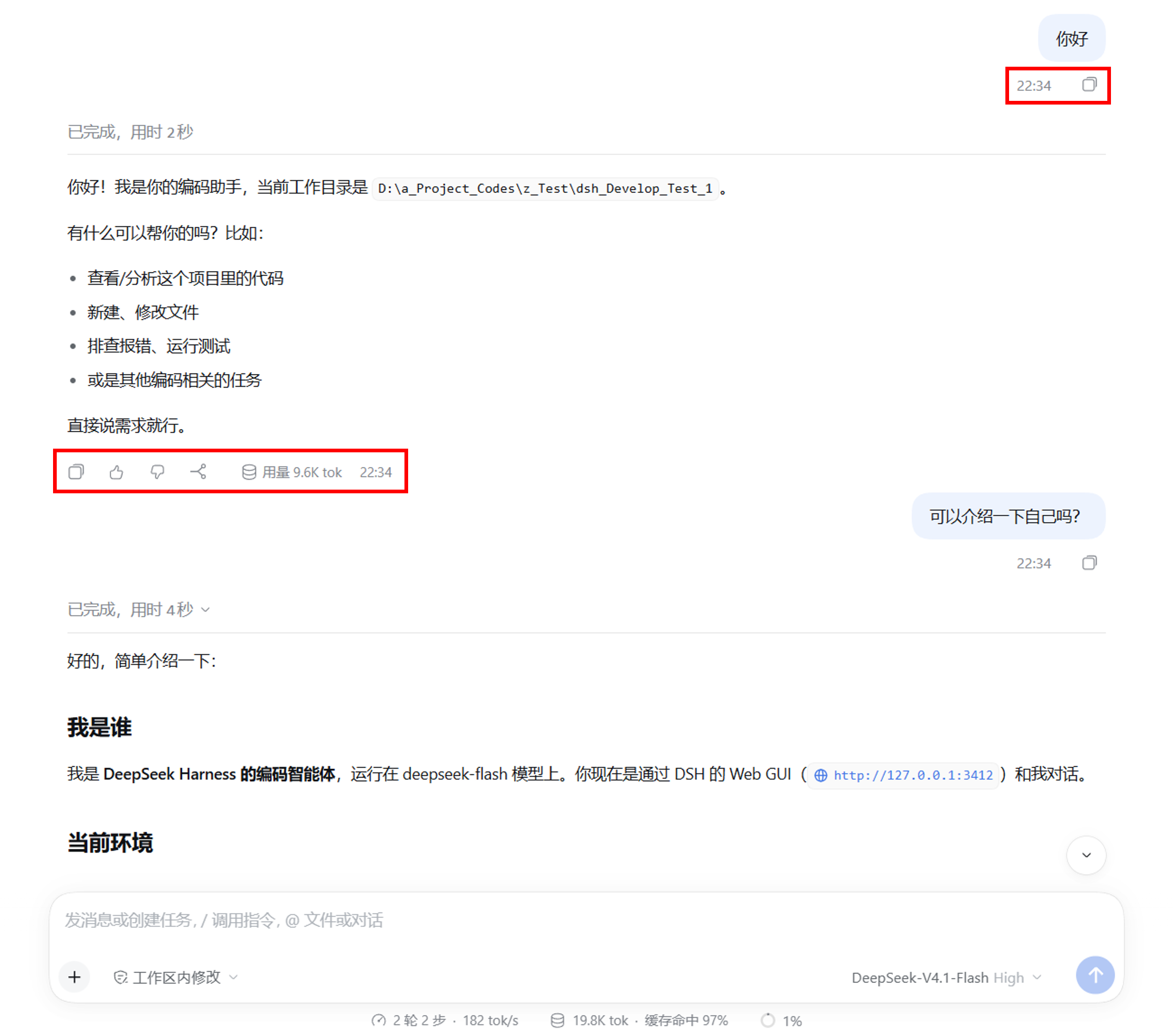
DeepSeek Harness(桌面版 / Web 版)插件:让每条消息——用户消息与 DSH 消息——气泡下方的整条操作栏无需悬停即可始终显示。
DSH 原生只在最新一轮消息上常显这条操作栏(复制 / 点赞 / 点踩 / 分支等按钮、时间,以及其他插件向该区域添加的按钮与信息),历史消息需要悬停才出现。本插件以一条 scoped CSS 可见性覆盖,让每条消息的操作栏都保持最新一轮那样的常显状态:复用原生渲染、原生位置与原生内容,不新增任何可见 UI。
opacity,按钮行为与悬停效果不变维护:Bobnemimimmi · 问题与反馈:GitHub Issues
安装前(Before Installation)
安装后(After Installation)
通过 DSH Desktop 安装(Install through DSH Desktop)
dsh-visible-action-row 安装,安装完毕后点击 立即启用。通过 npm 安装(Install through npm)
dsh plugin --profile web add dsh-visible-action-rownpm 安装拿到的是发布时构建好的成品,无需任何构建授权。
从 GitHub 安装(Install through GitHub)
会运行本包的 prepare 自构建;pnpm ≥10 首次 add 会拒绝并要求授权,按提示把打印的 allowBuilds 键加入 profile 的 pnpm-workspace.yaml 后重跑:
dsh plugin --profile web add github:Bobnemimimmi/dsh-visible-action-row本地目录 / tarball 安装(Local directory / tarball installation)
dsh plugin --profile web add ./dsh-visible-action-row或通过 Awesome DeepSeek Harness (DSH) Plugin 搜索安装(Search and install from the awesome list)
用命令行安装后,重启 DSH 即生效(桌面版重启应用;Web 版重启 dsh web)。
桌面版使用的 profile 名为
desktop:把上面命令里的--profile web换成--profile desktop。
dsh plugin --profile web remove dsh-visible-action-row重启后恢复原生「仅最新一轮常显」行为(restart DSH to restore the native behaviour)。
旧包 dsh-always-status-bar 只覆盖时间戳,且其锚点在 DSH 0.2.x 中已变更(因此在新版里实际为空转)。建议先移除再安装新包:
dsh plugin --profile web remove dsh-always-status-bar
dsh plugin --profile web add dsh-visible-action-rowdsh web(二进制安装 / 源码启动均可)0.2.1-rc.5(Windows 11)0.2.2-alpha.2(Windows 11)dsh CLI(或按 DSH 文档以源码方式运行 pnpm dsh)若升级 DSH 后操作栏不再常显,请核对以下稳定锚点是否仍存在于 packages/client/ui-chat/src/client/chat/:
MessageIconActions.tsx → 操作栏根节点的 data-clockTurnTailNodeView.tsx → data-actions-revealChatNodeSeat.tsx → data-chat-flow-kindMIT
CLASSIFICATION EVIDENCE
系统优先读取 GitHub Topics,再与站内分类词典和词根规则比对。当前命中: deepseek-harness。
morluto
Reverse engineer anything with agents, from app behavior down to native binaries.

deepseek-ai
DeepSeek Harness: Everything is a Plugin.

nexu-io
The 1st Collaborative AI Design Agent Workspace. Local-first and open source. Create motion, prototypes, websites, apps, dashboards, presentations, images, and videos with your team and AI agents. Share work, exchange feedback, and iterate together in one workspace.