模型与 MCP
待识别

rea
morluto
Reverse engineer anything with agents, from app behavior down to native binaries.

Blank-not-black/dsh-Remote
DSH Remote · 口袋里的 DSH 控制台 会话 · 审批 · 提问 · 文件传输,局域网 / Tailscale 直连 多服务器自动选优,聊天记录离线可看 带 Token 鉴权,数据只在你的设备之间流动 Sessions · approvals · questions · file transfer over LAN / Tailscale. Automatic fastest-server selection. Chat history available offline. Token-authenticated — your data flows only between your devices.
PROJECT TOPICS
INSTALL REFERENCE
dsh plugin --profile web add github:Blank-not-black/dsh-Remote
该命令指向仓库当前默认分支;尚无绑定当前 commit 的完整验证结果。
PROJECT README
Continue your DSH work from a phone or another computer: read sessions, answer approvals and questions, transfer files, and inspect the host.
English · 简体中文










DSH Remote consists of a DSH plugin, a single-file gateway, and clients. The plugin adds the DSH entry point and manages the gateway. The gateway handles authentication, HTTP/realtime proxying, and files. Clients include Android, mobile/desktop WebUI, and the HarmonyOS source project.
Documentation · Installation · Troubleshooting · Downloads · Issues
For task-based instructions and AI-assisted diagnosis, use the operation and troubleshooting knowledge base (Chinese) or the AI reading index. The plugin includes the same knowledge base as offline Doctor references.
The detailed guides are currently in Chinese. This page and the plugin README provide an English overview and installation path.
The current source is 0.8.0-rc.9 (2026-10-22), a candidate for validation before the stable release. See the rc.9 notes for scope and evidence; a local candidate does not establish npm or GitHub release availability.
| Area | Features |
|---|---|
| Sessions | History and realtime messages, model/reasoning selection, approvals, questions, goals, queues, subagents and turn branches |
| Learning and diagnosis | Eight-step mobile guide, read-only AI diagnosis, local operation logs and feedback |
| Files and images | Host browsing, previews, downloads, resumable chunks and image attachments |
| Host status | Gateway/DSH status, mux/host channels, devices, tokens and cost estimates |
| Plugins | Installed/discovered plugins, details, configuration toggles and operation records |
| Session insights | Optional dsh-context summaries and dsh-cost-meter costs/quotas |
| Weak networks and recovery | Independent long polling, WS backoff, local history, gzip/ETag and bounded crash recovery |
| Connections and themes | Multiple pairing addresses, groups, LAN/Tailscale and six Web themes; Blue Fat Fish is the default |
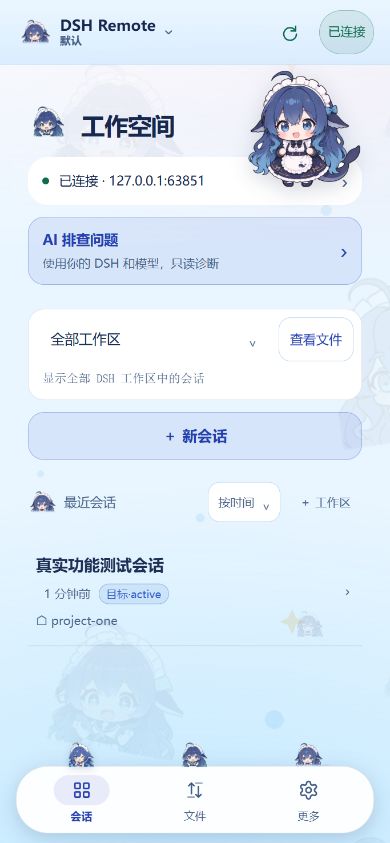
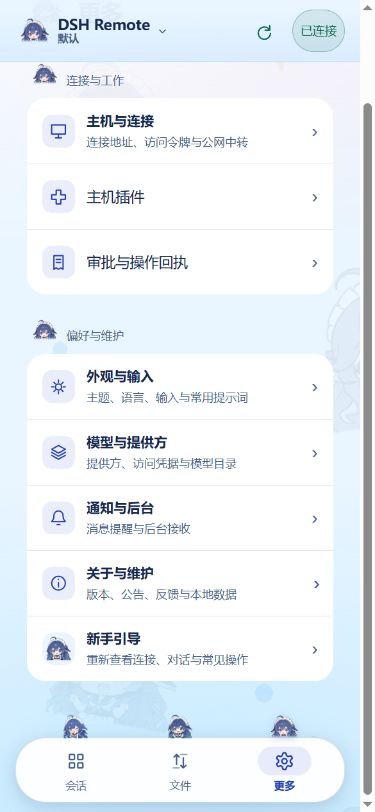
Mobile navigation is Sessions, Files, More. The session home shows workspaces, recent sessions and items needing attention. More groups host connections, plugins, receipts and preferences. Desktop uses the same three entry points with a wider conversation layout. See platform differences.
The mobile guide teaches connection, chat, files, branches, diagnosis and feedback. Finishing or skipping the entire guide removes its home invitation; reopen it at More → Preferences and maintenance → Getting started. Blue Fat Fish applies when no valid theme is saved; existing selections are preserved.
Image understanding depends on DSH and the model. Cost estimates do not replace provider bills. Insights require the corresponding host plugins and display unavailable states when data is missing. DSH UI renders a safe read-only subset.
Confirm that DSH Web works, then run as the same user:
dsh plugin --profile web add dsh-remote-plugin@latest
dsh plugin --profile web list --depth 0http://127.0.0.1:8787/health on the host.http://PC-LAN-IP:8787 and the token. A phone's localhost refers to the phone.The example targets the web profile; use your actual profile name. DSH Desktop uses its own plugin manager and requires a complete exit/reopen. Installing into Web does not install into Desktop. For a published candidate, use its exact @<version>; check npm before relying on @next or @latest.
For standalone gateways, multiple addresses, pinned versions and Git-source installation, see the installation guide. A standalone executable can run with --supervise; defaults are 0.0.0.0:8787 and upstream http://127.0.0.1:3080.
Pairing QR codes contain credentials. Use a trusted LAN or Tailscale; keep tokens private and avoid directly exposing the gateway to the public Internet.
Captured on 2026-10-22: rc.9 mobile WebUI with an isolated test host and sample data, showing the default fish skin and the updated More page. These are browser captures, not Android device captures. Older emulator, desktop and admin images remain in the screenshot archive with provenance.
 |
 |
Releases lists versions; Latest is the stable entry point. RCs are separate validation releases.
| Platform | Distribution |
|---|---|
| Android | dsh-remote.apk, Capacitor shell; permissions and device behavior need device validation |
| Windows x64 | dsh-remote-win-x64.exe, no separate Node installation |
| Linux x64 | dsh-remote-linux-x64, grant executable permission |
| Browser | Connect to the gateway for mobile/desktop WebUI |
| HarmonyOS | ArkTS/ArkUI source; build and sign yourself; current release CI does not build HAPs |
| macOS Apple Silicon | CI is configured to build dsh-remote-macos-arm64, ad-hoc sign it and run an isolated startup smoke check; no Apple notarization. Intel uses the plugin or source; see installation |
Documentation describes repository 0.8.0-rc.9 on 2026-10-22. HarmonyOS still declares 0.6.26. Check actual release attachments separately from build configuration; this page does not claim that public distribution or all device acceptance checks are complete.
Windows Desktop start/restart is experimental and requires a verified instance and trusted launch configuration. The gateway must stay online. An optional Windows login-start task for the gateway is available in the admin page and is off by default; it does not install a system service. See configuration and limits.
Ordinary development and pull requests target dev; main is the release branch and remains the GitHub default. See Contributing, Code of conduct, Security policy, and Support.
Documentation index links installation, usage, configuration, troubleshooting, plugin management, session insights, development, modules, compatibility, release, and historical records.
The gateway has no runtime dependencies; the WebUI is plain JavaScript without a build step. The repository retains existing Capacitor/AndroidX and vendored browser assets. Add no new dependencies and follow AGENTS.md. Edit root sources, then sync the plugin.
npm ci
npm run sync-plugin
npm run check
git diff --check
npm run build-app builds Android; npm run publish prepares local APK/update files and does not publish npm. npm run release <version> stages all non-ignored changes, commits, pushes and updates the tag; it requires the release scope to be accepted. Its --dry-run still writes local version files.
The offline credits list includes Blank-not-black, wikkd, anupamme, and liuchang-t. See GitHub Contributors for the full history. This list is not a newly queried contribution ranking.
CLASSIFICATION EVIDENCE
系统优先读取 GitHub Topics,再与站内分类词典和词根规则比对。当前命中: deepseek-harness。
morluto
Reverse engineer anything with agents, from app behavior down to native binaries.

deepseek-ai
DeepSeek Harness: Everything is a Plugin.

nexu-io
The 1st Collaborative AI Design Agent Workspace. Local-first and open source. Create motion, prototypes, websites, apps, dashboards, presentations, images, and videos with your team and AI agents. Share work, exchange feedback, and iterate together in one workspace.