

其他
插件

dsh-bili-scroll
c1overzz
DSH 插件:每天替你刷一轮 B站,读字幕挑出值得的、写一份日报,值得的 @ 你
PROJECT TOPICS
INSTALL REFERENCE
dsh plugin --profile web add github:Baisbt/dsh-service-manager
该命令指向仓库当前默认分支;尚无绑定当前 commit 的完整验证结果。
PROJECT README
One page for every MCP server and skill in DeepSeek Harness.
Add, edit, enable, disable and delete MCP servers without touching YAML · browse your skills · translate their English summaries with your own model.



English · 简体中文
DeepSeek Harness ships no MCP management UI. Adding a server means hand-writing YAML; finding out whether it connected means going back to a session and trying. Skills live as files on disk with English summaries you read once and forget.
This plugin adds the missing page. It never edits your DSH configuration files — it loads its own file through the official cordis:include mechanism, so cordis.patch.yml stays exactly as you wrote it.
${ENV_VAR} references — keep secrets in the environment, not in the config filedsh-context installed, each server shows how many tokens its tool definitions take, plus a jump to the context dashboard; without it the column simply is not there译文 / 原文 toggle for the whole list, ↻ to re-translate a single card, and a batch re-translate in the toolbar机翻 (machine translation) rather than pretending it workedSKILL.md for youdsh-context installed, each card shows how many times the skill was loaded in the last 7 daysTranslations only change what you read.
SKILL.mdis never modified — the model still receives the original English prompt.
The plugin also registers an mcp_service tool, so you can say "install the filesystem MCP" in a conversation instead of switching pages.
| Action | What it does | Needs approval |
|---|---|---|
list |
Servers, transport, status, tool count | No |
install |
Add or update a server | Yes |
remove |
Delete a server | Yes |
enable / disable |
Toggle a server | No |
Approval goes through DSH's one-shot authorization interface. A rejection, a cancellation, or no available answerer leaves the configuration untouched — it fails closed. Malformed arguments are rejected before the prompt, so an unusable request never interrupts you.
Everything is built on DSH's design tokens, so light and dark follow the app automatically.
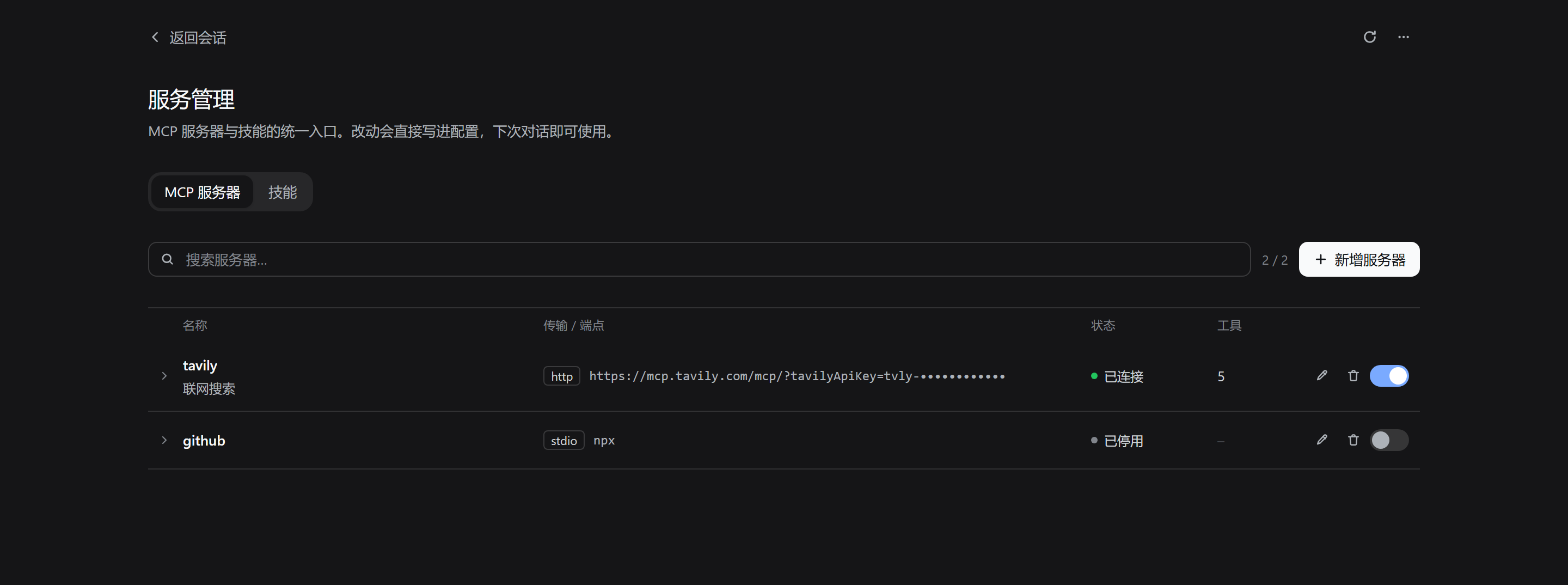
|
MCP servers
Edit, delete and toggle are always visible on each row. |
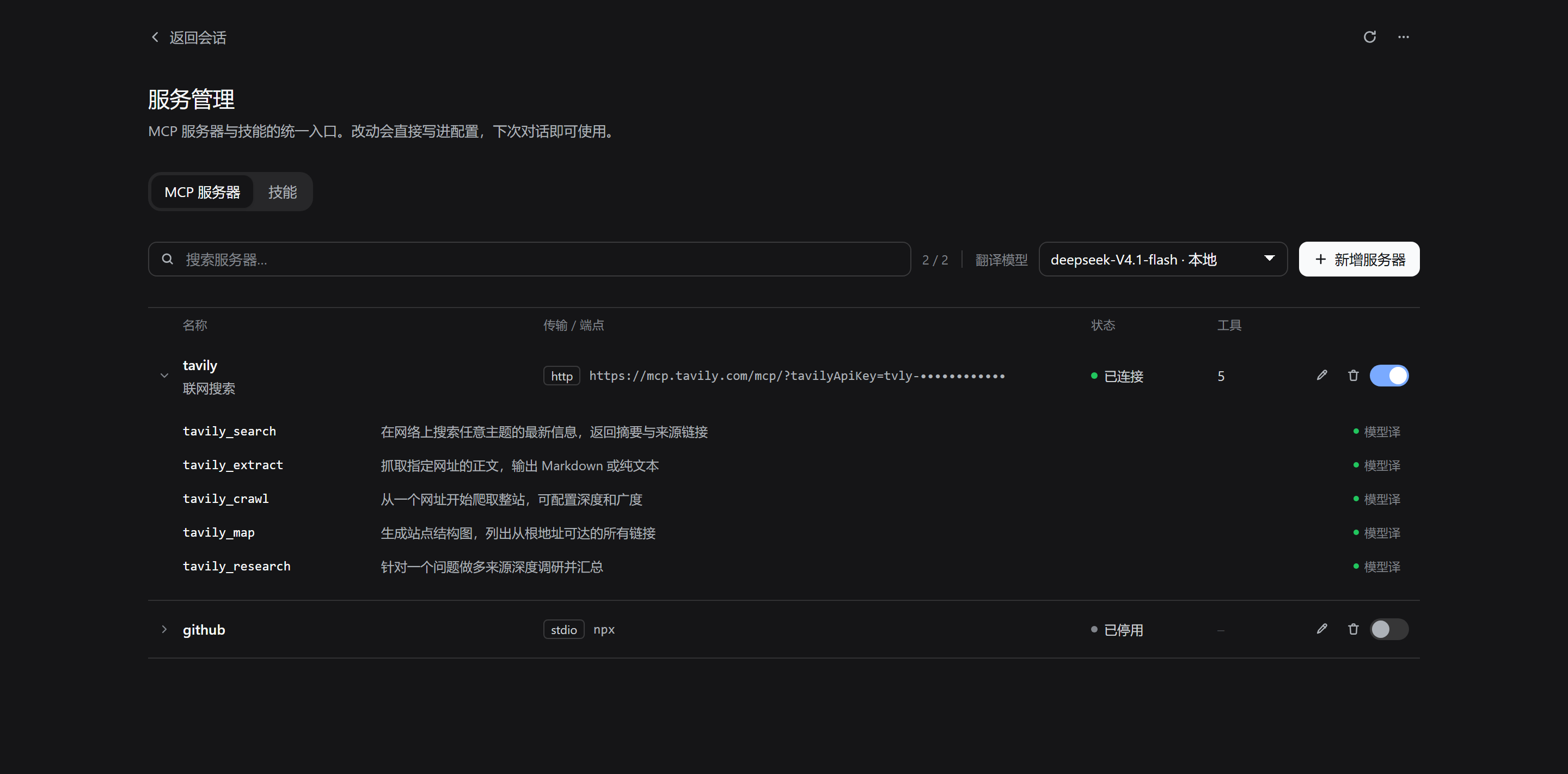
Expand to tools
One line per tool, ellipsised; hover for the English original. |
|
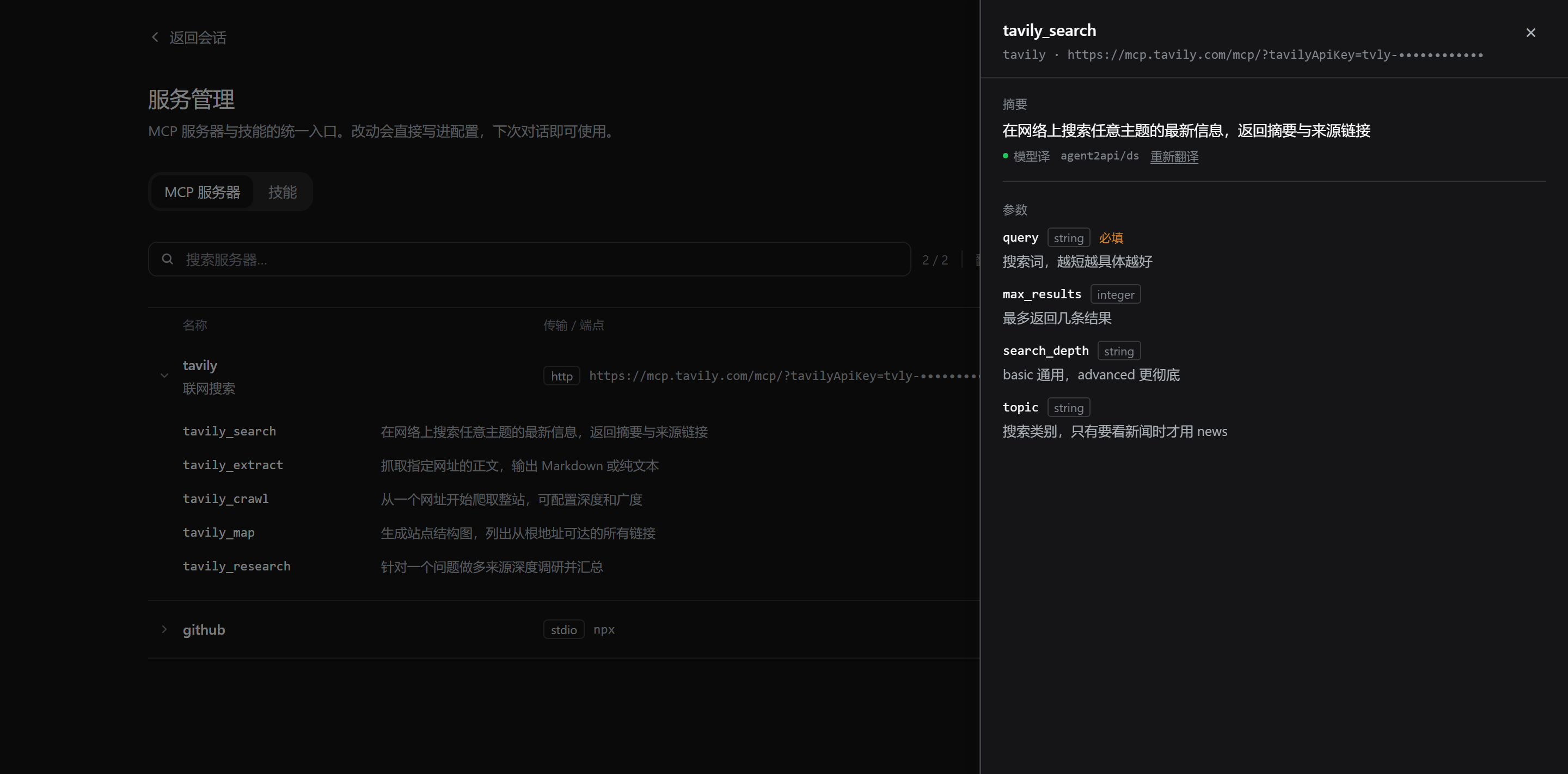
Tool drawer
Translated summary above, parameter table below. |
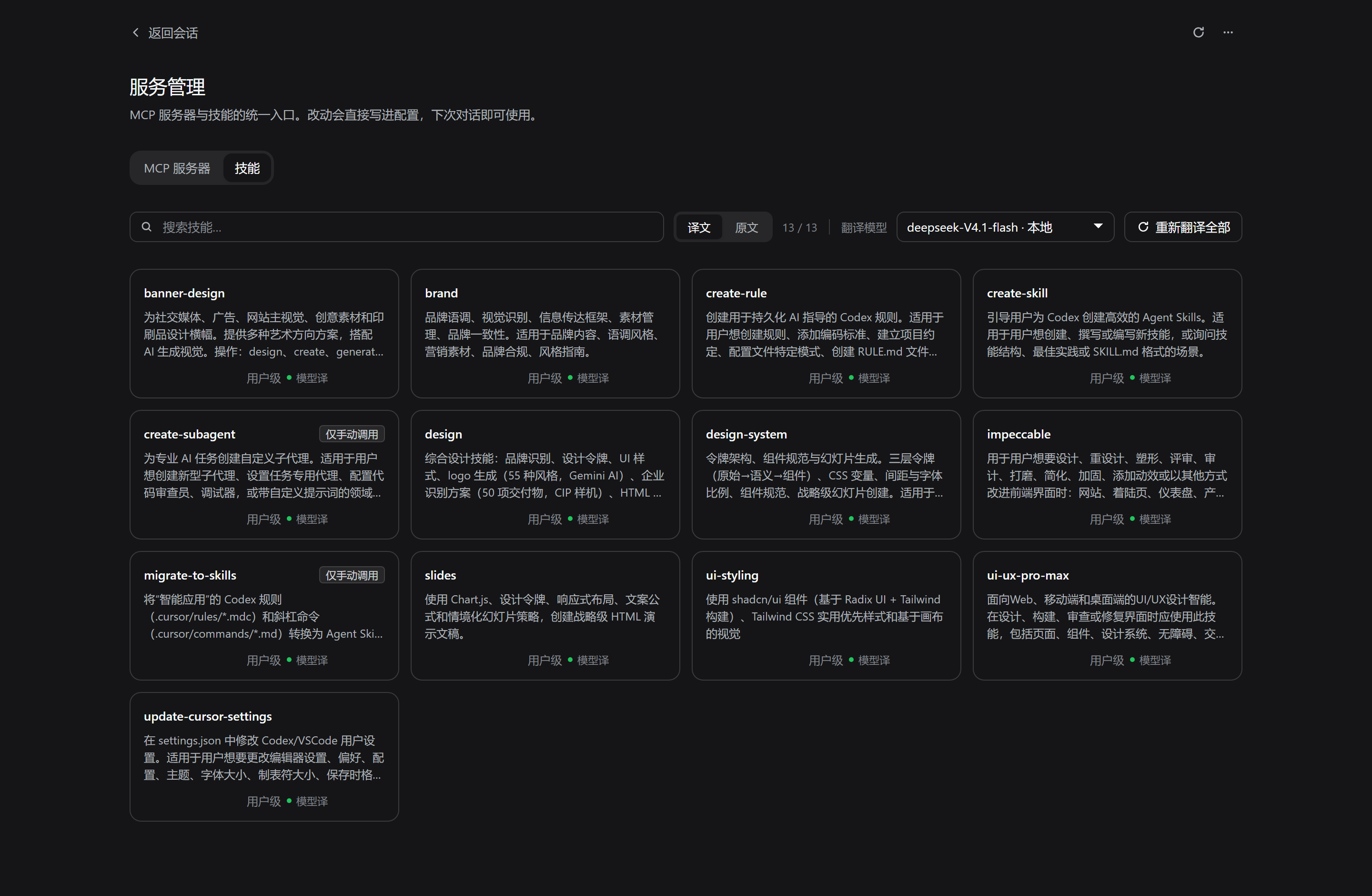
Skills
|
>= 0.2.0-rc.1 < 0.3.0pnpm on PATH (the plugin manager uses it)Open Settings → Plugins and paste either of these into the install box:
github:Baisbt/Baisbt-dsh-service-managerhttps://github.com/Baisbt/Baisbt-dsh-service-managerThen refresh the page (Ctrl+R). A 服务管理 entry appears in the sidebar.
Installing from npm by package name will work once the package is published.
⚠️ Before reinstalling the same package from a different source (say, a local directory you installed earlier), remove the leftover under
node_modulesfirst — otherwise you getERR_PNPM_EPERM. See FAQ.
MCP servers — click a row to expand its tools. The toolbar's model picker appears once a server with tools is open; pick a model and the tool summaries are translated.
Skills — summaries are English by default. Choose a model, hit 重新翻译全部, and the cards fill in. The toggle switches the whole list between translation and original; ↻ on a card re-translates just that one.
Opening the config directory — the page has an entry that opens the profile folder in your file manager (explorer.exe / open / xdg-open). It opens the folder; the plugin does not edit files you own.
Everything the plugin owns lives in your profile directory. Nothing else is touched.
| Path | What it is |
|---|---|
<profile>/mcp-servers.yml |
Generated MCP rows — the cordis:include target |
<profile>/.dsh-service-manager/servers.json |
Source of truth for the server list |
<profile>/.dsh-service-manager/translations.json |
Translation cache, keyed by a hash of the source text |
<profile>/.dsh-service-manager/settings.json |
Your model choice |
<profile>/.dsh-service-manager/diagnostics.json |
Health of the agent tool and the load-time probe |
<profile> is ~/.dsh/profiles/<name> — on Windows, %USERPROFILE%\.dsh\profiles\desktop.
cordis.patch.yml, cordis.yml or .credentials.yaml${ENV_NAME} and read from the environment at load time, so the config file holds no plaintextcordis.patch.yml (shipped by this plugin)
└─ service-manager ← Host half: routes, agent tool, translation
└─ service-manager-mcp
cordis:include → ./mcp-servers.yml ← the MCP rows this plugin ownsThe page reads and writes through routes registered with ctx.connection.fetch.register under /api/service-manager/*. After a write, the plugin refreshes the include subtree so the MCP bridge reconnects; the client polls that state rather than blocking.
Translation goes through ctx.get("llm").stream(...) with the model you picked, and is written back to translations.json so it survives restarts.
Three readings on this page come from dsh-context, an independent plugin that records what your sessions actually carry. It is optional: with it installed the readings appear, without it nothing changes.
| Where | With dsh-context installed |
|---|---|
| MCP table | a Tokens / turn column — how many tokens each server's tool definitions take in the latest request (estimated) |
| MCP toolbar | Context details — opens dsh-context's context insights page |
| Skill cards | how many times the skill was loaded in the last 7 days, and when |
How the connection works — one direction only:
contextHeaders, contextActivity) through DSH's own projection service. It never imports, patches or configures that plugin.POST /api/service-manager/context-cost and POST /api/service-manager/context-usage. It does not call dsh-context's HTTP endpoints.package.json has no dependency on dsh-context and dsh.client.inject is untouched. If it is missing, too old, or has nothing to report, the readings are simply not rendered — no zeros, no "please install" prompt, no error state.Only aggregate numbers are read: token estimates, load counts and timestamps — never prompts, file paths or command text.
Verified against dsh-context 0.82.x and 0.83.x; both projections are unchanged across those releases.
>= 0.2.0-rc.1 < 0.3.0pnpm build step, no runtime dependencies0.82.x – 0.83.x — without it the page behaves exactly as beforeERR_PNPM_EPERM: operation not permitted, rename ...Happens when you reinstall the same package name from a different source. DSH's uninstall only edits package.json — it does not delete the directory under node_modules. pnpm then cannot rename over the existing directory, and Windows refuses.
[ERR_PNPM_EPERM] [importPackage ...\node_modules\dsh-service-manager]
EPERM: operation not permitted, rename '...dsh-service-manager_tmp_1234_2' -> '...\dsh-service-manager'
This has nothing to do with whether the plugin is running — restarting will not help. Remove the leftover first:
:: a Junction left by a local `link:` install — removes the link only, your source is safe
cmd /c rmdir "<profile>\node_modules\dsh-service-manager"

:: a real directory — check the path before running this, it really deletes
cmd /c rmdir /s /q "<profile>\node_modules\dsh-service-manager"
Not sure which one you have? dir "<profile>\node_modules" | findstr dsh-service-manager — the one marked <JUNCTION> is a link.
Refresh the page (Ctrl+R). The Host half applies as soon as it installs; the browser bundle needs one reload.
Look at the yellow notice at the top of the page. It states three readings: which version is on disk, which version the Host process loaded, and whether the JavaScript in the page is an older build.
client.js is re-read from disk on every page load, but index.js is loaded once per process, so the app has to restart.They come from GET /api/service-manager/version, which is read-only and idempotent. Diagnosing this used to mean guessing from process start times and file mtimes; it no longer does.
HEAD https://github.com/... ETIMEDOUT in the log is network flakiness — pnpm retries by itself. A first install takes one to two minutes.
One request times out at 45 s and the whole batch has a 75 s budget. Check that the model in Settings → Models actually works, then hit ↻ on the card. Switching the picker to another model also helps.
No. Uninstalling removes the dependency entry, the bundle entry and the node_modules copy. mcp-servers.yml and .dsh-service-manager/ stay where they are. Note that the MCP servers themselves go away with the plugin, because they are loaded by its cordis:include row — reinstall and they come back, config intact.
Two halves, two toolchains:
client.js by tsc. React is never bundled: the compiled factory takes it from the host's frozen module table, and the output stays a plain script (window.__ModuleLoader__.load(...)), not an ES module.pnpm install # once — typescript + React type packages, dev only
pnpm build # client.tsx → client.js
pnpm test # build, then both smoke testsclient.js is a build artifact, but it is committed on purpose: it is what the plugin serves, so installing needs no compiler. Never edit it by hand — edit client.tsx and rebuild.
# Offline render smoke test — renders both views and both drawers,
# in Chinese and English, against a minimal React stand-in
node test/render-smoke.mjs
# Host smoke test — runs apply() against a minimal ctx and replays
# "disk was updated after the process started"
node test/host-smoke.mjs
Before releasing, stamp the build so both halves describe themselves:
node scripts/stamp.mjs          # write version + commit + build time into BUILD, rebuild client.js, then commit
node scripts/stamp.mjs --check  # verify the version matches package.json
This is what lets the page tell whether it is rendering a stale bundle, instead of comparing file timestamps by hand.
Screenshots in this README were not taken by hand. They were rendered in a headless browser from the real components, the real CSS and the real design tokens, with /api/* stubbed and fixture data in docs/preview/fixtures.json:
node docs/preview/serve.mjs # then open http://127.0.0.1:4173/docs/preview/The version notice has four states to look at: ?version=ok (default, no notice), ?version=stale (restart required), ?version=page (stale page build), ?version=unknown (package.json unreadable).
That preview environment is also the fastest way to iterate on the UI without installing anything.
sessionQuery.listSessions() is asynchronous; the projection reader treated its promise as an array, so the cold-session half was silently dead — only the session you had open counted. The MCP token column looked fine (a live session does carry request headers) while skill usage stayed empty. It is awaited now.slice(-N) was looking at the oldest N sessions and skipping the recent ones./snapshot — that route folds every session's timeline, which gets slow with a long session list. The Host reads the small per-day contextActivity projection instead.hasMainPanel (the same registry selectPanel checks), falling back to the slot registry on older builds.__smDiag() in the browser console reports what the panel probe and both readings actually got.dsh-context. When it is installed, the MCP table gains a Tokens / turn column — each server's tool definitions in the latest request, estimated — and a Context details button that opens its insights page; skill cards show how often each skill was loaded in the last 7 days. Nothing is required: without dsh-context the page is exactly as before, and nothing ever asks you to install it.contextHeaders / contextActivity projections through the Host. It never imports, patches or configures that plugin.— never means 0.client.tsx is the source; pnpm build compiles it to client.js with tsc — still a single plain script, still taking React from the host's frozen module table, no bundler and no second runtime. A type error now fails the build instead of the page.title tooltips became a portalled bubble; the two destructive-confirmation dialogs became one component; skeletons are drawn to the real layout; a failed load shows an error state instead of "no servers yet"; and the table reflows by container width rather than window width.zh slot, so upgrading does not re-translate anything.Issues and pull requests are welcome. Three things that make a change easy to accept:
client.jsnode test/render-smoke.mjs before opening a PR; it catches render breakage without a browserMIT © 2026 Baisbt
CLASSIFICATION EVIDENCE
系统优先读取 GitHub Topics,再与站内分类词典和词根规则比对。当前命中: 无有效分类标签。
c1overzz
DSH 插件:每天替你刷一轮 B站,读字幕挑出值得的、写一份日报,值得的 @ 你

hellowind777
一个自主的高级智能伙伴,不仅分析问题,更持续工作直到完成实现和验证。

xing-shuyin
Just open your browser — get all your work done.