
其他
插件

dsh-bili-scroll
c1overzz
DSH 插件:每天替你刷一轮 B站,读字幕挑出值得的、写一份日报,值得的 @ 你
PROJECT TOPICS
INSTALL REFERENCE
dsh plugin --profile web add github:AomiRaku/dsh-accountDisplayName-edit
该命令指向仓库当前默认分支;尚无绑定当前 commit 的完整验证结果。
PROJECT README
Replaces the sidebar account label — the phone number, email, or account name DeepSeek Harness shows at the bottom-left — and the avatar above it, with a name and image you choose, so screenshots do not expose the original.
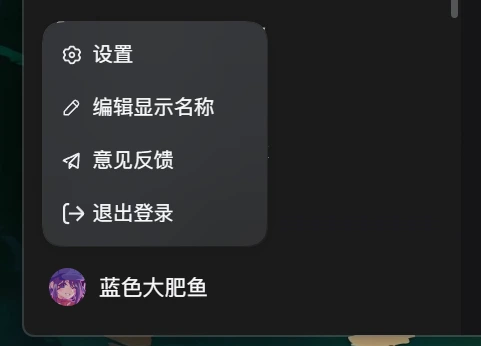
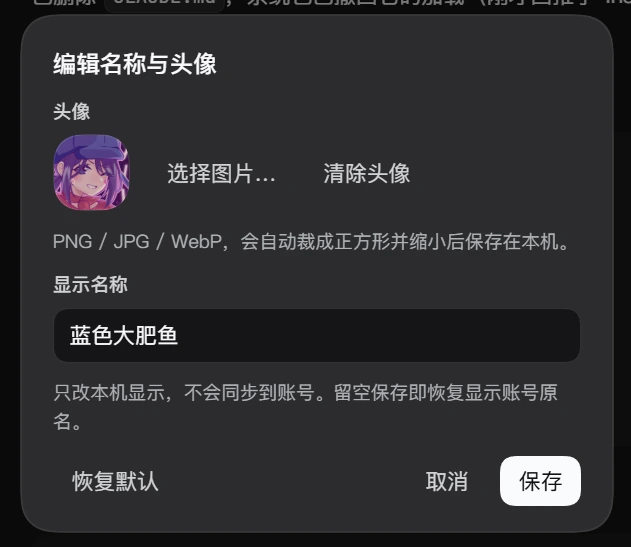
The edit entry is a new Edit display name row in the account menu, the one you open by clicking that label. The dialog it opens holds both the avatar and the name.
Enter saves, Esc cancels.localStorage, under
dsh.account-display-name-edit.alias and dsh.account-display-name-edit.avatar.Built and verified against DSH 0.2.0-rc.2. The account launcher and Menu DOM it
targets — data-signed-out, the _avatar / _label spans, the portaled
div[role="menu"] with its role="presentation" viewport and itemIcon /
itemLabel rows — is unchanged in 0.2.1-rc.2, which this package was checked
against. The host half imports nothing and the browser half fails soft, so a build
whose DOM has moved on degrades to "no override, no extra row" rather than an error —
see Compatibility.
The desktop profile is managed exclusively by the Electron application, so install
it there through the app's own plugin surface (Settings → Plugins, or dshmarket);
the CLI refuses that profile by design.
dsh plugin --profile <profile> add github:AomiRaku/dsh-accountDisplayName-edit
# or from npm, which skips the git fetch and build approval entirely:
dsh plugin --profile <profile> add dsh-accountdisplayname-edit
There is no build step and no prepare script: the browser half is committed as
lib/client.js, so pnpm never asks for build approval and the install is a plain
file copy.
Put the package where the profile resolves its bundles —
<DSH_HOME>/profiles/<profile>/node_modules/dsh-accountdisplayname-edit.
A directory junction/symlink to a checkout works.
Add this to <DSH_HOME>/profiles/<profile>/cordis.patch.yml:
- insert:
    - id: account-display-name-edit
      name: dsh-accountdisplayname-edit
That patch layer is watched, so it applies live — no restart needed.
The account menu, with the Edit display name row added under Settings, and the chosen name and avatar on the launcher below it:
The editor dialog: avatar preview, name field, and Save / Cancel / Use default:
Remove the insert from cordis.patch.yml and delete the package directory. The
stored name and avatar stay in the browser's localStorage until you clear them; the
plugin writes nothing else.
A dual-face plugin whose host half does almost nothing.
lib/index.js. Deliberately import-free. Its only job is to be a
Loader entry, so the host's client-module scanner reads dsh.client from
package.json and serves ./client to the browser. With no dependencies and no
peerDependencies, it cannot fail to load because of a missing, renamed or
version-mismatched peer package.lib/client.js. A hand-written single-file bundle, already in
the window.__ModuleLoader__.load({ id, factory }) form the module system serves
verbatim, so the package needs no build. It requires only react, which the shell
seeds as a platform module — which is why react is not a dependency either.@deepseek-ai/dsh-client-ui-settings-account renders that menu from a hard-coded
items array, and its only slot (settings.launcher, a single slot) is the
launcher row itself. Occupying that slot would delete 设置 / 意见反馈 / 退出登录, which
this plugin must not do. There is no menu-item slot to add to.
So the row is appended to the open menu's list, cloned from a shipped row — it therefore inherits that build's exact markup, classes and styling. Appending one node leaves React's own children untouched, and the row is removed with the menu because React never tracked it.
Selectors use only stable identifiers, never a hashed CSS-module prefix:
button[aria-haspopup="menu"][data-signed-out], an attribute the
account component always writes; the text node is found by the _label suffix and
the avatar by the _avatar suffix, with positional fallbacks;div[role="menu"] the Menu primitive portals to <body>,
identified as the one that appeared after the launcher was activated.The avatar span's real contents are React's — an <img> or an initial. Rather than
remove them, the plugin paints the picked image as the span's background and
hides the span's children with one scoped rule:
[data-dsh-accountdisplayname-edit-avatar="1"] > * { display: none !important }That is two attribute writes and a background image; no React-owned node is detached, re-parented or replaced, so a later account refresh cannot collide with it. Clearing the avatar removes the attribute and the background, and the real avatar reappears.
Every DOM probe runs inside try/catch; when a probe misses, the plugin does
nothing — it never edits another node and never throws into the shell's plugin
loader. Clearing the name hands the account plugin's own text back.
The label is written through React's own text node (nodeValue, not
textContent), so later account refreshes stay observable instead of updating a
node React no longer owns.
dsh.client.immediately: true is required: the plugin works through side effects
registered when its bundle materializes, so it belongs in the boot graph's
immediate tier.engines.dsh range is declared, on purpose. node-semver only admits a
prerelease version when some comparator in the range shares its exact
major.minor.patch tuple and itself carries a prerelease tag, so any range would
silently exclude a later prerelease of the harness — the failure mode the
awesome-dsh-plugin contributing guide warns about. Failing soft is the safer
contract here.npm install
npm test116 checks against a real DOM (jsdom + React 18.3.1):
test/dom.test.mjs — 40 checks: the bundle wrapper contract, apply()
registration, label replacement, re-application after the account half re-renders,
menu-row injection (label, icon, dropped shortcut, insertion position, shipped rows
untouched), row activation closing the menu and opening the dialog, save and reset,
and disposal.test/robustness.test.mjs — 16 checks over the fail-soft paths: the account row
gone entirely, the _label class renamed, the collapsed rail where the avatar is
the only span, an English locale, a menu rendered before its rows exist, no
document.body, the account span replaced by a React remount, and disposal after
the account row was removed.test/avatar.test.mjs — 28 checks: a stored image painted on the launcher, the
scoped stylesheet, the real avatar left intact, the dialog's file input and
pick/clear controls, draft-vs-Save semantics for the avatar, a signed-out launcher
without an avatar span, a corrupted stored value, and disposal. Picking a file
itself is not exercised here: jsdom has no 2D canvas and never decodes images.test/edge-cases.test.mjs — 32 checks over the failure and teardown paths: a
disable landing between two frames of the menu poll, a re-enable after a disable
while the dialog was open, a name the browser refuses to persist, the collapsed
rail before and after it expands, double disposal, re-applying, the menu closing
through the launcher's own toggle instead of a document-wide Escape, the dialog's
Tab containment and short-window scrolling, the click path performing zero
document-wide queries while leaving the menu's own opening frame untouched, and a
re-created label node, avatar node, or whole launcher button being repainted
before the next frame (no flash).It was also verified in a live DSH 0.2.0-rc.2: the host entry reached
fiberPhase: active, and the running Web GUI's slot tree listed the plugin's
shell.overlay entry as active, which means the host served the bundle and the page
materialized and ran it.
The awesome-dsh-plugin entry is ready to copy:
store-entry/data/plugins/AomiRaku__dsh-accountDisplayName-edit.yml
  -> data/plugins/AomiRaku__dsh-accountDisplayName-edit.yml
That one file, added to a fork of awesome-dsh-plugin, is the whole submission — do not edit the generated READMEs by hand.
Screenshots are declared in screenshots.json next to
package.json, which lists two repository-relative images in display order. They live
in this repository, so replacing one is a push here — not a new pull request to the
list.
["assets/screenshot-1.png", "assets/screenshot-2.png"]localStorage, so they are
per-origin and not synced across machines. They never reach the account.MIT
CLASSIFICATION EVIDENCE
系统优先读取 GitHub Topics,再与站内分类词典和词根规则比对。当前命中: 无有效分类标签。
c1overzz
DSH 插件:每天替你刷一轮 B站,读字幕挑出值得的、写一份日报,值得的 @ 你

hellowind777
一个自主的高级智能伙伴,不仅分析问题,更持续工作直到完成实现和验证。

xing-shuyin
Just open your browser — get all your work done.