
模型与 MCP
待识别

rea
morluto
Reverse engineer anything with agents, from app behavior down to native binaries.
PROJECT TOPICS
INSTALL REFERENCE
dsh plugin --profile web add github:Ansonfishing/dsh-cap-profile
该命令指向仓库当前默认分支;尚无绑定当前 commit 的完整验证结果。
PROJECT README
模型能力画像面板——DSH(DeepSeek Harness)插件。
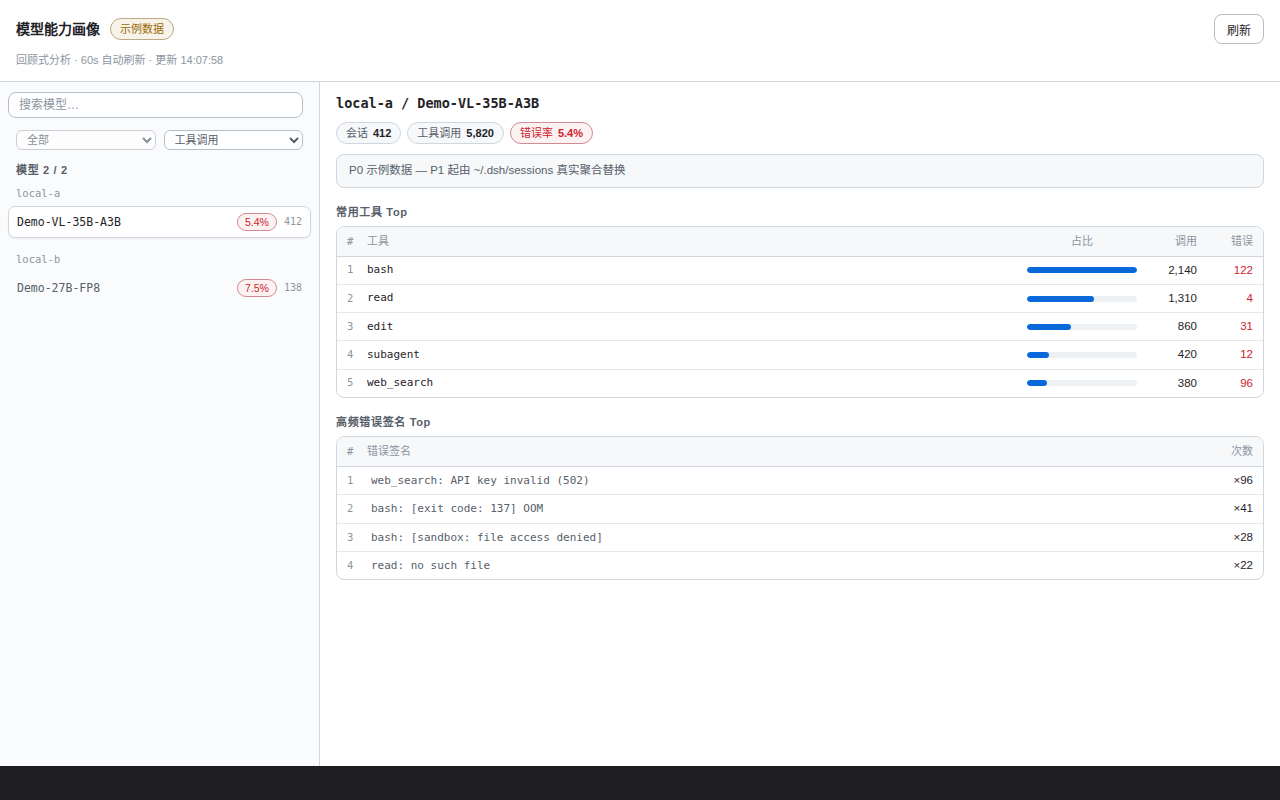
会话跑得越多,越难回答「哪个模型在哪些事上稳、哪些事上老翻车」。翻原始日志太慢,人肉统计容易漏。
这个插件把 ~/.dsh/sessions 的会话历史做成画像,直接回答:每个模型的会话数、工具调用量、错误率、最爱用的工具和最高频的错误签名。
前提:DSH(带 web)+ pnpm;Node ≥ 24(zstd 解码用 Node 内置 zstdDecompressSync)。
cd ~/.dsh/profiles/web                      # 你的 DSH web profile 目录
pnpm add github:Ansonfishing/dsh-cap-profile
然后在 package.json 的 dsh.profile.bundles 数组里加上 "dsh-cap-profile",重启 dsh。会话视图出现「能力画像」tab;首次打开触发后台首扫(大历史约 20s 级),期间先显示 mock 数据。
bash: [exit code: 137] OOM),快速看出模型「易翻车」面。clone 本仓库,浏览器直接打开 test/harness/index.html——零依赖渲染 harness,?scenario=mock|live|empty|error 切换数据场景,?chrome=0 隐藏 harness 顶栏。
npm test # node --test test/*.test.mjs本地开发:clone 后在 profile 里用 pnpm add link:../path/to/dsh-cap-profile。客户端改动浏览器 F5 即可;Node 侧(index.js / lib/*.js)改动需重启 dsh。
MIT © Ansonfishing
CLASSIFICATION EVIDENCE
系统优先读取 GitHub Topics,再与站内分类词典和词根规则比对。当前命中: llm、deepseek-harness。
morluto
Reverse engineer anything with agents, from app behavior down to native binaries.

deepseek-ai
DeepSeek Harness: Everything is a Plugin.

nexu-io
The 1st Collaborative AI Design Agent Workspace. Local-first and open source. Create motion, prototypes, websites, apps, dashboards, presentations, images, and videos with your team and AI agents. Share work, exchange feedback, and iterate together in one workspace.