
其他
完整应用

deepseek-harness
deepseek-ai
DeepSeek Harness: Everything is a Plugin.
PROJECT TOPICS
PROJECT README
English | 中文
Warm Light, Warm Dark, System-Aware.
A DeepSeek Harness Web profile bundle that replaces cool white interface colors with six warm semantic themes while leaving the native Appearance preference intact.
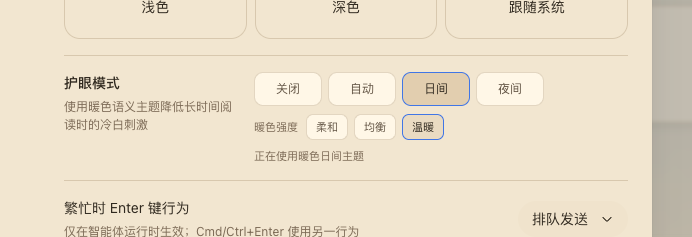
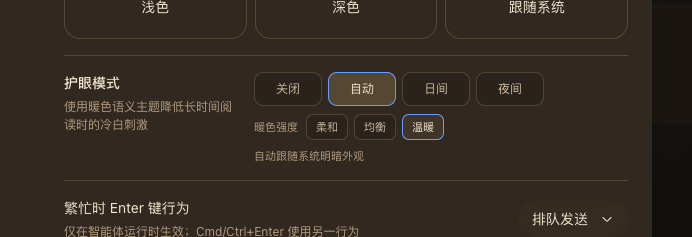
DSH Web's built-in Light and Dark themes are cool-toned. Eye care adds a warm light palette, a warm dark palette, and an automatic scheme without a global sepia filter or image transform.
off, auto, light, and dark.soft, balanced, and warm.The screenshots above show the General settings row in warm day mode and warm night mode. Day and Night are explicit; Auto follows prefers-color-scheme at the selected warmth. The row also renders an aria-live status and keyboard-visible focus states.
Install the public npm package into the Web profile:
dsh plugin --profile web add @anionex/dsh-eye-careFor local development, replace the package name with the checkout's absolute path or a locally packed tarball. DSH_HOME defaults to ~/.dsh; point it at a temporary directory to try the bundle without changing your main profiles.
Restart or start the Web UI:
dsh webOpen Settings → General → Eye care and choose a mode and warmth.
| Scheme | Soft | Balanced | Warm |
|---|---|---|---|
| Light | eye-care-light-soft |
eye-care-light-balanced |
eye-care-light-warm |
| Dark | eye-care-dark-soft |
eye-care-dark-balanced |
eye-care-dark-warm |
The Host half registers the eye-care Settings namespace and exposes a loopback-only Connection RPC channel /eye-care. Writes are serialized and fenced by expectedRevision; a conflict re-reads the Host snapshot and retries the latest intent.
The browser half registers the six themes, injects the General-settings row, and owns the controller lifecycle. The controller subscribes to theme/change and prefers-color-scheme, restores the pre-eye-care theme on disable or unload, and unregisters every theme on dispose. Remote browsers do not inject the Host RPC and therefore stay process-local.
settings, connection, locale, slots, and theme services.cd dsh-eye-care
pnpm install --frozen-lockfile
pnpm run check
pnpm run test
pnpm run buildRun the optional clean-profile installation test:
DSH_EYE_CARE_PROFILE_E2E=1 pnpm exec vitest run tests/profile-install.e2e.spec.tsCLASSIFICATION EVIDENCE
系统优先读取 GitHub Topics,再与站内分类词典和词根规则比对。当前命中: 无有效分类标签。
deepseek-ai
DeepSeek Harness: Everything is a Plugin.

walkinglabs
Harness engineering beginner tutorial, from 0 to 1

anywhere-labs
为 DeepSeek Harness (DSH) 插件生态打造的现代化桌面端解决方案。万物皆「插件」,桌面本身也是「插件」。