What it is / 这是什么
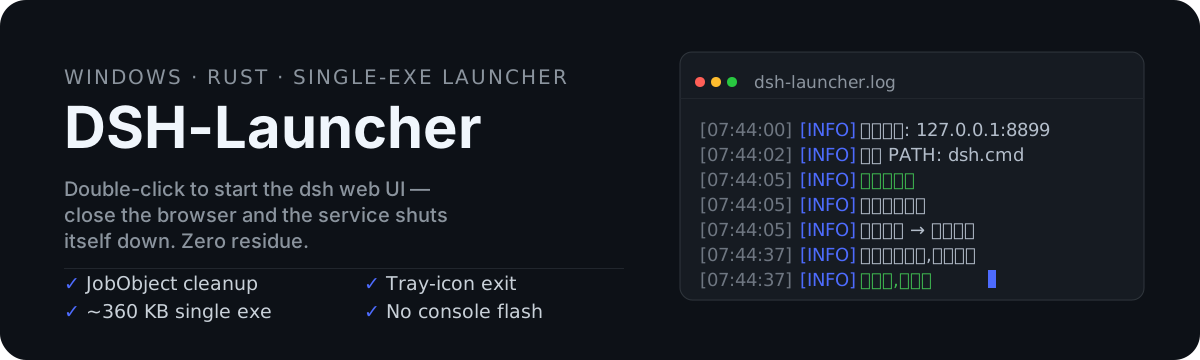
A single-file Rust Windows OS launcher for the dsh (DeepSeek Harness) web UI — no WebView2, no runtime deps, just a few hundred KB. Double-click to start; close the browser and the whole process tree is torn down — no terminal to babysit, no leftover node processes holding the port, no console flash.
一个用 Rust 编写的单文件 Windows OS 启动器,用于启动 dsh(DeepSeek Harness)Web UI——免 WebView2、零运行时依赖、体积仅几百 KB。双击即起,关闭浏览器即自动清理整个进程树——不用守着终端、不会残留 node 进程占端口、全程无黑窗闪烁。
Quick start / 快速开始
- Double-click
dsh-launcher.exe — no config file needed. Defaults: dsh web on port 3080.
双击 dsh-launcher.exe —— 无需任何配置,默认以 dsh web 启动、端口 3080。
- Customize via command line (optional) / 需要自定义?命令行参数(可选):
dsh-launcher.exe --port 8899 --args "web --port 8899"
- Close the browser: dsh shuts down, zero residue. (Browser already open? Right-click the tray icon to exit.)
关闭浏览器:dsh 自动停服、零残留。(浏览器本就在用?托盘图标右键退出。)
| CLI option / 命令行参数 |
Description / 说明 |
--url <URL> |
Service URL / 服务地址(默认 http://127.0.0.1:3080) |
--port <N> |
Readiness probe port / 就绪探测端口(默认取 url 端口) |
--timeout <secs> |
Readiness timeout / 就绪等待超时(默认 30s) |
--package <name> |
npm package for npx / npm 包名(默认 dsh) |
--args <"a b c"> |
dsh launch args, overrides config / dsh 启动参数(覆盖配置文件) |
--dsh-path <path> |
Explicit dsh entry / 显式 dsh 入口,跳过解析链 |
--check |
Validate the resolution chain only / 仅验证解析链 |
-h, --help |
Usage dialog / 用法说明弹窗 |
config.json is optional — only override the fields you need. Precedence: command line > config.json > built-in defaults. Copy config.example.json to start one if you need a fixed port / permanent args.
config.json 是可选的 —— 只写需要覆盖的字段。优先级:命令行 > config.json > 内置默认。需要固定端口/固定参数时,复制 config.example.json 起步。
{
  "dsh_path": "",
  "url": "http://127.0.0.1:8899",
  "port": 8899,
  "timeout_secs": 40,
  "package": "dsh",
  "args": ["web", "--port", "8899"]
}
| Field / 字段 |
Description / 说明 |
Default / 默认 |
dsh_path |
Explicit dsh entry; skips the rest of the chain when set / 显式 dsh 入口路径,设置后跳过其余解析链 |
empty / 空(自动解析) |
url |
URL opened in the browser once ready / 服务就绪后浏览器打开的地址 |
http://127.0.0.1:3080 |
port |
Readiness probe port (falls back to url port) / 就绪探测端口(不设则从 url 解析) |
url port |
timeout_secs |
Max wait; auto-extended to 60s for first npx pull / 最大等待超时;npx 首次拉取自动放宽到 60s |
30 |
package |
npm package name (used by npx) / npm 包名(npx 拉取用) |
dsh |
args |
Extra args passed to dsh / 透传给 dsh 的启动参数 |
[] |
dsh is DeepSeek Harness; the web UI entry is dsh web (a.k.a. dsh --profile web). Pass port etc. via args.
dsh 是 DeepSeek Harness,Web 界面入口为 dsh web(等价 dsh --profile web),端口等参数按需透传。
# Only validate the resolution chain, don't actually start / 仅验证 dsh 命令解析链,不实际启动
.\dsh-launcher.exe --check
How it works / 工作原理
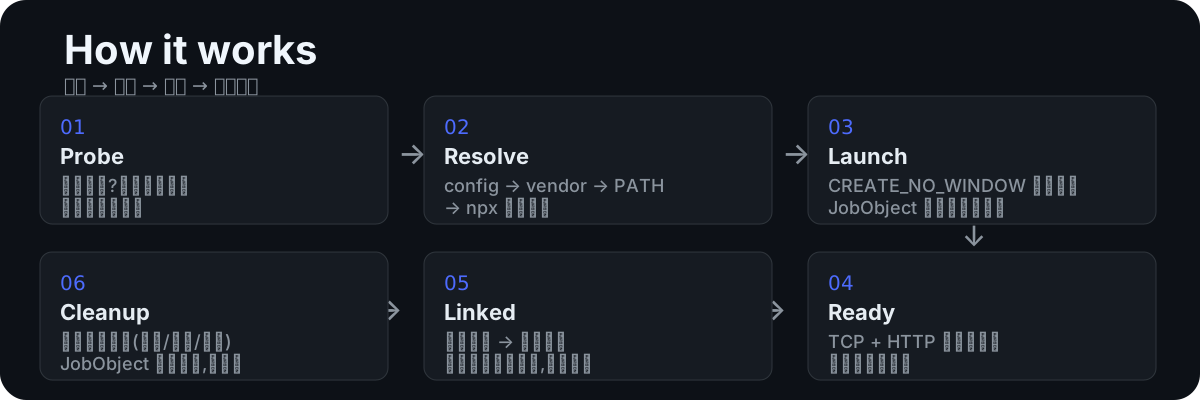
- Probe / 探测: service already running? Open the browser and exit — never a second instance.
端口已就绪?直接开浏览器退出,绝不拉第二个进程。
- Resolve / 解析: config path →
vendor\dsh\ offline bundle → dsh on PATH → npx --yes dsh, validated with dsh --version.
解析链:配置路径 → vendor\dsh\ 离线包 → PATH 中的 dsh → npx --yes dsh 自动拉取,dsh --version 校验可用性。
- Launch / 拉起:
cmd.exe /C hidden with CREATE_NO_WINDOW, immediately bound to a JobObject.
CREATE_NO_WINDOW 隐藏窗口拉起,立即绑定 JobObject。
- Ready / 就绪: TCP connect + HTTP GET double check (port open ≠ ready), then
ShellExecuteExW opens the browser foreground-activated.
TCP 连通 + HTTP 响应双重校验(端口通 ≠ 服务就绪),就绪后用 ShellExecuteExW 前台唤起浏览器。
- Linked / 联动: freshly launched browser closes → dsh auto-shuts-down; browser already running → resident mode, exit via tray icon.
关闭拉起的浏览器 → 自动关服;浏览器本就开着 → 降级常驻,托盘图标退出。
- Cleanup / 清理: every exit path (normal / tray / force-killed) — JobObject kills the whole process tree, zero residue.
任何退出方式(正常 / 托盘 / 被强杀),JobObject 连根终止进程树,零残留。
Features / 特性
- Auto-discovery / 自动发现: config path → offline
vendor\dsh\ → PATH → npx, no global install required
解析链自动发现 dsh:配置路径 → 离线 vendor\dsh\ → PATH → npx,免全局安装
- Real readiness probe / 真实就绪探测: TCP + HTTP double check with adaptive backoff and timeout guard
TCP 连通 + HTTP 响应双重校验,自适应退避 + 超时保护
- Zero residue / 零残留: JobObject
KILL_ON_JOB_CLOSE — normal, tray, or task-manager exit all terminate the full tree
JobObject KILL_ON_JOB_CLOSE:正常 / 托盘 / 任务管理器强杀,进程树全部自动终止
- Browser-linked lifecycle / 浏览器联动: close the launched browser → auto shutdown; shared instance → resident mode (tray exit), never kills your windows
关闭拉起的浏览器 → 自动停服;共享实例降级常驻(托盘退出),不误杀正在用的窗口
- Opens your default browser / 调用系统默认浏览器:
ShellExecuteExW respects the OS default browser (Chrome / Edge / Firefox / whatever you use) — no bundled browser, no hardcoded engine; browser-link lifecycle tracks common browsers
用系统默认浏览器打开 dsh web(Chrome / Edge / Firefox / 你惯用的任何浏览器),不捆绑浏览器、不强绑内核;浏览器联动自动识别常见浏览器进程
- Silent UX / 无窗体验: GUI subsystem, no console window, no black-window flicker; log to
dsh-launcher.log, errors pop a dialog
GUI 子系统无控制台、无黑窗闪烁;日志落盘 dsh-launcher.log,出错弹窗提示
- Failure guards / 异常守护: dsh dies during probing → report immediately (exit 4); timeout → cleanup (exit 3)
探测期 dsh 提前退出立即报错(退出码 4);超时自动清理(退出码 3)
- Single file / 单文件: ~360 KB exe, app icon embedded, zero runtime dependencies
约 360KB 单文件,内嵌图标,零运行时依赖
- No WebView2 / 不依赖 WebView2: plain Win32 tray + dialogs — no Edge/WebView2 Runtime needed, no 100+ MB webview payload, works on any Windows 7+
原生 Win32 托盘与弹窗,不使用 Windows 内置的 WebView2:无需 Edge/WebView2 运行时,不携带上百 MB 的 WebView 体积,Windows 7+ 开箱即用
Exit codes / 退出码
| Code / 码 |
Meaning / 含义 |
| 0 |
Normal exit / 正常退出 |
| 1 |
Config error / dsh spawn failed / 配置错误 / dsh 启动失败 |
| 2 |
Port open but HTTP abnormal / 端口已就绪但服务响应异常 |
| 3 |
Wait timeout / 等待服务超时 |
| 4 |
dsh exited early / unexpectedly / dsh 进程提前/异常退出 |
| 5 |
dsh resolution / auto-install failed (incl. no npm) / dsh 命令解析/自动安装失败(含 npm 不存在) |
Install via dsh plugin / 通过 dsh 插件安装
DSH-Launcher also ships as a dsh plugin (Windows only): dsh plugin add succeeds on the first try, zero friction — the exe rides inside the package (repo dist/dsh-launcher.exe, no lifecycle scripts, never triggers pnpm ≥10's build-script gate).
DSH-Launcher 同时提供 dsh 插件分发渠道(仅 Windows):dsh plugin add 一次成功、零拦截——
exe 随包自带(仓库 dist/dsh-launcher.exe,无任何生命周期脚本,不触发 pnpm ≥10 的构建脚本门禁)。
# Install (one-shot; the exe lands in node_modules with the package) / 安装(一次成功,exe 随包进入 node_modules)
dsh plugin --profile web add github:alvinpro/dsh-launcher
After install the exe is already in place (node_modules\dsh-launcher\dist\dsh-launcher.exe). The desktop shortcut — pointing straight at the bundled exe (zero copies, zero residue) — can be created two ways. It is created exactly once, on the first run; later dsh web starts never recreate it, even if you delete the shortcut yourself (to restore: re-run dsh plugin add, or delete the marker file node_modules\dsh-launcher\.shortcut-created and restart dsh):
安装后 exe 已随包就位(node_modules\dsh-launcher\dist\dsh-launcher.exe)。创建桌面快捷方式
(直接指向该 exe,零复制、零残留)有两种方式。快捷方式仅在首次运行时创建一次,
之后每次启动 dsh web 都不会再生成——即使你把桌面快捷方式删掉了也不会重建
(想恢复:重新 dsh plugin add 或删除标记文件 node_modules\dsh-launcher\.shortcut-created 后重启 dsh):
# Option 1 (immediate): one-click script — add + init in one step, shortcut appears right away / 方式 1(立即):运行一键脚本,add + 初始化一步完成,桌面快捷方式立刻出现
powershell -ExecutionPolicy Bypass -File scripts\install-plugin.ps1

# Option 2 (automatic): just start dsh web — the plugin's apply() creates the shortcut on its first run / 方式 2(自动):直接启动 dsh web,插件的 apply() 首次启动时自动创建快捷方式
dsh --profile web
# Dev / debug: install straight from this repo / 开发调试:本仓库目录直接安装
dsh plugin --profile web add .

# Uninstall (remove the plugin, then delete the desktop shortcut — nothing else to clean up) / 卸载(移除插件后,删除桌面快捷方式即可,无其他残留)
dsh plugin --profile web remove dsh-launcher
Remove-Item "$([Environment]::GetFolderPath('Desktop'))\DSH Launcher.lnk" -Force
How it works: the repo root is a pure-JS dsh bundle (declares dsh.bundle.patch) with no lifecycle scripts, so pnpm ≥10 never blocks it and add succeeds once; the exe ships inside the package dist/ (it comes along with the git clone at add time, zero download). The desktop shortcut is created by install.js and points straight at the in-package exe (nothing copied to AppData; dsh plugin remove deletes the exe with the package, no residue); after the first creation a .shortcut-created marker is written and later starts skip it.
原理:仓库根是一个纯 JS 的 dsh bundle(声明 dsh.bundle.patch),无 lifecycle 脚本,所以
pnpm ≥10 不会拦截,add 一次成功;exe 打进包内 dist/(add 时随 git clone 自带,零下载)。
桌面快捷方式由 install.js 创建并直接指向包内 exe(不复制到 AppData,dsh plugin remove
后 exe 随包删除,无残留),首次创建后写入 .shortcut-created 标记,后续启动直接跳过。
Offline distribution / 内网离线分发
No network? Skip npx: copy the dsh package into vendor\dsh\ next to the exe (supports dsh.exe / dsh.cmd / bin\dsh.exe / bin\dsh.cmd / main.js) — the resolution chain hits it automatically.
无网环境无法走 npx:把 dsh 包拷入 exe 同目录 vendor\dsh\(支持 dsh.exe / dsh.cmd / bin\dsh.exe / bin\dsh.cmd / main.js),解析链自动命中。
Build / 构建
cargo build --release
# Output / 产物: target\release\dsh-launcher.exe
Prerequisite / 前置要求: Rust stable (edition 2024) / Rust 稳定版工具链(edition 2024)。
cargo test --release
Verified / 实测通过: full startup (browser auto-opens, no console window, no black-window flicker — audited twice), tray-icon exit, browser-close auto-shutdown, handoff degradation (shared browser → resident), force-kill cleanup (processes zeroed, port released), early-exit detection, timeout cleanup, shim resolution.
实测通过:完整启动(浏览器自动打开、无黑窗闪烁——二次稽核)、托盘退出、关闭浏览器自动停服、握手降级(共享实例 → 常驻)、强杀清理(进程归零、端口释放)、提前退出检测、超时清理、shim 解析。
Design decisions / 设计决策
- Why not Tauri 2.0 / 为什么不用 Tauri 2.0: the launcher has no UI needs — WebView adds 3~5MB, a WebView2 runtime dependency and the Node toolchain for zero benefit. Native tray + dialogs are plain Win32; if a real UI is ever needed, follow the migration path in the design doc and reuse the process-management code as-is.
启动器无 UI 需求,WebView 只会徒增体积与依赖;托盘、弹窗用原生 Win32 即可。真需要界面时按设计文档的升级路线迁移,进程管理代码原样复用。
where vs where.exe: in PowerShell where is an alias for Where-Object — always use where.exe dsh.
PowerShell 里 where 是 Where-Object 别名,检测命令必须用 where.exe dsh。- npm shim trio / npm shim 三件套:
dsh (extensionless), dsh.cmd (executable), dsh.ps1 (PowerShell only) — the launcher only accepts .cmd/.exe.
dsh(无扩展名)、dsh.cmd(可执行)、dsh.ps1(仅 PowerShell)——启动器只认 .cmd/.exe。
License / 许可证
MIT — see LICENSE / MIT 许可证——详见 LICENSE


