
模型与 MCP
待识别

rea
morluto
Reverse engineer anything with agents, from app behavior down to native binaries.
PROJECT TOPICS
INSTALL REFERENCE
dsh plugin --profile web add github:AllenLogo/dsh-software-tools
该命令指向仓库当前默认分支;尚无绑定当前 commit 的完整验证结果。
PROJECT README
Sidebar 🔧 软件工具 manager for DeepSeek Harness Web. Maintain a curated inventory of local software — WSL CLI tools and Windows apps reachable via interop — and check the ones you want the model to know about. The checked set is injected into the model's system prompt as a compact section, so every session knows what software exists on this machine and how to call it. 中文说明见 README.zh.md。
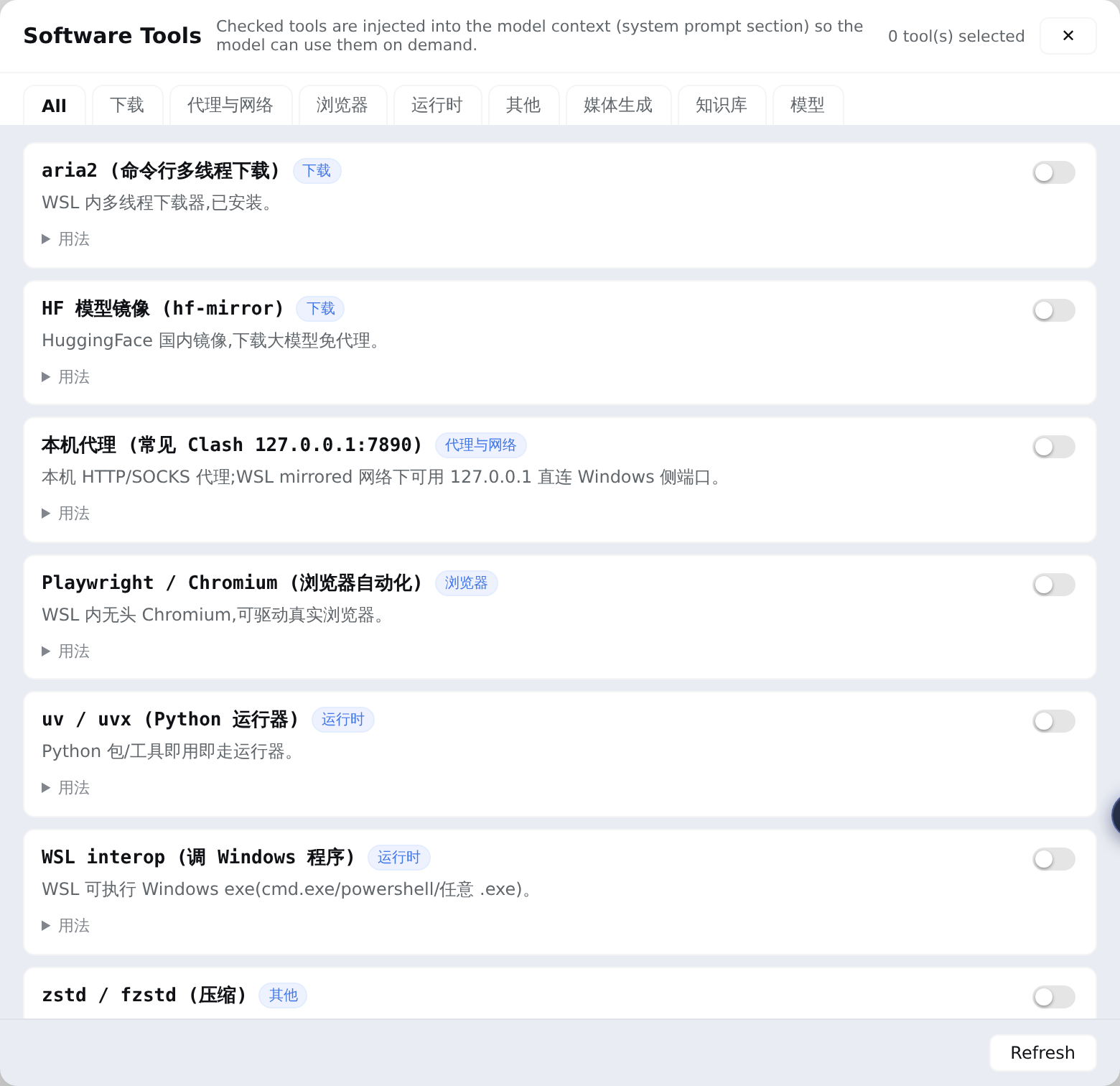
Illustrative screenshot: workspace names and spend figures are blurred out; UI details may lag the current version.
A model (e.g. deepseek-v4-flash) has no idea that you have IDM, ComfyUI, Obsidian, aria2… installed, let alone how to invoke each one. This plugin turns "local software inventory + invocation recipes" into a checkable, persisted, auto-injected system-prompt section: the model reads the usage field and runs the ready-made command.
| Capability | Detail | |
|---|---|---|
| 🔧 | Sidebar panel | Tools grouped by category; toggling takes effect on the model's very next request — no restart |
| 📥 | Built-in + user catalog merge | Portable built-in catalog (aria2 / proxy / playwright / uvx / interop / zstd …); user entries in catalog.json override built-ins by id |
| ✏️ | Panel editing | Add one entry from the panel footer (+ Add entry: name / description / usage / category) and delete a user row inline with a confirmation; built-in rows are read-only. Deleting backs up catalog.json, unchecks the id, and reveals the built-in version again when the row overrode one |
| 🧠 | System-prompt injection | Checked tools become a compact section on every assembly (systemPrompt.section, same seam as persona / plan-mode) |
| 🛠 | Bundled skill | Ships add-software-tool: the model learns to write newly installed software into the user catalog — no rebuild, no restart; entries are scoped to usage, not tuning |
| 🔒 | Loopback RPC | Panel ↔ host over a loopback-pinned RPC channel; reads local JSON only |
dsh plugin --profile web add dsh-software-toolsIf your pnpm supply-chain policy blocks dsh plugin add, install manually: copy the package into ~/.dsh/profiles/web/node_modules/ and append to ~/.dsh/profiles/web/cordis.patch.yml:
- insert:
    - id: dsh-software-tools
      name: dsh-software-tools
      config: {}
- insert:
    - id: software-tools-skill
      name: '@deepseek-ai/dsh-skill-filesystem'
      config:
        providerName: software-tools-skill
        includeDefaultRoots: false
        customSkillDirs:
          - !!js process.getBuiltinModule('node:path').join(process.getBuiltinModule('node:path').dirname(process.getBuiltinModule('node:module').createRequire(baseUrl).resolve('dsh-software-tools/package.json')), 'skills')
Restart dsh web and hard-refresh (Ctrl+Shift+R). A 软件工具 row appears in the panel rail (between Automation tasks and Task Board).
All optional; zero-config by default:
| Field | Default | Meaning |
|---|---|---|
settingsDir |
$DSH_HOME/software-tools |
State directory holding selection.json + catalog.json |
| File | Purpose |
|---|---|
<settingsDir>/selection.json |
{"ids": ["aria2", …]} — current selection |
<settingsDir>/catalog.json |
{"tools": [entry…]} — user catalog; same id overrides a built-in |
This table is the authoritative limit list (hard caps are host-enforced, see src/catalog.ts); the bundled skill and README.zh.md reference it instead of restating numbers.
| Field | Hard cap (host rejects beyond it) | Style target |
|---|---|---|
id |
[a-z0-9][a-z0-9._-]*, ≤64 chars, unique |
derived from the name; only needed for overrides / explicit-API use |
name |
≤200 chars | display name + purpose, e.g. ffmpeg (audio/video) |
category |
one of download / proxy / media / browser / knowledge / runtime / model / misc |
misc when unsure |
desc |
≤1000 chars (panel only, never injected) | one line, ~40–60 chars: "what it is / when to use it" |
usage |
≤2000 chars (injected on every request) | ≤5 executable lines, ~600 chars: command + prerequisites |
Every write to catalog.json / selection.json is first copied to <file>.bak.<YYYYMMDD-HHMMSS> (the newest 20 backups per file are kept) and then written atomically (temp file + rename), so a crash mid-write cannot truncate the catalog. A user catalog that cannot be fully understood is never rewritten: invalid JSON is reported as catalogError, while individual rows that fail validation (missing id/name/desc/usage/category) are kept untouched in the file and reported as catalogWarnings; the panel shows either warning and disables add/remove until the file is fixed. Duplicate ids are de-duplicated (last row wins) and reported as a warning too.
An entry is usage instructions only: written for the session that is about to call the tool — what it is, when to use it, the first command to run. Tuning/ops/troubleshooting/history (VRAM gates, quantisation and KV flags, measured throughput, port-change steps, migration history…) does not belong here; it belongs in the tool's own docs (README / deploy report / cheat sheet), with at most a
details in <path>pointer. The entry is injected on every request, so length is cost — and tuning needs far more context than a few lines.
Local state belongs in $DSH_HOME/software-tools/ only — never in this checkout:
.gitignore covers catalog.json*, selection.json* (so timestamped backups and copies are covered too), *.bak.*, .dsh/, config/, .env*, so a state file dropped into the repo cannot be committed by accident.pnpm run check:local-config scans every tracked text file and the staged diff for machine paths (/home/<user>/, /mnt/<drive>/, drive-letter paths) and refuses local state/credential paths by prefix and pattern: catalog.json*, selection.json*, .env* (except .env.example), filenames containing credential/secret, *.pem/*.key, and any path under .dsh/ or config/. It exits non-zero with the offending file:line, and CI runs it before typecheck. Generic placeholders (/path/to/..., C:\Tools\..., C:\Windows\..., C:\Program Files\...) are allowed.scripts/, so pnpm run check:local-config also resolves in an installed copy) but is meant to run inside the source checkout / CI, where a git index exists.Earlier commits in the published history (for example f0a0780 and f350915) still contain machine-local paths and an older, unredacted screenshot. Those objects are not rewritten: the working-tree cleanup and the guard above only guarantee that nothing of this kind is added from now on. Removing them would require a repository rewrite (git filter-repo plus a force-push), which was decided against — treat the public history as containing outdated local detail.
Three ways, all effective on the next panel refresh (no rebuild, no restart):
| Route | When |
|---|---|
| Panel form — footer + Add entry: name / description / usage / category | You already know the command; fastest path |
| Bundled skill — tell the model "add XXX to 软件工具" | The software is new to you and needs research first (the skill inspects the machine, then writes usage-only entries) |
Hand edit — catalog.json |
Scripting / bulk edits |
The id is derived from the name (my tool → my-tool, de-duplicated as my-tool-2); the panel does not ask for it, shows each row's id in small type, and reports the generated id in the success notice. A user entry whose id matches a built-in row overrides that built-in (shown as Overrides built-in), and deleting it restores the built-in.
The panel form only creates user entries — it never offers overwrite, and an entry whose id collides is rejected (id-conflict). Creating an override (or replacing an existing user entry) requires an explicit id plus overwrite: true on the add endpoint, i.e. the skill / JSON path; the panel UI does not expose it.
Deleting uses the row's Delete button (inline confirmation). Only catalog.json rows can be deleted — built-in rows are read-only (the button is disabled with a tooltip). Deletion backs up the file, removes the id from selection.json so a deleted tool cannot stay checked, and takes effect in the injected section on the next request.
src/index.ts): registers systemPrompt.section (software-tools, order 200) rendered from the current selection, plus the loopback RPC channel /_dsh-software-tools (list / set / add / remove); list tags every row with origin (builtin/user/override) and readonly.src/client/): contributes two official seats — sidebar.panellist (list: the rail row, whose id is the panel key and whose label is a thunk so the title follows the active locale) and main (keyed: the panel body the layout renders in the centre). Both wait on ctx.slots.inject(key, ...) for ui-layout / ui-sidebar to declare the seat. Built by tsdown into a lazy-CJS __ModuleLoader__ bundle (React comes from the host shell).skills/add-software-tool/): mounted via dsh-skill-filesystem's customSkillDirs, scoped to the plugin's own directory so user skill roots stay untouched.CLASSIFICATION EVIDENCE
系统优先读取 GitHub Topics,再与站内分类词典和词根规则比对。当前命中: deepseek、模型。
morluto
Reverse engineer anything with agents, from app behavior down to native binaries.

deepseek-ai
DeepSeek Harness: Everything is a Plugin.

nexu-io
The 1st Collaborative AI Design Agent Workspace. Local-first and open source. Create motion, prototypes, websites, apps, dashboards, presentations, images, and videos with your team and AI agents. Share work, exchange feedback, and iterate together in one workspace.