
模型与 MCP
待识别

rea
morluto
Reverse engineer anything with agents, from app behavior down to native binaries.
PROJECT TOPICS
INSTALL REFERENCE
dsh plugin --profile web add github:Alice-Marx/dsh-model-router
该命令指向仓库当前默认分支;尚无绑定当前 commit 的完整验证结果。
PROJECT README


Model routing and a persistent Bot workspace for DeepSeek Harness.
Turn a task into a reviewable execution plan, select suitable configured models or native CLI tools, and follow the results in one workspace. Add the full Bot edition for long-running conversations, multi-Bot delegation, private files, and your own Windows computers.
This is a community plugin. It manages independent AI connections and reuses Host services; each provider or CLI uses its own account and access rights.
Current stable version: 0.78.0 · Windows Remote Agent: 0.1.3
Use Bot contacts and chat as the main entry point for independent AI connections, multiple model routes, team delegation, private files, data analysis and your own Windows computers. Tasks, notifications and execution records stay in the workspace; Main Bot can work across saved model routes.
Version changes, fixes and verification records live in GitHub Releases and the GitLab documentation archive.
Choose an edition · Install · AI connections · First task · Bot delegation · Remote computers · Support
| Edition | Package to enter in Plugins → Add plugin | What it adds |
|---|---|---|
| DSH Bot + Model Router | @ljwei-stak/dsh-model-route-bot |
The full Bot workspace, model-routing workbench, Bot delegation, remote computers, private libraries, and routines. |
| Model Router | @ljwei-stak/dsh-model-router |
A Model Router entry in the standard Harness interface, with route planning, tools, execution, and accounting. DS Bot is not installed. |
Use one edition per Harness profile. Both editions share the routing configuration. To switch, remove the existing package entry in plugin management, add the other edition in the same profile, and retain your data directories and configured Bot home. Routing-only guide.
| Workflow | What you can do | Edition |
|---|---|---|
| Task-oriented model routing | Start from a task template; compare economy, balanced, or quality-first plans; use one route, a dependency-based team, or an exact model. | Both |
| Reviewable execution | Inspect models, tools, workspace, permissions, and estimates before confirming; track progress, results, cancellation, and supported retries. | Both |
| Native CLI tools | Detect and install registered tools, check login and mode readiness, and open an interactive terminal. | Both |
| Budgets and feedback | Set API limits, track reservations and receipts, inspect subscription calls/tokens separately, and use optional reviews and explicit ratings. | Both |
| Persistent Bot conversations | Give each Bot its own model, role, work directory, private chat, and permissions; handle side chats, questions, and approval cards. | Full Bot |
| Groups and shared context | Use mentions, staged group goals, handoffs, conversation search/checkpoints, and Bot/group/team memory with revision history. | Full Bot |
| Browser and document work | Use per-Bot browser partitions, supported Office reading/previews, connectors, credential cards, avatars, and team appearance settings. | Full Bot |
| Scheduled work | Schedule a target Bot or group through the Host's Automation tasks service. | Full Bot |
| Bot-to-Bot routing | Let a Main Bot select an eligible execution Bot from committed model, tool, computer, and funding settings, then dispatch real tasks. | Full Bot |
| Windows computers and routines | Pair your own computer, watch or control its desktop, record confirmed input, and replay saved routines. | Full Bot |
| Private file libraries | Organize files per Bot, upload/download binary files, edit text, and search private text with line-level results. | Full Bot |
| Conversation threads | Give one Bot several independent conversations: name them, switch between them, archive and restore them, and open one in the chat. | Full Bot |
| Pinned web pages | Pin the dashboards and boards you use, keep the list in the Host across restarts, and open a page in a framed view or in your browser. | Full Bot |
| Display preferences | Pick the chat measure and bubble style, and keep them across reloads, without touching any conversation. | Full Bot |
The full Bot edition manages its own model connections under Settings → AI. Save multiple connections for a provider with separate names, accounts, models and capacities, then select a route in the Bot's Models & tools settings. Use the Model API, Subscription accounts, CLI chat and Official tools sections to manage each connection type. In Bot settings, expand a tool row to choose its identity and execution mode, then save. Chat models and official execution tools have separate grants. Use Computer or AI connections above the Bot contact list to open these pages; the page toolbar also opens settings for the current Bot. Use Configure and repair to check the managed execution entry and repair its installation. Qwen Code, CodeBuddy Code, Gemini CLI, Step Code, MiMo Code and dsh-TUI support read-only and isolated workspace editing through the Host sandbox. Complete the vendor login, refresh detection, then choose the CLI model and mode and save the Bot grant. dsh-TUI managed tasks use the official dsh backend with DEEPSEEK_API_KEY in the Harness launch environment and API billing. Native chat (optional) creates a separate chat connection; it does not grant execution permissions.
| Connection | Configuration | Purpose |
|---|---|---|
| API models | Add a provider or compatible API connection with its endpoint, separate credentials and model capacities. | OpenAI, Anthropic and Google Gemini protocols, plus Ollama; uses API funding settings. |
| Subscription accounts | Enable the local login service under AI connections → Subscription accounts, then authorize your own ChatGPT/Codex, Claude, Google Antigravity, Kimi Code, Grok Build, Muse Code or Devin account. | Uses the account model catalog and subscription funding. Set the Bot subscription call allowance before chatting. |
| Native CLI chat | Select a driver, verify its executable/version and optional entry script, then save the connection's own account and model ID. | Retains a native CLI session under the Bot's saved route and funding configuration. |
| Official execution tools | Choose Install and sign in in Bot settings, complete the vendor login, recheck readiness and save the tool binding. | Grants supported file, command and other execution capabilities alongside a chat model from another provider. |
Subscription login uses a managed CLIProxyAPI component on this computer. Credentials remain in its private local directory. Model access and vendor limits follow the authorized account; catalog access is shown separately from verified inference. Models missing capacity metadata are withheld from the picker. Coding plans without supported OAuth login can use their vendor-provided API connection or an available native CLI driver.
CLI chat drivers include Claude Code, Codex, Pi, Step Code, Muse Code, Antigravity, Grok, Gemini, Kimi Code, Droid, Cursor, OpenCode, Qwen, Hermes, Cline, Copilot, Command Code, DeepSeek ACP and custom ACP. Availability depends on the local installation, account and model access. Connection states distinguish configuration, required attention and a verified conversation.
Antigravity uses its matching official runtime and harness files with separate OAuth credentials. DeepSeek ACP uses the dsh 0.2.2-rc.3 Node entry, its own API key and API funding, with one model request and at most 4096 output tokens per turn. Other subscription CLIs use their respective plan accounts. See the CLI chat connection guide for installation and configuration.
Edit the Bot's name, role and standing instructions under Identity & personality, then save to apply them. Chat supports separate threads, text drafts, paged history, Markdown, code and mathematics. Notifications open the relevant Bot and task. Main Bot supports multiple saved model routes; workers use their own models, permissions and funding.
@ljwei-stak/dsh-model-route-bot@0.78.0@ljwei-stak/dsh-model-router@0.78.0CLI installation is also supported. Choose the command for your edition:
# Full Bot workspace
dsh plugin --profile desktop add @ljwei-stak/dsh-model-route-bot@0.78.0

# Routing-only workspace
dsh plugin --profile desktop add @ljwei-stak/dsh-model-router@0.78.0
Alternatively, import the matching .tgz from GitHub Releases. For an extracted local package, select the inner package directory containing package.json and .dsh-plugin. A global npm installation alone does not register a Harness plugin.
The model-routing workbench is available in both editions. In the full Bot workspace, open Advanced workbench.
The application currently uses Chinese interface labels; English descriptions here explain the corresponding controls.
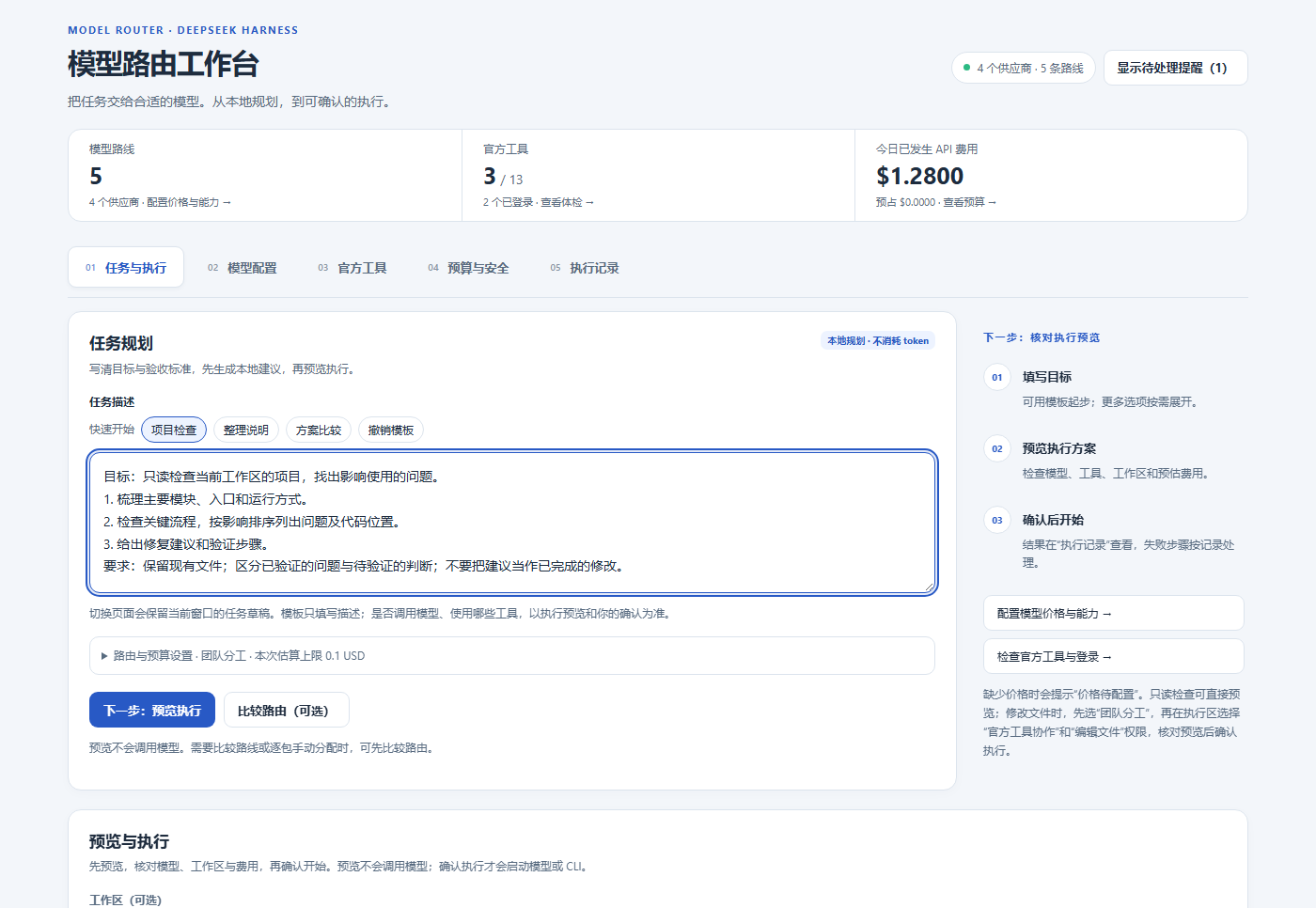
Actual workbench component with offline demonstration data. Models, prices, usage, and paths shown in these screenshots are examples.
| Tab | Main use |
|---|---|
| Task & execution / 任务与执行 | Write a task, choose a planning mode, optionally compare or assign packages, preview, and confirm execution. |
| Model configuration / 模型配置 | Manage exact configured routes, prices, quality evidence, billing preferences, and CLI model mappings. |
| Native tools / 官方工具 | Inspect tool installation, login, and execution-mode readiness; manage installations and terminals. |
| Budget & safety / 预算与安全 | Set API limits and execution policy; inspect actual spend, reservations, and subscription usage. |
| Execution history / 执行记录 | Review task output, receipts, interrupted/unknown states, cancellation, and supported recovery actions. |
Choose Single task for one route, Team for packages with dependencies, or Exact model to use a specific configured route. Compare routes is optional; after comparison, you can keep the recommendations or manually select an API model/tool for each package.
Route/budget and execution options are collapsed until needed. Draft task text, mode, selected model, and explicit per-task estimate stay in the current window's memory when pages remount; closing the app or reloading the client clears this draft. The Needs your attention panel can be closed with × and restored from the header; this visibility preference is remembered on the device. Failed-task reminders open the relevant execution record.
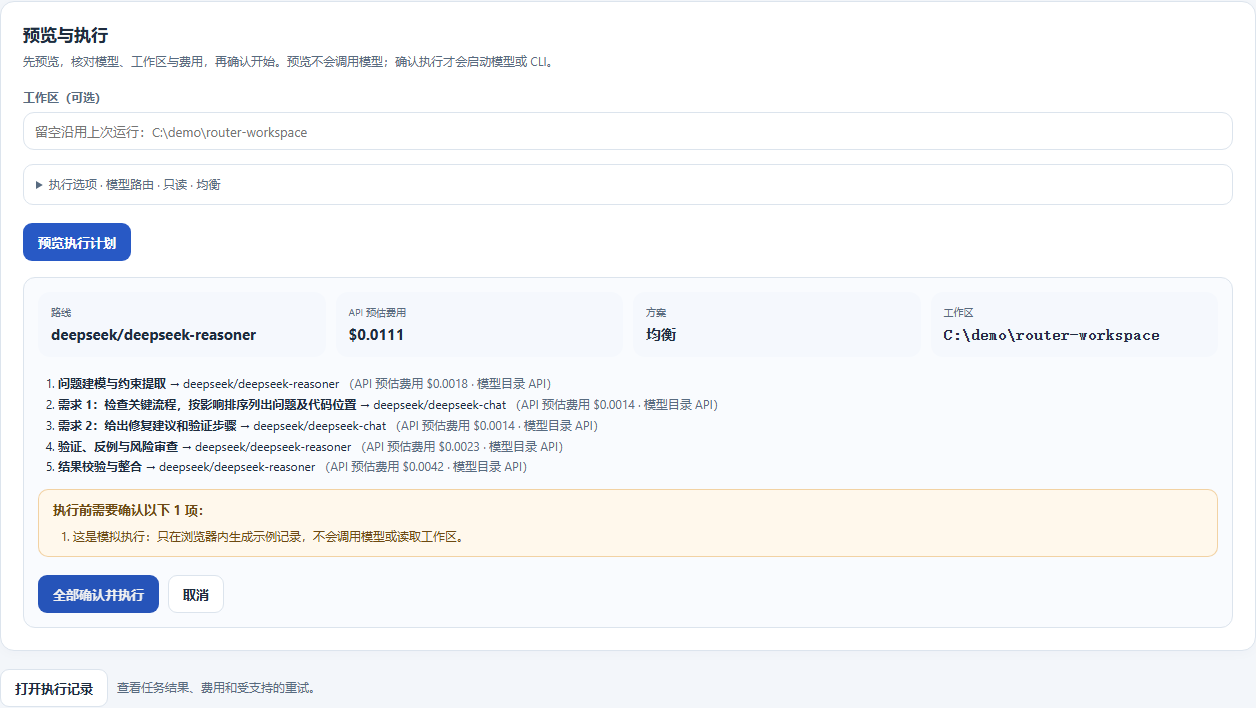
Offline preview example; no model was called. In a live workspace, confirmation starts the selected model or supported CLI.
Model routing executes read-only analysis. To modify files, choose Team → Native-tool collaboration → Edit files, then review the execution preview. A separate worktree collects changes; it does not restrict system access outside that tree.
The tool registry includes Qwen Code, CodeBuddy Code, Kimi Code, Claude Code, Codex, MiniMax Code, MiMo Code, Grok Build, Gemini, OpenCode, StepCode, Pi, Hermes, ZCode TUI, and DSH TUI. In Native tools, detect the tool, choose an available install method, complete the vendor's login, then check readiness for the execution mode you want.
Tool jobs distinguish queueing, dependency installation and post-install verification, and show elapsed time and the last output time. If execution verification times out after installation, the installed version remains visible and can be checked again. Windows interactive terminals use ConPTY with Job process-tree tracking; cold bootstrap and process creation have separate deadlines. dsh-TUI installation and managed execution use the same official dsh 0.2.2-rc.3 runtime.
ZCode TUI uses the vendor-supplied beta package @mbearo/zcode, installed with npm i -g @mbearo/zcode or the pnpm method. The command remains zcode; use zcode login to choose Z.ai or BigModel. It requires Node.js 22.16.0 or newer and matching optional native dependencies (Windows x64/ARM64, macOS ARM64, or Linux glibc x64/ARM64). Managed tasks use print JSON, a private runtime and the Host sandbox for read-only or workspace-edit execution. A saved CLI model is passed with --model; otherwise the configured default is used. Existing zcode bindings retain their identity. The older community zcode-cli distribution does not satisfy TUI detection.
An interactive terminal exposes the installed tool's own workflow and capabilities. Managed single-tool and team execution use supported adapters; installation or login alone does not establish readiness for every mode or model. Managed execution requires the Host process sandbox. Qwen, CodeBuddy, Gemini, Step, MiMo and dsh use private per-task runtime state; source login files remain in the local CLI account. MiMo managed tasks leave Git integration to the Host. CodeBuddy Code is available as an execution tool; Qwen Code can also be configured separately for native chat. The explicitly selected native environment has the current system user's permissions.
Full Bot edition. Create a Bot, select an exact configured model, and set its role and work directory. In Bot bindings, commit tools, computer/workspace access, and funding settings for execution Bots. Main has full Host authority across all connected model routes and tools and inherits the verified access ceiling of paired computers. Its binding configures the default model, workspace, funding and official-tool execution; worker capability checkboxes do not narrow Main. Actual model support, funding configuration, installed tools and pairing revocation still determine what can run.
In Main → Model and tools → Configure multiple model routes, add the exact provider and model for each route. Enable its funding scope, then set shared API budgets and subscription call limits. Each API route has its own prices and request bounds. Choose an enabled route as the default and save the settings together. A Host chat session can select another enabled route while keeping the saved default. For the integrated Claude subscription route, a switch can carry completed text history into a private process context. The native process receives only the new user turn. Histories with attachments, tool calls, or unconfirmed turns require a fresh conversation on that route.
A Host Claude conversation profile can enable hostTools: true to offer paired-computer file, approved container command, browser, desktop, operation, artifact and Task tools through its private MCP connection. This works in integrated and independent chat. Main inherits the paired computer's verified scope. Workers use their committed grants. File writes and commands create durable Tasks. Browser and desktop calls retain a conversation-owned operation record; an unknown effect blocks later mutations until the original Agent operation is reconciled. Screenshots arrive as bounded MCP PNG images. Calls require an active turn, and repeated bridge requests are refused. Bots with data-analysis permission also receive data_load, data_describe, data_sql, data_show and data_export, using their existing private database and library. These data tools are also available in API independent chat. Current data support is CSV/TSV/JSON, SQLite, bar/line/area charts and CSV export; saved results can be opened in the Data panel. Cancellation interrupts the data worker and prevents a cancelled library read from starting a later write. Already committed changes may remain, so inspect the existing data before repeating a cancelled or timed-out write. Claude profile configuration.
The workspace shows native tool activity in both chat modes, scoped to the selected Bot and conversation. Open the activity indicator to inspect earlier entries. “Returned” records a CLI response; the task or remote-operation receipt determines whether the operation succeeded. Cancellation and confirmed process shutdown are separate facts. Unconfirmed turns remain marked for review, and recording failures are shown explicitly.
Main delegates through coordinate_bots; workers require the committed team-work permission. Assignments retain their original conversation, work thread and request identity, and targets use their own model, permissions and funding. Consult assignments cannot execute tools. Restored work keeps its delegation ancestry for cycle and depth checks; uncertain execution or delivery is never automatically repeated.
Results stay in the original conversation's durable team_inbox. Results from a parallel batch share one compact notification; result bodies enter context only when a Bot reads selected items. If a new interactive instruction arrives while teammates work, the old notification is held for review and the results remain available. team_inbox lists metadata, reads bounded text pages, acknowledges used results, or dismisses irrelevant ones. Reading alone does not acknowledge delivery, so a lost tool response does not hide unread results. Every read rechecks current access; unknown outcomes require reconciliation, and handling an inbox item neither cancels work nor confirms that an uncertain process stopped.
coordinate_bots reply mode |
Behavior |
|---|---|
resume (default) |
Notify once after the batch finishes, if the original input is still current. Read and verify relevant results before one final answer. |
inbox |
Collect results for later reading without waking the sender. |
none |
Send a one-way notice with no result return. |
| To do this | Use this workflow |
|---|---|
| Hold a private conversation | Select a Bot in the sidebar, send a message, and respond to questions or approval cards as they appear. |
| Collaborate in a group | Create a group from the chat selector, set members/administrators and response rules, and use @ mentions to address Bots. Configure staged goals for longer work. |
| Manage long-term context | Search conversations, use checkpoints/segments, and edit Bot, group, or team memories. Review proposed skill/project-rule learning before accepting it. |
| Work with pages and documents | Open the current Bot's browser panel, manage pages, and attach supported Office documents for reading/preview. Configure connectors and enter secrets through credential cards when needed. |
| Schedule recurring work | Enable the Host's Automation tasks service, choose the target Bot/group, task, and schedule, then check the next-run state. The Host and relevant Agent must remain running. |
| Customize the workspace | Choose from 19 built-in model persona avatars in Create Bot or Account → Bot settings → Bot → avatar → Personas. Each portrait blinks and changes posture as its Bot works. Click a large preview to see the character nod, lift its head, or glance sideways. Bot animation settings and system reduced motion apply. Ordinary characters, uploads and the avatar library are also available. |
| Interface mode | DS Bot owns its sidebar and chat appearance, isolating classic Agent skins, wallpaper and floating ornaments. Account → Switch to classic Agent mode restores the saved classic appearance; the DS Bot footer button returns to Bot. |
Integration mode reuses Harness Sessions. An optional independent runtime has its own session store; switch ownership explicitly so a Bot is served by one runtime at a time.
Available in the full Bot edition. On Tasks, inspect task counts per Bot, filter by All / In progress / Needs attention / Ended, or search task names and task, plan, or operation IDs. Counts and filters cover loaded records; funding admission is in progress, while budget waiting needs attention.
Needs your attention reports the full count and expands beyond six items. Each reminder opens the original task; approval reminders can open the owning Bot's conversation to show its original request. Open a task's timeline for queue, admission, execution, stop-request, and reconciliation events, with the original identities for each attempt. Reading history does not dispatch tasks or invoke models; stop requests still require confirmation. Older Hosts without history support retain existing receipt details.
The Host loads at most 512 tasks, prioritizing pending and active work before newer historical records, and explicitly reports loaded and total counts when truncated. History reads the latest 80 events on demand and reports its total when truncated. These are durable managed-task records; they do not cover every chat message or live provider output.
Full Bot edition. Model routing chooses a model route; Bot routing chooses a configured Bot and dispatches a task to it.
Routing uses each Bot's own saved prices, including when Bots share the same model. Invalid prices or quality scores remain unknown. When scores tie, a known price takes precedence before the Bot ID.
Changing a task, refreshing candidates, or switching Hosts retires the previous preview. Expand View comparison basis to inspect candidate scores and unknown information. Creating a task requires a current preview; a confirmed submission shows its plan ID and disables repeat creation. If the acknowledgement is missing or incomplete, refresh the task records and check the original submission before creating another task. On narrow screens, scroll tables horizontally to inspect all columns.
Check original submission reads the original request's durable plan and operation IDs without resubmitting, granting access, or calling a model. A missing record is a current observation: the original request may still complete. The reminder survives page remounts for the same connected Host in this window, and stores only the submission reference in memory. Reloading the app clears it. After checking the records yourself, an explicit reminder dismissal only clears the notice; it does not stop the original task or create another one.
Before reloading, expand Save submission code and copy the code. After reloading, connect to the original Host and paste it into Check a saved submission to query the original record. The code contains only the original Bot and request IDs; it contains no task text or credentials and does not authorize execution. Invalid codes are rejected locally. If clipboard access is unavailable, select and copy the code manually. Lookup failures explain whether to sign in again, update the Host, check a mismatched record, or reconnect; the reference remains available for another read.
flowchart LR
    U["Task + acceptance criteria"] --> M["Main Bot"]
    M --> R["Check eligible Bots and preview route"]
    R --> A["Research Bot · configured model/tools"]
    R --> B["Build Bot · configured model/tools"]
    R --> C["Review Bot · configured model/tools"]
    A --> E["Task records + outputs + receipts"]
    B --> E
    C --> E
An example team arrangement. Create these Bots and commit their access before routing work to them.
The Main Bot can also call bot_route_task or its alias bot_dispatch. Both dispatch by default; preview: true only previews. bot_task_plan_status returns the actual plan/task state. Each execution Bot's model call has its own budget admission and receipt linked to the parent task. Role text does not grant tool or computer permissions.
Full Bot edition. Install @ljwei-stak/dsh-model-route-bot in DeepSeek Harness on both computers. The plugin includes the Agent service and Windows desktop helper; a separate Agent installation is optional. The computers need a reachable LAN/VPN address. Keep Harness running and the target Windows user signed in.
On the computer to control:
On the controlling computer:
Pairing pins the device public key and uses Noise encryption. Invitations expire after two minutes and allow five incorrect confirmation attempts. Pairing does not provide public NAT traversal. Embedded access shares one selected folder and optional Windows desktop; approved shell/browser configurations remain available through the standalone Windows Agent 0.1.3. Existing standalone Agent pairings remain supported.
Desktop viewing uses adaptive JPEG streaming with native input acknowledgements and a measured frame rate. Human control prevents conflicting Bot desktop automation. It requires an available, signed-in Windows interactive session; secure/UAC desktops are outside this capture scope. Performance depends on resolution and network conditions.
Full Bot edition. Routines save a demonstrated desktop sequence privately for the selected Bot.
A routine holds up to 200 retained steps, with pauses up to 60 seconds, and checks display identity, physical resolution, coordinates, and recorded DPI. It replays coordinates and timing, so application/layout changes may require a new recording. If an input may have taken effect but its acknowledgement was lost, the result is unknown. Inspect the real desktop and provide a reconciliation note before unblocking another run. A stop request remains pending until stopping is confirmed.
Full Bot edition. Open Library, select a Bot and folder, then upload/download files, create folders, or edit supported text. Name filtering narrows the current folder. Search text scans the selected Bot's private text files and returns file paths, line numbers, and matching lines; open a result to edit and explicitly save the file.
Binary transfers preserve the original bytes, with a 16 MiB per-file limit; text reading/editing is limited to 1 MiB per file. Same-name uploads are rejected. Authorized bot_library_search calls use the calling Bot's own library. PDF/Office uploads are stored as files; searchable text here is not a general OCR or semantic-indexing service.
The Host owns committed model, tool, computer, funding, and operation identity. Bot dispatch, model-originated tools, and owner workbench actions follow this authority. Worktree isolation organizes code changes; vendor-native processes use the current user's system access.
Credentials for independent plugin AI connections are saved through the Host credential service; existing Harness routes use the Host's own authentication settings. Routing state, receipts, committed Bot bindings, private libraries, and routine ledgers live under <DSH_HOME>/model-router/. The configured Bot home stores upstream conversations, memory, browser state, and team files. Agent configuration and pairing credentials remain on the controlled computer. Back up these locations before changing runtime ownership; keep pairing files, recordings, logs, and private files out of public reports.
| Component | Current scope |
|---|---|
| Harness integration | Declared Host versions are listed in package.json; the current compatibility baseline is Harness SDK 0.2.2-rc.3, Cordis 4.1 and schemastery 3.19. |
| Bot foundation | Pinned DS Bot 0.2.7, with project-specific integration and product overlays. |
| Remote desktop | Embedded plugin access or Windows x64 Agent 0.1.3, with an available signed-in interactive desktop. |
| Tool execution | Availability depends on the local platform, installed CLI, account, exact model, and supported execution adapter shown by the workbench. |
| Symptom | What to check |
|---|---|
| Old interface after an update | Fully quit the tray Host, verify the installed package/version, and restart. |
| No route or eligible execution Bot | Check configured exact models, allowed tools, grants, availability, and the route preview's rejection reasons. |
| Tool installed but execution blocked | Check login, model access, mode-specific readiness, workspace, and committed permissions. |
| Agent reachable but desktop unavailable | Check the signed-in Windows session, Agent/helper tasks, display access, and native logs. |
| New Bot cannot use a paired computer | Check the pairing's allowed Bots/managed-Bot limit, then save that Bot's computer and tool grants. |
| Can watch but cannot take control | Check desktop-input permission, write access, and current control ownership. |
| Interrupted, unknown, or stop pending | Inspect execution records and the actual remote result; reconcile before another attempt. |
| Routine reports a display change | Restore the original display, resolution, DPI, and application layout, or record again. |
| Library upload/edit refused | Check file size and same-name collisions; binary transfer and text-edit limits differ. |
| Cost or usage unknown | Check actual model identity, configured prices, and reported usage. Missing data is not zero. |
Use GitHub Issues for reproducible problems and GitHub Releases for installation files. Include the edition, plugin/Host versions, platform, steps, and a sanitized screenshot or error. Remove credentials, pairing files, and private task content.
Project extensions are MIT licensed. The bundled DS Bot source retains its Apache-2.0 license and notices; provenance is recorded in SOURCE.json. Thanks to DeepSeek Harness and DS Bot for the Host and Bot foundations.
The formula below applies to API-billed results. Algorithmic route-price comparisons are planning inputs; they do not turn a subscription into an API bill. The execution preview separates API money from estimated subscription tokens.
For API-billed results, a valid CLI-reported USD amount, including explicit zero, wins over token-price calculation. Otherwise, token-based CLI accounting requires complete normalized usage, known nonnegative prices, and a reported actual model matching the priced route or its explicit CLI mapping:
C_a = \frac{I_u p_i+O p_o+R p_r+W p_w}{10^6}$C_a$ is actualUsd; $I_u$, $O$, $R$, and $W$ correspond to inputTokens, outputTokens, cacheReadTokens, and cacheWriteTokens. $p_i$, $p_o$, $p_r$, and $p_w$ are the matching input, output, cache-read and cache-write prices in USD per million tokens.
These ledger counters are disjoint after adapter normalization; do not add cached tokens to an inclusive input count. Missing optional cache prices use the input price. Incomplete usage, absent prices or unknown/unmatched identity keep the amount null, not zero. Complete terminal evidence can survive a failed/cancelled/timed-out run; partial events are marked usageIncomplete.
For example, a complete API result with 1,000 uncached input tokens at \$1/million and 500 output tokens at \$5/million costs \$0.0035. A subscription result instead records the reported tokens and call count; it is not converted to API money. A provider-reported \$0 for an API attempt is explicit evidence for that attempt, not proof that earlier unknown attempts were free. Actual provider bills are authoritative. Official-team mode does not automatically fall back to API, but a vendor CLI using its own API credentials still incurs API-billed usage.
Manual assignment: after planning, choose algorithm recommendations or select an API model / official tool for each package. See the workbench workflow.
The planner is a deterministic local heuristic, not a trained success predictor. It classifies text, estimates complexity, creates suitable analysis/execution/verification/synthesis packages, discovers exact configured routes, overlays profiles, and applies capability/quality constraints. An explicit route bypasses comparison with other routes. Catalog quality/latency/risk hints are experimental priors, not measured success probabilities or live vendor quotes. Execution is currently text-oriented; a vision label does not establish an end-to-end multimodal pipeline.
Without matching resource evidence, base input tokens are $\max(80,\lceil n/3.7\rceil)$, then adjusted by package-stage multipliers. Base output is 900, adjusted by stage/reasoning effort, with minimum 220. Here $n$ is the JavaScript text.length value. This is a text-length heuristic, not a vendor tokenizer. Sufficient matching, complete history replaces these heuristics with empirical P90 resource estimates, without applying effort or stage multipliers again. Let $I$ be total estimated input, $R$/$W$ the cached-read/write portions, $O$ output, and prices USD per million tokens:
C = \frac{(I-R-W)p_i+O p_o+R p_r+W p_w}{10^6}U_c = \frac{1}{1+C/\max(C_{\mathrm{ref}},10^{-12})}$U_c$ is costUtility. The price symbols are the same as above. $C_{\mathrm{ref}}$ uses fixed reference prices (input 1, output 5, cache read/write 1 USD/million), not a vendor offer. Fixed scaling prevents an unrelated expensive candidate from flattening all cost penalties. Unknown prices produce a public estimate of null and cost utility 0. Internal unconstrained search uses a cost sentinel of 0, but finite-budget assignment excludes unknown-price candidates; the sentinel never means free execution.
With normalized quality $q$ and normalized latency, specialty, reasoning-fit and risk proxies:
L = \begin{cases}
\dfrac{1}{1+t/10\,000}, & t\text{ known}, \\
1-\min(1,\max(0,\ell e_\ell)), & \text{otherwise}.
\end{cases}
u = w_q q+w_c U_c+w_\ell L+w_s s+w_r r-w_k k-\alpha\max(0,f-q)+\Delta_pS = \sum_{j=1}^{n}u_j - 0.015\sum_{(i,j)\in E}\mathbf{1}[\rho_i\ne\rho_j]$L$ is latency utility: $t$ is the matching historical P90 duration in milliseconds; otherwise $\ell$ is the latency proxy and $e_\ell$ its effort multiplier. In the utility formula, $s$/$r$/$k$ are specialty/reasoning-fit/risk, $f$ is the quality floor, $\alpha$ is criticality, and $\Delta_p$ is the bounded preferenceAdjustment; the $w$ terms are the corresponding weights. $S$ is assignmentScore; $E$ contains dependency edges, and $\rho_j$ is package $j$'s provider/model route. The indicator is 1 when routes differ, otherwise 0.
Quality first uses sufficient matching objective task evidence, then falls back to task-category LiveBench, overall LiveBench, and profile/catalog estimates. Model and effort are compared jointly only when at least two API efforts have usable task evidence; observed duration can replace the latency proxy. Public-data refresh is opt-in. Human ratings affect only the bounded preferenceAdjustment; they cannot increase objective quality or satisfy its floor.
| Package basis | Quality | Cost | Latency | Specialty | Reasoning | Risk |
|---|---|---|---|---|---|---|
| Simple | 0.28 | 0.45 | 0.14 | 0.04 | 0.07 | 0.02 |
| Balanced | 0.40 | 0.26 | 0.10 | 0.09 | 0.10 | 0.05 |
| Complex | 0.48 | 0.14 | 0.06 | 0.14 | 0.11 | 0.07 |
| Synthesis | 0.58 | 0.08 | 0.04 | 0.08 | 0.16 | 0.06 |
Base quality floors are 0.75 / 0.78 / 0.82 for simple/balanced/complex tasks; critical complex packages raise the floor, and complex synthesis is at least 0.84. The economy preset multiplies quality/cost/latency weights by 0.75/1.6/1.1 and lowers the floor by 0.04. Quality-first multiplies quality/cost/specialty/reasoning by 1.35/0.5/1.2/1.2 and raises the floor by 0.04. Tilted weights are renormalized to the original total; adjusted floors are clamped to [0.5, 0.97]. Balanced applies no tilt.
provider/model route subtracts 0.015 from utility.budgetFeasible: false. A displayed plan is not proof that the budget is satisfied.“Exact” applies only to the retained candidate space and proxy objective. Candidate caps and beam pruning prevent a guarantee of global optimality over all configured models; use the preview to inspect the selected route and any relaxed quality floor.
Routing profiles support matching resource evidence, fallback rules, reasoning-effort handling, and optional JSON validation with escalation. Escalation defaults to off and permits at most one additional ordinary API request after billing and budget checks.
CLASSIFICATION EVIDENCE
系统优先读取 GitHub Topics,再与站内分类词典和词根规则比对。当前命中: model、deepseek。
morluto
Reverse engineer anything with agents, from app behavior down to native binaries.

deepseek-ai
DeepSeek Harness: Everything is a Plugin.

nexu-io
The 1st Collaborative AI Design Agent Workspace. Local-first and open source. Create motion, prototypes, websites, apps, dashboards, presentations, images, and videos with your team and AI agents. Share work, exchange feedback, and iterate together in one workspace.