返回目录
模型与 MCP 插件

dsh-music-panel

Aliboder/dsh-music-panel

Local music panel for DeepSeek Harness: scan a folder, browse tracks with covers and tags, and play in a sidebar player with playlists and synced lyrics.

Stars
35
Forks
1
Issues
5
更新
5 天前

PROJECT TOPICS

项目标签

INSTALL REFERENCE

安装参考

未验证
dsh plugin --profile web add github:Aliboder/dsh-music-panel

该命令指向仓库当前默认分支;尚无绑定当前 commit 的完整验证结果。

PROJECT README

README

dsh-music-panel icon

dsh-music-panel

A local + online music player, natively embedded in DeepSeek Harness.
在 DeepSeek Harness 里,把本地曲库、在线音乐平台和自建音乐服务器装进同一台播放器。

Local library · NetEase Cloud Music · QQ Music · KuGou · Bodian · Qishui · Navidrome / Subsonic · Lyrics · Cache · EBU R128 · 10-band EQ`n本地曲库 · 网易云音乐 · QQ 音乐 · 酷狗 · 波点音乐 · 汽水音乐 · Navidrome / Subsonic · 歌词 · 缓存 · 音量均衡 · 均衡器

npm release CI license

中文 · English

Local library · 本地曲库

Screenshots · 截图

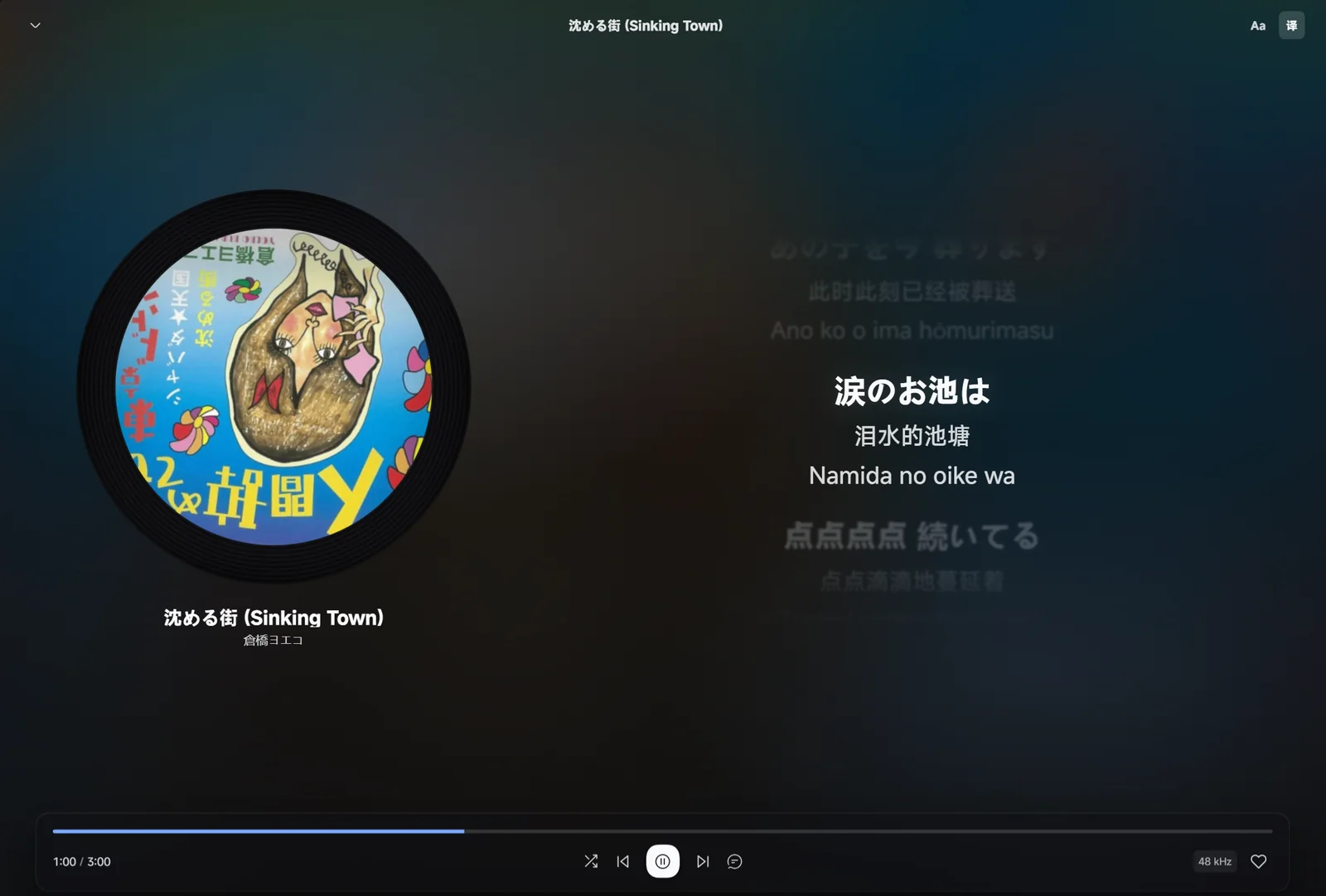
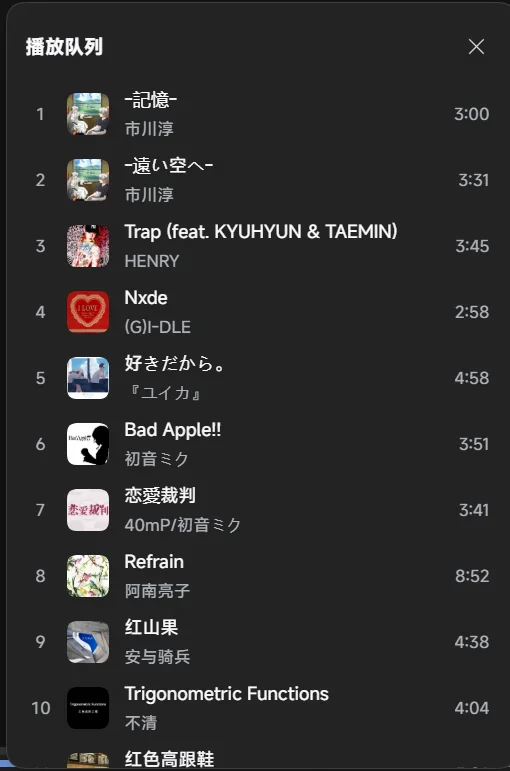
Now playing · 播放页 Queue · 播放队列
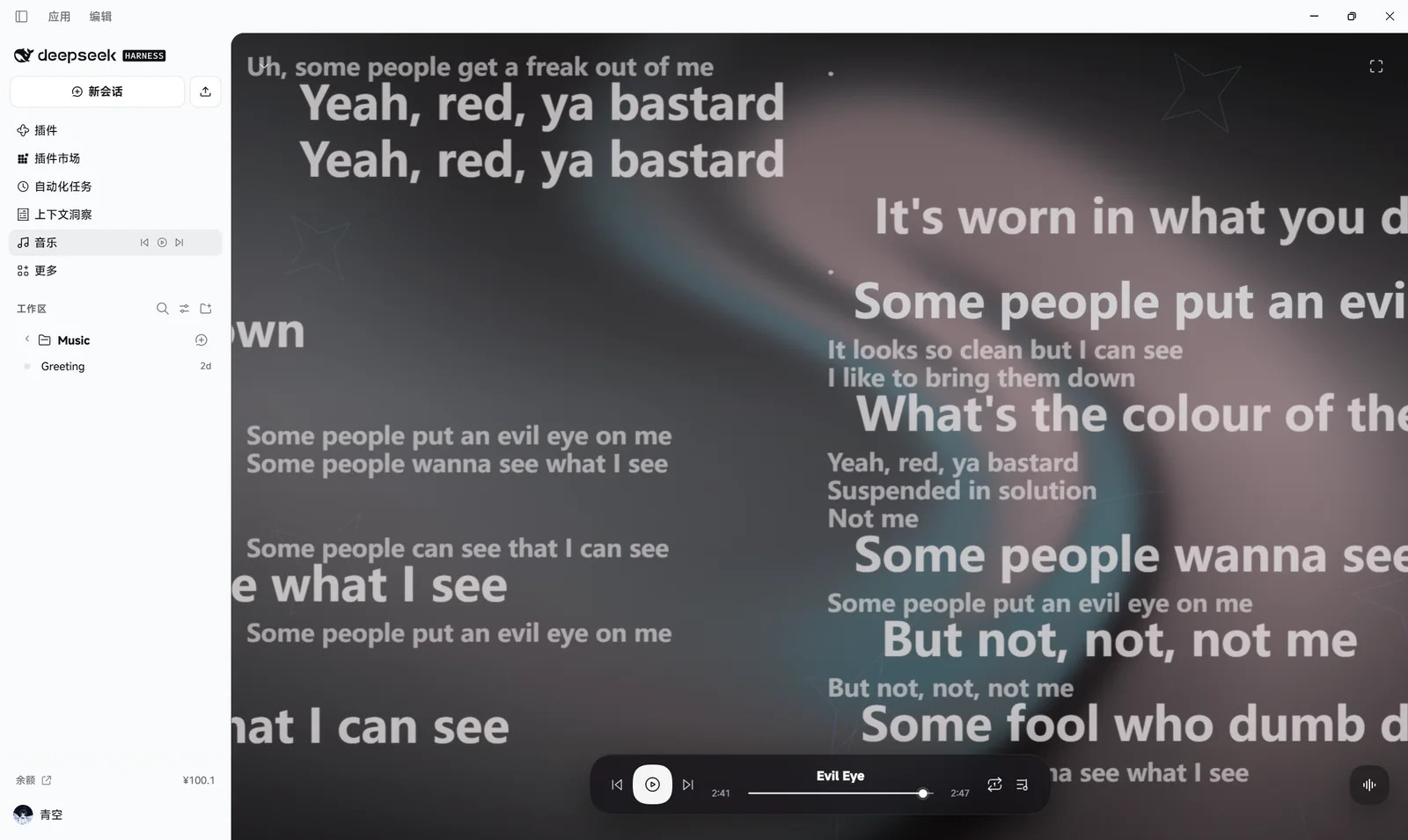
Now playing with vinyl artwork, translated lyrics and romaji Playback queue panel
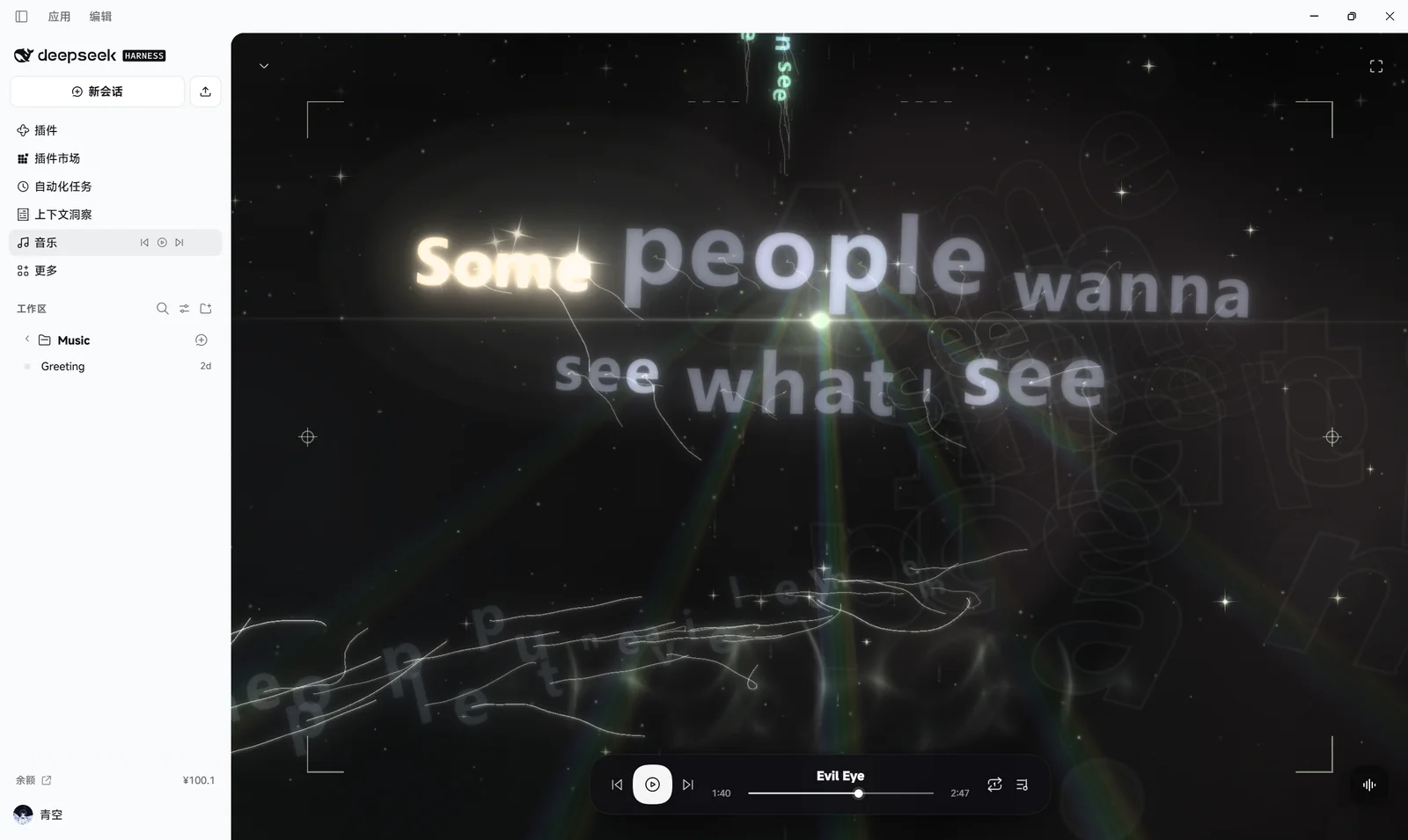
Folia stage · 歌词舞台 Folia lyrics · 逐行歌词
Folia lyric stage with light rays and large lyrics Folia lyric stage with multiple lyric lines
More screenshots · 更多截图
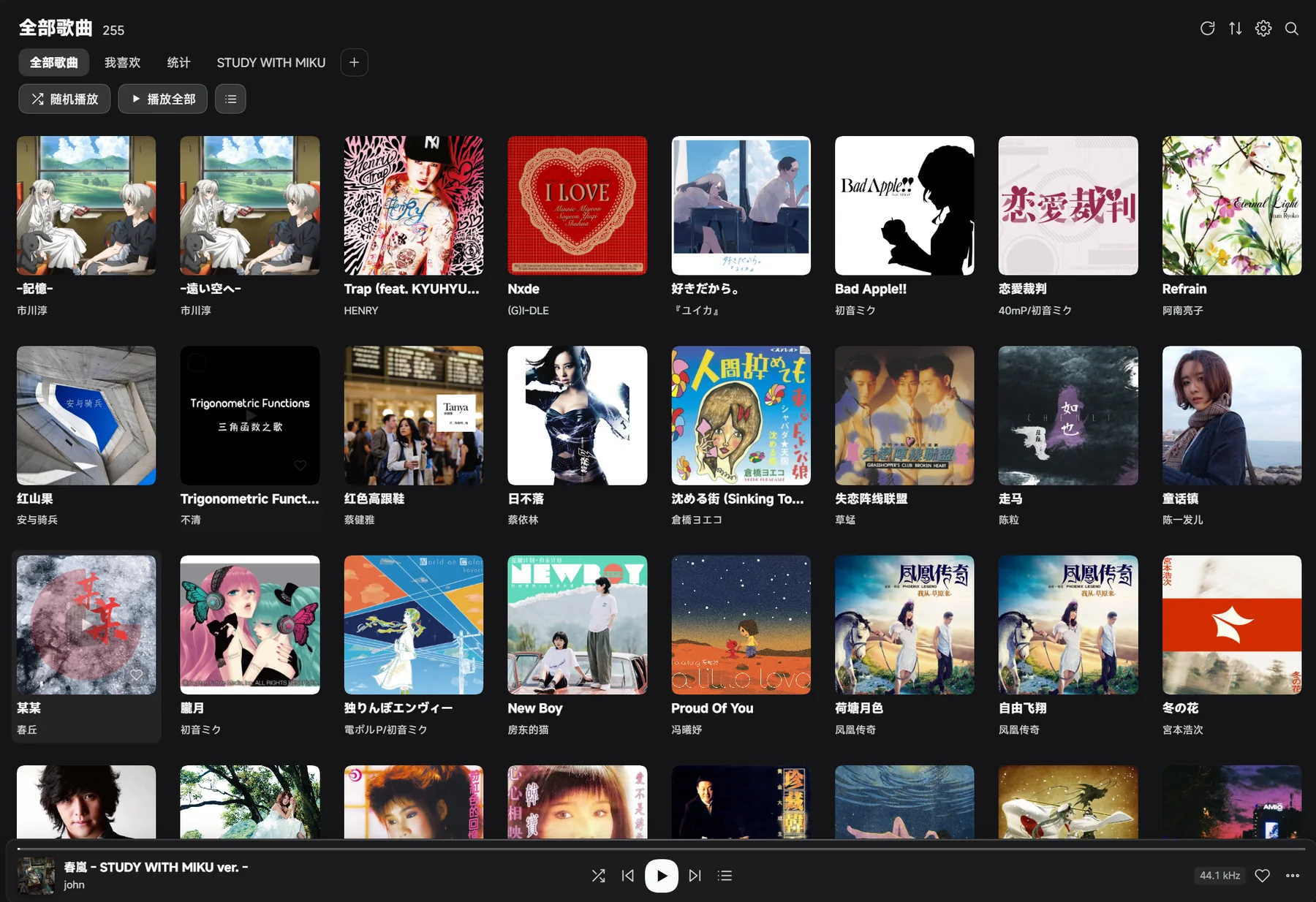
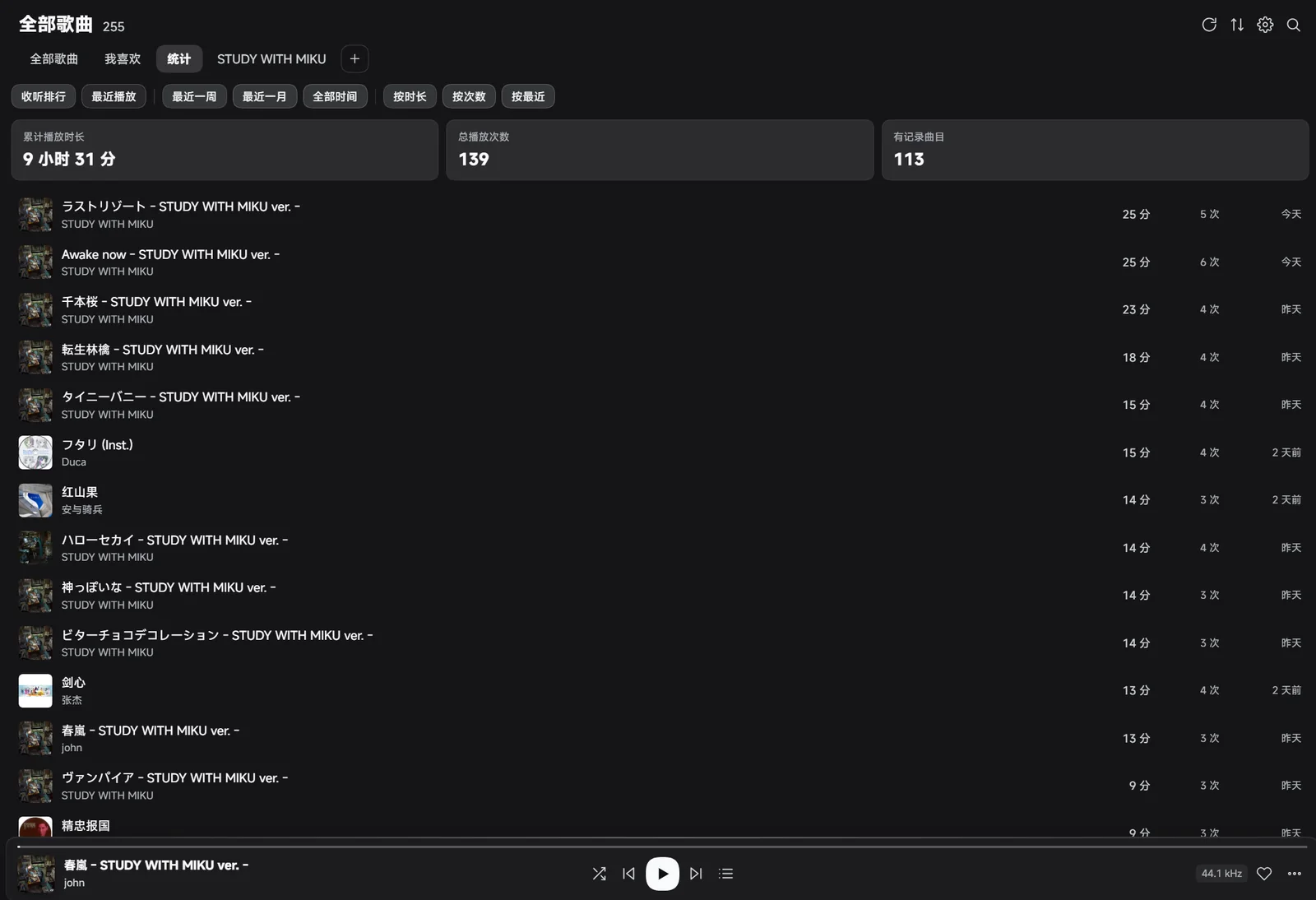
Local library · 本地曲库 Statistics · 播放统计
Local library album grid Listening statistics
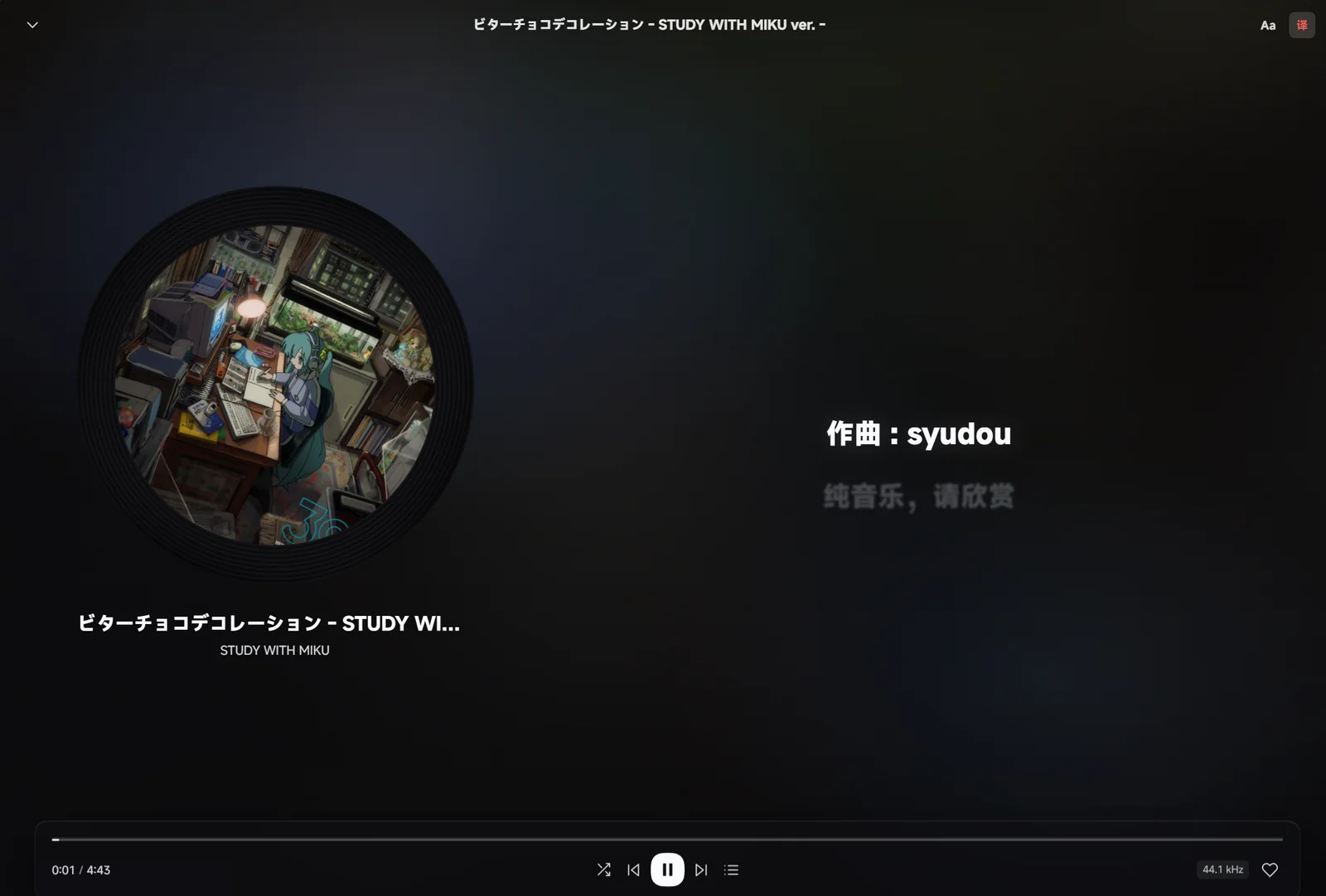
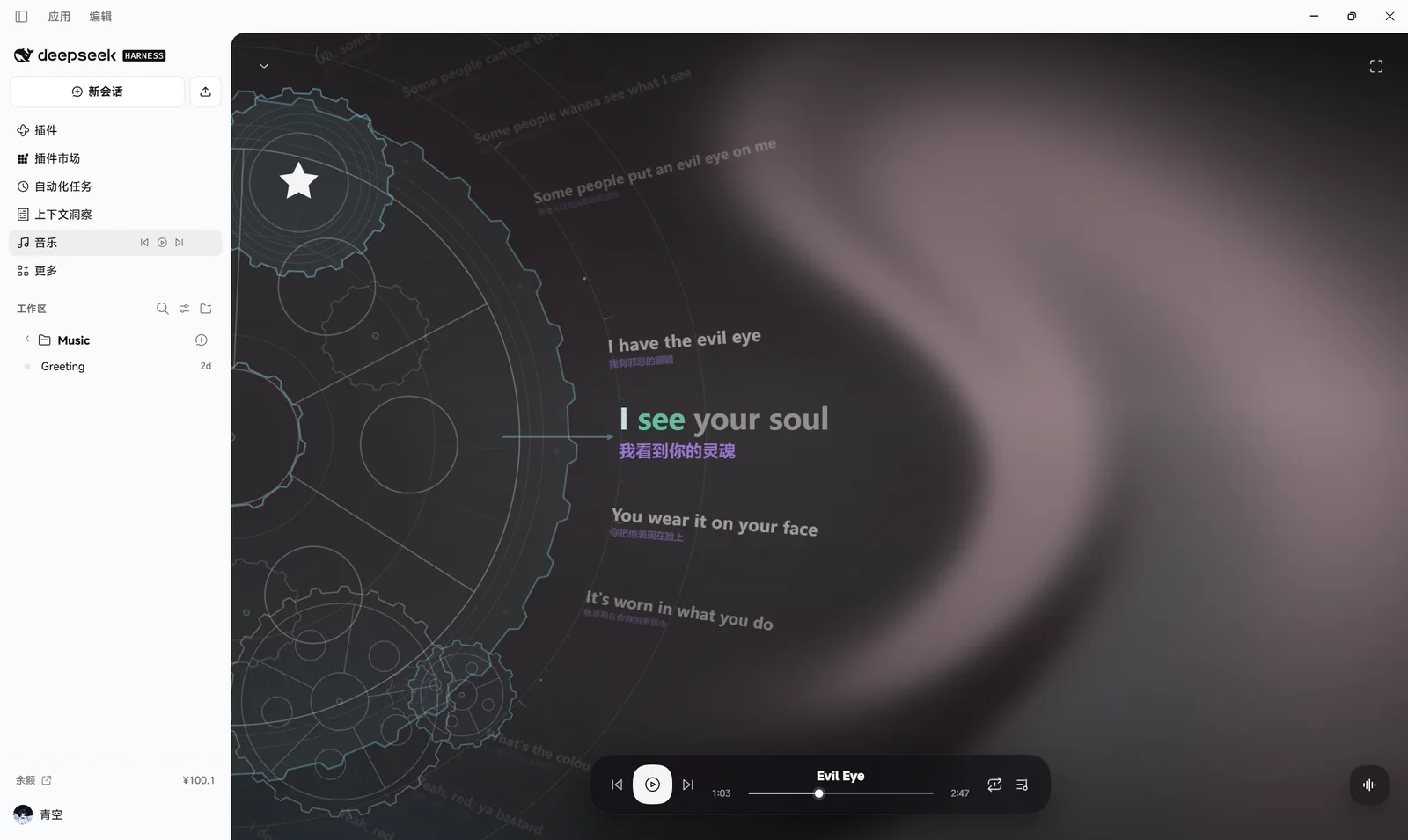
Instrumental · 纯音乐播放页 Orbit stage · 轨道歌词
Instrumental now playing screen Folia orbit lyric stage

中文

为什么是 dsh-music-panel

大多数音乐插件只做“能播”。dsh-music-panel 想做的是一台真正属于 DSH 的播放器:本地曲库、在线平台、歌词、缓存、元数据和播放统计共享同一套界面与队列,不需要在应用之间来回切换。

能力
本地 + 在线 硬盘里的歌直接播;网易云 / QQ 音乐 / 酷狗 / 波点 / 汽水的云端歌单与喜欢也能直接浏览和播放;Navidrome / Subsonic 自建库可接入。
像播放器,而不是列表 专辑网格、黑胶播放页、逐行歌词与翻译、可拖拽队列、播放统计、快速定位。
把在线歌单当本地歌单 歌单缓存 + 预取 + 后台校准,切走再切回不重新加载;支持按平台顺序 / 名称 / 歌曲数排序。
曲库维护留在窗口里 在线补全标签、替换封面、校准歌词、检测重复、回收站恢复,不用打开第三方工具。
为 DSH 原生设计 左侧栏入口、输入框上方歌词条、会话内播放控制,跟随宿主深浅色主题与组件规范。
只在你的机器上运行 Cookie、缓存、播放记录全部保存在本机;客户端不直连外部域名。

功能

本地曲库

  • 多根目录扫描,可配置子文件夹深度;支持 MP3 / FLAC / M4A / AAC / OGG / OPUS / WAV / AIFF / WMA / APE。
  • 歌曲 / 专辑 / 歌手 / 文件夹 / 喜欢 / 统计多种视图;按目录聚合并可单独隐藏。
  • 列表循环、单曲循环、顺序播放、随机、上一首 / 下一首、进度拖动、音量与静音。
  • 记忆上次播放曲目与进度,支持每首歌断点续播。
  • 空格播放 / 暂停,Ctrl / ⌘ + ← / → 切歌,/ 聚焦搜索。

在线音乐

  • 顶栏一键切换本地音乐、网易云、QQ 音乐、酷狗、波点、汽水、Navidrome / Subsonic;播放队列跨来源保留。
  • 扫码登录后读取云端歌单、喜欢、最近播放;未登录也可播放平台免费曲目。
  • Navidrome / Subsonic:设置 → 在线填写服务器地址、用户名和密码;搜索、播放、歌词、封面、收藏和歌单通过 Subsonic 标准接口完成。
  • 完整曲库(可选):主动勾选「保存密码,启用完整曲库」后,使用 Navidrome 原生分页接口浏览全库;不勾选时使用随机采样的「全部歌曲」,不影响搜索和其他功能。
  • 歌单歌曲缓存:按 provider + playlistId 缓存 60 秒,导航项 hover / focus 预取;切回时先显示缓存,过期后后台校准。
  • 在线歌单排序:平台顺序 / 名称 / 歌曲数,偏好保存在本机。
  • 账号资料:设置 → 在线显示官方平台图标、当前昵称与头像;头像通过本机代理加载。
  • VIP 识别:根据当前登录账号判断可播放性,VIP 曲目显示金色徽标。
  • 音频缓存:默认关闭;只有整首播完后才写入,设置 → 数据里可开关、限制容量(默认 5 GB)并按最近播放清理。跳过、失败和试听片段不会写入。
  • 可调歌词宽度:播放页歌词栏两侧都可拖动调整宽度(双击复位),宽度按本机偏好保存。
  • 两栏间距可调:界面编辑里可调封面栏与歌词栏的间距(12–96px,默认 60px)。
  • Folia 歌词样式:14 种 Folia 样式按上游源码移植(静止 / 云阶 / 浮名 / 莫奈 / 倾诉 / 回环 / 心象 / 绘光 / 商籁 / 凝彩 / 花火 / 雾笺 / 镜台 / 时计),共用 Folia 的时钟、逐字时间线、封面取色主题与音频带;另有「随机」:按歌曲时长等分,把除静止外的样式洗牌后依次上场,同曲顺序固定。原“经典”布局已移除,默认样式为“莫奈”。
  • Folia 背景:播放页使用 Folia 的六种 shell 背景(通用 / 莫奈 / 漫游 / 隐现 / 星空 / 嵌入,另可选“空”),支持封面取色流体、Paper Shaders 抖动与印刷效果、星空与网页嵌入;可在外观设置里切换,默认「隐现」。
  • 列表内搜索:歌单 / 专辑 / 本地库右上角的放大镜点开后是当前列表的搜索框,按歌名、歌手、专辑实时过滤;顶部的全局搜索只负责在线搜索,两者互不干扰。
  • 智能过渡:播放页「音频效果 → 音量」或设置 → 播放,只有一个开关。播放到曲末前 14 秒时自动分析当前曲尾与下一首开头的响度,从安静点切入、按安静段长度决定重叠(2.5–6 秒),但下一首只在重叠的最后 2.5 秒才淡入(不会提前一大段就开始唱);下一首一旦出声,界面(标题 / 封面 / 歌词 / 进度 / 队列)就切换到它;开启过渡时会在当前曲播放期间于后台预取下一首在线曲目,未缓存的在线歌曲不必等曲末 14 秒窗口才开始下载;只有真正静音的前奏(低于 -45 dBFS)才会被跳过,轻声前奏属于音乐内容会完整保留;同专辑连续曲目固定保持原始衔接;暂停、切歌、拖动进度会立即取消过渡。
  • 音量均衡:浏览器内置 EBU R128(BS.1770)分析,按曲目自动调整增益,不依赖 ffmpeg;首次分析后缓存结果。
  • 均衡器:播放页音量按钮里的「音频效果 → 均衡器」,10 段(31 / 62 / 125 / 250 / 500 / 1k / 2k / 4k / 8k / 16k Hz,Q=1.41,±12 dB)。「设备」页签内置约 8800 条 AutoEQ 耳机补偿曲线,可按型号搜索并套用(数据来源与许可见 THIRD_PARTY_NOTICES.md);出厂预设沿用 Winamp 原版 18 组曲线,可保存自己的曲线;“编辑”页有实时频响曲线、前置增益、自动 headroom 与输出限幅(多段提升不破音)。
  • 列表内搜索:歌单 / 专辑 / 本地库右上角的放大镜会展开成当前列表的搜索框,按歌名 / 歌手 / 专辑实时过滤;顶部全局搜索只负责在线搜索,两者互不干扰。
  • 在线歌词与翻译:网易云 trans、QQ 加密翻译流、酷狗 KRC 内嵌译文;Navidrome / Subsonic 使用 OpenSubsonic 结构化歌词(如服务器支持)。

歌词、元数据与整理

  • 内嵌歌词与 .lrc,播放页逐行高亮、翻译、字号 / 粗细 / 模糊 / 对齐可调、±0.5s 偏移。
  • 在线歌词搜索并写回内嵌歌词,写前自动备份。
  • 在线匹配网易云 / QQ 音乐 / iTunes / MusicBrainz 元数据,支持整曲或单字段匹配。
  • 编辑标题、艺术家、专辑、年份、音轨号、碟号、风格、专辑艺术家、作曲、作词、注释、歌词。
  • 替换封面、检测重复、批量收藏 / 加入歌单 / 编辑 / 删除到回收站。
  • 删除操作进入插件回收站,可按原路径恢复,不是永久删除。

安装

要求:DSH Web / Desktop。 插件需要浏览器载体播放音频,并使用宿主已配置的网络与存储。

方式一:插件市场(推荐)

在 DSH 的 插件市场 搜索 dsh-music-panel,或让 Agent 执行:

plugin_manager install_bundle dsh-music-panel

安装后完整重启 DSH,左侧栏出现音乐图标。

方式二:npm

在 DSH profile 目录下:

pnpm add dsh-music-panel

然后重启 DSH。npm 包:https://www.npmjs.com/package/dsh-music-panel

安装/升级后侧栏没有音乐图标?

先确认版本是 0.27.3 或更高。0.27.2 及更早版本缺少 package.json 的 ./package.json 导出,DSH 会静默把插件判定为非客户端包:服务端工具可用,但浏览器端不会加载。

升级到 0.27.3+ 后:

  1. 完整退出并重启 DSH,不是只刷新页面。

  2. 如果仍然没有图标,在插件市场把音乐插件关闭再开启一次。

  3. 仍无效时,检查 profile 的 cordis.patch.yml 是否残留了禁用覆盖:

    - id: music
      disabled: true

    删除这一段后重启。不要删除上面的 - insert: 音乐插件配置。

  4. 插件管理器显示“已启用”但市场显示“已停用”,通常就是这条覆盖造成的;两层状态不一致时以 profile 最终应用的配置为准。

快速开始

本地音乐

  1. 点击左侧栏音乐图标打开面板。
  2. 右上角齿轮 → 音乐库,添加一个或多个音乐文件夹。
  3. 扫描完成后双击歌曲,或点「播放全部」。

在线音乐

  1. 顶栏切到网易云 / QQ 音乐 / 酷狗,或选择 Navidrome / Subsonic。
  2. 首次使用:齿轮 → 在线,点对应平台「登录」,用手机 App 扫码确认;Navidrome 填写服务器地址、用户名和密码后连接。
  3. 直接点导航里的云端歌单开始播放;整首播放完的歌曲才会写入音频缓存(默认关闭)。
  4. 需要清理时到 设置 → 数据 查看用量或清空。

Navidrome 的「全部歌曲」默认是随机采样。需要按页浏览完整曲库时,在连接表单中勾选「保存密码,启用完整曲库」;该选项会把密码额外写入本机 sessions.json,详见下方隐私说明。

隐私

  • 全部逻辑在本机运行;登录 Cookie、token 以及 Navidrome 的 salt + token 只写入 ~/.dsh/music/sessions.json(权限 0600)。
  • Navidrome 默认只保存盐化 token。只有主动勾选「保存密码,启用完整曲库」时,密码才会以明文额外写入同一文件;这会扩大本机账户泄露后的影响面,请只在自己的机器上使用,并确保系统账户和磁盘加密可信。
  • 缓存与播放记录位于 ~/.dsh/music/,可随时清理。
  • 客户端不向外部域名发请求:在线搜索、取链、歌词、封面均由 Host 发起并同源代理。

兼容与限制

  • 仅支持 DSH Web / Desktop 宿主。
  • 在线平台使用公开的非官方接口,可能失效、限流或改版;失败时会在界面提示,不影响本地播放。
  • Navidrome / Subsonic 使用标准 Subsonic 接口,目前只在 Navidrome 0.64.2 上实测;Gonic / Airsonic / Supysonic 等兼容服务器理论上可用。
  • Navidrome 的「完整曲库」使用其内部 /api/song 接口,可能随版本变化;失效时会退回随机采样,不影响搜索、播放和收藏。
  • VIP / 付费曲目是否可播取决于当前登录账号,界面会显示金色徽标。
  • 平台图标使用各平台 App Store 官方应用图标,仅用于平台识别,商标归各平台所有。
  • 在线层实现来源:网易云与 QQ 走各自的上游 API 包(本机 127.0.0.1 服务,由插件自分配端口);酷狗保留插件自有的签名实现;波点走 bodian-music-api;汽水走 qishui-music-api(二维码需用抖音 App 扫码授权);飞牛(fnOS)需要用户自建服务器才能验证,尚未启用。
  • 登录态:0.36 起改为新的 sessions.json 结构(0600),旧的 providers.json 不再读取,升级后需重新登录一次。

开发

npm test            # 80 test files
npm run check       # syntax + manifest checks
npm run pack:check  # package self-check
  • Host:index.js + src/host/**,提供 /music/* HTTP API。
  • Web:client.js 由 src/client/** 分片(src/client/manifest.json 定序)构建,单文件、零运行时依赖,只依赖宿主注入的 react。
node scripts/build-client.mjs          # rebuild client.js
node scripts/build-client.mjs --check  # verify src/client and client.js agree
node scripts/build-vendor.mjs          # rebuild the bundled framer-motion fragment

更多规范见 主题与组件开发规范 与 UI review;发版步骤见 发布手册。

参考与致谢

本项目大量参考并移植了 Folia(folia-major-main 0.7.28,AGPL-3.0-only),Folia 仓库地址:https://github.com/chthollyphile/folia-major。

  • src/folia/** 的歌词舞台与背景是 Folia 渲染器的逐文件移植;src/client/utils/lyrics/** 是 Folia 歌词流水线的逐字副本(LRC / 增强 LRC / TTML / VTT / QRC / YRC / KRC 解析、staff 署名、副歌、行过滤、icu-folia 分词)。
  • 在线层(provider 能力位、注册表、统一门面、失败分类、本地服务生命周期)按 Folia 的架构对齐;逐字换源、行过滤规则即时生效、手动词级分词、原生副歌范围等行为都以 Folia 为参照实现。
  • 移植只改边界(React props、播放时钟、主题、音频带、存储 / 服务 / worker shim),渲染与解析代码保持上游原样。逐项来源与许可见 THIRD_PARTY_NOTICES.md、移植规则见 docs/folia-porting.md。

License

本项目自 0.36.0 起以 AGPL-3.0-only 发布,© Aliboder。0.35.0 及更早版本为 MIT,已发布的旧版本不受影响;因为本版本包含 AGPL-3.0-only 的 Folia 移植代码,整体必须保持同一许可。


English

Why dsh-music-panel

Most music plugins stop at “it plays”. dsh-music-panel is built as a real music player for DSH: local files, online providers, lyrics, caching, metadata, and listening stats share one interface and one queue — no app switching.

What you get
Local + online Play files from disk, browse cloud playlists from NetEase Cloud Music, QQ Music, KuGou, Bodian, and Qishui, or connect your own Navidrome / Subsonic server.
A player, not just a list Album grid, vinyl now-playing view, synced lyrics with translations, draggable queue, listening stats, and “jump to current track”.
Online playlists that feel local Per-playlist cache, hover prefetch, stale-while-revalidate refresh, and sorting by platform order / name / track count.
Library maintenance in place Match metadata, replace covers, edit tags, calibrate lyrics, deduplicate tracks, and restore from trash.
Native to DSH Sidebar entry, lyric line above the composer, in-conversation playback, host theme tokens, and light/dark support.
Local by design Cookies, cache, and history stay on your machine; the browser side never calls external domains directly.

Features

Local library

  • Multi-root scanning with configurable folder depth; MP3 / FLAC / M4A / AAC / OGG / OPUS / WAV / AIFF / WMA / APE.
  • Songs, albums, artists, folders, favorites, and statistics views; folder grouping with per-folder hiding.
  • Repeat modes, shuffle, previous / next, seek, volume, and mute.
  • Restores the last track and position; optional per-track resume.
  • Space play/pause, Ctrl / ⌘ + ← / → previous/next, / focus search.

Online music

  • Switch between local, NetEase, QQ Music, KuGou, Bodian, Qishui, and Navidrome / Subsonic from the top bar; the queue is shared across sources.
  • QR sign-in for cloud playlists, favorites, and recent plays; free tracks work without signing in.
  • Navidrome / Subsonic: enter the server URL, username, and password in Settings → Online. Search, streaming, lyrics, covers, favorites, and playlists use standard Subsonic endpoints.
  • Complete library (optional): opt into “Save password, enable complete library” to page the full library through Navidrome’s native API. Without it, “All songs” is a random sample; search and every other feature still work.
  • Playlist cache: 60-second per-playlist cache with hover/focus prefetch. Reopening shows cached tracks immediately, then revalidates in the background.
  • Playlist sorting: platform order / name / track count, persisted locally.
  • Account profiles: official provider icons, nickname, and avatar in Settings → Online; avatars are proxied by the Host.
  • VIP awareness: playability follows the signed-in account; VIP tracks are marked.
  • Audio cache: off by default; a track is written only after a full play. Settings → Data has the switch, a size limit (5 GB default), usage, and per-category clearing. Skips, failures, and preview clips are never written.
  • Volume leveling: built-in EBU R128 / BS.1770 analysis with per-track gain, no ffmpeg required; results are cached.
  • 10-band equalizer: Audio effects → Equalizer in the player bar (31 / 62 / 125 / 250 / 500 / 1k / 2k / 4k / 8k / 16k Hz, Q=1.41, ±12 dB). The Devices tab ships ~8,800 AutoEQ headphone correction curves with model search; factory presets reuse Winamp’s 18 curves; the Edit tab has a live response curve, preamp, and automatic headroom + limiter.
  • Smart transition: one switch in Audio effects → Volume (or Settings → Playback). It analyses the end of the current track and the start of the next, then blends with an equal-power curve for 2.5–6 s; the next track only fades in during the last 2.5 s, and the UI switches the moment it becomes audible. Album tracks keep their original join; pause, seek, or next cancels the blend.
  • In-list search: the magnifier in a playlist, album, or library header expands into a search field for the list you are looking at (title / artist / album); the top-bar search stays dedicated to online search.
  • Online lyrics and translations for the Chinese providers; Navidrome / Subsonic uses OpenSubsonic structured lyrics when the server provides them.

Lyrics, metadata, and cleanup

  • Embedded lyrics and .lrc; line highlighting, translation, typography controls, alignment, and ±0.5s offset.
  • Online lyric search with backup before writing.
  • Metadata matching via NetEase / QQ Music / iTunes / MusicBrainz, whole-track or per-field.
  • Edit title, artist, album, year, track/disc number, genre, album artist, composer, lyricist, comment, and lyrics.
  • Cover replacement, duplicate detection, batch favorite / add-to-playlist / edit / trash.
  • Deletions go to the plugin trash and can be restored by original path.

Install

Requires DSH Web / Desktop. A browser runtime is needed for playback.

Plugin marketplace (recommended)

Search for dsh-music-panel in DSH, or run:

plugin_manager install_bundle dsh-music-panel

Then restart DSH completely. A music icon appears in the sidebar.

npm

From the DSH profile directory:

pnpm add dsh-music-panel

Then restart DSH. Package: https://www.npmjs.com/package/dsh-music-panel

No music icon after install/upgrade?

First check the version: 0.27.3 or newer. Versions up to 0.27.2 lacked the ./package.json export, so DSH silently treated the package as a non-client package: the Host tool worked, but the browser bundle never loaded.

For 0.27.3+:

  1. Quit and restart DSH completely — a page refresh is not enough.

  2. If the icon is still missing, disable and re-enable the music plugin from the plugin marketplace.

  3. If that does not help, check the profile's cordis.patch.yml for a stale disable override:

    - id: music
      disabled: true

    Remove that block and restart. Do not remove the - insert: music entry above it.

  4. “Enabled” in the plugin manager and “Disabled” in the marketplace usually means this override is present; the final profile composition wins.

Quick start

  1. Open the music panel from the sidebar.
  2. Settings → Library, add one or more music folders.
  3. Double-click a track, or press “Play all”.
  4. For online music, switch to a provider and sign in via QR in Settings → Online; for Navidrome/Subsonic, enter the server URL, username, and password.
  5. Open a cloud playlist or your server library from the navigation; tracks are cached only after a full play (the cache is off by default).

Navidrome’s “All songs” view is a random sample by default. To page the complete library, enable “Save password, enable complete library” in the connection form; that stores the password in the local sessions.json (see Privacy).

Privacy

  • Everything runs locally. Cookies, tokens, and Navidrome’s salt + token are stored only in ~/.dsh/music/sessions.json (mode 0600).
  • Navidrome stores only a salted token by default. If you opt into “Save password, enable complete library”, the password is additionally written in plaintext to the same file; this increases the impact of a local account compromise. Use it only on a machine you trust, with a protected OS account and disk encryption.
  • Cache and history live under ~/.dsh/music/ and can be cleared at any time.
  • The browser side never calls external domains: search, stream resolution, lyrics, and covers are proxied by the Host.

Limitations

  • DSH Web / Desktop only.
  • Online providers use public, unofficial APIs; they may change, throttle, or break. Failures are surfaced in the UI and do not affect local playback.
  • Navidrome / Subsonic uses standard Subsonic endpoints and is currently tested only against Navidrome 0.64.2; Gonic / Airsonic / Supysonic and other compatible servers are expected to work.
  • Navidrome’s complete-library view uses its internal /api/song endpoint, which may change between versions; if it fails, the panel falls back to random sampling without affecting search, playback, or favorites.
  • VIP / paid track availability depends on the signed-in account and is marked in the UI.
  • Provider icons come from the official App Store artwork and are used only for identification; trademarks belong to their owners.
  • Online transports: NetEase and QQ run their upstream API packages as local 127.0.0.1 services on ports the plugin allocates itself. KuGou keeps the plugin's own signing implementation. Bodian uses bodian-music-api; Qishui uses qishui-music-api and its QR must be authorized in the Douyin app. fnOS needs a user-hosted server and is not enabled yet.
  • Sign-in state: 0.36 stores credentials in the new sessions.json (0600). The old providers.json is no longer read, so upgrading asks for one fresh sign-in.

Development

npm test
npm run check
npm run pack:check
  • Host: index.js + src/host/**, exposing /music/* HTTP routes.
  • Web: client.js is built from src/client/** as a single CJS module with no runtime dependencies beyond the host-provided react.
node scripts/build-client.mjs
node scripts/build-client.mjs --check

See theme guidelines and UI review for conventions, and the release guide for how a version is shipped.

Credits

  • AutoAnimate (MIT) powers the now-playing track transitions.
  • Folia (AGPL-3.0-only, folia-major-main 0.7.28): the lyric stages and backgrounds in src/folia/** are a file-by-file port of Folia's renderers, and src/client/utils/lyrics/** is a verbatim copy of its lyric pipeline (LRC / enhanced LRC / TTML / VTT / QRC / YRC / KRC parsing, staff credits, chorus, line rules, icu-folia segmentation). The online layer (provider capabilities, registry, unified facade, failure classes, local service lifecycle) follows Folia's architecture, and so do the word-level lyric upgrade, instant line-rule re-filtering, manual word segmentation and native chorus ranges. Only the boundaries are adapted (React props, playback clock, theme, audio bands, storage / service / worker shims); rendering and parsing stay as upstream. Repo: https://github.com/chthollyphile/folia-major. Per-item notices: THIRD_PARTY_NOTICES.md; porting rules: docs/folia-porting.md.

License

AGPL-3.0-only © Aliboder — since 0.36.0. Versions up to 0.35.0 were MIT and stay as published. This release ships AGPL-3.0-only code ported from Folia, so the whole work keeps the same license.

CLASSIFICATION EVIDENCE

分类依据

项目类型插件
功能分类模型与 MCP
规则置信度中

系统优先读取 GitHub Topics,再与站内分类词典和词根规则比对。当前命中: deepseek-harness。