
模型与 MCP
待识别

rea
morluto
Reverse engineer anything with agents, from app behavior down to native binaries.
PROJECT TOPICS
INSTALL REFERENCE
dsh plugin --profile web add github:AleixRocal/dsh-sidepanel-web
该命令指向仓库当前默认分支;尚无绑定当前 commit 的完整验证结果。
PROJECT README
A browser in the DSH right sidebar — annotate any page in its DOM and send the annotation to the chat.









dsh-sidepanel-web adds a Browser tab to the right sidebar of DeepSeek Harness Web. It is a real browser next to your conversation, and it can turn any element on the page into a precise message for the agent.
Pick the button, field or card you are talking about, write what should change, and insert it. The message carries your note, the element's identity and selector, the page it lives on, and one screenshot with the annotation pinned. The full DOM payload — HTML, computed styles, size and position, framework source — is written to an annotation JSON the agent opens only when it needs to reason about the layout. The agent no longer has to guess which element you mean, and you no longer have to describe it with coordinates or a pile of screenshots.
At a glance
file#n pointer to the annotation JSON (HTML excerpt, computed styles, size and position, framework source), and one screenshot with the pick pinned.Source: github.com/AleixRocal/dsh-sidepanel-web · Package: npmjs.com/package/dsh-sidepanel-web
[!TIP] Two carriers, one flow. Pages you build —
localhost,*.local, private IPs, self-signed dev servers — go through a same-origin proxy and stay fully interactive. Public pages are rendered by a real Chromium on the host over CDP, soX-Frame-Optionsand CSP cannot block them. The panel chooses automatically; the switch is one click away.
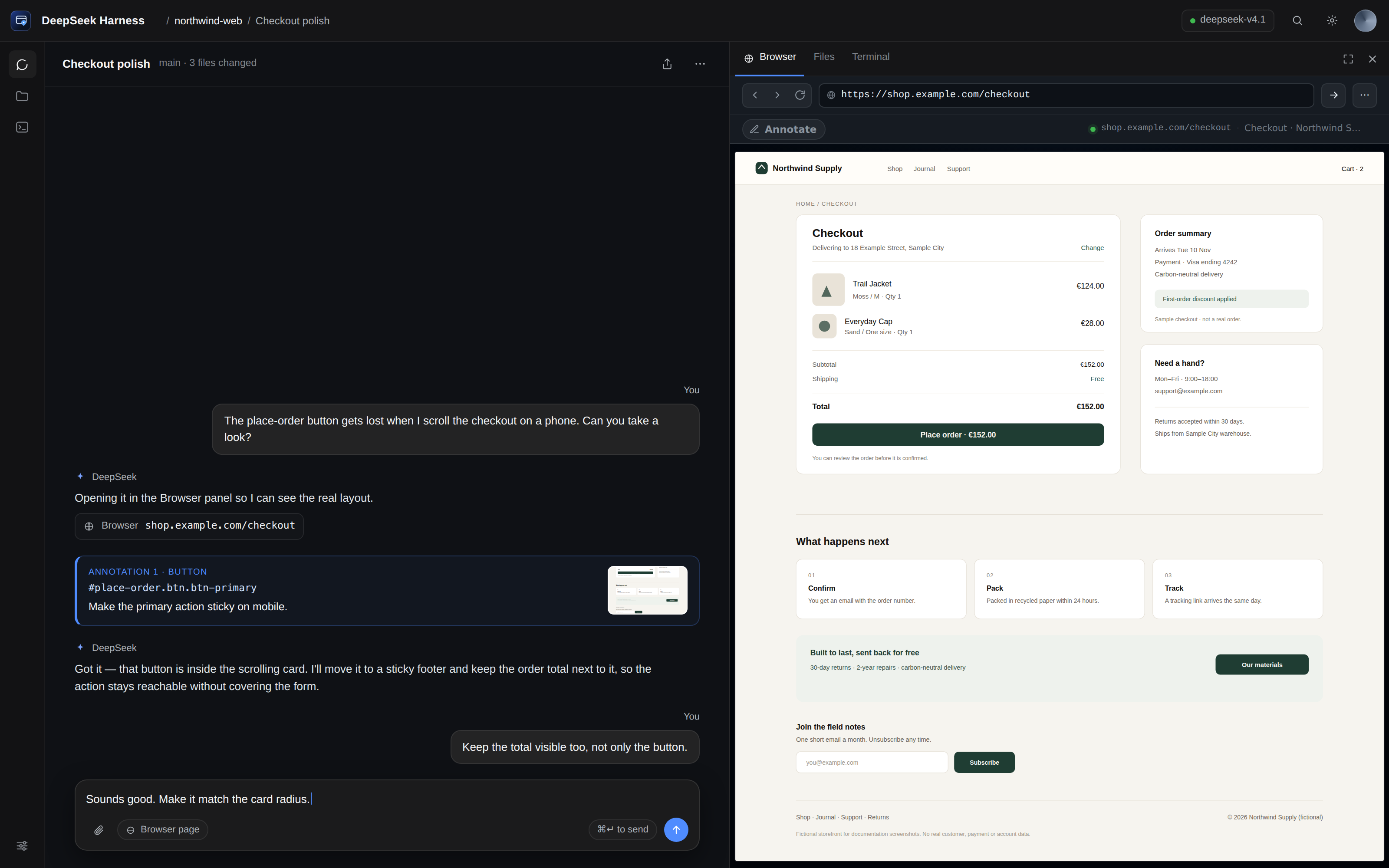
Mockup screenshots: the storefront, conversation and URLs are invented. No real account or customer data is shown.
localhost:5173, shop.local or example.com — the scheme is added for you (http:// for local hosts, https:// for public ones).No coordinates and no “the blue button at the bottom”. The annotation names the element, shows where it lives, and carries the note that says what you want.
Each annotation is one block of text, followed by one image with every pick pinned:
[Annotation 1] "Make this primary action sticky on mobile"
· Element: button#save (Save changes)
· Selector: #save
· Page: Settings — localhost:5173/settings
· Details JSON: ~/.dsh/data/dsh-sidepanel-web/annotations/2026-11-16-localhost_5173.json#1file#n pointer to the structured detail. The JSON holds the HTML excerpt, the computed styles that usually matter (display, position, colors, font, padding, radius), the size and position, the parent chain and the framework source. The agent reads it only when it needs to reason about layout, so the chat stays readable and no context is wasted on a dump you did not ask for.A screenshot shows what the page looks like. A DOM annotation says what the element is.
| Only a screenshot | A DOM annotation |
|---|---|
| The agent sees pixels and guesses which element you mean. | The agent gets the tag, id, classes, selector and an HTML excerpt. |
| You describe the location in words. | The agent gets computed styles, size and position. |
| The visual context is clear. | The visual context is still there, with numbered pins. |
Both matter. The image tells the agent where the element sits and what surrounds it; the DOM payload tells it what the element is, so it can find the code, make the change, and reason about the layout without a round of “which button?”. The note adds intent — what you want changed, not just what exists.
The panel can render a page in two ways. You normally do not need to think about it: the choice follows the URL and is remembered per origin.
| URL | Carrier | What it gives you |
|---|---|---|
localhost, *.localhost, *.local, private/loopback/link-local IPs |
Native — same-origin proxy | The real page and its DOM, fully interactive, with the annotation overlay; self-signed certificates are accepted; cookies live in a per-origin host jar. |
Any other http(s) page |
Remote — CDP | A real Chromium on the host renders the page; frames and input are streamed into the panel. Works with X-Frame-Options, CSP and logins from the browser profile. |
Native carrier. DSH fetches the page, rewrites its URLs and injects a small shim plus the annotation overlay, so the page is same-origin with DSH and can be inspected and clicked like a normal tab. HTML, CSS, JS, images and API calls stay on the proxy; fetch, XMLHttpRequest, history.pushState/replaceState and window.open are kept on it; <script type="importmap"> URLs are rewritten; data-action="family"-style action names are left alone. WebSockets/HMR are not proxied.
Remote carrier. The host Chromium loads the page for real and streams frames into the panel; clicks, wheel, typing and drags are forwarded. It is the carrier for public sites, pages that refuse to be framed, and sites behind a login.
Switching. The native view has a Remote view (CDP) button. The remote view offers Native view (proxy) for local hosts and Force native view (unsafe) for any other origin, remembered per origin. Forcing a public page through the proxy shares DSH's origin with that page — only do it for sites you trust.
In the sidebar
kind: "browser"), so the chat's “open link in sidebar” preference lands here; params.url is navigated on arrival.example.com becomes https://example.com/; shop.local:5173, 127.0.0.1:5173 or 192.168.1.20:8080 use http://. Non-web schemes (mailto:, file:, javascript:, data:) are refused.cdpUrl/wsUrl at any Chrome started with --remote-debugging-port, let the plugin discover one, or let it launch its own with a persistent profile.devicePixelRatio.ctx.locale; other locales fall back to English.Annotating
tag#id.class 240×44 [role], so you can see what you are about to pick.InputActions.insertText, so the annotation is added at the caret without replacing your draft.0.3.0 (Web profile).# from npm
dsh plugin --profile web add dsh-sidepanel-web
# from GitHub
dsh plugin --profile web add github:AleixRocal/dsh-sidepanel-web
# or from a local clone, while developing
git clone https://github.com/AleixRocal/dsh-sidepanel-web
dsh plugin --profile web add link:/absolute/path/to/dsh-sidepanel-webRestart dsh web once and refresh the GUI. The Browser tab appears in the right-sidebar guide.
A scoped copy (@aleixrocal/dsh-sidepanel-web) is also published to GitHub Packages; the canonical package is the npmjs one. Installing the mirror needs a token with read:packages and @aleixrocal:registry=https://npm.pkg.github.com.
example.com and press Enter. The panel opens https://example.com/; the scheme is added for you.[!NOTE] If no browser is found on the usual CDP ports, the plugin launches a dedicated headless Chromium with a persistent profile. Set
chromePathonly when auto-detection misses your binary.
To reuse the browser you already run (same cookies and logins), expose its CDP port and point the plugin at it — no separate install:
google-chrome --remote-debugging-port=9222 --user-data-dir="$HOME/.config/chrome-dsh" &- id: dsh-sidepanel-web
config:
cdpUrl: http://127.0.0.1:9222 # or wsUrl: ws://127.0.0.1:9222/devtools/browser/…Chrome 136+ refuses /json/version on the default profile, hence the separate --user-data-dir. Without cdpUrl/wsUrl the plugin probes 9222–9225 and 9333, then ~/.local/state/dsh-sidepanel-web/browser.json, then the ego bridge file.
example.com → https://example.com/ (scheme added for you).localhost:3000, shop.local, 192.168.1.20:8080 → http://, because local dev servers rarely have TLS.| URL | Carrier | Why |
|---|---|---|
example.com, any public site |
CDP screencast | Works even when the site sends X-Frame-Options/CSP. |
localhost, *.local, private/loopback/link-local IPs |
Same-origin proxy | Native rendering, DOM access and annotation without a screencast. |
Set options in the profile patch, under the plugin's row:
# ~/.dsh/profiles/web/cordis.patch.yml
- id: dsh-sidepanel-web
  config:
    chromePath: /path/to/chrome
headless: true| Key | Default | Meaning |
|---|---|---|
chromePath |
auto-detect | Absolute path to a Chromium-based browser. |
headless |
true |
Launch the host browser without a window. |
autoLaunch |
true |
Start a browser when no CDP endpoint is available. |
wsUrl |
empty | Explicit CDP endpoint (ws://127.0.0.1:port/devtools/browser/…). |
cdpUrl |
empty | HTTP debugging endpoint of an existing browser, e.g. http://127.0.0.1:9222; resolved through /json/version. |
profileDir |
~/.local/share/dsh-sidepanel-web/profile |
Browser profile directory (persistent: logins survive restarts). |
homeUrl |
https://www.deepseek.com |
First page when the browser starts. |
device |
responsive |
Emulation preset: responsive, desktop, laptop, tablet, mobile, android. |
pollMs |
1200 |
Screenshot polling interval for the legacy stream mode. |
quality |
82 |
JPEG quality for the legacy stream mode. |
streamMode |
screencast |
screencast or poll (legacy stream mode). |
streamFps |
15 |
Frame-rate cap for the legacy stream mode. |
DSH Web GUI
  └─ Browser tab (sidebar.right.pane.tab)
       ├─ Carrier A · native (local/dev)
       │    proxy iframe ──► /api/sidepanel-web/p/<origin>/<path>
       │                         └─ rewriting proxy (HTML/CSS/JS/API)
       │                              └─ overlay: element pick → note → composite image
       └─ Carrier B · remote (any page)
            CDP Chromium (host) ──► screencast frames + forwarded input
                 └─ same panel, same annotation flow

  annotations + one pinned screenshot ──► composer (InputActions.insertText)
The host half owns the Chromium, the proxy, the screenshots and the composite render; the client half is the tab you see. The native carrier keeps the page same-origin so the overlay can read its DOM and you can click it; the remote carrier streams a real browser and forwards your input. Both feed the same annotation payload, so the chat does not care which carrier you used.
On Insert, the host captures one viewport screenshot and re-applies every pick's pin (by selector for a native page, from the live page for CDP) and returns a single PNG. Local pages are loaded through the same proxy path the iframe shows — one canonical redirect first, so a dev server that moves the page to another path or port is captured exactly as it renders — using a short-lived cookie the proxy route accepts for that render only. If the proxy capture fails, the service falls back to a direct render, so the message still has its image and all the text.
lib/index.js, lib/service.js, lib/cdp.js, lib/launcher.js): routes, Chromium lifecycle, CDP, screenshots, crops, composite render.lib/proxy.js): fetches local/dev pages, rewrites URLs, injects the shim and overlay, keeps a per-origin cookie jar.lib/page.js): rendered-page carrier and the annotation overlay.lib/url.js): scheme detection shared with the client (mirrored inside lib/client.js and enforced by test/url-smoke.mjs).lib/client.js): the sidebar tab, address bar, native/remote carriers, annotation note card, composer insertion, EN/ES dictionaries.A deeper write-up of the DSH Web integration (slots, tab registry, carriers, browser discovery) is in docs/browser-integration.md (Catalan).
example.com and it opened https://example.com/. Can I force http://?Yes — type the scheme explicitly (http://example.com). Local/dev hosts (localhost, *.local, private, loopback and link-local addresses) already default to http:// because dev servers rarely have TLS. Non-web schemes are rejected.
Public pages use the CDP carrier, not an iframe, so X-Frame-Options is not the cause. Check that the host Chromium is running and reachable (cdpUrl/wsUrl or the auto-launch), and that the host has network access to the site. The panel's status line names the CDP error.
Yes, explicitly: open the site, click the ⋯ menu and choose Force native view (unsafe). The choice is remembered per origin, so every later tab to that origin opens in the native carrier, and the page becomes proxied and annotatable like a local one. Only do it for sites you trust: the proxied page shares DSH's origin and can read the panel DOM and call the DSH API with your session. The default policy is unchanged — local/dev goes native, public goes to CDP.
Because DSH sizes images by how many arrive together: a lone image is shown at 240px on its long edge and is never upscaled past its natural size, while several images in one message become 64px squares. A crop of a small button would look tiny either way. Insert therefore sends one viewport screenshot with every pick pinned, and leaves the crop and the HTML excerpt in the annotation JSON instead of the text.
The rewriting proxy drives most apps, but WebSockets/HMR are not proxied and some heavy JavaScript apps need a real browser. Use Remote view (CDP) for that site; the choice is remembered per origin.
/json/version.Start it with a separate profile: --user-data-dir="$HOME/.config/chrome-dsh". The default profile is protected from CDP since Chrome 136.
The plugin's own Chromium uses the persistent profileDir (~/.local/share/dsh-sidepanel-web/profile by default). When you point it at your own browser via cdpUrl/wsUrl, that browser keeps its own profile and cookies.
No. This is a Web-profile plugin; DSH Desktop uses an Electron <webview> and a different profile.
Only their container. The overlay cannot pierce a cross-origin frame or a closed shadow root.
With npm run mockups, from the real client and a mock backend. Every image uses invented content (fictional storefront, reserved example.com, invented conversation); no real DSH window, account, customer, file path or token is captured. See Screenshots and privacy.
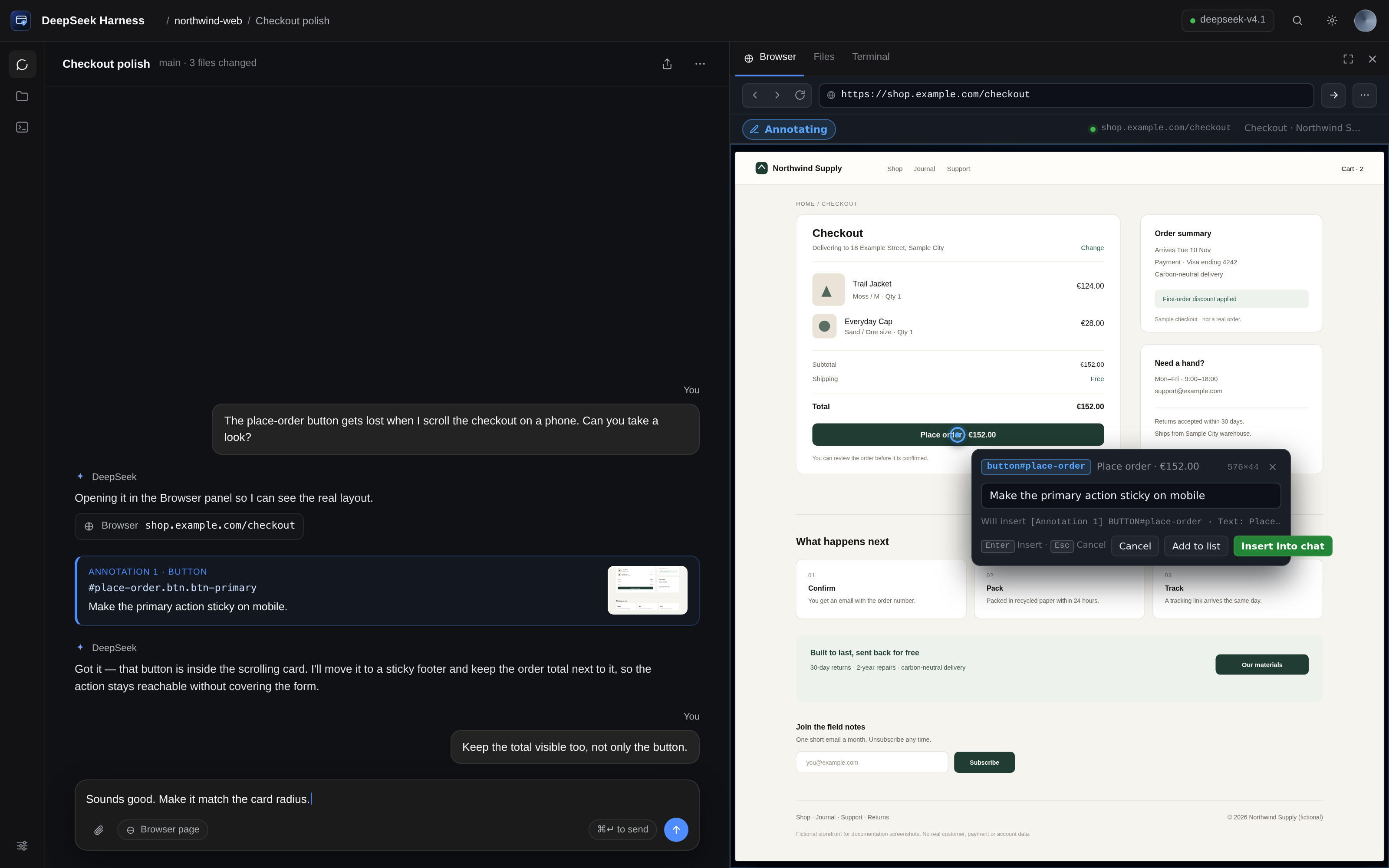 |
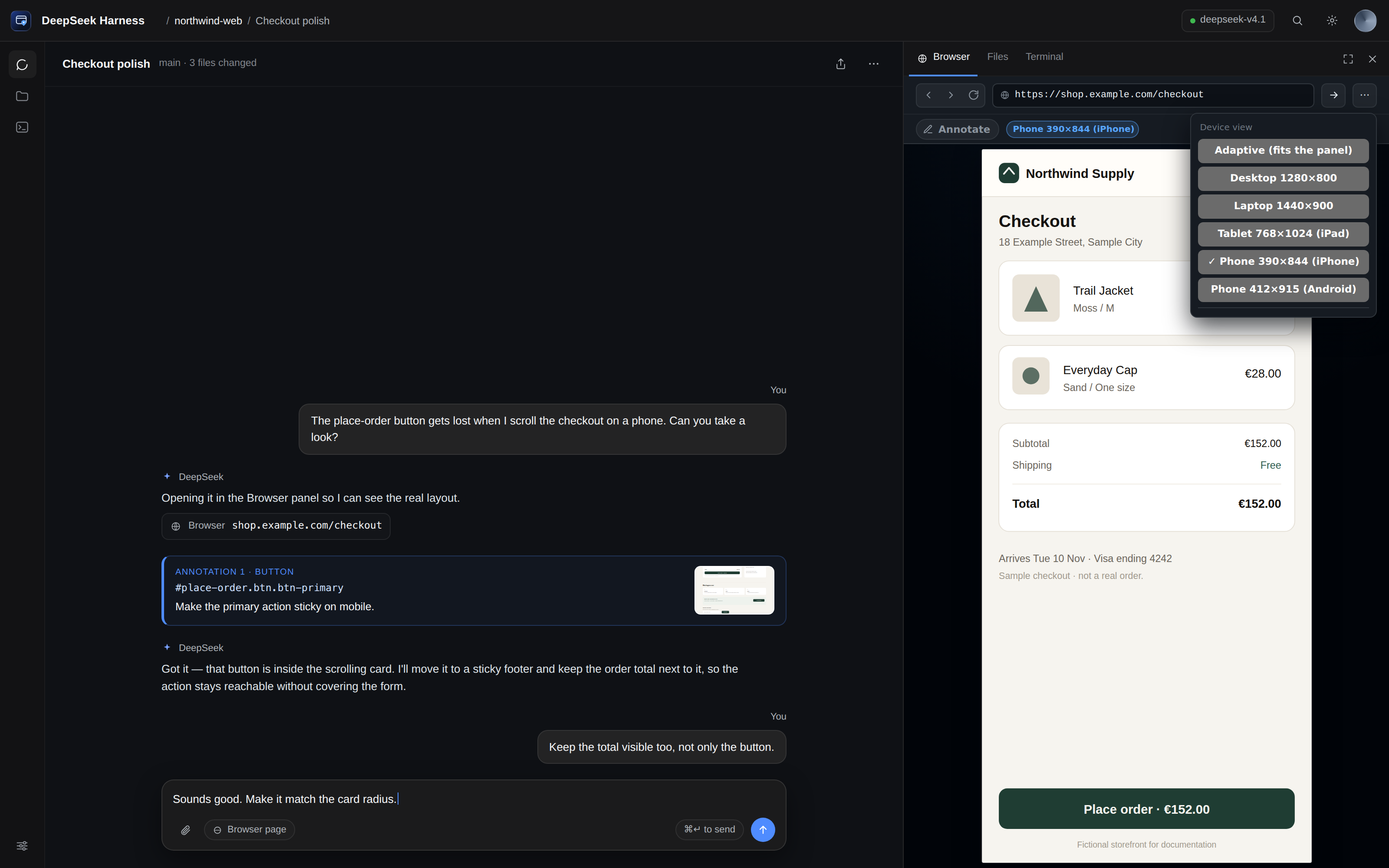 |
| Pick, note, send. The pin lands on the element and the note card prepares the composer payload. | Device emulation. Desktop, laptop, tablet, iPhone and Android with touch and DPR. |
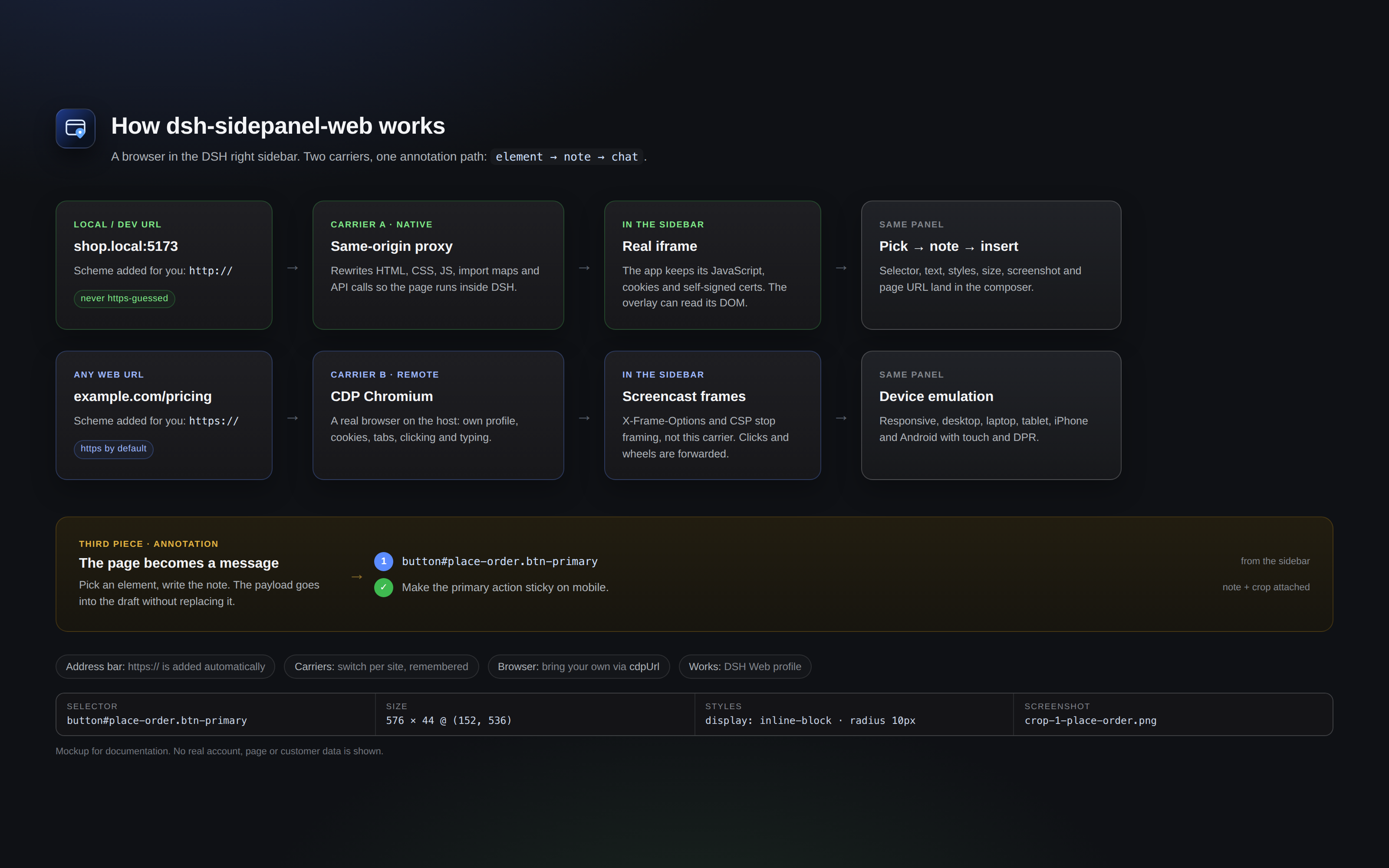
The diagram: a local/dev page through the same-origin proxy, a public page through CDP, and both feeding the same annotation payload.
All screenshots are mockups generated from test/preview/shell.html and test/preview/diagram.html: the panel is the real client, the storefront is the fictional Northwind Supply on the reserved example.com domain, and no real account, page or customer data is used. See Screenshots and privacy.
Screenshots are part of the deliverable, so they follow a hard rule: no real user data.
lib/client.js; the shell around it (conversation, workspace, session) is static HTML in test/preview/shell.html.example.com domain.screenshots.json declares the four storefront images for plugin marketplaces.npm run mockups; the banner is rendered from test/preview/banner.html.connection.requestRejection(req); the web server is loopback-bound. The one exception is the proxy route accepting the per-process render cookie below, which cannot reach any other route.*.local, private, loopback and link-local ranges). Public URLs are refused and handled by the CDP carrier, unless the origin was explicitly forced into the native view.allow-scripts allow-forms allow-same-origin allow-popups for local proxy pages). allow-same-origin is required for the proxy document to keep its cookies and APIs; it also means a proxied page shares the DSH origin. Only proxy pages you trust.sidepanel_render cookie for the DSH origin, scoped to /api/sidepanel-web/p/, HttpOnly, random per process and deleted after the capture. It unlocks that proxy route only; page JS cannot read it and it is never sent to a non-DSH origin.<webview> and a different profile; this plugin does not replace it.lib/
index.js host plugin: routes, settings, proxy registration
service.js CDP service: status, navigation, screenshots, crop, composite
cdp.js zero-dependency CDP client
launcher.js Chromium discovery/launch (container-safe, cert errors ignored)
page.js rendered-page carrier + annotation overlay
proxy.js local/dev rewriting reverse proxy
url.js address-bar normalisation (mirrored in client.js)
client.js sidebar tab, carriers, overlay bridge, composer
assets/ icon.svg, icon.png, icon-180.png, banner.png, screenshots/
test/ smoke tests and the preview/mockup harness
docs/ DSH Web integration research and the collaboration model (Catalan)npm run check # node --check on every source file
npm test # URL rules + proxy rewrite smoke tests
npm run test:ui # Esc, native Insert and composite attachments (needs Chromium)
npm run test:composite # real Chromium composite render with pins (needs Chromium)
npm run smoke # host CDP smoke test (needs Chromium)
npm run mockups # re-render assets/banner.png and assets/screenshots
dsh plugin --profile web add link:"$PWD"Release notes live in CHANGELOG.md.
The preview harness renders the real lib/client.js with a mock backend:
node test/preview/server.mjs
# http://127.0.0.1:7788/harness.html?state=ready&w=360&h=780
See test/preview/README.md for every state, the full-window shell, the behaviour test and the mockup pipeline.
Listed in awesome-dsh-plugin (PR #12641, merged 2026-11-08):
dsh-plugin topic is set.package.json declares dsh.bundle and ships cordis.patch.yml.assets/icon-180.png and storefront screenshots in screenshots.json.market/entry.yml.dsh-sidepanel-web on npm.Contributions are welcome: bug reports, carrier fixes, documentation and mockup improvements. Start with CONTRIBUTING.md, run npm run check and npm test, and read the screenshot privacy rule before adding images. main is protected: changes land through a pull request with one review and green CI. Why the rules look like that, which other projects they borrow from and how conflicts are settled is in docs/collaboracio.md (Catalan). This project follows the Code of Conduct. Security reports go through SECURITY.md, not public issues.
Forked from zengxiaolou/dsh-annotate-browser (MIT): the CDP client, launcher, element picker and crop flow started there. This fork adds the official right-sidebar integration, the local/dev rewriting proxy, the two-carrier switch, the annotation overlay, device emulation, EN/ES copy, the composite annotated image and the composer hand-off.
MIT. See LICENSE; the original copyright notice is preserved.
English · Català · 中文 · Back to top ↑
CLASSIFICATION EVIDENCE
系统优先读取 GitHub Topics,再与站内分类词典和词根规则比对。当前命中: deepseek、deepseek-harness。
morluto
Reverse engineer anything with agents, from app behavior down to native binaries.

deepseek-ai
DeepSeek Harness: Everything is a Plugin.

nexu-io
The 1st Collaborative AI Design Agent Workspace. Local-first and open source. Create motion, prototypes, websites, apps, dashboards, presentations, images, and videos with your team and AI agents. Share work, exchange feedback, and iterate together in one workspace.