Ambient Recall · 「潜藏追忆,如影随形」
dsh-auto-memory — She remembers, unbidden.
EN Now, across windows, too. Context that survives windows, sessions, and tools
中文 该想起的,自己浮现。跨窗口 · 跨会话 · 跨工具,记忆不断线
🌐 Landing page (full feature tour · data flow · papers · screenshots)
Promo gallery · click any thumbnail to view full size · frame-by-frame flip-through below
Promo gallery, frame by frame (expand and flip through)
Frame 1 · Hero — She remembers, unbidden

Frame 2 · Auto Recall — A semantic model matches it and injects it before you ask

Frame 3 · Welcome Tour — Every feature, explained and toggled on the spot

Frame 4 · Recall & Crystallization — Conversation condenses into skills, traceably

Frame 5 · Unattended Mode — Runs all night, zero small talk, zero interruptions

Frame 6 · External Memory Inheritance — Your other AIs feed her memory too

Frame 7 · Scheduled Greetings — Every day remembered






pnpm add @a9i5k4/dsh-auto-memory@latest
📖 User guide ·
🎨 Skin guide ·
👥 Teamwork guide ·
Changelog ·
Contributors & Sponsors ·
QQ group
Key contributor — built the entire frontend, and drove the critical vulnerability scan & debugging work for this release.
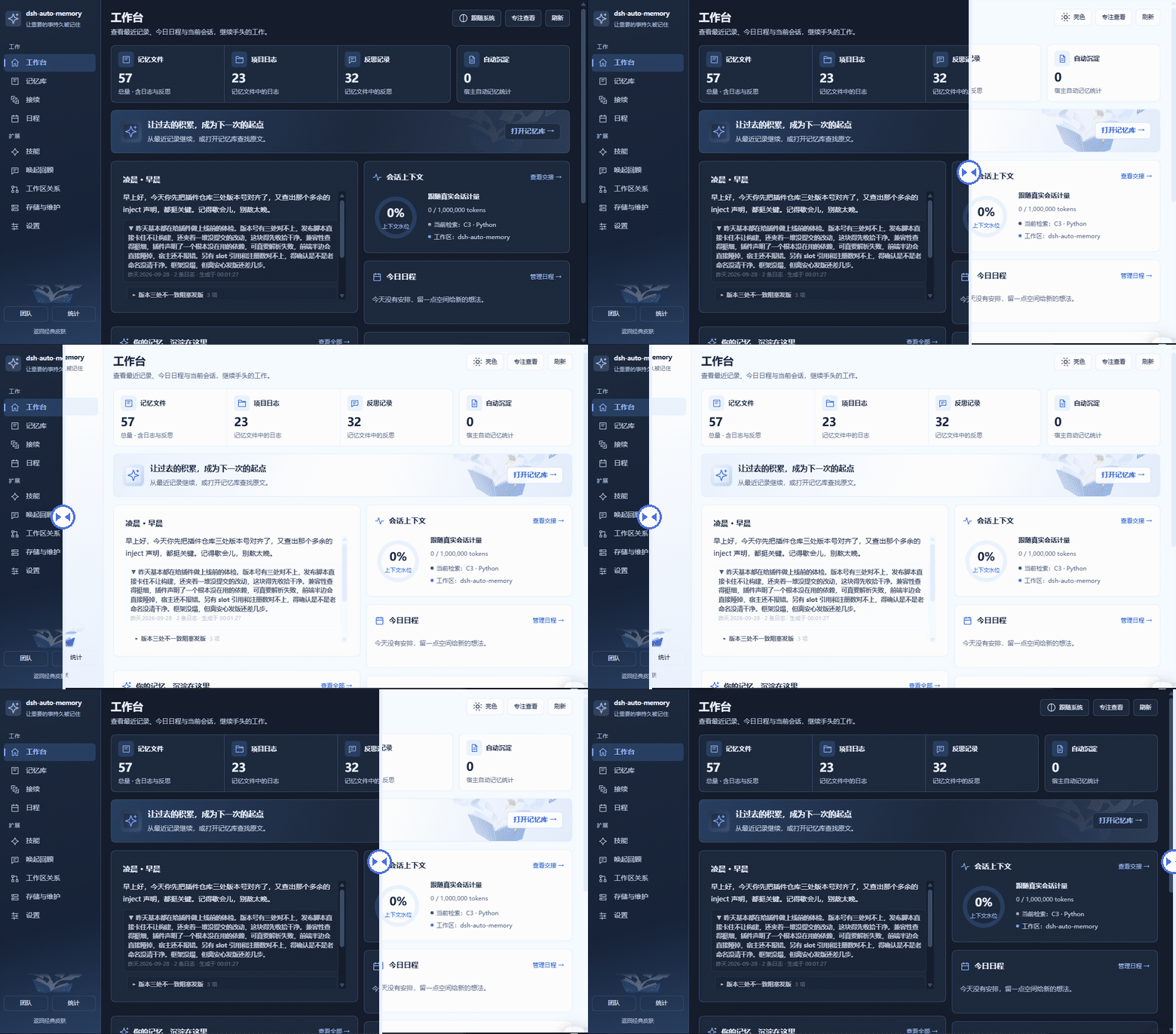
Dark ⇄ Light slider preview · auto-playing loop (GitHub READMEs can't run a real drag widget) —
in the app, switch Dark / Light / Follow system from the panel header.
A reference-style memory workbench: nine-page navigation, list & detail views,
four settings groups, focus view, dark mode and narrow-screen layouts.
Switch to it from the memory panel header button — the classic skin is untouched
and always one click away. All 24 real-host screenshots live in the
Skin guide.
[!NOTE]
🧭 Getting ready for the official long-term memory
Adaptation and pre-research for DeepSeek Harness's official long-term memory system are underway — when it ships, this plugin will offer semantic recall and cross-window continuation for official memories from day one. Everything here is a toggle: with ample stability and flexibility built in, the plugin will auto-adapt to and flexibly complement the official memory stack. Your memory stays seamless — no migration needed.
The burned book keeps no book report
Everyone who does real work with AI knows the moment: halfway through, the context window fills, and she "forgets". Not for lack of intelligence — her thinking was compressed into a summary, like burning a whole book and keeping one line of book report. Why that fix failed, why that path dead-ended — all in the fire.
dsh-auto-memory never believed it had to be this way. She keeps memory outside the window: what should resurface, resurfaces unbidden; and everything she recalls has provenance — checkable, editable, deletable.
Now we push this route to its last missing piece — when the context fills, she no longer compresses herself. She closes a notebook filled with margin notes and opens a new page. The notebook stays within reach.
Compression distorts, closed windows reset, tool switches zero out — starting from here, none of that holds.
Highlights in 30 seconds
|
|
| Proactive recall, zero instructions |
Memory is never fetched by the model — the host watches context and recalls automatically, injected at a fixed boundary, prefix-cache friendly |
| Three-layer memory engine |
User rules → project notes → daily logs; injected + on-demand recall |
| Memory writes itself |
A subagent quietly evaluates every turn and files topic-grouped entries — you never "remember to log" |
| Every activation is auditable |
Each recall decision carries a full evidence chain, gradeable in the Recall review tab; skills crystallize from cross-session evidence |
| Proactive reminders |
The AI spots deadlines and promises in conversation, files them into the calendar and reminds you later |
| Everything is a switch |
Welcome tour + settings page, every feature individually toggleable (incl. unattended mode) |
| External memory inheritance |
Memories from WorkBuddy / CodeBuddy / Claude Code / Codex are scanned, importable, per-source managed |
| Production-grade hygiene |
Write gate (mojibake/stutter/JSON-injection blocking) + dirty-token scanner + credentials never enter prompts |
| Astra-style context management |
A filling context no longer collapses into one summary — four-part handoff notes carry work across windows, full history stays searchable, the agent retrieves on demand (on by default, threshold 0.75) |
| No cross-talk between workspaces |
Open several workspaces or sessions at once and each keeps its own recall decisions and index cache. Clicking into one never disturbs the one that's running |
| Model-agnostic |
No vendor lock, no tier lock: any model on DSH works out of the box — lexical 0GB floor, built-in ~130MB semantic tier, advanced 563MB |
| Portable memory |
Everything lives on your own disk; memories scan in from other AI tools, every entry has an evidence chain — auditable, deletable. Memory belongs to you, not to any vendor |
Four things we poured our heart into
Four features in this plugin were raised one by one, by hand; everything else — calendar, search, the mind map, unattended mode, memory hygiene — grows around them.
The first · She takes notes, and she says welcome back
The earliest version of this plugin learned two small things: after every conversation, it wrote down what was worth keeping, unprompted; and when you returned from time away, or in the morning, afternoon, and late-night hours, it greeted you in a fitting tone. Simple — but these two acts set her character: memory is not a database, a greeting is not a notification chime; it is what a colleague who remembers you says when you walk back in. Everything else grew on that character. We call this plugin "she" throughout — not marketing polish, but because from the very first feature, she was doing the things a person does.
The second · Not "look it up when I remember", but remembering while doing
Humans use memory two ways: deliberately retracing what was done before — and, far more often, having the right memory surface on its own in the middle of doing. The last major release gave her the second kind. We put a Transformers model next to the memory stores so that, mid-conversation, she judges two things: whether anything is worth recalling right now, and which memory it should be — judging from the very material of the dialogue: what you're thinking, what you said, what she answered. The relevant memory thus walks into place, through a fixed boundary into the next turn, before the model even opens its mouth. It never depends on the model "remembering to look" — forget once, and the memory might as well not exist. She remembers to think for you.
The third · Like riding a bicycle — no need to think about how
Once a person learns to ride, they never replay the tutorial — muscle memory takes over, and the skill transfers to the next road on its own. She grows that kind of memory too: after watching your corrections a few times, or doing the same kind of thing again and again, a workflow crystallizes into a skill; next time something similar shows up, the checklist attaches itself — no one reminding. What was learned deliberately becomes something done casually — her procedural memory, the part you can review, pin, and watch grow in the Memory Hub tab.
The fourth · Handoff, not compression
When the context fills, she no longer burns the whole book for a one-line summary; she writes a four-part handoff note — state, goals, dead ends and why, progress and next step — closes this window, and opens the next. The full history stays archived and searchable; details can always be looked back up. The newest of the four, and the last piece of a complete memory — see How she hands off.
Why a plugin
In September 2026, GPT-6 Astra shipped Context Management as an experimental flagship feature: notes kept across context windows, earlier history searchable, handoff preferred over compression as the window fills.
Seeing the announcement, we were quietly glad — like someone walking a night road alone who sees a light come on in the distance. Putting memory outside the window: structured notes, searchable archives, handoff over compression — it turns out we are not the only traveler on this road. That a flagship is willing to press the experimental button for it says this idea deserves to be taken seriously by more people.
So we built it as an open plugin: no experimental gate, no subscription tier — install it in DSH, and every model on your machine gets its own.
|
GPT-6 Astra / Codex experimental feature |
dsh-auto-memory |
| Availability |
Single-vendor flagship, experimental |
Open plugin, any DSH model, install and go |
| Notes |
Keep notes across windows |
Four-part handoff ledger, directly readable and editable by you |
| Archive |
Earlier windows searchable |
Local full archive + lexical/semantic dual-channel retrieval |
| Retrieval |
history/_context tools |
memory_search / memory_note gated-agent tools |
| Trigger |
Token budget + handoff |
Water-level awareness + pre-completion interception |
| Ownership |
Vendor side |
All on the user's disk, governance-style writes, auditable |
| Tiers |
Bound to subscription plans |
0GB lexical → 130MB built-in semantic → 563MB Python advanced |
One route, two arrivals: it ships with a flagship; ours walks into your machine as a plugin.
Handoff is on by default — threshold 0.75, just below the host's 0.80 auto-compaction line (see How she hands off).
One week
Monday, you hand her a research task and shut the laptop halfway through.
Wednesday, you're on a different machine and have switched the default model while you were at it. What she picks up is not "sorry, I don't remember" — it's last week's progress, three dead ends already tried, and the next step. The handoff note is there, the raw record is searchable, and the memory travels with you.
Friday, you ask casually: "Why do you remember this?" She shows you: which message, which tool output, which late-night reflection it came from. You can have her hold onto it tighter — or let it go.
She remembers, unbidden. And if you want her to forget — that's one sentence too.
Handoff-related scenes are on by default.
How she remembers
Memory comes in four layers, each minding its own shelf:
| Layer |
Location |
Content |
| User-level memory |
~/.dsh/memory/MEMORY.md |
Cross-project rules & preferences |
| Project notes |
~/.dsh/memory/workspaces/{workspace}/MEMORY.md |
Conventions & decisions |
| Daily logs |
~/.dsh/memory/workspaces/{workspace}/YYYY-MM-DD.md |
Append-only work log |
| Daily reflections |
…/reflections/YYYY-MM-DD.md |
Structured review (results / lessons / next) |
Static discipline lives in the system prompt — byte-stable, keeps the prefix cache hot, never re-encodes history; dynamic memory rides a runtime snapshot — only the last day of logs plus a reflection digest are injected, everything else fetched on demand via memory_read / memory_recall. Credential/secret sections are always filtered out of prompts.
Memory writes itself. After every turn a small subagent quietly makes one judgment — what's worth keeping: long-term-valuable topics are grouped into today's log (## Topic (HH:MM) + bullets), durable decisions are promoted to project notes, cross-project rules to user-level memory, small talk skipped. Failures don't panic — they queue and retry every 5 minutes, with a 15-second heartbeat file proving the loop is alive. Daily writes have a budget; over budget, the AI merges and dedupes before writing — she remembers restraint, and she remembers not to lose things.
Then, periodically, she looks back: memory_consolidate reads recent logs and distills what deserves long-term promotion into project notes — auto-consolidation handles "log the flow each turn"; this handles "after a while, what's worth keeping".
How she recalls
Never depends on the model "remembering to look". Existing memory solutions either rely on the model calling a retrieval tool, or on you pasting context by hand — skip it once, and the memory might as well not exist. This is host-side associative middleware: while the conversation runs, she watches context and runtime events continuously, and the relevant memories are retrieved, decided, and injected into the next turn before the model opens its mouth. Sent requests can't be rewritten, so injection runs at a fixed boundary — the prefix cache never goes cold, and tokens never pay twice for a memory. Her judging material is the dialogue itself: what you're thinking, what you said, what she answered; whether to recall, and what to recall, is decided live by the semantic model — not "look it up when I remember", but remembering while doing.
Powers are separated too: what to recall belongs to the semantic decision layer; whether and when belongs to the identity/authorization/timing governance layer — every delivery carries an evidence chain. Every page she hands over has also passed inspection: injected content is neutralized for template variables at every exit — a plain {{baseUrl}} in a log can no longer brick an entire turn.
Ask, and she answers: memory_recall returns a layered summary list first (each memory as a ~90-character digest with id, score and match reason), fused across lexical + semantic + time arms — ask for "last week's release trouble" and the memories from that window surface first; expand any id for the full text. Replies are conversational with sources cited. memory_recall is cross-workspace by nature — other projects' logs, notes, and conclusions are one sentence away.
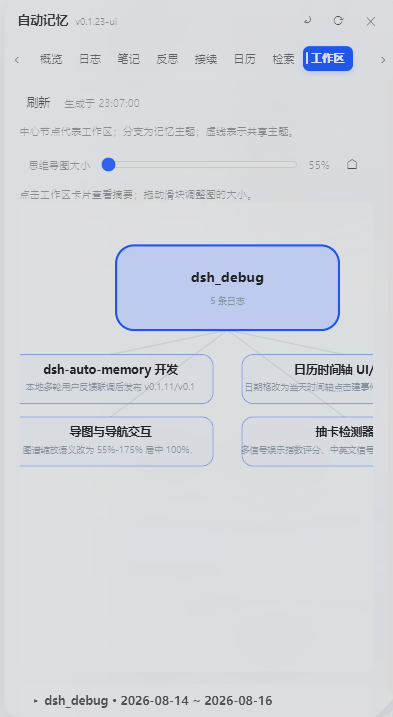
The panel's Workspace tab draws all of this as a mind map: workspaces at the center, memory topics as branches, dashed lines for cross-workspace shares; draggable, zoomable, click a card for details. Your memory has a shape for the first time.
Retrieval isn't "dump all memory in" — three tiers, descending (OpenViking-style)
This borrows OpenViking's tiering idea, recalibrated against real corpus measurements in this repo. The rule is descend tier by tier — never all at once:
| Tier |
Content |
Budget |
When it appears |
| Tier-0 · Catalog (index layer) |
One line per entry = title · conclusion · layer · status · date |
≤ B0 = 800 tokens (resident, ~30 entries) |
The norm — only this tier is injected by default |
| Tier-1 · Digests (candidate layer) |
≤ L1 = 140 chars each, top K = 8 |
8 × 140 = 1120 chars |
Only when the catalog under-hits |
| Tier-2 · Source chunks (evidence layer) |
chunkId = hash(memoryId, digest, index) |
≤ B2 = 2400 chars / call |
Only when evidence is needed |
Flow: Tier-0 out first → narrow → descend to Tier-1 only if short → fetch Tier-2 only for evidence. Single-turn injection still respects injectBudgetChars (default 8000 chars).
Full vs slim (the 3.2.6 narrowing): the full snapshot goes out at most once per turn — on the first turn of a live human request, and in unattended runs only after fullEverySlims (default 3) slim rounds, i.e. roughly once every 3×3 ≈ 9 steps. A slim refresh carries only the status frame (dates, water level, pending reminders); it never carries the content body. So a turn's injection can be a few hundred chars instead of the full budget.
Why it's built this way (measured, not guessed):
- The native corpus is smaller than you'd think: source text p90 is only 1196 chars, max 1692. So OpenViking's
L0 → L1(2k) → L2 middle step can be dropped — jumping from a 140-char digest straight to a ≤2400 source chunk is an acceptable span.
- Pure priority makes tiering collapse: on real corpus, the
project layer's 77 chunks consumed the entire 800-token budget, leaving whiteboard / user / log with zero entries — "tiered" degenerating into single-tier. Hence per-layer quotas (e.g. project ≤ 60% · B0) — a hard rule, not a suggestion.
- Reconciliation: spot-checking real
expand output against corpus length — mem_d55f8e8e reported 1499 chars ↔ corpus 1499 ✅, mem_5a7f779a reported 1403 ↔ 1403 ✅.
The "Karpathy module" — the whiteboard is the corpus: feeding the memory flow graph straight to the AI
This line started from a sentence: "dsh graph is exactly the Karpathy module I wanted." The problem it solves isn't "is retrieval accurate" — it's the shape of memory. Traditional RAG rediscovers from zero on every query, accumulating nothing; the Karpathy-style answer is to let a model incrementally maintain a persistent wiki (entity pages, concept pages, cross-references, contradiction flags) navigated by index.md + log.md.
What this repo shipped isn't "yet another wiki" — it found an interface that needs zero new machinery: pages are the corpus (S10.1).
A whiteboard card carries an anchor, and the anchor is what the Tier-0 catalog slices by. The slicing order is 「anchor → heading → top-level item → whole-file fallback」, so an anchored card becomes its own entry in the guidance layer injected every turn — no new pipeline required.
### Card title
<!-- memory:mem_<32hex> -->
How the anchor is computed (content-addressed, recomputable):
mem_ + first 32 hex chars of sha256(workspaceKey + '\0' + page relative path + '\0' + card title).
The whiteboard text is one of five sources (user / project / log / whiteboard / reflection) feeding the Tier-0 catalog, and it holds a reserved floor quota (whiteboard and user each reserve floorRatio·maxTokens) — so the project layer can't swallow the whole 800-token budget and lock the whiteboard out.
⚠️ Implementation boundary (stated plainly, not oversold): the anchor→corpus path is currently wired only for injection (Tier-0 catalog, via add('whiteboard', …) in index.js).
The memory_recall retrieval corpus still contains only four source classes — daily logs / reflections / project notes / user-level memory — the whiteboard is not yet wired in (see the four pushL0 call sites and the four semSources entries in lib/index.js).
In other words: whiteboard content is injected every turn, but memory_recall still cannot search it. This is a contract-layer item defined but not yet implemented, and it is outside the scope of this change.
The payoff cuts both ways:
- The kanban/whiteboard stops being "a view for humans only" — it is simultaneously a source of injection corpus. Goals, criteria and conclusions you write on the board are visible to the AI in the guidance layer on the next turn;
- It also eases the "two sources of truth" problem: content exists once, on the board; the guidance layer is derived from it, so you can't get "board says A, index says B".
The six Karpathy-style landing items (S10.1–S10.6):
| Item |
What it does |
| S10.1 Pages are the corpus |
Whiteboard cards carry anchors ⇒ sliced by the Tier-0 guidance layer and injected every turn (retrieval side not yet wired — see the boundary note above) |
| S10.2 Index auto-derived |
index is derived from pages (link + one line + layer/status) and must not be written twice; the derived result must match Tier-0 catalog entries |
| S10.3 Lint completed |
Four zero-token classes: orphan entries / stale / mentioned-but-no-page / missing cross-reference. Only "contradiction detection" needs an LLM, and it must be user-triggered — never on the automatic path; lint reports, never auto-fixes |
| S10.4 No state machine |
The whiteboard is a view layer; state belongs to memory entries' layer + status. Adding a state machine = a violation |
| S10.5 Answers flow back |
The conclusion of any search/analysis must be one-click depositable as: ① a new whiteboard card (anchored) ② a memory entry ③ a handoff ledger line. Any conclusion that "lives only in the conversation" is a process failure |
| S10.6 Human/model split |
<!-- model --> / <!-- user --> sections; a full rewrite must carry the user section back verbatim — after a model rewrite, the user section is preserved byte-for-byte |
Sequencing discipline (a lesson actually paid for): the contract layer (format / anchors / index derivation) must come before the RAG substrate — it determines the shape of the corpus; build RAG first and you redo the corpus. The UI layer (board rendering / interaction) comes after RAG instead — "it's only a view".
A path explicitly rejected: Grep agentic ("model-driven glob/grep beats everything"). Its premises are multi-turn LLM tool calls every round (a token multiplier) and a corpus that is exactly token-matchable — but natural-language memory has no literal string to grep. We took only the phrase "whether to search should be judged intelligently", and handed the default judgement to a local linear classifier, fv2 (0 tokens).
Activation eligibility: judging "should this be recalled", not "how similar is it"
This is the most technical — and most misunderstood — part of the system. Semantic relevance ≠ activation eligibility: material can be very similar to the current topic and still be unhelpful to inject right now. We split the decision into two separately measurable targets: semantic relevance and activation eligibility.
The failure mode we named and measured: the echo trap.
When a user restates a memory ("you said X, right?"), that memory's semantic score is necessarily high — yet injecting it now is redundant. On 86 human gold labels: the highest suppress-class score (the noodle echo at 0.6507 and its variant 0.6254) exceeds every activate positive (max 0.5914). In other words — the threshold that "looks safest" lands squarely on echoes.
The two-arm echo rule: echo = 「query and top-1 candidate form a near-duplicate restatement」∧「declarative mood」∧「no recall intent」.
Lexical arm (bigram containment ≥ θ) and semantic arm (denseTop ≥ 0.75) combine with OR — either arm alone was falsified as insufficient; combined, they hit zero false negatives and zero false positives across the 86 gold labels.
Three falsified shortcuts (negative results, published in the paper):
- Lexical containment alone cannot detect echoes — the echo-suppress group's median containment (0.273) is lower than the activate group's (0.462), because questions naturally share the target's terminology;
- Pure text tri-classification cannot judge eligibility (macroF1 0.494);
- A global upfront echo veto harms explicit follow-ups — moving it out of the global front and into the proactive lane improved the best operating point from precision 0.818 / recall 0.237 / 1 violation to 1.000 / 0.289 / 0 violations.
Calibration and feature weights (reproducible numbers):
- Sigmoid calibration lifted intent-head accuracy 0.744 → 0.872 and Brier 0.227 → 0.131 (58 gold);
- LR coefficients of the deployable feature set:
mark (question/recall markers) +1.64 ≫ containment +0.94 > intentProb +0.58 > margin +0.27 ≫ denseTop −0.38.
- In one line: "is this a question" matters an order of magnitude more than "how similar is it".
Three deployment tiers: the size–quality curve (all measured)
| Tier |
Size |
Runtime |
L2 R@5 |
Role |
Lexical BM25 (lexical_pre_v2) |
0 |
Pure JS |
0.200 |
The always-available floor and final fallback |
JS semantic tier (transformers.js + multilingual-e5-small q8) |
~130MB |
Node-side ONNX |
0.850 |
The standard tier, yours on npm install |
| Python advanced tier (BGE-M3 int8 ONNX 563MB / fp32 2.3GB) |
optional 2nd tier |
sidecar |
0.925 |
Quality champion, enabled on demand in the wizard |
JS tier key numbers: model load 679ms, query encode 3.8ms, full rebuild of 251 entries 5.5s.
int8 key numbers: head-to-head with fp32 R@5 delta = 0.000, MRR gap 0.007 (noise level), mean vector cosine 0.975, encode speedup 6× (44s vs 262s), single-query p50 16ms.
⇒ Quantization loss is zero in ranking terms, so the 563MB tier can replace fp32 as the default.
The e5-small vs BGE-M3 gap (0.85 vs 0.925) concentrates on hard-negative twin pairs — the small model is still far better than pure lexical (+65pt), but adversarial near-neighbour discrimination is a capacity problem, not a protocol problem.
Every conclusion comes from reproducible experiments and is frozen into an engineering decision ledger (D1–D11): retrieval model selection · activation policy v2 · embedding benchmark · held-out human gold evaluation (67 human-scored items: actPrecision 0.917 / harmful injections 0 / echo layer 7/7).
How she reminds
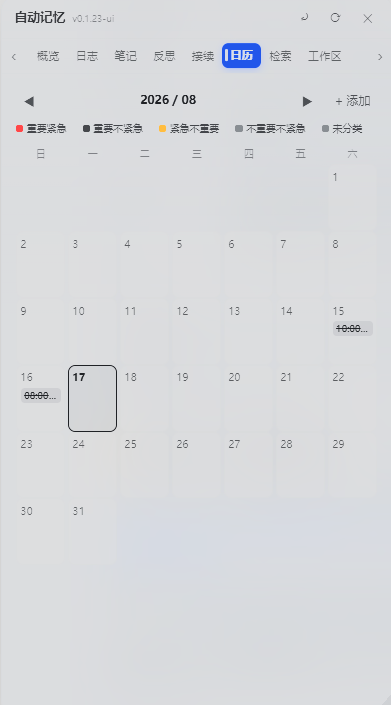
The calendar maintains itself — she does the paperwork. Deadlines and promises spotted in conversation are filed automatically (calendar_add); pending items keep being injected into later sessions until completed — no agreement gets lost in the depths of some chat log. The day view is a 07:00–22:00 timeline with location, reminders, and urgency-tinted colors; calendar_list / calendar_done / calendar_remove let her report, check off, and withdraw.
Period-aware greetings: morning, afternoon, late night — each one mentions the most important work of your day. Not template small talk; a greeting from someone who read your log.
Return after more than an hour away and the memory panel opens itself — a "welcome back", plus the digest of what you should know. Don't like being greeted? One switch — "Auto-open memory panel" — turns it off.
How she grows
Distillation: trading process logs for reusable conclusions. Daily logs older than 30 days are read through, and only what carries cross-session value is distilled — technical decisions, architecture conventions, preferences, hard-won pitfalls — into project notes; originals are archived as a floor, degrading to verbatim archiving if the AI is unavailable — not a single character lost. The recall boundary is just as clear: skills, user-level and project notes are never distilled — only date-named logs go through, and the untouchable stays untouched.
Skills: like riding a bicycle — no need to think about how. After learning to ride, a person never replays the tutorial — muscle memory takes over. She grows that too: after watching your corrections a few times, or repeating similar work, a workflow crystallizes into a skill; next time something similar appears, the checklist attaches itself. Injection comes in three grades — full steps / excerpt / hint — with high-risk scenarios auto-downgraded to a hint, never in the way. Skills promote gradually on cross-session evidence, approved in the Memory Hub tab; 90 days unused and they auto-archive, important ones can be pinned, frequently used ones stay gently warm.
Reflections: before closing the books each day, she writes her own review. Results, lessons, next steps — in a reflection layer of their own; the first session of the next day presents yesterday's review. From Monday on, your project has someone who remembers everything yesterday said.
How she hands off
Handoff is on by default — the water-level threshold sits at 0.75, just below the host's 0.80 auto-compaction line. The window auto-follows the active model (settings.yaml contextWindow, e.g. 1M), or set it manually.
When the context fills, she no longer burns the whole book for a one-line summary; she writes a four-part handoff note — task state, goals, approaches tried and why they failed, progress and next step — closes this window, and opens the next. What didn't fit in the notes is safe too: the full history of messages and tool outputs lands in a local archive, searchable anytime — no detail dies in the fire.
She can also look things back up herself: memory_search queries the full archive on demand, memory_note jots down what matters — from "passively fed injections" to "looking things up on her own", the second upgrade of her memory.
Token water-level awareness completes it: as the window fills, she suggests opening a new window and handing off, instead of silently compressing. The window is the host's territory — she midwifes the handoff, and never decides for the host.
Why handoff isn't "write a summary" — the engineering of whiteboard and ledger
The problem: asking an LLM to produce a paragraph of "what happened before" for a new window looks simple but degrades — each compaction loses a layer, and after a few rounds the handoff material is out of sync with reality, with nobody able to tell that it is. So the rule here is: handoff material must not get to speak for itself either — it has to be traceable, decidable, and regression-tested.
Three entities, each minding one job:
| Entity |
What it is |
Where it lives |
| Handoff ledger |
A fixed four-part shape: task state / goals / approaches tried and why they failed / progress and next step |
handoff/handoff-*.md |
| Whiteboard (PLAN.md) |
The project's whole-picture map: a human-readable planning snapshot; old versions are archived on rewrite |
handoff/PLAN.md |
| Anchor |
Every record carries <!-- memory:mem_<32hex> --> — identity addressing, not positional addressing |
inside the memory file |
Two hard engineering constraints:
- Ledger quality is a hard gate, not a style suggestion. The four headings must match verbatim (a wrong heading breaks downstream weighted truncation and the injection-side parser), each section has a minimum length, and a bad one is rejected outright — the very shape of the section you're reading was formed by that gate.
- Anchors stop append-writes from piercing the file.
appendAnchoredRecord() parses the existing file first: any non-clean state fails closed (neither appends nor rewrites); if reserved syntax appears in the body, the write is refused on the spot with a line number — rather than "succeeding" and then making the whole file permanently unwritable from the next write onward.
The kanban board is not a separate UI — it is another view over the same ledgers and whiteboard: ledger entries laid out as a swimlane matrix (goals / in progress / failures and detours / archived).
A real recorded misstep: board v1 squeezed 92 files into 92 cards and left three swimlanes permanently empty. The root cause was not "too few cards" but a slicing granularity off by one level (slicing by file instead of by the sections inside), compounded by a missing break in sectionOf that collapsed every document into its last heading. v2 aligned granularity to "section".
Where the deep end lives: the cross-window continuity internals are under docs/internal/ — the three-tier contract (Tier 0/1/2 budgets and acceptance predicates), the semantic architecture spec (clauses S1–S10 and stage gates), and the RAG + Karpathy program (six-step pipeline × three stage lines as a build map).
How she moves in
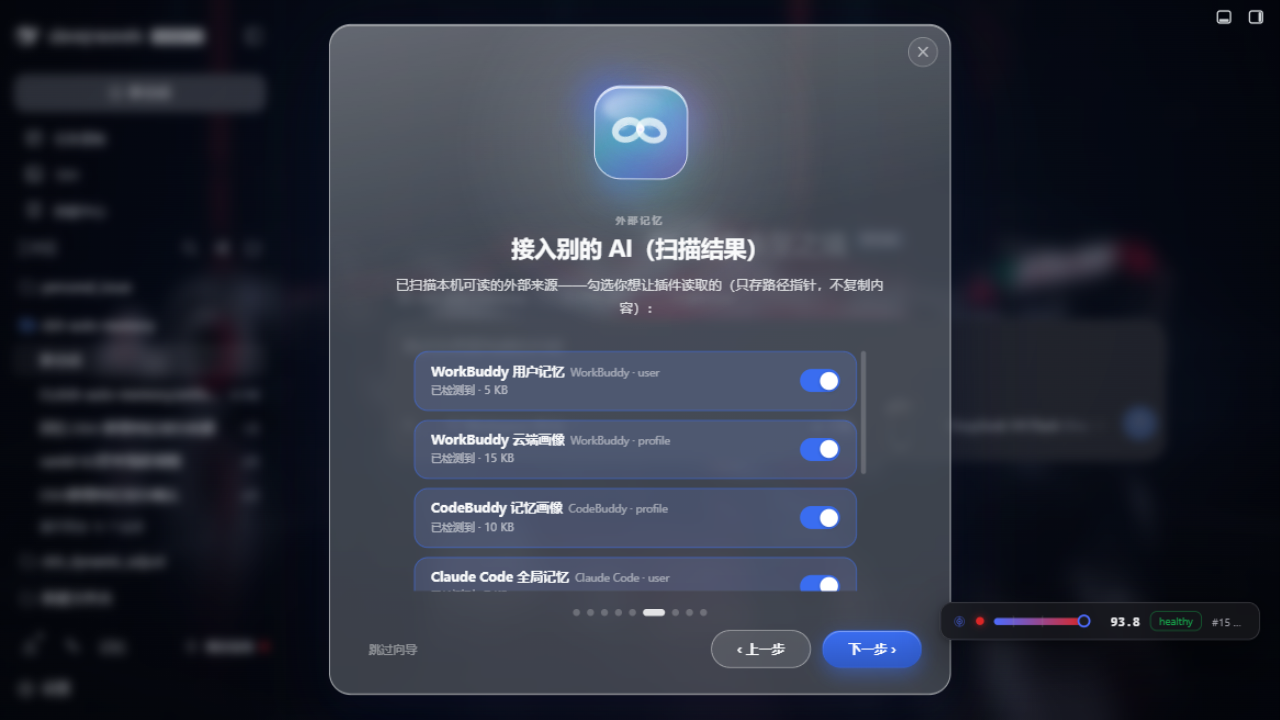
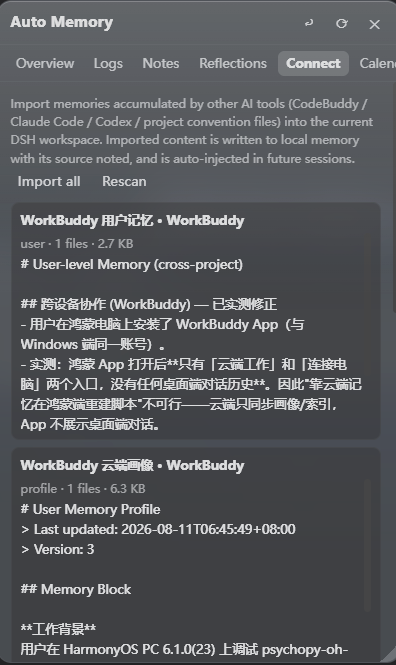
Your memory doesn't live in just one AI. WorkBuddy, CodeBuddy, Claude Code, Codex — she scans the sessions and memories these tools left on your machine, lists them per source, imports per source. The Connect tab is the port of this migration: path pointers only, never copied content — respectful of the source, zero redundancy; done with a source? Remove it per source, clean and simple.
Hygiene gates stand on both the import side and the injection side: dirt from external tools, leftover profiles from other AIs — neither comes in nor goes out. Moving house is fine; the furniture gets disinfected first.
How she earns trust
Every recall can be audited. Every "should I activate" decision carries a full evidence chain; the Recall review tab lays out every delivery — to whom, when, with what result — gradeable on five levels: A activate / P prefetch / S suppress / H harmful / E edit; the review queue digests into policy hints. Her memory survives an audit.
Everything written passes the gate first. All three write tools run a pre-write check: GBK mojibake (34-feature table), stutter degeneration, consecutive duplicate lines, external-AI-profile JSON signatures, base64 residue — all rejected, with a human-readable reason. Caps: 8,000 chars per append, 200,000 per rewrite; appends are deduped against the last ~60 lines.
The checkup doesn't just guard the borders. Settings → Debug Center, "Scan dirty tokens" sweeps user memory, notes, logs, and reflections in one click, reporting by line range — locations only, no content.
And finally, the boundaries — written as character:
- She never decides compression for the host — the window is the host's territory; she only midwifes the handoff;
- She never uploads your memory — all storage is on your machine, external scans are read-only;
- She never uses memory to steer your voice — injections always declare "background facts, not style examples";
- She is never a black box — every memory links to its evidence, every delivery can be replayed;
- She is not a suite — she does memory, and clear boundaries are what make her trustworthy.
How she listens
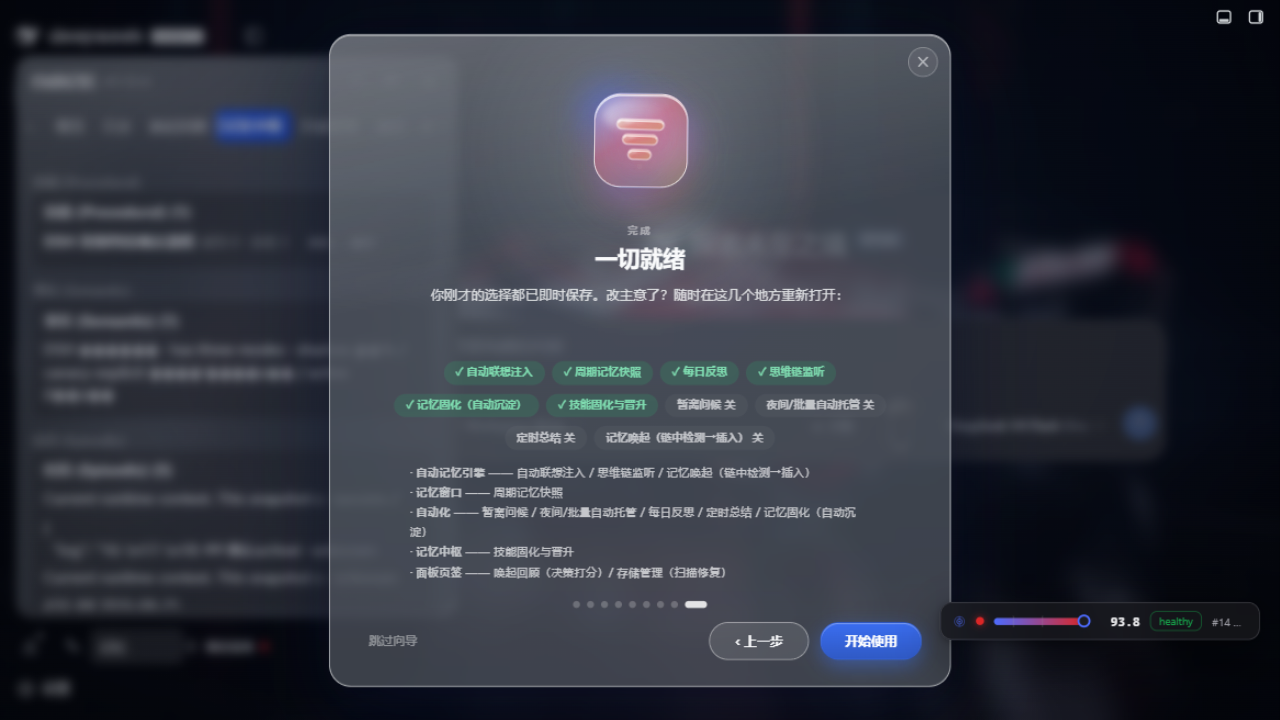
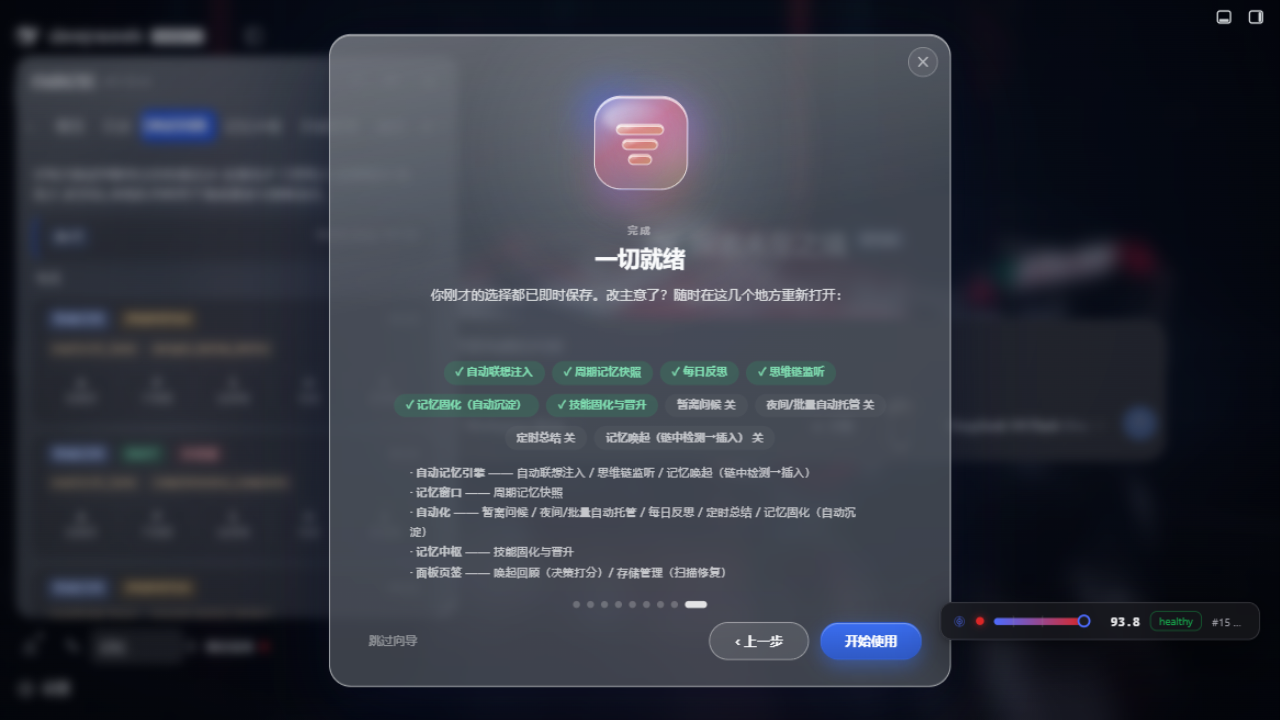
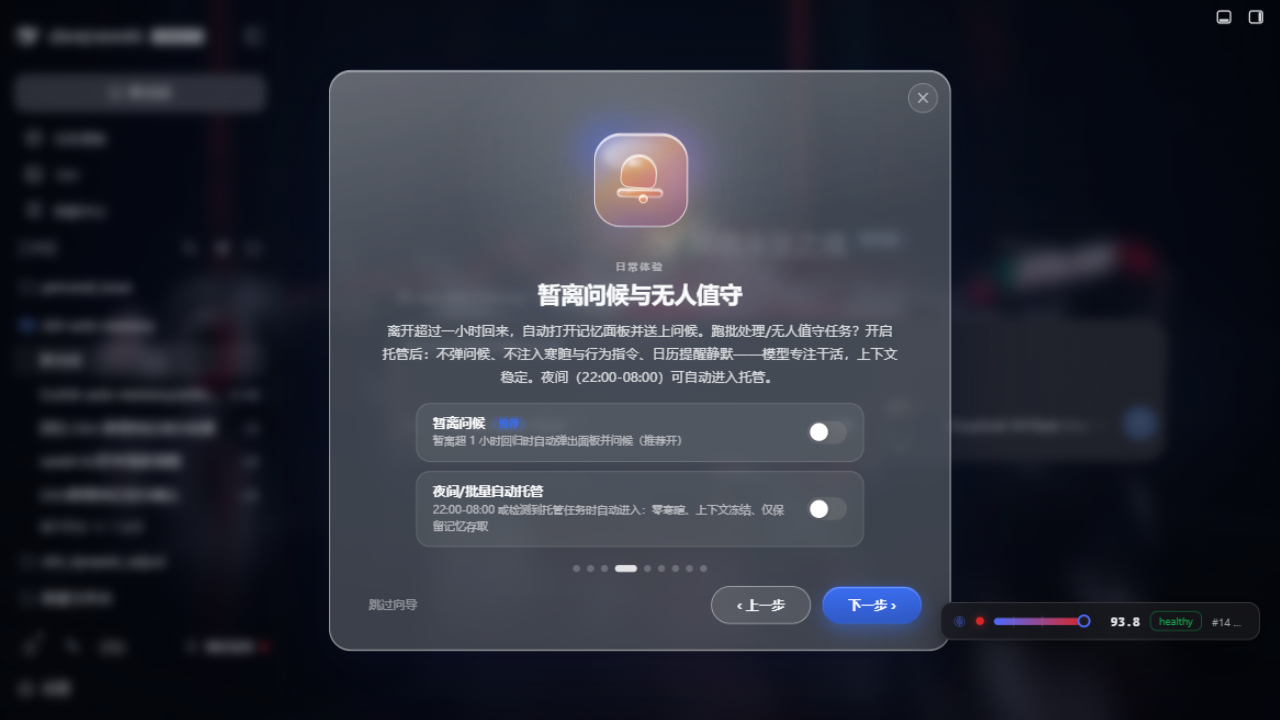
Everything is a switch. First launch auto-plays the welcome tour: one Office/Fluent-style liquid-glass app icon per step — cyan inject, amber greeting, green calendar, violet engine, sky radar, coral finish — each with its own looping motion (bell sway, page flip, linked rings, prism spin, radar sweep, rising spark). Flip every feature right in the tour; switches write config instantly, no second trip to settings. The semantic engine's detection, download, and self-test are inline in the tour, done in one pass. External memory sources are scanned live, ticked per source. Close it halfway without worry — the final "finish" step tells you exactly where each switch lives in Settings.
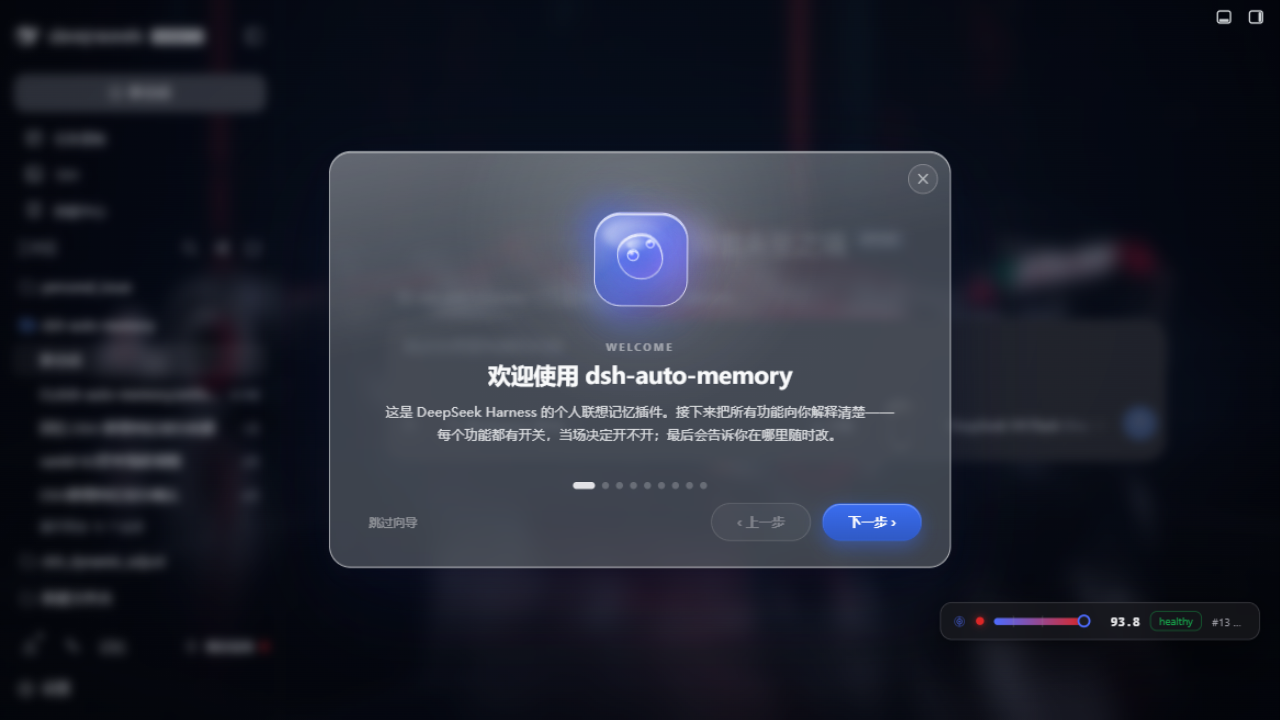
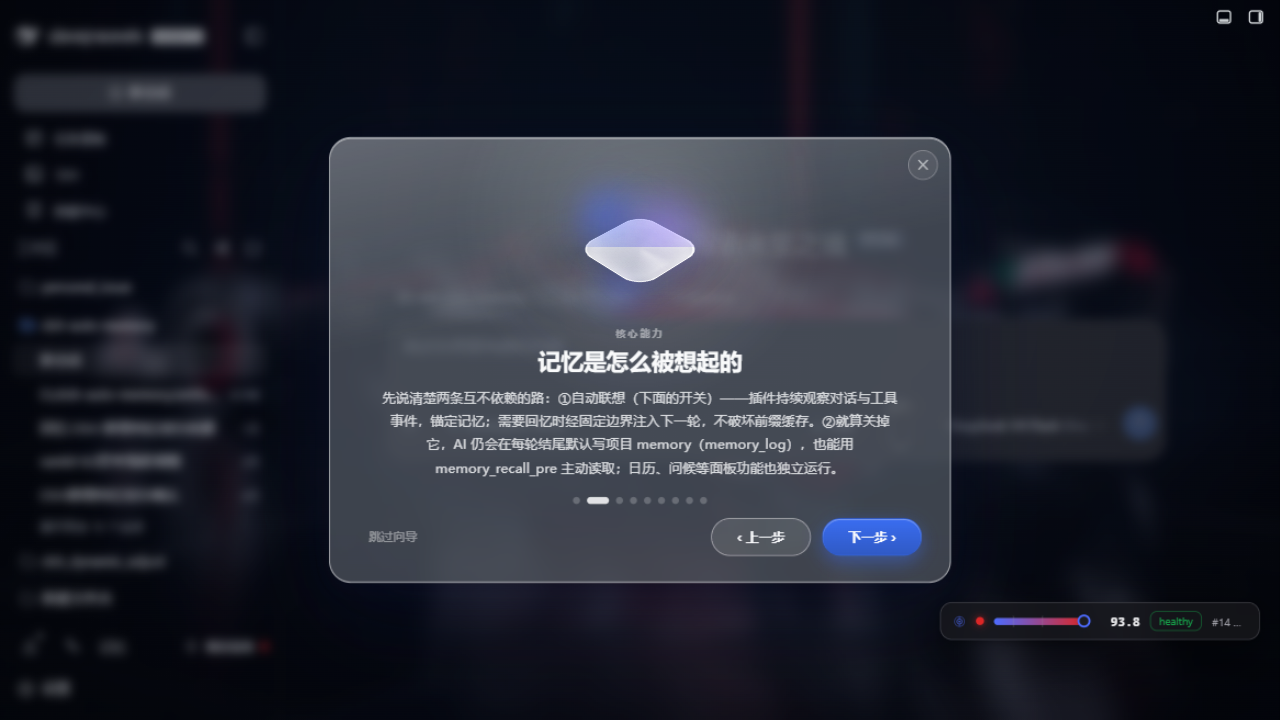
One-time catch-up for upgraders: from v0.1.30 every user auto-plays the full tour once after upgrading, then the changelog follows (skippable). Reopen anytime via Settings → Appearance → Welcome tour → ▶ Replay.
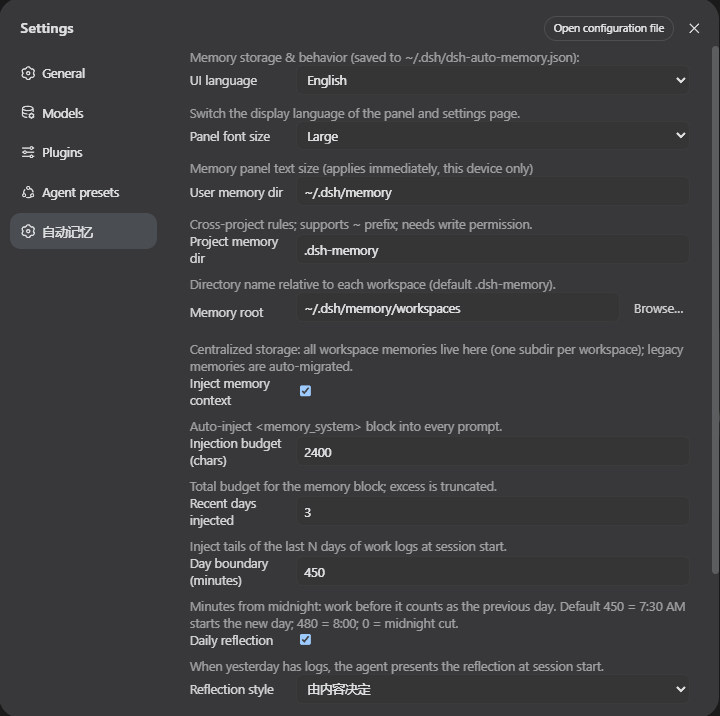
Settings and the tour are twin entrances, mapped one-to-one: proactive recall, periodic snapshots, away greetings, night unattended, daily reflection, scheduled digests, external memory, skill crystallization, auto-open… every switch carries a description, the UI switches between Chinese and English, and the panel font size is adjustable.
Twelve tabs, each minding its own post: Overview (away greeting + period summaries), Logs (incl. the user-level hard-rules editor), Recall review (the audit — grade every activation), Memory Hub (three stores + skill approvals), Storage, Notes, Whiteboard, Reflections, Connect (external memory), Calendar, Search, Workspace (mind map). The panel is considerate too: in DSH Desktop enhanced mode (transparent/Mica materials) it keeps its readability; the default position never covers the sidebar "Memory" entry; click outside or press Esc and it's gone — present, but never in the way.
Long batch jobs? Go unattended. Settings → Automation offers Unattended mode and auto-unattended overnight (22:00–08:00, tunable): while engaged, no greetings, no niceties or behavioural directives, calendar silent — the model focuses on the work, and tokens go to the work too.
Upgrades with dignity. The Settings "Check for updates" button compares against the npm registry, and registry installs get one-click updates; major-version changelogs open with a glass-logo animation — three slabs assembling, expanding, dissolving — click anywhere to skip.
Install (one command)
Prerequisite: install DeepSeek Harness and start dsh web at least once.
Run in the profile directory (~/.dsh/profiles/web):
cd ~/.dsh/profiles/web
pnpm add @a9i5k4/dsh-auto-memory@latest
Then edit package.json in that directory and append to the dsh.profile.bundles array:
"@a9i5k4/dsh-auto-memory"
Restart dsh web (the 「Memory」entry appears in the sidebar).
No pnpm? npm install @a9i5k4/dsh-auto-memory@latest works the same.
pnpm v11 blocks packages published <1 day ago: set minimumReleaseAge: 0 in pnpm-workspace.yaml or pin an explicit version for same-day updates.
Semantic engine (optional but recommended)
The built-in JS semantic tier (e5-small q8, ~130MB) needs the @huggingface/transformers inference library, installed automatically as an optional dependency of the main package. If your pnpm security policy blocked its native scripts (you see ERR_PNPM_IGNORED_BUILDS / Ignored build scripts: onnxruntime-node, sharp), approve and reinstall once:
# approve the onnxruntime-node / sharp native install scripts, then reinstall transformers
pnpm approve-builds
pnpm add @huggingface/transformers
Restart dsh web — the welcome tour's semantic-engine step auto-detects readiness (SHA256 verify + inference self-test).
Three retrieval tiers, switchable in Settings → Semantic engine:/n/n- Lexical (C1, 0GB) — the always-on floor, BM25 over full text.
- Built-in semantic (C2, ~130MB) — the default, auto-downloaded on first launch. Recall is layered (L0 summaries + rank-space fusion), so long memories no longer get truncated by the model's token limit.
- Advanced Python (C3, ~563MB) — BGE-M3, for power users; install it in the same settings step and it also serves
memory_recall, not just proactive association.
Retrieval is time-aware too: ask for "last week" or "three days ago" and the matching memories rise to the top. Lexical retrieval (0GB) always works as a fallback; skipping the engine only lowers recall precision.
Removing the advanced engine: Settings → Semantic engine has an "Uninstall and reclaim disk" button that deletes the whole ~/.dsh/python-engine/ directory (venv ~280-400MB + model ~539MB, about 850MB total). The same thing by hand:
rm -rf ~/.dsh/python-engine # Windows: rmdir /s /q %USERPROFILE%\.dsh\python-engine
Only that directory is touched — memories and embedding-config.json stay where they are.
AI-era installation
Copy this to the AI assistant you're already using:
Install the npm package @a9i5k4/dsh-auto-memory in the DeepSeek Harness web profile
directory ~/.dsh/profiles/web (pnpm add or npm install),
append "@a9i5k4/dsh-auto-memory" to the dsh.profile.bundles array in package.json,
then restart dsh web to activate the plugin.
Updating
cd ~/.dsh/profiles/web && pnpm up @a9i5k4/dsh-auto-memory@latest
The Settings page has a "Check for updates" button comparing your version with the npm registry; registry installs get a one-click update.
Configuration
Config file ~/.dsh/dsh-auto-memory.json (everything adjustable in the Settings GUI, zh/en UI and panel font size included):
{
  "userMemoryDir": "~/.dsh/memory",
  "memoryRoot": "~/.dsh/memory/workspaces",
  "injectEnabled": true,
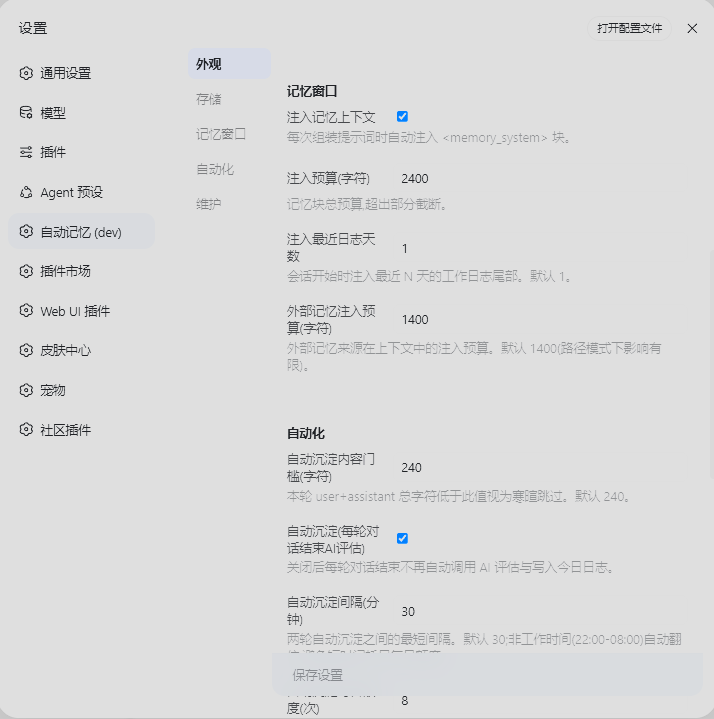
  "injectBudgetChars": 8000,
  "recentDaysInjected": 1,
  "reflectEnabled": true,
  "autoConsolidate": true,
  "autoConsolidateCooldownMinutes": 30,
  "autoConsolidateDailyMax": 8,
  "unattendedMode": false,
  "unattendedAuto": false,
  "unattendedAutoHours": ["22:00-08:00"],
  "memoryHubEnabled": true,
  "externalSources": { "workbuddy-user": true, "claude-global": true },
  "dayBoundaryMinutes": 450
}
Full key reference lives in the Settings page — every switch has a description, and every welcome-tour switch maps 1:1 to settings.
Engineering core (restraint by design)
- Zero runtime dependencies beyond Node built-ins
- Prefix-cache friendly: byte-stable injection keeps DeepSeek's prefix cache hitting — your history is never re-encoded
- Rate-limited AI: auto-consolidation ≤8×/day with a 30-minute cooldown; dynamic injection defaults to an 8,000-char budget — useful memory without burning tokens
- Centralized storage: all workspace memory under one root (
~/.dsh/memory/workspaces/), readable from any session
- 30-day distillation: old logs are AI-distilled into project notes; originals archived, nothing lost
The 3.0 rebuild (invisible to you — but every recall goes through it)
Most of this release adds no new buttons. It changes what makes a memory trustworthy. Eight mechanisms, all shipped and measured:
| Mechanism |
The problem it kills |
| Write-side gate |
Reserved-syntax filtering moved into the write primitives instead of being detected after the fact. Content carrying a reserved marker is refused on the spot with a line number — no more "one bad line makes the whole file permanently unwritable" |
| Decision ledger |
Every "should I recall this?" call becomes a reviewable ledger entry; five-grade scoring (A/P/S/H/E) flows back into policy. Not a log — an auditable chain of decisions |
| Single-source state commit |
The memory index version (miv) converges on one source, killing the "one store, two version numbers" class of recompute-and-miss bugs |
| Concurrent atomic writes |
On Windows a rename hitting an external file handle throws EPERM. Now it retries with backoff, and on final failure it preserves the full candidate snapshot (recoveryPath) for forensics instead of destroying already-rendered content |
| Engine identity gate |
The JS and Python semantic implementations are mutually exclusive identities: whichever you pick is the one that runs — never shadowing, never cross-triggering |
| True incremental embedding |
Only changed records get re-embedded, with reuse ordering — instead of recomputing the whole store |
| Bounded rerank window |
Optional rerank tiers (off/fast/enthusiast): the clock starts at enqueue, 60s expiry with no renewal, LRU ≤16, yields when busy — background work never slows the live conversation |
| Multi-workspace / multi-session isolation |
With several workspaces and sessions open at once, each keeps its own gate decisions, index cache, and degradation state. Clicking into a workspace can no longer disturb the one that's actually running |
Each of the eight ships with a regression suite and a mutation demo (revert the mechanism to its old behaviour and the tests must genuinely go red). Engineering detail lives in docs/internal/.
UI gallery
Memory panel · Overview (away greeting + AI period summaries)
Memory Hub · three stores + skill promotion approvals
Recall review · grade every activation decision
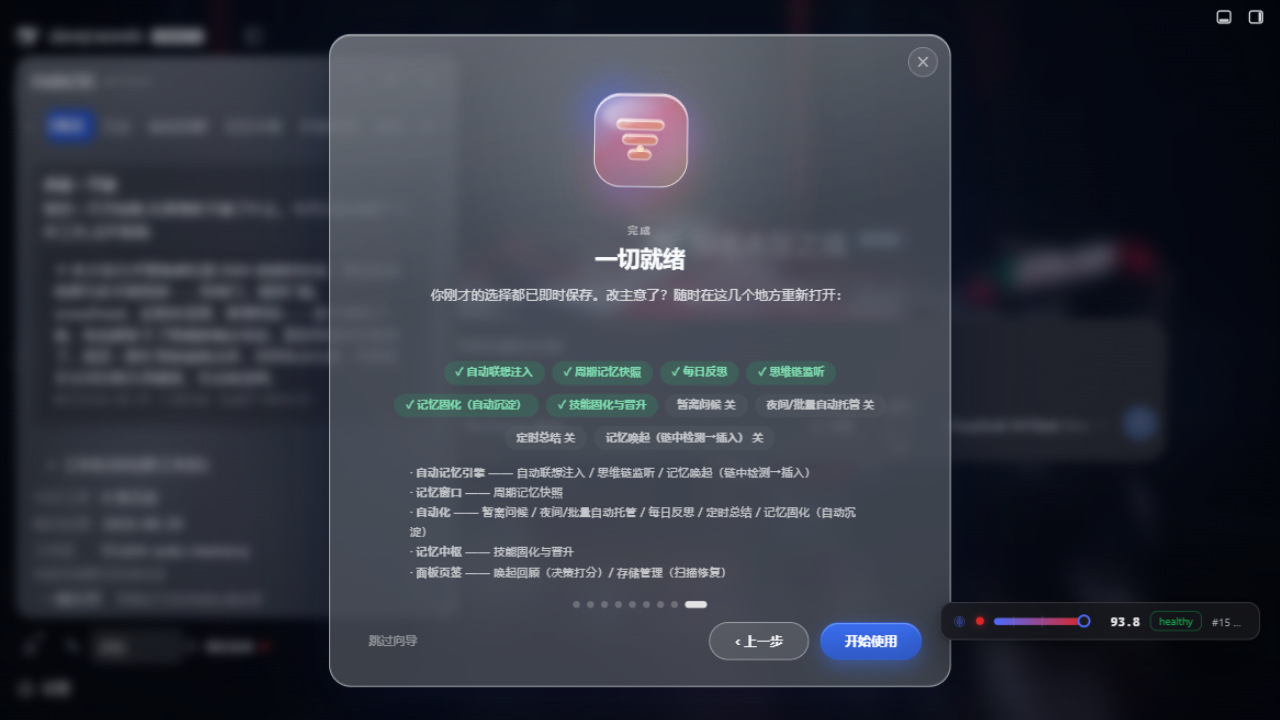
Welcome tour · feature switches + engine detection
More screenshots (click to expand)
External memory scan (inside the tour)
Connect other AI tools
Calendar view
Workspace mind map
Settings
Structure
lib/index.js — Host half: engine, injection, tools, routes (zero runtime deps, Node built-ins only)lib/client.js — Browser half: memory panel (calendar / mind map) + settings page + welcome tour (zh/en i18n)python/ — optional Python semantic sidecar (BGE-M3 int8, advanced tier)cordis.patch.yml — plugin registration row
Architecture
All milestones are implemented and live-verified. The full interactive architecture map lives at docs/proactive-associative-memory-system-map.html; the core layering:
DeepSeek Harness (Node, 127.0.0.1:3080)
├─ JS memory core (lib/*_pre.js, zero runtime deps)
│   M1 session isolation · M2 ContextObserver projection
│   M3 memory anchoring (anchored records + sidecar identity)
│   M4 corpus adapter + shadow retrieval host (evidence store)
│   M5 context/evidence bridge (envelope · coverage · cite/correction)
│   M6 activation inbox (validate→offer→claim→reference tail→delivered/seen)
│   lexical_pre_v2 lexical fallback retrieval (BM25 + CJK 2gram, 0GB always-on)
│   C2 built-in semantic tier (e5-small q8 ~130MB, default)
└─ Python sidecar M7 (optional, lazy-spawned child process)
    worker_semantic_pre_v1.py
    ├─ index_sync: JS-authorized paged index build (digest checks, scope grouping)
    ├─ dense: BGE-M3 int8 + para-512 chunks + cosine (R@5 0.925)
    ├─ hybrid: dense 0.7 + lexical 0.3 fusion
    └─ fv2 activation policy: two lanes + hard gates (echo/correction/stale/scope)
Separation of powers: the Python semantic layer decides what to recall and when to suggest; the JS authority layer decides identity, authorization, timing, and delivery — Python never creates evidence nor injects directly. Data flow: context_push → M5 envelope → decision → M6 fixed-boundary injection → delivered/seen evidence back.
Design papers
The design is not guesswork — every algorithmic conclusion comes from reproducible experiments, frozen into an engineering decision ledger:
Papers were authored by the autonomous engineering agent (ZCode / GLM); all conclusions were frozen into the production implementation under human review.
Project documents
| Document |
Answers |
| Whitepaper |
What are the invariants you must not break, and what are the known limits? Every default value in it is code-verified. |
| Skin guide |
How to build a skin: the three key layers (tokens / anchors / assets), the full token table, the readings↔routes map, and the acceptance checklist. Contributors: submit skins to the skins/ library via PR. |
| Teamwork guide |
Teamwork as it stands: every config key, the 10 team routes, the data-flow diagram (outbox → transport → merge → conflicts), standalone-mode behaviour, and the honest "not implemented" list. |
| Frontend co-creation plan |
What can outside contributors change, what is off-limits, and how to do it — complete component/route/slot map included. |
| Feature Inventory |
What features exist and where each one lives (39 user capabilities / 19 tools / 71 routes / 155 config keys) |
⚠️ Upgrading from before 3.0? A batch of default values was flipped in 3.0.0 —
most notably whiteboard + ledger went from off to on. Do not trust pre-3.0
documentation on defaults; see the whitepaper §4.1 for the verified table.
Known limitations
- Memory files are plain-text Markdown; no secrets stored unless explicitly requested.
memory_recall session search depends on the deployed session-query index; without it, only local search works.- Advanced Python (C3) recall requires the BGE-M3 model installed in Settings → Semantic engine (~563MB).
- Lexical search is a full scan without an inverted index; only matters once memories number in the thousands.
autoConsolidateCooldownMinutes = 0 falls back to 30 (known quirk, to be addressed).- Plugin-set changes require a dsh restart.
Community
Feedback & chat: join the community QQ group — Join the dsh-auto-memory group — for bug reports, usage tips, and quick responses faster than GitHub issues.
🏆 Sponsors · 赞助商
| Logo |
简介 |
 |
dshapi · API 中转站 —— 为本项目的开发、回归测试,以及 M 系列语义引擎的选型与激活策略研究提供模型端点。没有这些额度,那些基准实验根本跑不起来。
立即注册 → |
Community contributors:
- @Minervaowl7 — responsible for the complete development of the new frontend (the dev-preview UI) and critical debugging: a reference-style memory workbench (nine-page navigation, list & detail, four settings groups, focus view, dark mode, narrow-screen), integrated through a generator that derives new skin variants from the classic components and fails loudly on structural drift (PR #146). Also the most prolific contributor overall: 51 PRs + 57 issues covering workspace-overview log-date anchoring, auto-continuation host hardening, semantic-index self-healing, the python download chain and recovery-candidate lifecycle (#16–#146)
- @JIE42393 — 7 issues on panel behaviour, recall quality and configuration edge cases (#15, #26, #30, #41–#43, #45)
- @Fishsb — 3 issues on memory recall and injection behaviour (#18–#20)
- @messiahyl — 2 issues (#8, #9)
- @ProperSAMA — panel readability fix for DSH Desktop enhanced mode (transparent/Mica materials) + entry-button anti-occlusion & outside-click/Esc close (PR #12)
- @nkh0472 — unattended/batch workflow hardening feedback that drove the welcome tour and per-feature switches (Issue #10)
- @fei009009 — pull request (#29)
- @humou44 — Japanese UI localisation: proposed in PR #143 and landed as a dictionary-driven i18n layer covering the whole panel (602 inline strings + 583 dictionary keys); more languages will plug into the same layer
- @alexchenzl (#6) · @ALuoXue (#2) · @Architectxz (#1) · @cuohua (#40) · @eclgo (#13) · @jeffsui (#39) · @lhbsaa (#3) · @moonltppt (#14) · @swtseaman (#21) · @xiaochaZ (#38) · @zjj871114037 (#7) — bug reports and feature requests
Full credits, including infrastructure sponsors: Contributors & Sponsors
Sponsors
Development resources for this project are partly provided by:
- DSH API — API relay station providing the model endpoints used for development, testing, and the semantic-engine research behind the M-series features. Thank you for keeping the lights on.
Infrastructure and API-quota sponsors are listed on the Contributors & Sponsors page. If you would like to support the project, open an issue or join the QQ group.
Credits
This project is built human-machine collaboratively. In addition to engineering and community contributions above:
- Aik358 — project owner: product direction, architecture, and engineering.
- @Minervaowl7 — author of the new frontend (the skin system): independently built the complete new UI — a nine-page workbench, list/detail views, four settings groups, focus view, dark-mode adaptation and narrow-screen layouts. This is the starting point and foundation of the plugin's skin system: by integrating through a generator that derives new skin variants from the classic components, later contributors can keep re-skinning on top of it while the classic skin stays byte-for-byte unchanged. Also the project's most prolific community developer (51 PRs · 57 issues).
- ZCode (GLM, Z.ai) — autonomous engineering agent: M-series semantic-engine implementation, benchmark research papers (M7-RESEARCH-PAPER / Activation v2 report), regression suites, and the landing-page design/build.
- Kimi K3 (Moonshot AI) — frontend agent: contributed to the v0.1.30 welcome-tour interface assets and visual QA.
- DeepSeek Harness (DeepSeek V4) — the self-iteration environment and collaborator of this project: most of the features contributed by the community author and the agents above were grown inside DeepSeek Harness, self-evolving together with DeepSeek V4 — spotting a problem, locating the root cause, writing the patch, running the regression suite and opening the PR all happened within the same set of Harness sessions. This is itself an instance of a harness iterating on, and developing, itself: the project is used by humans and AI while it makes itself better in the very same environment. The plugin's own context-management capabilities (handoff ledgers / whiteboard / watermark sensing / auto-continuation) grew out of exactly this need — supporting long-running, cross-session self-iteration.
AI agents are credited as authors of the research papers and parts of the implementation, under human review and direction.
Release


