
模型与 MCP
待识别

rea
morluto
Reverse engineer anything with agents, from app behavior down to native binaries.
PROJECT TOPICS
PROJECT README

English · 简体中文






⚙️ Setup · 🚀 Quick Start · ✨ Key Features · 🧰 MCP Tools · 🐍 Python SDK · 🤝 A2A · 🏗️ Architecture · 📖 Docs · 简体中文
FlowX lets AI agents build, run, and evolve workflows through MCP, a Python SDK, or A2A. Describe a process and FlowX generates a workflow graph, audited and tested Python nodes, and a FastAPI backend.
Describe → Generate → Inspect → Run → Evolve → Reuse
Original upstream: AIpRoBuilder/FlowX · Attribution notice · Source provenance and verification. FlowX remains Apache-2.0 licensed; compliant forks and reuse are welcome.
prompt, image, and video cards in addition to structured text. The new flowx_core.media toolkit adds provider image/video helpers, Pillow resize and crop, FFmpeg trim and resize, optional headless Blender (FLOWX_ENABLE_BLENDER=1), and FLOWX_MEDIA_DRY_RUN=1 for zero-cost node tests. Media outputs and step cards are journaled under workflows/<workflow_id>/runs/. Provider calls can be billable, and generated code and tests are not sandboxed.prompt, image, and video cards, with run history (Sync outputs), stale-revision badges, zoom/wide canvas, drag-to-arrange layout saved per workflow, and a lightbox for full-size previews. Media is delivered through an owner-only /api/flowx/media route using authenticated HTTP Range responses. Each workflow also has an Edit .env panel that shows and edits its service_<id>/.env file for service-specific provider, media, and tool configuration. See the plugin README.FLOWX_LLM_API_KEY and no longer ask for a skill directory. The FlowX skill scripts reuse the plugin's saved Python, workspace, and API key.WorkflowEngine subclasses.run_service returns a connectable base_url; MCP adds run_step and reset_session.evolve and MCP workflow evolution can target the whole workflow, a single node, or let the engine decide.Turn an intent into an editable, reusable process instead of a one-off answer. Change the workflow later without rebuilding unchanged nodes.
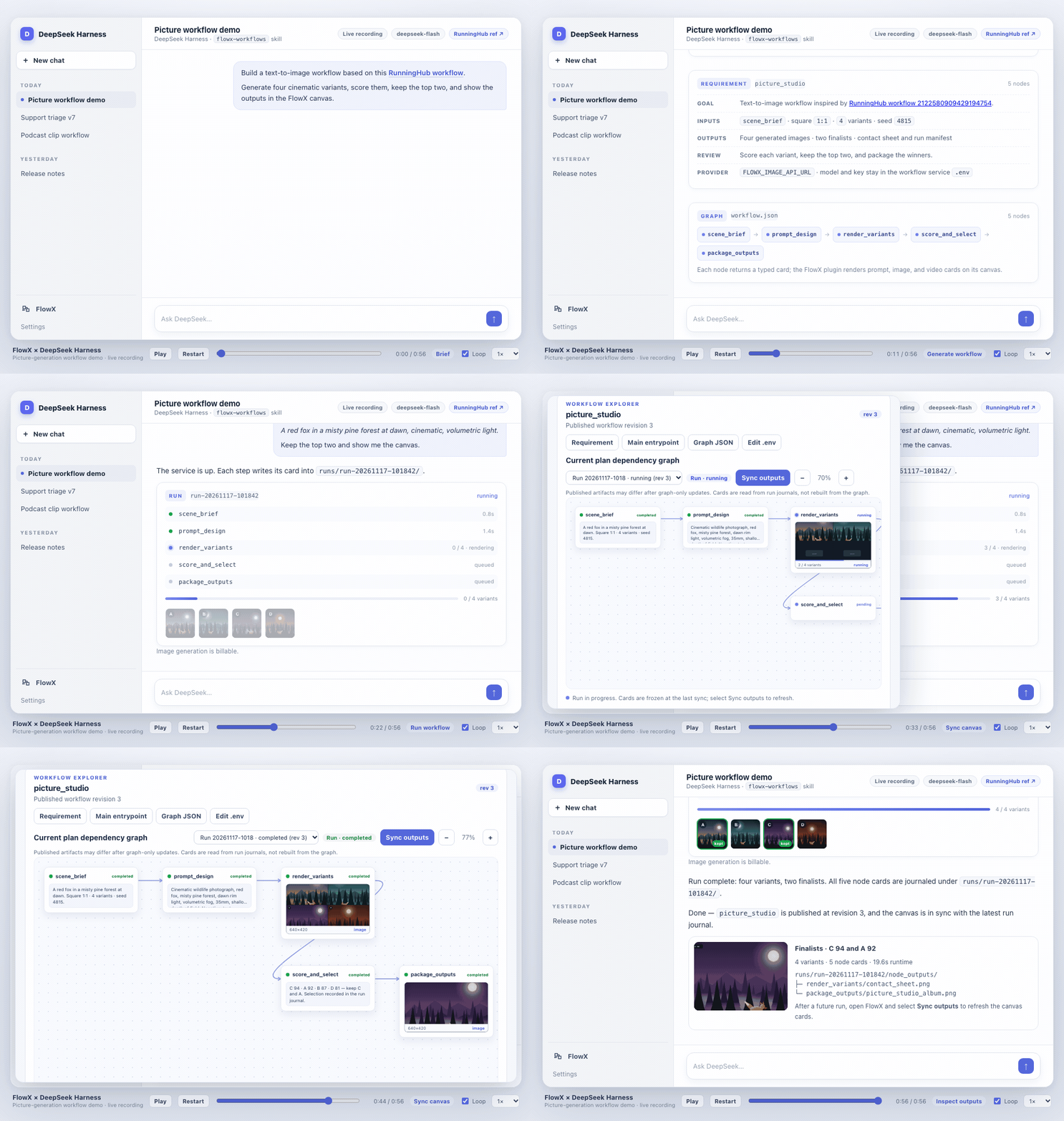
Live recording of a FlowX picture-generation workflow in DeepSeek Harness. See the storyboard or open the interactive demo.
workspace/workflows/<workflow_id>.Clone FlowX and install the core, MCP server, SDK, and A2A adapter:
git clone https://github.com/AIpRoBuilder/FlowX.git
cd FlowX

# Create and activate a virtual environment
python3.10 -m venv .venv
source .venv/bin/activate

# Install FlowX and its runtime dependencies
python -m pip install --upgrade pip
python -m pip install -e .# Poetry
poetry env use python3.10
poetry install
# uv
uv sync
# conda
conda env create -f environment.yml
conda activate flowxTo replace the Git-installed ag_ui_workflow runtime with a local checkout, install FlowX and its dependencies first, then install the local runtime without dependencies:
python3.10 -m venv .venv
source .venv/bin/activate
python -m pip install --upgrade pip
python -m pip install -e .
python -m pip install -e ../ag_ui_worflow --no-deps
With Poetry or uv:
# Poetry
poetry env use python3.10
poetry install
poetry run pip install -e ../ag_ui_worflow --no-deps

# uv
uv sync
uv pip install --python .venv/bin/python -e ../ag_ui_worflow --no-deps
For source-checkout execution, FlowX automatically discovers each packages/* component. Set FLOWX_EXTRA_PATHS only when the external ag_ui_workflow source is not installed.
cp .env.example .envEdit .env and set your provider, model, API key, and workspace:
FLOWX_LLM_PROVIDER=deepseek
FLOWX_LLM_MODEL=deepseek-flash
FLOWX_LLM_API_KEY=
FLOWX_DEFAULT_WORKSPACE=./.flowx_workspaces
FLOWX_CONFIG_ROOT lets an installed flowx-mcp resolve a .env file outside the repository checkout. FLOWX_EXTRA_PATHS can point at a local ag_ui_workflow source when it is not installed into the current environment.
The SDK and A2A server read process environment variables; they do not automatically load this .env file. Export the settings or load the file in your application before creating a client. For example, from the checkout root in macOS/Linux:
set -a; source .env; set +a# Default local stdio entry point
flowx-mcp
# Verbose logging
flowx-mcp --verbose
# Source-checkout entry point
python3.10 run_server.pyUse poetry run or uv run if the environment is not activated. An MCP host normally starts the server itself; the command above is for checking the entry point.
Replace the executable with the absolute path to your virtual environment's flowx-mcp, and set your credentials and workspace. MCP hosts may not inherit your shell's PATH.
{
  "mcpServers": {
    "flowx": {
      "command": "/absolute/path/to/your/venv/bin/flowx-mcp",
      "env": {
        "FLOWX_LLM_PROVIDER": "deepseek",
        "FLOWX_LLM_MODEL": "deepseek-flash",
        "FLOWX_LLM_API_KEY": "<your key>",
        "FLOWX_DEFAULT_WORKSPACE": "/absolute/path/to/flowx_workspaces"
      }
    }
  }
}
Store credentials according to your MCP client's security guidance; avoid committing them to a repository.
The FlowX workflow skill guides a compatible coding agent through building, inspecting, repairing, running, and evolving workflows. Install it in a skill directory before using it.
To make it available in a project (including this one), run the following from the root of a FlowX source checkout, replacing the example path with the destination project's absolute path:
TARGET_PROJECT=/absolute/path/to/your/project
mkdir -p "$TARGET_PROJECT/.github/skills/flowx-workflows"
cp -R skills/flowx-workflows/. "$TARGET_PROJECT/.github/skills/flowx-workflows/"
Alternatively, install it for your user account in VS Code from the FlowX source checkout:
mkdir -p ~/.copilot/skills/flowx-workflows
cp -R skills/flowx-workflows/. ~/.copilot/skills/flowx-workflows/
These commands overwrite matching files in the destination; review or back up local changes first. Other agent hosts may use different skill directories; check their documentation. When redistributing the skill, retain its attribution and the applicable FlowX LICENSE and NOTICE.
Open the target workspace in a skill-capable agent and ask it to use FlowX, or
invoke /flowx-workflows in a host that supports skill slash commands. Reload
the workspace if the skill is not discovered. Installing the skill copies its
instructions and scripts, not the SDK; on first use, the agent can install FlowX in an appropriate
Python environment if it is missing. Configuring an LLM and registering the
MCP server are separate steps. See installation,
environment, and
MCP registration. A pip install does not
automatically install the agent skill.
With Hermes Agent installed, install this skill from the public GitHub repository:
hermes skills install AIpRoBuilder/FlowX/skills/flowx-workflows
hermes skills list
In a Hermes chat, the equivalent is
/skills install AIpRoBuilder/FlowX/skills/flowx-workflows. Review the skill
and approve the installation when prompted; then start a new session or
refresh the skills and invoke /flowx-workflows. GitHub installation requires
the skill to have been committed and pushed to the repository's default branch;
it cannot install unpublished local changes.
To install both FlowX and the skill in one explicit operation on macOS or Linux, run the following with Git, Hermes, and Python 3.10+ available. It creates a dedicated virtual environment and refuses to reuse an existing path:
python3 -c 'import sys; assert sys.version_info >= (3, 10), "Python 3.10+ required"' && \
  test ! -e "$HOME/.flowx/venv" && \
  test ! -L "$HOME/.flowx/venv" && \
  python3 -m venv "$HOME/.flowx/venv" && \
  "$HOME/.flowx/venv/bin/python" -m pip install 'git+https://github.com/AIpRoBuilder/FlowX.git' && \
  hermes skills install AIpRoBuilder/FlowX/skills/flowx-workflows
Review and approve the Hermes prompt, then check its output. If a step fails or
the installation is declined, the environment may remain; inspect it before
retrying. The command does not register MCP or configure credentials. For MCP
registration use $HOME/.flowx/venv/bin/flowx-mcp as the executable; for SDK
code use $HOME/.flowx/venv/bin/python.
To install the current local checkout into the default Hermes profile instead, run this from the FlowX repository root (back up any existing destination file first):
mkdir -p ~/.hermes/skills/flowx-workflows
cp -R skills/flowx-workflows/. ~/.hermes/skills/flowx-workflows/
For a named profile or a custom Hermes home, use that profile's skills directory instead. Copying manually does not use Hermes's hub installation or update tracking. The skill is separate from the FlowX MCP server and its configuration.
After setup, ask your MCP-capable agent:
Use flowx to build a workflow.

Build a workflow that accepts a support ticket, classifies its category,
assigns a priority, and drafts a reply. Name the reply node draft_reply.
Return the category, priority, and draft reply as structured output.create_workflow(name="Ticket Triage"), then start_new_workflow(workflow_id, prompt). The optional name is the workflow folder and ID; omitting it keeps the generated-ID behavior. A name must be a safe single folder name and cannot overwrite an existing path.get_build_status(workflow_id). Check status and result.ok: the response's top-level ok only confirms that the status query succeeded.input_required, show awaiting.prompt and awaiting.test_log, then resume with submit_background_build_input using the exact workflow_id, revision, request_id, awaiting.stepId as step_id, and the user's input. Poll again.get_workflow and list_nodes. Use the generated step IDs, not fixed demo IDs.MCP builds run in the background; the Python SDK retains synchronous methods. Older synchronous MCP build tools were removed: finish or abort an old paused build with the old server before upgrading. Generation sends requirements and possibly logs to your LLM provider and can run generated tests; review generated code before running its service.
start_build_workflow_json, start_build_nodes, and start_build_main_entrypoint. The graph tool also modifies existing plans; start_build_workflow and start_evolve_workflow modify existing workflows.test: <guidance> amends the test, skip skips the amendment, and an empty answer uses the test log. Supported start tools accept interactive=false to repair from the log without prompting.abort_background_build and its exact workflow_id, revision, and request_id. For recovery_required, call recover_background_build with the exact workflow_id and revision before starting another build.list_pending_builds recovers pending questions only while the original process is alive.Run the workflow as a service.
Update the draft_reply node: for urgent tickets, include an escalation note.
Then rerun the service.run_service starts or restarts the generated service. run_step feeds one step's input to the running service and reports when the workflow pauses for more input; reset_session cancels a paused run. start_evolve_workflow changes the whole workflow (target="workflow"), one node (a step id or node id from list_nodes), or lets the engine decide; poll its background build as above.
These MCP tools let the host agent operate the workflow layer from the same conversation. UI rendering is deliberately left to the host.
| Category | Tool | Purpose |
|---|---|---|
| Background | create_workflow(name=None) |
Allocate an empty workflow, optionally naming its folder and workflow_id. |
| Background | start_new_workflow |
Start building an allocated empty workflow and immediately return. |
| Background | start_build_workflow_json(workflow_id, prompt, temperature=0.35) |
Create the graph and requirement analysis for an allocated empty workflow or modify them for an existing workflow; does not build nodes or the entrypoint. |
| Background | start_build_nodes |
Build nodes or amend specific nodes by step id; unchanged nodes are reused. |
| Background | start_build_main_entrypoint(workflow_id, amendment='', fastapi_port=8000, smoke_test=false) |
Create or regenerate the main entrypoint from the latest nodes, optionally smoke-testing it. |
| Background | start_build_workflow |
Modify an existing workflow from a request and/or run logs; later stages can follow earlier changes. |
| Background | start_evolve_workflow |
Evolve an existing workflow (target="workflow") or one node (step id or node id); without target the engine decides. |
| Background | get_build_status |
Query the latest in-process status and any review question by workflow_id. |
| Background | submit_background_build_input |
Guard and accept an answer for a paused build, resume in the background, and return immediately. |
| Background | abort_background_build, recover_background_build |
Abort a paused build or recheck an uncertain engine state. |
| Background | list_pending_builds |
List paused background builds and their awaiting questions; recover request_id and revision after a timeout or client restart while the server remains alive. |
| Runtime | run_service |
Run a built workflow as a service and return its base_url; calling it again reruns the service with the latest files. |
| Runtime | run_step |
Feed one step's input to the running service; returns awaiting when the workflow pauses for more input. |
| Runtime | reset_session |
Cancel a paused session so the next run_step starts a fresh run. |
| Runtime | stop_service |
Stop a workflow's running service. |
| Inspection | list_workflows |
List workflow ids with their node ids, versions and unresolved errors. |
| Inspection | list_nodes |
List a workflow's nodes as step id, node id and version; use them as start_evolve_workflow targets. |
| Inspection | get_workflow |
Locate a workflow's requirement, workflow.json, node versions and main entrypoint. |
Embed workflow building directly in a Python agent or the backend behind your own intelligent UI, without an MCP transport. A complete walkthrough is in examples/sdk_quickstart.py.
from flowx_sdk import FlowXClient

with FlowXClient(workspace="./workflows") as flowx:
    created = flowx.build_workflow_json(
        "Build a workflow that categorizes and prioritizes support tickets.",
    ).raise_for_failure()                                  # workflow.json + requirements
    workflow_id = created.workflow_id
    flowx.build_nodes(workflow_id, await_repair_input=False).raise_for_failure()  # all nodes, or {step_id: amendment}
    flowx.build_main_entrypoint(workflow_id).raise_for_failure()
    print(flowx.run_service(workflow_id))                  # run as a service
    input("Press Enter to stop the service... ")
Each build call returns an AgentResult with per-stage outcomes, errors, logs, and artifact paths. raise_for_failure() raises for failed stages. Keep the client open while using the service; exiting the with block stops services it started.
build_nodes, build_workflow, and evolve default to pausing on a failed node test. If status="input_required", inspect awaiting and resume with flowx.answer(request_id, input, awaiting["stepId"]). A paused result can have ok=True, so raise_for_failure() alone does not confirm completion. Pass await_repair_input=False to repair from the test log automatically. For guidance and input options, see examples/sdk_guided_repair.py.
With the SDK installed, LLM settings exported, and a workflow graph already built, run the skill's build script from the repository root, replacing the workspace and workflow ID with your own:
python skills/flowx-workflows/scripts/build.py --workspace "$WS" nodes --workflow-id "$WF"If the script emits an input_required JSON event, review awaiting.prompt and
awaiting.test_log. Keep the same process running and enter one JSON line in
its stdin, followed by Enter:
{"action":"answer","input":"Handle empty input before calling the API."}Send one answer per pause; repeat if another node needs input. Use
test: <guidance> as the input to amend the generated test, skip to skip this
amendment attempt, or an empty string to repair from the test log alone. Send
{"action":"abort"} to cancel; closing stdin also aborts. The optional step_id
must match awaiting.stepId. --auto-repair disables these test-repair pauses.
Check the final result.status, result.ok, stages, errors, and logs rather than
assuming a pause or answer means success.
Node audit violations are repaired automatically from their audit reports; they do not have a separate user-input pause. See the skill instructions and dynamic workflow documentation for details.
To change an existing workflow, choose what to evolve with evolve(workflow_id, command, target=...). list_nodes returns each node's step id and node id to use as a target; without a target the engine decides what the command refers to. A runnable walkthrough is in examples/sdk_evolve.py.
For a direct, LLM-free smoke test of the expanded DynamicWorkflowOrchestrator engine, see examples/dynamic_workflow_orchestrator.py. It exercises per-node generation/repair chains, finalizer IDs and an incremental business-graph update.
from flowx_sdk import FlowXClient, WORKFLOW_TARGET

workflow_id = "<existing workflow ID>"
with FlowXClient(workspace="./workflows") as flowx:
  flowx.evolve(workflow_id, "Add a language-detection step.", target=WORKFLOW_TARGET, await_repair_input=False).raise_for_failure()
  nodes = flowx.list_nodes(workflow_id)
flowx.evolve(workflow_id, "Validate empty input.", target=nodes[0]["step_id"], await_repair_input=False).raise_for_failure()Let another agent delegate workflow generation to FlowX through the non-streaming Agent2Agent endpoint:
flowx-a2a --host 127.0.0.1 --port 8001It serves an A2A agent card at /.well-known/agent-card.json and JSON-RPC at /a2a (also /). Supported methods are message/send, tasks/get, and tasks/cancel. Send an A2A text message to build a workflow; add metadata.workflowId to modify an existing one. The task is completed when every stage succeeded and otherwise failed; either way it carries the result, including the generated artifact paths.
The Generative Workflow layer has one shared core and three agent-facing interfaces: flowx_core plans, generates, audits, and runs the generated workflows; flowx_mcp, flowx_sdk, and flowx_a2a make those capabilities available to different agent hosts. The generated runtime sits beneath that layer; the intelligent UI sits above it.
flowchart TB
  UI["Intelligent UI / agent host"] --> MCP["Local MCP: build, modify, run"]
  UI --> SDK["Python SDK: build, modify, run"]
  PEER["Peer agent"] --> A2A["A2A: delegate generation"]
  MCP --> CORE["FlowX · Generative Workflow layer"]
  SDK --> CORE
  A2A --> CORE
  CORE --> FILES["Workflow graph + node code + backend"]
  FILES --> RUNTIME["FastAPI + ag_ui_workflow runtime"]
  MCP -->|"run / rerun as a service"| RUNTIME
  RUNTIME -.->|"AG-UI SSE to a custom frontend"| UI
MCP -->|"follow-up changes"| CORE| Path | Import | Responsibility |
|---|---|---|
packages/core |
flowx_core |
Request engine, graph and node generation, audits, repair orchestration, and service supervision. |
packages/mcp |
flowx_mcp |
Local stdio MCP server and tool surface. |
packages/sdk |
flowx_sdk |
Python client for building, evolving, inspecting, and running workflows. |
packages/a2a |
flowx_a2a |
Non-streaming A2A adapter. |
docs |
— | Dynamic-workflow, runtime-compatibility, and provenance details. |
tests |
— | Cross-package layout and provenance checks. |
Workflow compilation is the mechanism behind the Generative Workflow layer. Planning and code generation turn intent into artifacts; audits provide feedback during generation and runtime checks. The artifact flow below is mirrored from assets/architecture.mmd.
flowchart LR
    A[Raw requirement] --> B[requirement_analysis.md]
    B --> C[workflow.json]
    C --> D[node_docs/*.md]
    D --> E[nodes/*.py]
    E --> F[main.py]

    C --> G[Graph audit]
    E --> H[Node audit]
    F --> I[Entrypoint audit]
    F --> J[Runtime log audit]

    G -->|feedback| C
    H -->|feedback| E
    I -->|feedback| F
J -->|feedback| EFlowX targets the request-scoped ag_ui_workflow API, verified against upstream revision 0319046 (2026-10-23), including the StepMeta step-metadata contract. Contract details for contributors are in docs/RUNTIME.md.
FlowX thanks CGraph for providing the runtime DAG engine framework used in workflow execution.
Issues and pull requests are welcome. If FlowX is useful to you, star the repo, share a workflow you generated, or open an issue describing an intent you want turned into a workflow.
When you redistribute or modify FlowX, keep the LICENSE and NOTICE attribution (see docs/PROVENANCE.md).
Interested in building the Generative Workflow layer for AI Agents—or connecting it to an intelligent UI? Get in touch at peterxcx@gmail.com.
WeChat QR code:

FlowX is licensed under the Apache License 2.0. Redistribution and modification are permitted under its terms; keep the NOTICE attribution and the source provenance record when redistributing FlowX source.
Original upstream: AIpRoBuilder/FlowX.
CLASSIFICATION EVIDENCE
系统优先读取 GitHub Topics,再与站内分类词典和词根规则比对。当前命中: mcp、llm。
morluto
Reverse engineer anything with agents, from app behavior down to native binaries.

deepseek-ai
DeepSeek Harness: Everything is a Plugin.

nexu-io
The 1st Collaborative AI Design Agent Workspace. Local-first and open source. Create motion, prototypes, websites, apps, dashboards, presentations, images, and videos with your team and AI agents. Share work, exchange feedback, and iterate together in one workspace.