
其他
完整应用

deepseek-harness
deepseek-ai
DeepSeek Harness: Everything is a Plugin.
PROJECT TOPICS
PROJECT README
English | 中文
A DeepSeek Harness (DSH) plugin for the Web UI: play a customizable sound when a task finishes, and an attention sound whenever something needs a human.
📬 Submitted to Awesome DSH Plugin — PR #752 (pending maintainer approval)
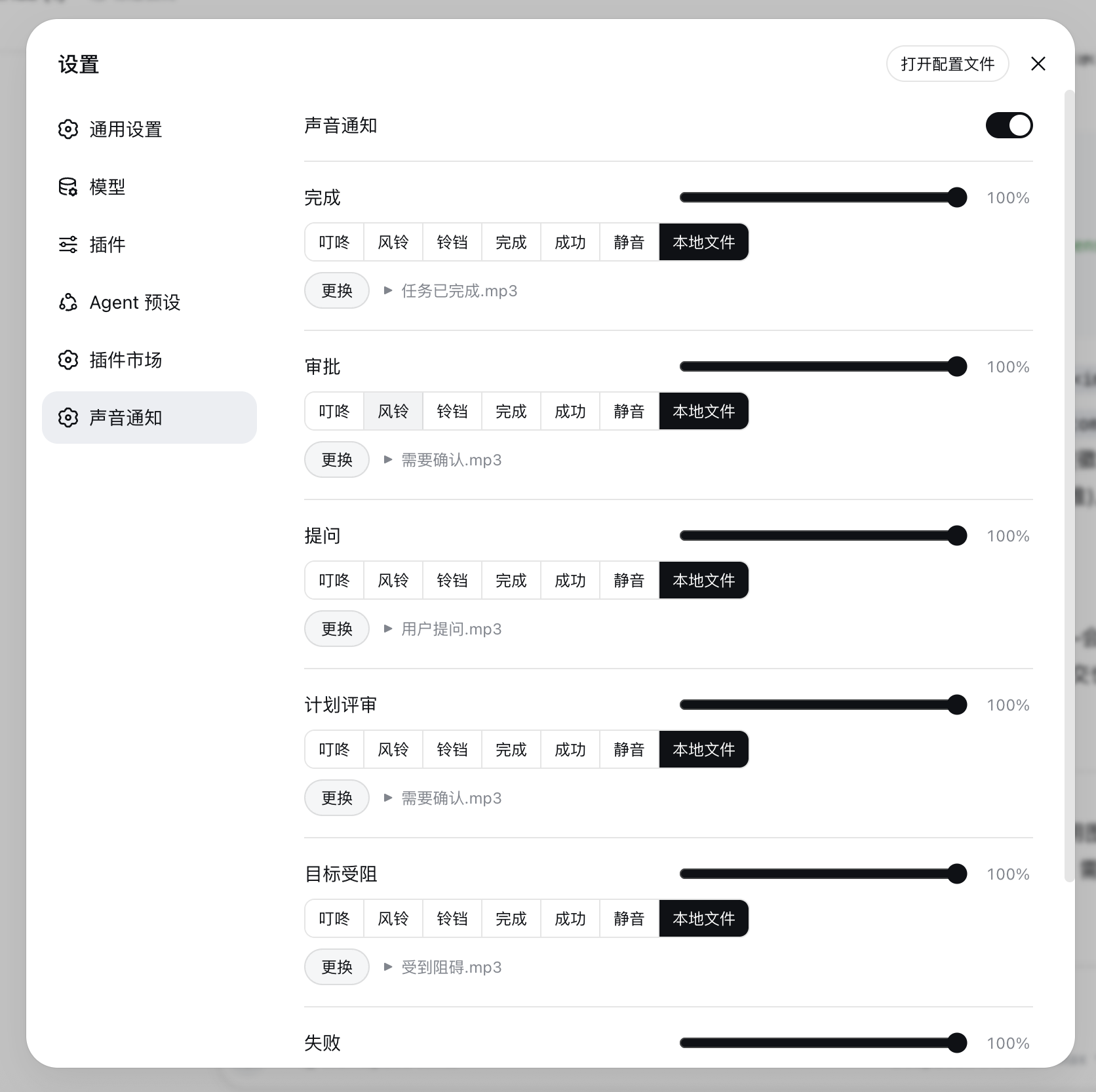
Each event type has its own sound and its own volume (0–100%):
| Event | Detection | Default sound |
|---|---|---|
| Turn end / background task completed | turn/end with reason.kind === 'completed'; job → completed |
Chime |
| Approval request | approval/requested frame |
Ding |
| User question | question/requested frame (not plan-review shaped) |
Ding |
| Plan review | question/requested frame classified as plan-review |
Ding |
| Goal blocked | goal projection enters blocked |
Ding |
| Background / loop failure | job → failed; turn/end error; host/agent-error |
Bell |
max-tokens / blocked / interrupted turns stay silent.events.mux plus events.host. Mux-open replay of still-pending
approval/question frames (refresh recovery) does not ring; each rpcId rings at most once.Subagent-originated events are detected and routed independently from the main agent:
session/jobs entry with kind === 'subagent' (each
parallel delegation completing used to ring the main completion sound; now it does not).origin: 'subagent' /
parentId (continuable subagents), including child-session turn ends, approvals,
questions, goal projections, and failures.The settings panel adds a 子代理事件 / Subagent Events section with six rows (same sound sources and per-row volume as the main events) plus an ignore all subagent events master switch. All six subagent sounds default to mute; main-agent events are unchanged.
Each event picks one sound from a Radio.Button group in the settings panel:
dsh-sound-audio), immune to the
localStorage quota.The master switch and config export/import stay visible; a 主 Agent / 子代理 tab bar switches the panel between the six main event rows and the subagent panel (its own six rows plus the 「忽略子代理事件」/ ignore-all-subagent-events switch). Each event row has a volume slider on the title row and a Radio.Group of Radio.Button options below — click to select and play; a local-file row with a choose/replace button appears when 本地文件 is selected.
Requires a DSH version with bundle-plugin support (dsh.profile.bundles + dsh.bundle.patch)
and pnpm on PATH (corepack enable or npm i -g pnpm).
# One command: pnpm installs the package and adds it to the profile's bundle layer
dsh plugin --profile web add @ai-galaxy/dsh-sound

# Restart the server (or refresh the page), then open Settings → 声音通知
Other profiles work the same way: dsh plugin --profile <name> add @ai-galaxy/dsh-sound.
To track unreleased main, install from the GitHub source instead:
dsh plugin --profile web add github:AI-Galaxy-GPU/dsh-sound@deepseek-ai/schemastery,
@deepseek-ai/cosmokit, @standard-schema/spec) into
$DSH_HOME/profiles/web/node_modules/."@ai-galaxy/dsh-sound" to dsh.profile.bundles in
$DSH_HOME/profiles/web/package.json.dsh web.dsh-sound:config), sanitizing every read and filling defaults. Uploaded
local music files are stored in IndexedDB (dsh-sound-audio) instead —
no localStorage quota limits.enabled, quietCurrent, ignoreSubagent, and six main sound + six main
volume fields — completionSound / approvalSound / questionSound / planReviewSound /
goalBlockedSound / failureSound (builtin key, none, local, data: URL,
or audio:<id>) and completionVolume … failureVolume (0–1) — plus the matching
subagentCompletionSound … subagentFailureSound / subagentCompletionVolume …
subagentFailureVolume pairs for the subagent channel (all sounds default to none).
localFiles keeps the last chosen local file per event (completion, … and
subagent-completion, …) so switching to a built-in sound and back does not drop it.defaultSound
becomes completionSound, voice/TTS values degrade to the per-event default,
and workspaces / debounceMs / global volume / voice settings are dropped.dsh-sound settings namespace: on rc.6 the
settings API allowlist (WEB_SETTINGS_NAMESPACES in dsh-host-apiproxy) does not expose
third-party namespaces to browsers, so the client does not depend on settingsScope today;
the registration keeps the migration path open for future releases.Compatibility
>=20 (engines.node).0.1.5-alpha.1, 0.1.5-alpha.2, 0.1.5-rc.1, 0.1.5-rc.2 —
declared as compatible in dsh.compatibility.dshReleases; the plugin was also
smoke-tested end-to-end (settings panel + live event sounds) on a source build of
0.1.3-alpha.1.dsh plugin --profile web add <tarball> → dsh web --no-open boots and serves the
plugin bundle (@ai-galaxy/dsh-sound/client.js present in the boot page, no plugin
load errors) → dsh plugin --profile web remove @ai-galaxy/dsh-sound leaves the
profile clean. Each run used a temporary DSH_HOME, deleted afterwards.Dependencies
@deepseek-ai/schemastery (settings schema) plus the peer
@deepseek-ai/cordis. No other runtime dependencies.@deepseek-ai/dsh-client-runtime, and
@deepseek-ai/dsh-client-ui-settings are provided by the host application through
the client module table; the package ships no copies of them.Capabilities and permissions
dsh-sound-audio). There is
no filesystem access outside the browser sandbox and no automatic file scanning.localStorage (dsh-sound:config), audio files in
IndexedDB.preinstall / install / postinstall / prepare are absent).Failure bounds
npm test      # 100+ assertions across host and client halves (Node only, no browser needed)
npm run check # syntax check
Layout:
Profile development note: the profile's pnpm uses
nodeLinker: hoisted, which COPIESfile:dependencies intonode_modulesat install time — edits to this checkout do not reach the running app until you either re-runpnpm --dir ~/.dsh/profiles/web update @ai-galaxy/dsh-soundor replace the copied directory with a symlink to this checkout. The web server reads bundle content per request (only the boot-page rev hash is cached at startup), so after refreshing the copy a browser hard-refresh (Cmd+Shift+R) is enough — no server restart needed.
lib/index.js — host half: registers the settings namespace (schema + defaults)lib/client.js — browser bundle: event detection, sound engine
(Web Audio / IndexedDB audio), settings panellib/types/index.d.ts — host-side type declarationscordis.patch.yml — bundle patch layer (inserts the dsh-sound row)tools/ — tests and verification scripts (not shipped in the npm package)Published as @ai-galaxy/dsh-sound (requires membership of the ai-galaxy npm org;
publishConfig.access is already public).
npm login                       # npm account (2FA recommended)
npm publish --access publicCLASSIFICATION EVIDENCE
系统优先读取 GitHub Topics,再与站内分类词典和词根规则比对。当前命中: 无有效分类标签。
deepseek-ai
DeepSeek Harness: Everything is a Plugin.

anywhere-labs
为 DeepSeek Harness (DSH) 插件生态打造的现代化桌面端解决方案。万物皆「插件」,桌面本身也是「插件」。

walkinglabs
Harness engineering beginner tutorial, from 0 to 1