
模型与 MCP
待识别

rea
morluto
Reverse engineer anything with agents, from app behavior down to native binaries.
PROJECT TOPICS
INSTALL REFERENCE
dsh plugin --profile web add github:96274zxc/vscode-pet
该命令指向仓库当前默认分支;尚无绑定当前 commit 的完整验证结果。
PROJECT README
English | 简体中文
Blobby is the official VS Code chat pet, ported to the DeepSeek Harness Web composer. It uses the
official sprite sheets, accessories, frame timings, physics and interaction rules from
microsoft/vscode, not a look-alike. On Windows it can also step out of the DSH window and live on
the desktop while DSH is minimized.
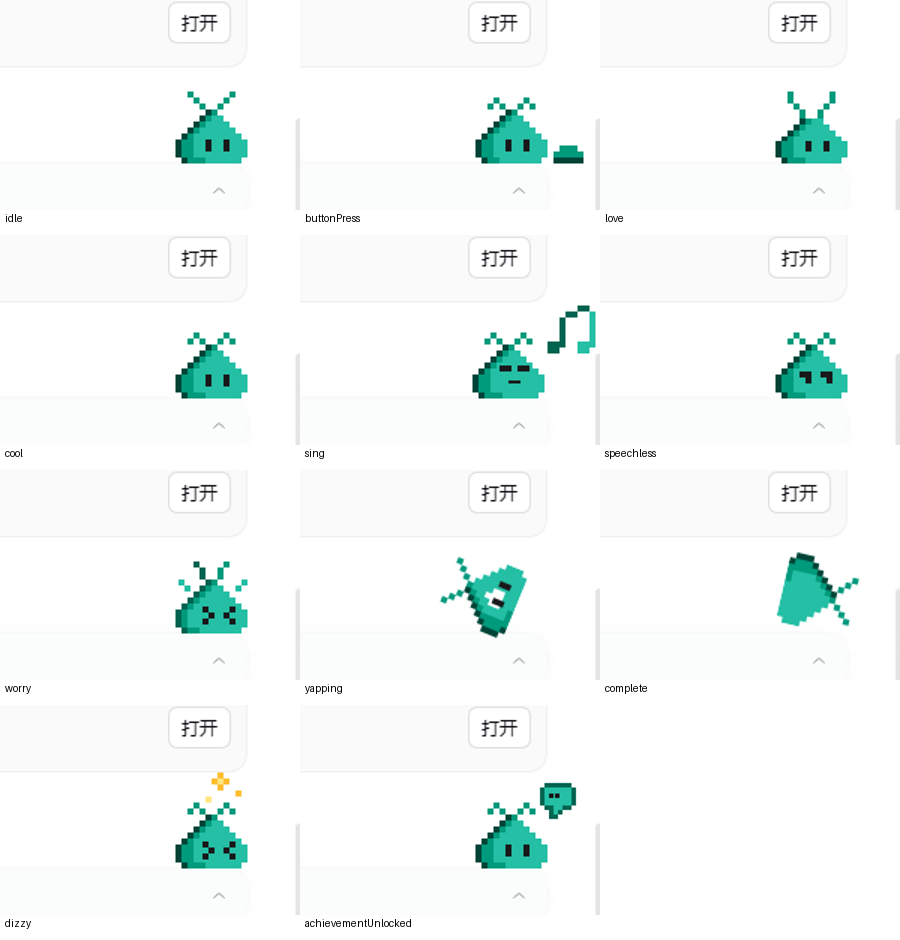
This is an independent DSH port, not a Microsoft product. All Blobby sprite art, accessory atlases, animation timing, physics constants, achievement catalog, color palette and jump-game rules are derived from the official VS Code implementation and are used under the MIT license.
ce233327f26ef7791b7fff0143c24e81a8126bd2icons/icon-{144,72,48,36,30}.png keeps native variants, and icon.svg embeds the
144px master.Thanks to the VS Code team and the original Blobby authors for the character and artwork.
Shift+←/→, hop with ←/→, catch it while it falls, and watch
the despawn/respawn portal sequence. While the DSH window is visible the composer card is its only
perch: it spawns and respawns above that card, follows it when the window or input grows/shrinks,
bounces off the side walls, and its respawn drop is capped above the composer instead of falling
from the top of the chat. On the desktop the taskbar (or the screen bottom while the taskbar is
auto-hidden) is the floor.frameIndices, e.g. idle [0,20]), and when the pet faces
left the horizontal gaze component is flipped in the overlay source to cancel the pet image's
mirror, so the pupil still moves toward the screen-space cursor like the window's unmirrored eye
overlay. The mouse-bounce counter is an accent pill at the pet's top-right (5s or until the next
throw) and 20+ bounces spawn the same 24-particle confetti burst (window temporarily grows to fit
it; reduced motion skips the confetti). Remaining known differences: the desktop never falls to a
respawn death (taskbar floor), the jump game opens in DSH, the DSH port does not track
achievements, and the VS Code-only painting/searching states and keyboard hop do not apply. The facing follows the cursor only in the idle pose; sleeping, waking,
typing, rendering, clapping and reaction poses keep the direction they had when they started,
matching the window's ChatPetFacingController.
Smart Hide keeps the pet on the desktop only instead of above other applications. The native
helper exits with DSH; on non-Windows the menu items are absent and the host refuses to start the
helper, and the plain Web GUI hides the items as well./blobby still unlocks Color
Customization for the solid and custom colors.buddy-waking sprite, 880ms) and
the status line reports that it woke up; only the next click plays a random reaction./blobby). Hats and colors are applied immediately and persist.prepare/start/stop, the client bounds /start at 15 seconds, and the in-window
pet is suspended only after the helper reports the show, so a stalled warmup or prepare can no
longer leave Blobby invisible in both places; a start invalidated by DSH regaining focus is
stopped instead of shown.theme/labels when they changed, and
the helper keeps the last values otherwise.?blobbyDebug=1 (or localStorage["dsh.vscode-pet.debug"]="1"),
window.__dshBlobby.memory() reports the JS heap, image/colored cache sizes, desktop frame bytes
and timer/listener/DOM counts; the helper's status.json reports frames: {loaded,total,bytes}.prepared flag so the client clears active even when the hidden renderer's long-poll stalls (the
/pending wait is also bounded and retried); and the helper reports stopReason,
dshWindow, dshIconic, dshForeground, dshWasIconic in status.json while the client's
snapshot exposes starting, stopping, lastHiddenReason, so a hide can be attributed to the
focus return, the window-restored check or a client stop.status.json at most every 250ms, but since 1.2.17
the host treated the file's phase as authoritative. The first facts heartbeat right after a
successful /start still read the old prepared snapshot, so the client believed the helper had
hidden itself and stopped it in the same tick — after every minimize/blur Blobby simply
disappeared. Each show now carries an increasing showSeq, the helper stamps it into
status.json, and the host only trusts a snapshot that belongs to the current show. The helper
also flushes the status file immediately on show/hide transitions (no 250ms wait) and only then
acknowledges with shown, and /start waits for that acknowledgement: a helper that never
confirms fails the start with 504 (the client then restores the in-window pet) instead of
suspending both halves.\uXXXX escapes, decoded back to the original text by any reader) and the
helper reads stdin as UTF-8 explicitly; an unparsable command is reported on stderr instead of
being dropped silently.rgb()/rgba() form, but Chromium serializes opaque colors as #rrggbb. Every
opaque theme color (menu text, muted/disabled text, accent) was silently dropped, the host filled
the missing fields with its dark-palette defaults, and the light menu drew near-white labels
(#f2f3f5) on the white background while only the disabled row stayed readable. The reader now
parses hex as well as rgb forms, and a partial theme falls back inside the palette selected by
dark, so a light menu can never inherit dark labels again./api/blobby/desktop/probe route asks the prepared helper (Win32 WindowFromPoint at the
in-window pet) whether DSH is still visible and unobstructed, so clicking the desktop keeps Blobby
in the window while a window that covers DSH still hands it over; the client re-probes every 600ms
while DSH stays visible, and falls back to the old focus-based handoff when no helper can answer.[data-chat-running] + its divider span), converts the distance into the bubble's CSS coordinate
(accounting for the 30/96 transparent source rows and the pet scale) and keeps the visible top on
that line, with a clamp so a very large pet never drags the bubble into its face. It re-runs on
state changes, layout, scroll and resize; without a running row it falls back to the original CSS
position. At the default 48px size the bubble now starts exactly on the divider (measured 0.00px
offset); with the clamp, pets much larger than the composer gap keep a small overhang instead of
covering the eyes.waking transient but never
re-rendered, so clicking a sleeping Blobby left it asleep on screen; the shake-then-wake animation
only appeared if an unrelated facts update happened to recompute the state (the keyboard path
worked because activate() called recompute() itself). _wake() now renders immediately when it
starts the waking animation (guarded against the nested call from recompute()'s busy-start path),
so the official 8-frame buddy-waking sprite plays for 880ms and then returns to idle, matching
the VS Code original. The desktop helper already handled this in its state machine.clip-path, and Chromium applies that change from none as a discrete jump (it is not
interpolated), so the bottom of the body vanished before the upper body slid down; on the way back
the clip was dropped instantly and the pet briefly painted over the composer before sliding up.
The occlusion now lives on the pet mount as a fixed inset() at the composer card's top edge
(--chat-pet-run-occlude) and is held for the whole 320ms return slide, so the body slides in and
out behind the input card in both directions with no layer change. The desktop helper used to jump
between the resting, run and peek poses; it now tweens the same offset with an ease-out curve
(320ms, reduced motion snaps), keeping the visible bottom on the taskbar edge as it sinks and rises.focusPrimaryWindow() route — the exact function behind the tray menu's Open entry — by starting
the executable again and letting Electron's single-instance handshake focus it; the helper clears
ELECTRON_RUN_AS_NODE for that launch, otherwise the app starts as a silent Node process. A
hidden-to-visible transition also dismisses the pet.From the public npm package (after release):
dsh plugin --profile web add vscode-petSource install from the public repository (always available):
dsh plugin --profile web add github:96274zxc/vscode-petFor the Electron desktop app, use Plugins → Add plugin → vscode-pet, or the same CLI with
--profile desktop where the CLI is allowed to manage that profile.
For development from this checkout, link the package into a profile:
$node = "$env:USERPROFILE\.dsh\dsh-runtimes\dsh-primary-runtime\dependencies\node\bin\node.exe"
$pnpm = "$env:USERPROFILE\.dsh\dsh-runtimes\dsh-primary-runtime\dependencies\pnpm\bin\pnpm.mjs"
$profile = "$env:USERPROFILE\.dsh\profiles\desktop"
& $node $pnpm --dir $profile add "vscode-pet@link:C:/path/to/vscode-pet"
Then add vscode-pet to the profile's dsh.profile.bundles (or enable it in Plugins). Reload the
page; if the Electron app does not recompose the loader live, restart it. To uninstall, remove the
dependency and the bundle selection.
node scripts/fetch-assets.mjs   # re-download the pinned VS Code assets
node scripts/build.mjs          # validate dimensions and build client.js
node --test test/*.test.mjs
client.js is generated. Edit files under src/ and rebuild; do not edit client.js directly.
Assets are embedded as PNG data URLs so the plugin works under both http:// and the desktop
dsh-app:// scheme without cross-origin canvas issues. The test suite also compiles and runs the
Windows desktop helper's deterministic self-test (desktop/blobby-desktop.ps1 -SelfTest); the
helper is a local PowerShell/.NET WPF process that the host half starts only in the Windows desktop
app.
| Input | Action |
|---|---|
| Click / Enter / Space | Random reaction; wakes Blobby; opens the hats panel while the star is visible |
← / → |
Hop along the composer |
Shift+← / Shift+→ |
Throw toward a wall |
Right-click / Shift+F10 / ContextMenu |
Context menu |
| Drag | Move Blobby; release with speed to throw |
| Bounce while falling / Enter / Space | Bounce |
/blobby |
Unlock Color Customization and open the color tab |
/vscode-pet |
Show/hide Blobby (keeps the plugin installed) |
| Right-click → Show on Desktop | Windows desktop app only: move Blobby to the desktop while DSH is minimized or unfocused (✓ when enabled) |
| Right-click → Smart Hide | Windows desktop app only: show the desktop pet on the desktop only, never above other apps |
| Alt+Tab to a window that covers DSH / minimize | Windows desktop app only: move Blobby to the desktop above the other window |
| Click the desktop or a window beside DSH | Windows desktop app only: DSH stays visible and unobstructed, so Blobby stays in the window |
| Focus the DSH window | Windows desktop app only: return Blobby into the DSH window |
| Double-click the desktop pet | Bring the DSH window back |
>=0.2.1-rc.1 Web and Desktop profiles.connection-authenticated host routes on the
loopback server plus a local PowerShell/.NET WPF helper; the plain Web GUI hides the menu items and
non-Windows hosts return 501 for desktop-start requests. While the display is enabled the helper
stays prepared in the background for an immediate handoff and exits when DSH exits. No DSH source is
modified and no model tools or routes outside /api/blobby/desktop/* are added.localStorage['dsh.vscode-pet.prefs.v1'] on the local device. Desktop frames and settings are
generated on the client; the helper only receives PNG frames, labels and local geometry.Sprite art, animation timing and interaction logic are derived from
Microsoft VS Code commit
ce233327f26ef7791b7fff0143c24e81a8126bd2, MIT licensed. See NOTICE.md for the exact
paths. The plugin code is MIT licensed (see LICENSE).
The plugin was exercised in a temporary DSH web profile with headless Chrome: idle/typing/thinking/
clapping/sleep/reactions, drag and throw, despawn/respawn, the context menu, both customization
tabs, hat and color selection, Color Customization unlock, and the jump game. docs/states.png is the
state matrix and docs/hats.png / docs/color.png are the customization panels from that
run.
It was then verified in the real Electron desktop profile (not headless): composer-card landings, default spawn, maximize/restore repositioning, rotated wall bounces, capped respawn, and resizing while the pet is airborne. The fall and respawn paths were also compared frame by frame against VS Code 1.144's Blobby on the same machine.
Desktop display was verified in the same Windows Electron profile: the trailing check mark and the
conditional Smart Hide item, the portal/respawn handoff when minimizing and restoring, landing on
the taskbar, throwing without a fall respawn, Smart Hide against a foreground app, double-click
restore, the desktop Hats command opening the existing panel, and the helper exiting when DSH's
host closes its stdin. After the handoff optimizations it was re-checked for the prepared helper
(desktop portal visible within about half a second of clicking away), focus-based switching
(Alt+Tab/click-away), the ~60 fps composition loop during throws, subpixel-exact pet placement
(appliedScreenX equal to the physics position instead of the window's rounded pixel), the exact
DSH grab cursor captured at runtime (byte-identical icon/hotspot), the drag resistance wobble, the
thinking bubble while a turn runs, a taskbar that stays clickable under the pet window, and a desktop
context menu that appears at its final position without a flash.
The 1.2.19 handoff fix was re-checked against the real helper: the shown acknowledgement with a
fresh status.json (showSeq matching, phase starting), /facts right after the start reporting
prepared: false while the helper rested above the taskbar with DSH minimized, and the stop returning
the helper to a prepared phase that /facts reports as prepared: true again.
The 1.2.20 encoding fix was verified with a bundle carrying the Chinese menu labels: the same reuse
show that had timed out after 8 s now acknowledges in 3–6 ms, and eight consecutive minimize/restore
cycles on the real helper reused one prepared session (showSeq 1…6) without a single cold respawn.
The 1.2.21 light menu was compared with the in-window menu on the same screen: enabled text is
#0F1115 in both, disabled text is #81858C in both, and the menu background differs by one unit
(#FBFCFC desktop vs #FAFBFB in-window) because the desktop menu is opaque while the in-window
menu is translucent over the page.
The 1.2.22 changes were verified on the real desktop: a ~15ms burst capture of the pet around the
menu click has no blank frame (1.2.21 lost the pet for one frame), the desktop helper stays on
idle/rendering instead of typing while the composer holds text and DSH is minimized (the
forwarded facts showed hasInput:false while hidden and hasInput:true while focused), and the
probe reported foreground/covered/iconic correctly against a real Notepad window (beside DSH:
uncovered; over the in-window pet: covered; DSH minimized: iconic).
The 1.2.23 bubble anchor was measured in the live chat at the default size: with the pet resting at
top 644 and the composer card at 692, the status divider sits at 637 and the bubble's visible top
lands on 637 as well (0.00px offset; the screenshot's divider row and bubble top edge are the same
row). The anchor is computed from the divider rect, so it follows a different window/font layout and
re-runs on scroll/resize instead of assuming a fixed offset.
The 1.2.24 wake fix was exercised on the live pet in both placements. In the DSH window the
data-state timeline after a real mouse click is sleep → waking (880ms) → idle, and a burst
capture of the pet confirmed the rendered sprite changed for the waking frames. With the desktop
helper shown (DSH minimized) the helper's status.json sampled around the click shows the same
sleep → waking → idle sequence, so both placements play the shake-then-wake animation.
The 1.2.25 constant-size fix was verified by sampling the helper's status.json window rect across
state changes: a sleeping pet clicked into waking and back to idle keeps 208×112 throughout
(previously 136×112 → 112×112), and clicking an idle pet into the wide cool state also keeps
208×112. The rendered buddy-waking frames were also compared pixel-by-pixel with the official
buddy-waking-*.spritesheet.png: the port's frames are a faithful recolor (the same pixels, with
the body/shadow palette from VS Code's own chatPetColors.ts). The thin dark line at the body's
side during the shake is the official 1px shadow outline (source color #004e7c), which the
palette maps to #808080 for the White preset because VS Code itself uses body.darken(0.5);
it is not an added border, and it stands out most with a white body. The port keeps that behavior
to stay faithful to the original; choosing a saturated color preset makes the shadow blend again.
The 1.2.26 run animation was captured at ~20ms against the composer edge in the live DSH window: on
the way down the hat's top edge moves 40px over 320ms while the visible bottom stays pinned to the
composer card's top, and on the way back the body emerges from that same fixed line instead of
popping over the input. The desktop helper's standalone run was captured the same way: the pet sinks
below the taskbar edge over ~320ms and rises back through it, with status.json reporting
runOffset 40 → 0; the helper self-test covers the motion curve (run-motion).
The 1.2.27 tray fix was verified live. With DSH hidden to the notification area, the helper's
status.json reported phase=resting, a resolved dshWindow and dshForeground=false, and the pet
stayed visible instead of being dismissed as "dsh-focused". A real double-click brought back the same
1296×828 window at its previous position and in the foreground, and the restored session UI switched
views on click, so the hidden WebContents was awake — not just a painted frame. Restoring DSH from the
tray icon also dismisses the pet through the hidden-to-visible check.
The helper's geometry, physics and state-machine self-test runs in the test suite.
CLASSIFICATION EVIDENCE
系统优先读取 GitHub Topics,再与站内分类词典和词根规则比对。当前命中: deepseek-harness。
morluto
Reverse engineer anything with agents, from app behavior down to native binaries.

deepseek-ai
DeepSeek Harness: Everything is a Plugin.

nexu-io
The 1st Collaborative AI Design Agent Workspace. Local-first and open source. Create motion, prototypes, websites, apps, dashboards, presentations, images, and videos with your team and AI agents. Share work, exchange feedback, and iterate together in one workspace.