
模型与 MCP
待识别

rea
morluto
Reverse engineer anything with agents, from app behavior down to native binaries.
PROJECT TOPICS
INSTALL REFERENCE
dsh plugin --profile web add github:9087/dsh-shell-progress
该命令指向仓库当前默认分支;尚无绑定当前 commit 的完整验证结果。
PROJECT README
English | 中文


A DeepSeek Harness plugin that shows where a multi-step shell command is right now, as a segmented progress bar inside the tool-call card.
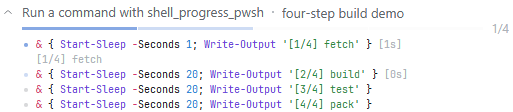
The real card, expanded, with 3/4 done and step 4 in flight.
Collapsed, the card's summary row carries a segmented bar, one segment per top-level step (pending, running or done), beside a 3/4 counter, so where the command is and how many steps are left read at a glance. Hover a segment and it opens that step's card, showing its command line, its output and its time.
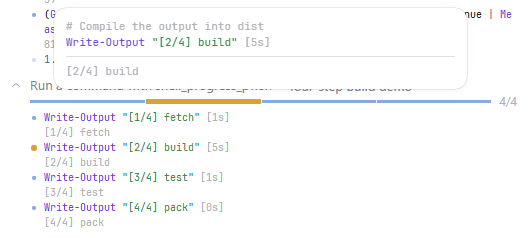
In the hover card, each step gets a one-line comment above its command line, spelling out what that line is for. (The lines come from the model, written alongside the command so a run never waits for them; each distinct command is asked for once, and a card whose notes missed the record fetches them the first time you hover or open it. They can be switched off on the DSH Settings page under "Shell Progress" and are on by default.)
Expanding the card shows the command's steps, one row each: the line's command, plus its time and output; the step in flight carries a running clock.
A command the model runs in the background (run_in_background: true) is a job, and its card says so: the title reads "run a background job", with the warning mark beside it explaining on hover, and no bar or counter — the record is written the moment the job starts, so a bar could only claim a position it never saw. Expanding the card lists the command's statements; the output stays with the shell, in the Background jobs list at the top of the conversation, which also stops the job. The command runs unmodified (so its output is byte-exact), and a long build or test suite no longer holds the turn while it runs.
A command that cannot be split, or that the plugin declines to track, is still ONE command: the card draws one segment, and a ⚠ after the title explains on hover that the command was not split, so the bar describes the whole command rather than per-step progress. The command itself runs exactly as it does under the pwsh tool, and its output obeys the same per-step budget.
In DSH, open the Plugins page and click Add plugin, then enter dsh-shell-progress (the npm package name).
Or from the command line:
dsh plugin --profile web add dsh-shell-progressOr mount it by hand in the profile's cordis.patch.yml:
- insert:
    - id: shell-progress
      name: dsh-shell-progress
Either way, restart dsh web afterwards (the host loads plugins once, at start-up).
- insert:
    - id: shell-progress
      name: dsh-shell-progress
      config:
        enabled: true
        pollIntervalMs: 120
        maxStepOutputChars: 8192
        maxSteps: 400
liveRetentionMs: 300000| Field | Default | Meaning |
|---|---|---|
enabled |
true |
Register the shell_progress tool. |
pollIntervalMs |
120 |
How often the host reads the running process's output. |
maxStepOutputChars |
8192 |
Per-step output kept in the persisted progress. |
maxSteps |
400 |
A command split into more steps than this runs unmodified. |
liveRetentionMs |
300000 |
How long a settled call's live record is kept for a late poll. |
When a step's output passes maxStepOutputChars, the lines that do not fit are dropped from
the CARD's copy, and that step's output is followed by the number of characters that are
missing (in the step list and in the segment's hover card alike). Without it a truncated
step reads exactly like a quiet one. The budget is the card's memory, not the tool result:
the model-visible stdout comes from the shell seam and is unaffected by it (the seam's own
truncated / spillPath reporting applies as it always does).
Development, testing and publishing details live in DEVELOP.md and PUBLISH.md.
MIT
CLASSIFICATION EVIDENCE
系统优先读取 GitHub Topics,再与站内分类词典和词根规则比对。当前命中: deepseek-harness。
morluto
Reverse engineer anything with agents, from app behavior down to native binaries.

deepseek-ai
DeepSeek Harness: Everything is a Plugin.

nexu-io
The 1st Collaborative AI Design Agent Workspace. Local-first and open source. Create motion, prototypes, websites, apps, dashboards, presentations, images, and videos with your team and AI agents. Share work, exchange feedback, and iterate together in one workspace.