
其他
完整应用

deepseek-harness
deepseek-ai
DeepSeek Harness: Everything is a Plugin.
PROJECT TOPICS
PROJECT README





English | 中文
Author: 7DGroup
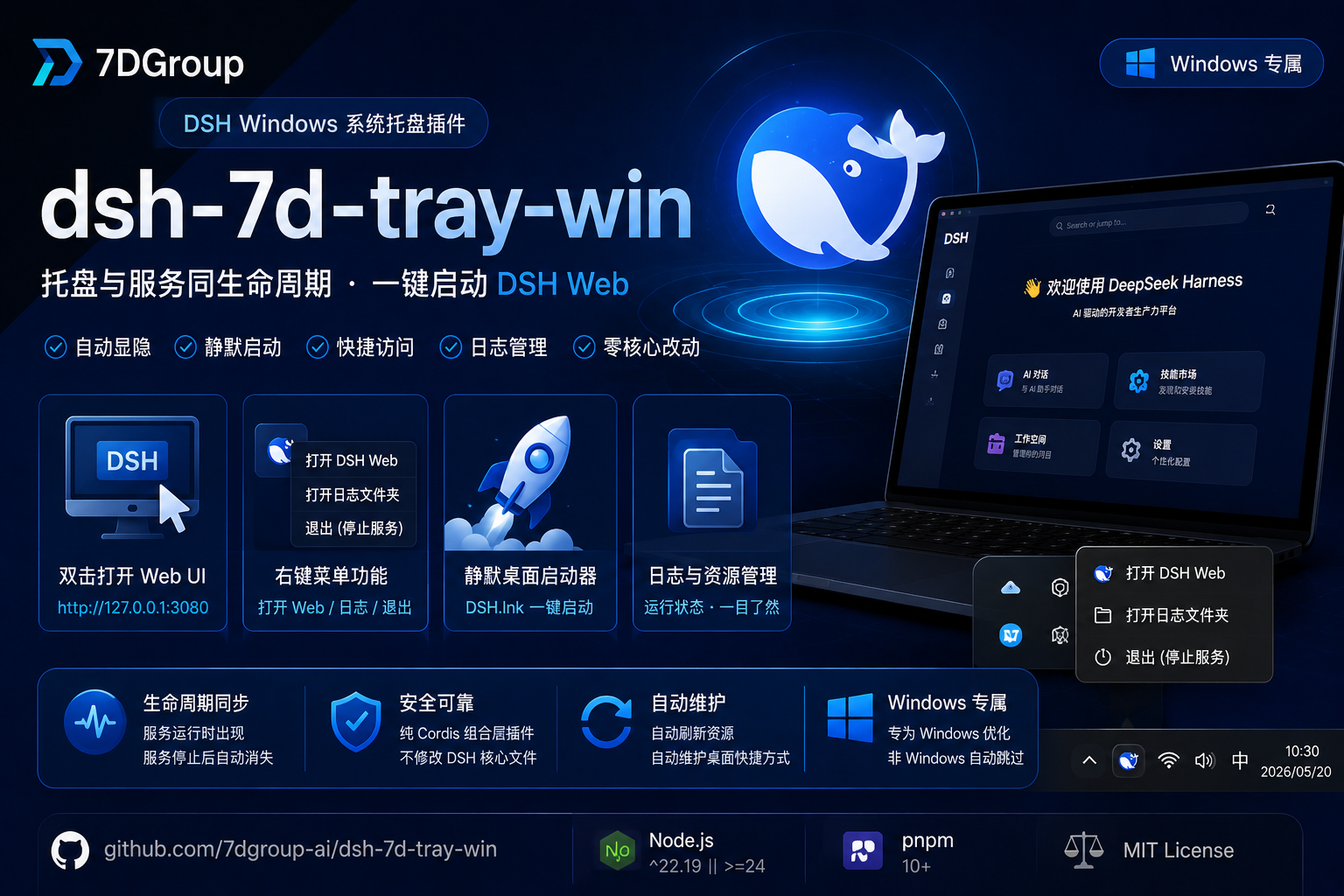
A Windows-only system-tray plugin for DeepSeek Harness (dsh). While dsh web is running, the DeepSeek whale icon appears in the system tray; when the server stops, the tray icon disappears within 3 seconds — the tray shares the full lifecycle of the service. It also maintains a silent desktop launcher (DSH.lnk): double-click it to start the server in the background with no console window and open the browser automatically.
| Field | Value |
|---|---|
| Author | 7DGroup |
| Version | 0.2.0 |
| Platform | Windows 10/11 (win32; auto-skipped on other platforms) |
| Runtime | Node ^22.19.0 \|\| >=24.0.0 · pnpm 10+ · dsh CLI |
| Plugin name | tray-7d-win |
| Peer dependency | @deepseek-ai/cordis ^4.0.1 |
| Repository | github.com/7dgroup-ai/dsh-7d-tray-win |
| License | MIT |
After dsh web starts, the DeepSeek whale icon appears in the system tray, and the desktop shortcut DSH.lnk is created automatically:
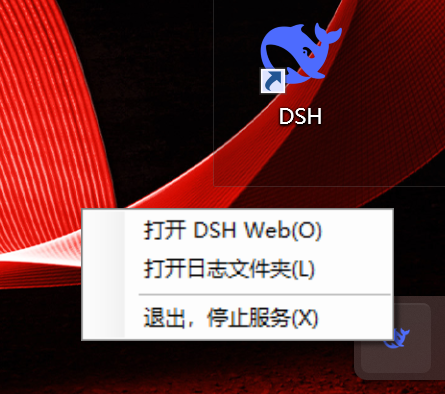
When the server exits (including crashes), the tray icon and tray agent process disappear automatically.
dsh web via npx automatically.dsh web is started (desktop shortcut, command line, script), the tray appears automatically; it disappears within 3 seconds after the server exits.DSH.lnk; double-click it to start the server in the background with no window and open the browser.cordis.patch.yml; no files in the official DSH packages are overwritten or modified. Removing the plugin (dsh plugin remove) restores the original state, and upgrading the official DSH version will not conflict with this plugin as long as the Cordis lifecycle stays compatible.DSH.lnk auto-maintaineddsh-7d-tray-win/
├── assets/ # assets shipped with the package
│ ├── DSH.ico # tray icon
│ ├── tray-agent.ps1 # tray agent script
│ ├── starter.ps1 # dsh web startup chain script
│ ├── starter-launcher.cs # silent desktop launcher source
│ └── make-shortcut.ps1 # desktop shortcut maintenance script
├── lib/ # runtime entry
│ └── index.js # Cordis plugin: tray control logic
├── cordis.patch.yml # composition patch layer
├── package.json
├── LICENSE
├── README.md
└── README.zh.md^22.19.0 || >=24.0.0.NET Framework 4 (ships with Windows; used once to compile the silent launcher)web profile (recommended)Most sessions boot the default web profile (dsh web is shorthand for dsh --profile web), so installing into web is recommended:
dsh plugin --profile web add @7dgroup/dsh-7d-tray-winOr install from a local path (useful for development/testing):
dsh plugin --profile web add C:\path\to\dsh-7d-tray-winAfter installation, start dsh web; the tray icon and desktop shortcut will take effect automatically.
If you use a custom profile, replace web with your profile name. The plugin only activates in the profile it is installed into.
| Action | Behavior |
|---|---|
| Double-click icon | opens the Web UI (port auto-detected) |
| Right-click → Open DSH Web | opens the Web UI (port auto-detected) |
| Right-click → Open log folder | opens %LOCALAPPDATA%\dsh-7d-tray-win\ |
| Right-click → Restart service | confirms, then kills and restarts dsh web |
| Right-click → Exit | stops dsh web and closes the tray |
On first boot the plugin compiles starter-launcher.cs into starter-launcher.exe and creates/refreshes the desktop DSH.lnk. From then on:
DSH.lnk → no console window appearsdsh web starts in the background (port read from cordis config)All runtime assets and logs are stored in %LOCALAPPDATA%\dsh-7d-tray-win\:
| File | Purpose |
|---|---|
DSH.ico |
tray icon |
tray-agent.ps1 |
tray agent script |
starter.ps1 |
dsh web startup chain script |
starter-launcher.cs |
silent launcher source |
starter-launcher.exe |
compiled silent launcher |
make-shortcut.ps1 |
shortcut maintenance script |
dsh-launch.log |
service startup chain log (npx/dsh output) |
tray-agent.log |
tray agent lifecycle log |
plugin-debug.log |
plugin apply/spawn/dispose debug log |
On every boot the plugin refreshes these files to the latest versions shipped with the package.
win32 platforms; no tray or shortcut is created.csc.exe is missing, the desktop shortcut feature is unavailable, but the tray still works.DSH.lnk itself shows no tray; the tray is provided by this plugin while dsh web runs.dsh web boot overwrites the files in %LOCALAPPDATA%\dsh-7d-tray-win\ with the plugin's latest assets. Do not store custom persistent files there.webServer cordis service — it follows whatever port dsh web is actually listening on, including custom ports configured via cordis.patch.yml or --port.%LOCALAPPDATA%\dsh-7d-tray-win\ and the desktop DSH.lnk; when multiple dsh web instances run concurrently, the last one to start wins the shared files. Run only one instance at a time.Q: It says pnpm is not found during installation.
A: dsh plugin delegates to pnpm, so make sure pnpm is installed and on PATH:
npm install -g pnpm@10Q: The tray icon does not appear. A: Please check:
web);dsh web started successfully;%LOCALAPPDATA%\dsh-7d-tray-win\plugin-debug.log and tray-agent.log for errors.Q: The desktop shortcut is not created.
A: Check %LOCALAPPDATA%\dsh-7d-tray-win\plugin-debug.log for csc.exe not found or launcher compile failed. The first run requires .NET Framework 4 that ships with Windows.
Q: How do I uninstall? A: Run:
dsh plugin --profile web remove @7dgroup/dsh-7d-tray-winThen you may manually delete %LOCALAPPDATA%\dsh-7d-tray-win\ and the desktop DSH.lnk.
Q: Can it be installed on non-win32 platforms? A: Yes, but the plugin will auto-skip and create neither tray icon nor shortcut.
Q: Will upgrading the official DSH version break this plugin?
A: No. This plugin is a Cordis composition bundle; it only adds one row to your profile's cordis.patch.yml and does not overwrite or modify any official DSH package files. As long as the Cordis lifecycle remains compatible, the plugin continues to work after an official upgrade.
MIT · Copyright (c) 2026 7DGroup
CLASSIFICATION EVIDENCE
系统优先读取 GitHub Topics,再与站内分类词典和词根规则比对。当前命中: 无有效分类标签。
deepseek-ai
DeepSeek Harness: Everything is a Plugin.

anywhere-labs
为 DeepSeek Harness (DSH) 插件生态打造的现代化桌面端解决方案。万物皆「插件」,桌面本身也是「插件」。

walkinglabs
Harness engineering beginner tutorial, from 0 to 1