
Agent 与会话
插件

nuwa-skill
alchaincyf
你想蒸馏的下一个员工,何必是同事。蒸馏任何人的思维方式——心智模型、决策启发式、表达DNA。Distill how anyone thinks.
PROJECT TOPICS
INSTALL REFERENCE
dsh plugin --profile web add github:439436269-ctrl/dsh-pinned-sessions
该命令指向仓库当前默认分支;尚无绑定当前 commit 的完整验证结果。
PROJECT README
npm package:
@vfvrpq/dsh-pinned-sessions· repo:dsh-pinned-sessionsA pinned-session group in the sidebar for DeepSeek Harness: 「置顶」 sits where a Workspace group sits — a 34px header with an outline pin glyph, a count and a search button, and 32px session rows under it for every pinned session, across all workspaces. Pin enough of them and you can search right there.
DSH already pins sessions (hover a row → pin glyph, or right-click → 「置顶会话」), but the result is only a re-order inside that session's own workspace group: a pinned session still scrolls away when you switch workspaces, collapse groups, or drown in a long list.
This plugin gives the pinned set its own group, above the Workspace browser:
插件
自动化任务
工作区                        ← the native section header
置顶  1  dsh-pinned-sessions v0.7.0  🔍   ← this plugin, inside the list
   插件笔记:dsh-cost-…   默认工作区   4 小时前
默认工作区
   新会话
   …
With the search open (the count becomes matched/total):
置顶  1/3  dsh-pinned-sessions v0.7.0  ✕
   [ 搜索置顶会话              ]
插件笔记:dsh-cost-… 4 小时前默认工作区) and carries the
session's own status dot from the same store the native rows read
(uiSession.sessionStatus): running is the native rotating arc, finished-but-unopened
is a green dot, and a pending approval / plan review / question is an amber dot whose
compact label (「待审批」) replaces the timestamp; title, workspace and time also ride
the row tooltip;IconClockOutlineRegular the row further
down the sidebar shows. That cell is exclusive: a live run, a pending interaction or
an unread completion keeps its status dot and the clock never renders beside it. A
task count of 0 (or inactive-only tasks) shows nothing, and the row tooltip gains the
count;sidebar.workspaces.session.row.action's own order (archive 100,
pin 200) and its 15px gap, calling the same workspaces methods the native
buttons call;23分钟 / 2天, never 2 天前);
the full "ago" form stays in the row tooltip, and the open Session's row is
highlighted by the native retainedBy.mainView rule;⋯ menu carrying the native session menu:
pin/unpin · rename (Ctrl+Alt+G) · fork · archive (Ctrl+Alt+A) · copy Session ID ·
copy session path, drawn with the native MenuItemButton (icons and shortcut
chips). Rename opens the native modal shape, both copy actions confirm with a short
notice, and the session-path row appears only when dsh-session-path answers its
/api/dsh-session-path/resolve route (probed once at mount, then used to copy);dsh-pinned-sessions v0.8.0 —
as a muted chip that links to
@vfvrpq/dsh-pinned-sessions
on npm (target="_blank"; the desktop shell turns that into shell.openExternal,
so it opens in your browser instead of inside the app). The chip shows the
unscoped name because the sidebar is 256px wide; its tooltip/aria-label carry
the full scoped name, and clicking it never toggles the group;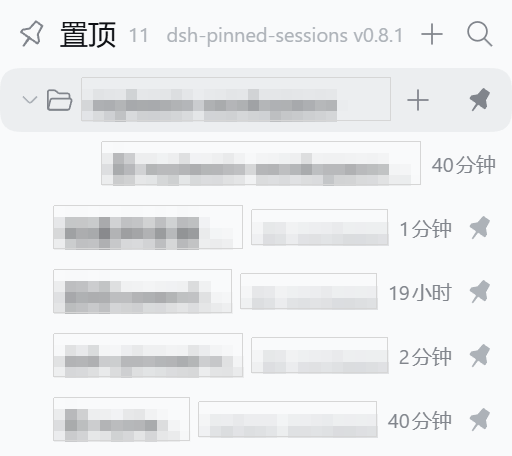
uiWorkspace.openWorkspace, i.e. the
same path as 「新会话」) and 「取消置顶工作区」. Right-clicking a Workspace row in the sidebar also
offers 「置顶工作区 / 取消置顶工作区」 as a new first item of the native menu (registered through
DSH's contextMenus registry, with the native pin glyph). The folder click itself creates nothing —
0.8.0 wrongly called openWorkspace there, which only created a blank Session, so nothing
visibly happened (the 「文件夹没法执行」 report of 2026-11-11);matched/total while searching;点 + 置顶工作区,或在会话行上点图钉);Session pinning owns no new state: it is the Host capability the native Workspace
browser already ships (dsh-api-workspace-controller → workspaces.pinSession /
unpinSession, persisted in the workspace storage unit), so the sidebar and the
group always agree — pin with either one and the other updates immediately.
Workspace pinning is the one exception. The Host models pins for Sessions only
(workspace carries pinnedSessionIds, the controller exposes
pinSession/unpinSession, and no Host package has pinWorkspace), so this list is
stored by the plugin: one namespaced key,
localStorage["@vfvrpq/dsh-pinned-sessions.pinnedWorkspaces"], holding a JSON array of
Workspace ids, most recently pinned first (the Host's own order for
pinnedSessionIds). It stores the pin choice and nothing else — Workspace names,
paths and session membership always come from workspaces.list, never a second copy.
The sidebar's browsing region between the global panel rows and the foot is
declared as one single slot (sidebar.workspaces) owned by
@deepseek-ai/dsh-client-ui-workspace, and it exposes no "extra group" seat:
| seat | owner | what it holds |
|---|---|---|
sidebar.panellist (list) |
ui-sidebar | the global panel rows (插件, 自动化任务, …) — a row is a button, not a group |
sidebar.workspaces (single) |
ui-workspace | the whole browsing region: header, search, tree, menus |
Shadowing sidebar.workspaces would mean reimplementing the entire browser
(search, flat/grouped views, drag ordering, menus, hover cards, archive flow), so
instead this plugin mounts next to the renderer's own outlet anchor
(div[data-slot="sidebar.workspaces"], display: contents) as its previous
sibling inside the region, and portals the group into that host node:
flex: none, so the native browser keeps flex: 1 and simply
gets a little less height — the pinned group stays put while the list scrolls;MutationObserver, so the group
survives re-renders and sidebar collapse/expand;Bugs and ideas: Issues.
dsh plugin --profile <your-profile> add @vfvrpq/dsh-pinned-sessionsThe package is dual-face (dsh.bundle.patch + dsh.client): the Loader row
brings up the no-op Host half, and the browser half arrives through
exports["./client"].
cd ~/.dsh/profiles/desktop
# 1) make the package resolvable (pnpm hard-links a directory dependency, so a
#    symlink keeps edits live). The install name comes from the package's own
#    package.json, so a scoped package lands under node_modules/@vfvrpq/:
pnpm add file:/path/to/dsh-pinned-sessions     # or hand-edit package.json
ln -sfn /path/to/dsh-pinned-sessions node_modules/@vfvrpq/dsh-pinned-sessions
# 2) activate the row in your own patch layer (hot: the loader watches it)
cat >> cordis.patch.yml <<'YAML'
- insert:
    - id: dsh-pinned-sessions
      name: '@vfvrpq/dsh-pinned-sessions'
YAML
Then reload the Web UI (⌘R / F5). The boot graph is rebuilt per page load, so
an edited lib/client.js shows up on the next reload — no application restart.
Do not also add @vfvrpq/dsh-pinned-sessions to dsh.profile.bundles at the
same time: insert is append-only and never de-duplicates ids, so the plugin
would be mounted twice and its slot registrations would collide. (Appending that
row to a patch file that still holds the template's bare [] produces invalid
YAML and is silently ignored — [] plus a sequence is two documents in one file.)
lib/client.js is the browser bundle, written by hand in the same
window.__ModuleLoader__.load({ id, factory }) shape the build emits — plain JS
with react.createElement, no build step, no JSX. apply(ctx) registers exactly
one entry:
| registration | slot | id |
|---|---|---|
| sidebar group (portals into the sidebar) | shell.overlay (list) |
pinned-sessions-section |
Client services it injects: slots, sessions, workspaces, uiWorkspace,
uiSession, locale. It reads the three stores (sessions.list,
workspaces.list, uiSession.sessionStatus) through useSyncExternalStore and
never writes to them directly.
The scheduled-task clock does not go through a slot: the
sidebar.session.row.leading seat is declared by ui-workspace's entry, the slot
runtime rejects a renderSlot the caller did not declare, and declaring an
already-declared seat throws slot "…" is already declared. So the group reads the
same Host catalog (schedule/catalog()) itself — one read for the whole group,
refreshed on schedule/changed and connection reset, released when the last row
unmounts. remote is deliberately not a required inject: a composition without
ui-schedule still loads the group, it just has no clock.
<bundled node> test/bundle-check.mjsRegisters the bundle against a fake window.__ModuleLoader__, materializes the
factory with stub require, runs apply() against a fake Client Context and
renders the group with a hook shim — asserting the entry id, the dictionaries'
key parity, the anchor selector, pin order, the count, the running dot, the
unpin toggle (and that it does not also open the row), collapse, the empty hint,
the archived note, subagent filtering, the English copy, and the npm chip (its
text, its href, target/rel, and that clicking it does not toggle the group).
The scheduled-task mark has its own region: the clock glyph in the 16px leading
cell, its localized label, the row tooltip, no mark at a count of 0, and the three
states that outrank it (running, pending approval, unread completion). The
source itself is covered too — one read per subscription, active-only counting,
one re-read per schedule/changed and per connection reset, release on the last
unsubscribe, and no mark after a rejected or refused read.
Because a client bundle cannot read its own manifest, lib/client.js repeats the
package name and version (PACKAGE_NAME / PACKAGE_VERSION). The chip checks
compare them against package.json, so a version bump that forgets the bundle
fails the suite instead of shipping a stale chip.
The DOM-mounting half needs a real sidebar, so it is covered by the Playwright pass recorded in VERIFY.md.
lib/index.js      Host half — no-op; exists so the Loader row resolves and the
                  client-modules scan can find the package
lib/client.js     Browser half — the whole feature
cordis.patch.yml  Bundle patch: one row, id === package name
test/bundle-check.mjspinWorkspace): another
browser profile, or cleared site data, loses the list; a Workspace removed from the
registry drops its row (a stale id is neither rendered nor counted).origin: "subagent") never appear.div[data-slot="sidebar.workspaces"] would hide the group.remote.schedule.catalog):
without ui-schedule, or when that read is refused or fails, the row simply has no
mark — it never shows a stale one and never throws.CLASSIFICATION EVIDENCE
系统优先读取 GitHub Topics,再与站内分类词典和词根规则比对。当前命中: session-management。
alchaincyf
你想蒸馏的下一个员工,何必是同事。蒸馏任何人的思维方式——心智模型、决策启发式、表达DNA。Distill how anyone thinks.

freestylefly
Prompt as Code | GPT Image 2 / 2.5 提示词与案例库,530+ 个案例、20+ 套工业级模板与可复用 Skills,新增 2.5 同提示词对比专区,附完整提示词与生成记录,持续更新。

titanwings
Distilly — Distill how they think into reusable Skills for any Agent or Bot. Formerly Colleague Skill(原同事 Skill).