
开发工具
待识别

treg
superdesigndev
OpenRouter for agent tools. Join community here: https://discord.gg/6mQYYfFMAn
PROJECT TOPICS
INSTALL REFERENCE
dsh plugin --profile web add github:3588834014-del/bilibili-note-plugin
该命令指向仓库当前默认分支;尚无绑定当前 commit 的完整验证结果。
PROJECT README
DSH plugin packaging of
3588834014-del/bilibili-note.This repository is the plugin edition: the upstream project plus a DeepSeek Harness bundle wrapper (
package.json/cordis.patch.yml/lib/index.js). The original skill + CLI lives upstream — use that one if you don't need to install it as a dsh plugin. GitHub does not allow forking a repository into the same account, so this is a derivative copy rather than a fork-network fork.
Turn Bilibili videos into structured Obsidian notes — subtitles only, never the video.
中文说明见 README.zh-CN.md。


A small CLI — plus an optional agent skill — that turns a Bilibili video into a structured
Markdown note in your Obsidian vault. It downloads only the subtitle file (--skip-download),
cleans the timestamps, and writes a note with YAML front matter, a summary section, bullet
points carrying clickable ?t= jump links, and the full transcript collapsed at the bottom.
The repetitive half (fetch, parse, format, verify) is a script. The judgment half (summary, key points, tags) is left as a documented contract you or an agent fill in.
Bilibili URL ──▶ fetch ──▶ manifest.json ──▶ [you / agent] ──▶ content.json ──▶ write ──▶ note.md
                  │         subtitles +                      summary, bullets,       │
                  │         timestamped segments             tags                    │
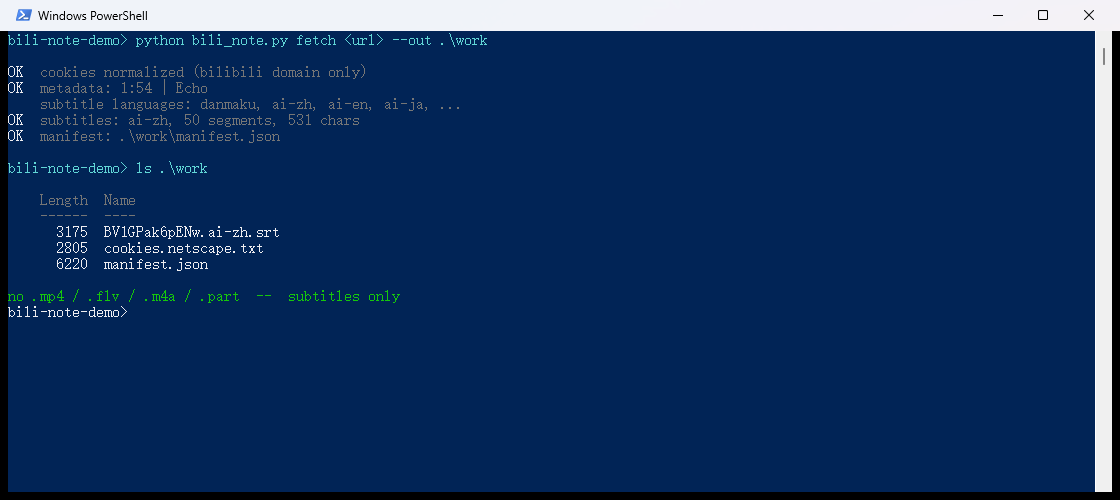
└── yt-dlp, subtitles only ────────────────────────────────────────┘fetch on a real video — note what is not there: no .mp4, .flv, .m4a or .part,
only the subtitle file and its manifest.
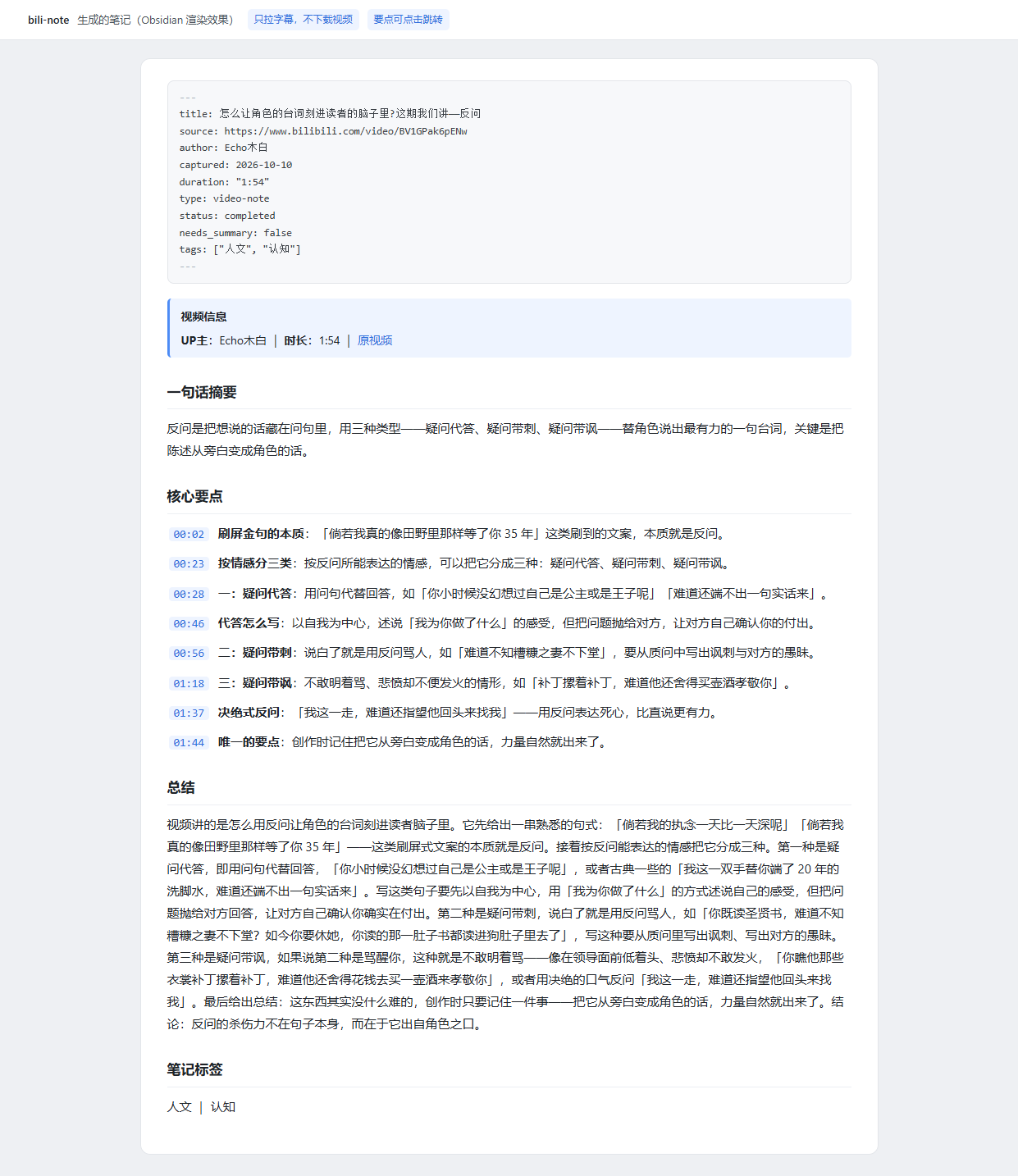
And the note it produces (Obsidian rendering — front matter, clickable ?t= jump links,
summary, bullets, tags). Screenshot taken from a real run, not a mock-up:
--skip-download is mandatory, and the tool verifies no media file
(.mp4/.flv/.m4a/.part) landed in the working directory. No reverse-engineering, no
private APIs — just yt-dlp.No dependencies — standard library only. yt-dlp is an external command, not a Python package.
dsh plugin --profile web add github:3588834014-del/bilibili-note-pluginThis is a bundle plugin that registers the bilibili-note skill straight into the DSH skill
catalog — no manual copying into ~/.agents/skills. Restart your profile afterwards and the
skill is available; the model picks it up from phrases like 「B站笔记」 or a pasted BV link.
The plugin ships its own copy of scripts/bili_note.py, docs/ and SKILL.md, and rewrites
the <skill-dir> placeholders in the skill body to the absolute install path, so the model
never has to guess where the script lives. Uninstall with
dsh plugin --profile web remove dsh-bilibili-note.
There is no npm package yet, so this plugin is source-installed — it is listed on dsh-plugin.org but will not appear in the in-app plugin store. pnpm ≥10 may ask you to allow the git dependency's build script; this package has no
preparescript, so nothing runs at install time.
pipx install git+https://github.com/3588834014-del/bilibili-note.git
# or
git clone https://github.com/3588834014-del/bilibili-note.git
cd bilibili-note && python -m pip install .
Then:
bili-note --version
bili-note note "https://www.bilibili.com/video/BVxxxxxxxxx" \
--note-dir ~/MyVault/Sources/Videospython scripts/install.py # installs to ~/.agents/skills/bilibili-note
python scripts/install.py --dry-run # show what would be copiedThe skill then appears in the dsh skill catalog and can be triggered with phrases like
「B站笔记」. The plugin, the skill-file install and the CLI all share the same implementation
(scripts/bili_note.py).
| Requirement | Notes |
|---|---|
| Python 3.8+ | stdlib only |
yt-dlp |
pip install -U yt-dlp — the only download channel |
| Bilibili login cookies | Required for AI subtitles; see below |
DSH >=0.2.0-rc.2 <0.3.0 |
Only for the plugin/skill route |
Worth knowing before you install, since this tool touches the network and your vault:
bilibili.com through yt-dlp only. It downloads subtitles, never
video or audio (--skip-download is mandatory and verified).$BILI_COOKIES or ./cookies.txt. It
writes a normalized temporary copy next to the work dir for yt-dlp; it never uploads,
logs, or commits cookies.--note-dir you pass, plus a scratch work directory.
Nothing outside those two paths is modified.Bilibili's AI-subtitle endpoint needs an authenticated session.
cookies.txt.export BILI_COOKIES=/path/to/cookies.txt # Linux / macOS
$env:BILI_COOKIES = "C:\path\cookies.txt" # PowerShellVideos where the uploader supplied their own subtitles may work without this.
This is the single most surprising thing in this repository. That extension writes lines like:
.bilibili.com FALSE / FALSE 1819635894 SESSDATA xxxxxThe domain carries a leading dot, yet the host-only flag in column 2 is FALSE. Python's
http.cookiejar asserts:
assert domain_specified == initial_dotThe mismatch raises, and yt-dlp refuses to load the entire file:
ERROR: invalid Netscape format cookies file '...': '.bilibili.com\tFALSE\t/...'The practical symptom is nasty: subtitles never arrive, and the error looks like
"this video has no subtitles." The fix is normalization — strip the leading dot and set the
flag to FALSE (a host-only cookie is still sent to api.bilibili.com and friends, so the
session is preserved). normalize_cookies() does this, plus filters to the bilibili domain
and de-duplicates by domain/path/name. You never have to do it by hand.
Nothing is hard-coded. Pick either:
bili-note note "<URL>" --note-dir "<vault>/Sources/Videos"    # explicit

export BILI_VAULT="/path/to/MyVault"                           # or environment
export BILI_TARGET_DIR="Sources/Videos"                        # optional, this is the default
Deliberately no built-in default vault path: hard-coding one "looks right" path silently creates an empty directory on someone else's machine, and notes vanish into it.
# fetch metadata + subtitles (subtitles only, never the video)
bili-note fetch "<URL>" --out ./work

# write the note straight from an existing work dir
bili-note write --work ./work --note-dir "<vault>/Sources/Videos" --content-file content.json

# one shot: fetch + write
bili-note note "<URL>" --note-dir "<vault>/Sources/Videos" [--content-file content.json]

# structural self-check
bili-note verify --note "<note path>"

# environment self-check: cookies / yt-dlp / output dir (no network)
bili-note selftest
selftest answers the question you will actually ask — "why did I get no subtitles?" —
before you blame the code:
  ✓ cookie file: /home/me/cookies.txt
  ✓ has SESSDATA login: ...
  ✓ yt-dlp: /usr/local/bin/yt-dlp
  ✗ output dir: not configured (pass --note-dir, or set BILI_VAULT/BILI_TARGET_DIR)
fetch walks you through each step:
✓ cookie normalized: ... (33 bilibili cookies)
✓ metadata: <title> (<uploader>) | 12:34
  subtitle languages: danmaku, ai-zh, ai-en
✓ subtitles: ai-zh, 134 segments, 1625 chars
✓ manifest: /path/to/work/manifest.json
content.json — the judgment half{
"summary": "One sentence, 60-120 chars, conclusion first.",
"body": "200-400 chars covering the argument and the conclusion.",
"tags": ["认知", "人文"],
"cards": ["CC_example"],
"bullets": [
{"time": 0, "title": "Short heading", "text": "One sentence."},
{"time": 23, "title": "Short heading", "text": "One sentence."}
]
}time is seconds; the tool renders the MM:SS label and the jump link for you.
title and cards are optional. Omit --content-file entirely to get a draft note with
placeholders and status: draft.
---
title: Video title
source: https://www.bilibili.com/video/BVxxxxxxxxx
author: Uploader
captured: 2026-01-01
duration: "12:34"
type: video-note
status: completed
needs_summary: false
tags: ["认知", "人文"]
---
> [!info] 视频信息
> **UP主**:Uploader | **时长**:12:34 | [原视频](https://www.bilibili.com/video/BVxxxxxxxxx)

## 一句话摘要
…
## 核心要点
|- [00:00](https://www.bilibili.com/video/BVxxxxxxxxx/?t=0s) **Heading**:One sentence.
|- [00:23](https://www.bilibili.com/video/BVxxxxxxxxx/?t=23s) **Heading**:One sentence.
## 总结
…
## 笔记标签
认知 | 人文
## 原始字幕
> [!quote]- 完整字幕(点击展开)
> …cleaned transcript, no timestamps or indices
The
|-prefix on bullet lines looks like a broken table row, and it is — deliberately. A downstream archive checker matches^\|- \[[0-9]{2}:[0-9]{2}\], so standard-list syntax would be rejected. All format constraints and their reasons live in docs/FORMAT.md.
No network, no cookies required:
python -m unittest discover -s tests -v108 tests covering SRT parsing and timestamp cleanup (LF/CRLF/BOM, multi-line cues,
over-1-hour offsets, HTML and ASS tags, literal < > in text, zero-width characters,
duplicate rolling captions, empty cues), both timestamp formats, bullet-line contract,
draft-literal contract, cookie normalization, URL normalization (tracking params and ?p=),
anthology timestamp rebasing and subtitle-file selection, duplicate-part detection, on-disk
write and de-duplication, verify positive/negative cases, the CLI wiring, Python
minimum-version compatibility guards, and repository hygiene.
CI runs the same suite on Linux + Windows × Python 3.8/3.10/3.12 — see .github/workflows/ci.yml.
?p=6 to grab a single part instead.
Jump links point at {anthology URL}/?t={cumulative}s, so they are exact when playing the
anthology as a whole but not when you open one part standalone. That is inherent to
merging, not a fixable bug.ai-zh is machine-generated and regularly
mis-hears or drops words. The rule this project follows: quotes are copied verbatim and
not silently corrected; anything recoverable from context is paraphrased without
quote marks; anything unintelligible is dropped rather than guessed. See SKILL.md §2.6.[93:31]), not H:MM:SS — deliberate, to
match the existing corpus.[100:00], [123:49]). A validator
using ^\|- \[[0-9]{2}:[0-9]{2}\] only accepts 2 digits and will under-count, flagging long
videos as "too few bullet points." Measured on the 2:10:32 anthology: 24% of the timeline
has 3-digit minutes, first at 100:00. Fix is to widen {2} to {1,3} downstream; this
repo's checker does that. verify passes such notes but prints a warning.Issues and PRs welcome. Read docs/FORMAT.md before touching anything
format-related, and keep python -m unittest discover -s tests green — TestDownstreamContract
exists specifically to pin those contracts down.
CLASSIFICATION EVIDENCE
系统优先读取 GitHub Topics,再与站内分类词典和词根规则比对。当前命中: cli。
superdesigndev
OpenRouter for agent tools. Join community here: https://discord.gg/6mQYYfFMAn

T-Auto
A toolkit for low-level operations in DSH, designed to reduce token usage and task execution time / DSH 底层操作工具插件,旨在减少 Token 消耗与任务耗时

crafter-station
A public gallery of animated pets for Codex, Claude Code, DeepSeek Harness, Hermes, OpenCode, Gemini CLI, and more.