dsh-effort-slider
A Claude Code–style reasoning-effort slider for DeepSeek Harness — click Effort in the model menu, drag without steps, snap on release, with a WebGL fire trail; any third-party model/provider gets real, working thinking-effort control.





English · 中文 · Español · 日本語 · Deutsch · Русский · Português · 한국어
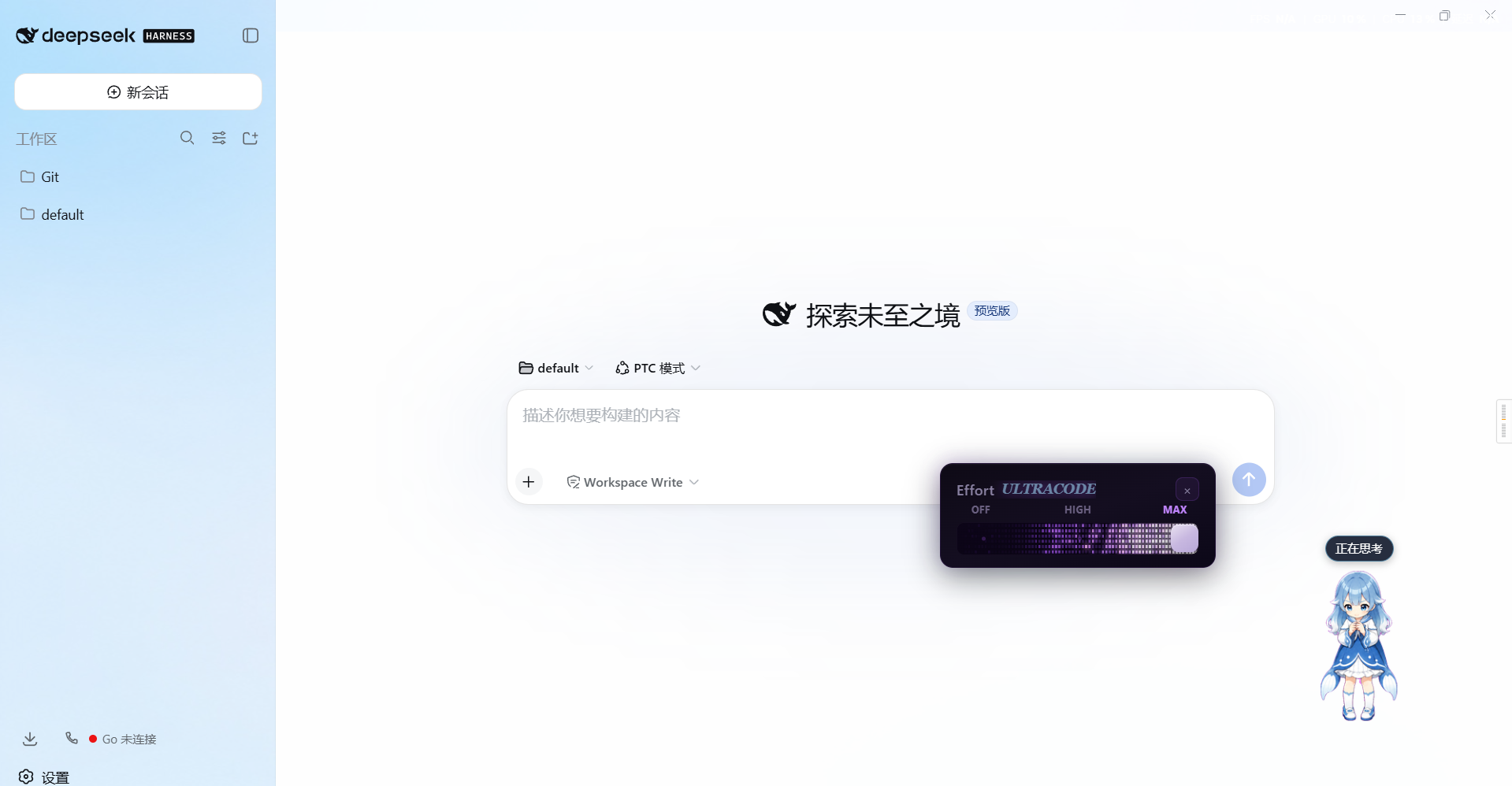
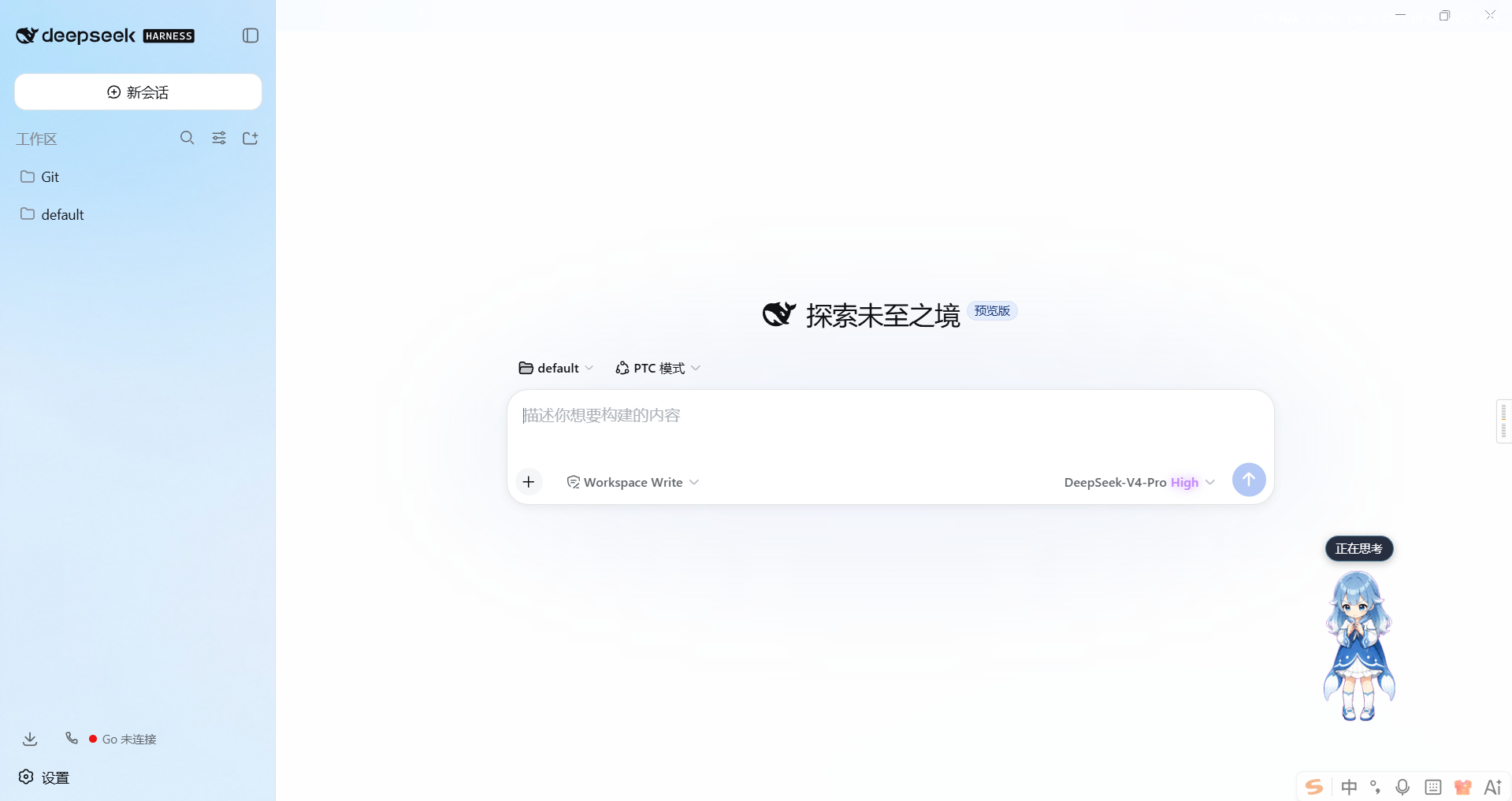
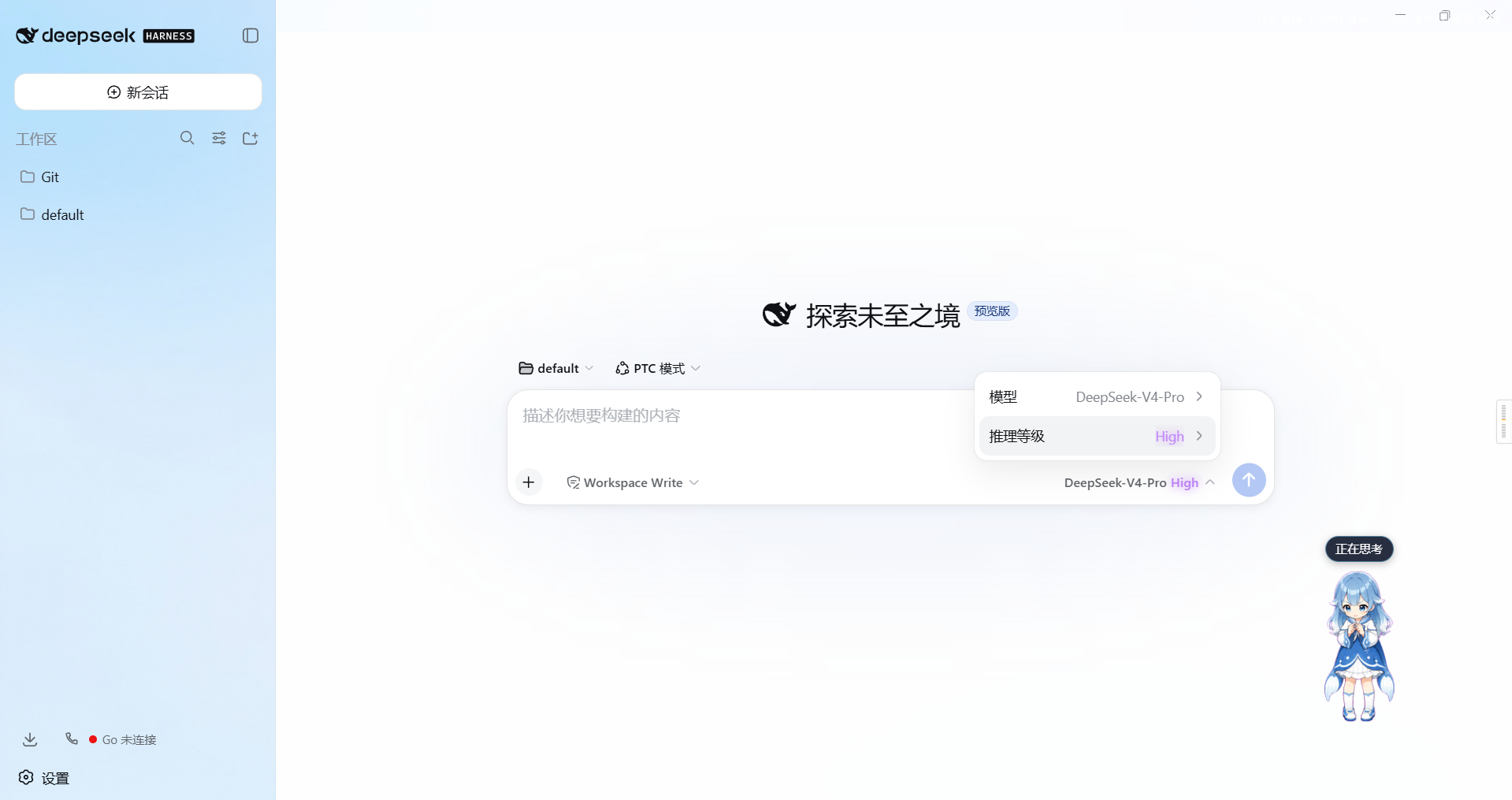
Click the Effort row (second row of the official model menu) instead of the built-in level list: an Effort slider panel pops up — OFF/MAX scale ticks, Low/Medium/High/Ultracode status shown live, and after the panel closes the effort value stays color-coded on the menu row and on the model-seat trigger button.
Features · Compatibility · Install / Uninstall · Quick Start · Configuration · Permissions & Data · How It Works · Troubleshooting · Development
Demo screenshots (menu-row coloring / model-seat trigger / Effort panel — effort level is color-coded):
| Menu row |
Model-seat trigger |
Effort panel |
 |
 |
 |
🆕 v0.5.0 — Evaluation-fix batch. Reliability: the panel splits loading / load-failed / unsupported into three states with a retry button; failed slider writes surface a transient red status instead of failing silently; user config edits made mid-provision are detected (the entry is re-read before mutate, conflicting rounds defer); every host provisioning failure path now logs a warning, and an unrecognized Effort row produces a one-time diagnostic. Panel UX: re-anchors on scroll/resize, closes on Esc / outside click / anchor unmount, and clicking the Effort row toggles it; tick dots and labels align with the real snap points; the slider carries aria-label / aria-valuetext; UI text is bilingual (zh/en, follows <html lang>). New debugReport option: per-route/per-model provisioning detail plus an optional read-only llm/stream tracer logging route/model/effort per request; a ? help hint in the panel header points at enabled / dialect / debugReport. Also: GitHub Actions CI (typecheck + tests + build + stale-artifact gate), the WebGL fire no longer burns at 60 fps while invisible, and the npm package is renamed to @txc2768651338/dsh-effort-slider (the old unscoped dsh-effort-slider name is retired).
🆕 v0.4.0 — Ported to DSH 0.2.0: DSH replaced its settings service with SettingsForms (settings are now profile entry configs; installSection / settings.get / settings/updated are gone). The host half now locates the pi-ai profile entry (llm-pi-ai), reads it via settings.describe(), writes via settings.mutate(), and listens to settings/document-updated. The client half derives the current session from retainedBy.mainView (SessionListState.current was removed). Plugin options (enabled / defaultDialect / routes) live in the plugin's entry config, editable in the DSH settings page. DSH ≤ 0.1.5 is no longer supported (use v0.3.0 there).
🆕 v0.3.0 — Ported to DSH 0.1.5: client Context now comes from @deepseek-ai/cordis, per-session state is read/written via ctx.modelDirectories, and the settings section is installed via settings.installSection(); the adapter-metadata wrapper was dropped (see Universal effort provisioning). DSH ≤ 0.1.1 is no longer supported.
🔧 v0.2.5 — Fixed universal provisioning failing silently on explicit models arrays (dsh-settings path ops cannot traverse array nodes — the array is now replaced as a whole).
🔧 v0.2.4 — Fixed universal provisioning never landing when the pi-ai settings section registers late (now retries until the section is ready).
🆕 v0.2.3 — The model-seat trigger button also color-codes its effort name, persistent after the menu closes.
🔧 v0.2.2 — Fixed menu-row coloring breaking on whole-menu remounts (full-scan throttled repaint; color inferred from the effort text).
🆕 v0.2.1 — The effort value on the model menu's Effort row keeps its level color after the panel closes.
✨ v0.2.0 — Any custom third-party model/provider gets working thinking-effort control (hot-applied).
🎛️ v0.1.0 — Initial release: intercepts the official Effort menu and shows a Claude Code–style Effort slider panel.
Full notes for each version: Releases
Features
| Feature |
Description |
| 🎚️ Stepless dragging |
Continuous 0–100 dragging that writes reasoningEffort in real time (16 ms throttle, no request pile-up while dragging) |
| 🎯 Snap on release |
Snaps to the nearest level on release / blur / keyboard end, with one confirmation write |
| 🔥 WebGL fire trail |
Three-pass shaders (ignite → blur → composite); the fire front follows the thumb with spring damping |
| 🏁 OFF/MAX ticks |
First/last levels always show OFF / MAX; middle levels show the API-returned name |
| 🎨 Level status |
Effort name shown in the panel header, colored/glowing per level; menu row and model-seat trigger keep the same color after closing (v0.2.3) |
| 🌐 Universal effort |
Third-party models without reasoning metadata automatically get the universal 5-level scale; pi-ai models get wire-level dictionaries patched in, hot-applied (v0.2.0) |
Only reasoningEffort is written — model selection is untouched. Models with no multi-level reasoning show 「当前模型不提供多档推理等级」 (no multi-level reasoning available).
Universal effort provisioning (v0.2.0, simplified in v0.3.0)
Any custom third-party model/provider gets thinking-effort control that actually works on the wire:
- Wire-level provisioning (host, pi-ai): for
llm-pi-ai models missing reasoningEfforts, the dictionary and compat wire dialect
are patched in (hot-applied, no restart); pi-ai translates the level into real wire fields
(reasoning_effort / thinking / OpenRouter reasoning.effort, etc.) and advertises the same declaration as the model's
reasoning catalog metadata — which is what makes the official Effort row appear for a hand-declared model at all;
- Client fallback scale: if the directory returns no reasoning metadata, the panel still opens with the universal 5-level scale;
- Existing user declarations (
reasoningEfforts: false or a custom dictionary) are always respected and never overwritten.
Why there is no adapter wrapper any more. Up to v0.2.5 the host half also wrapped each adapter's resolveModel to inject
universalReasoning into models that declared no reasoning metadata. DSH 0.1.5 made llm.adapters a private field with no
public accessor, so that path is impossible — and unnecessary: reasoningEfforts is the one declaration that feeds both the
request wire and the model catalog. Model-level compat is only written when the route declares api: openai-completions,
because pi-ai refuses a switch the model's protocol cannot read.
Supported wire dialects for custom endpoints (set effort-slider.defaultDialect or routes.<route>). A dialect translates
levels on api: openai-completions routes only — native protocols use pi-ai's built-in mapping, so the dialect setting
has no wire effect there:
| Dialect |
Wire effect |
effort (default) |
OpenAI-style reasoning_effort: low/medium/high/max |
deepseek |
thinking:{type} toggle + reasoning_effort |
openrouter |
reasoning: { effort } (OpenRouter normalized) |
together / zai |
reasoning.enabled / thinking:{type} + optional effort |
qwen |
enable_thinking toggle |
string-thinking / ant-ling |
thinking / reasoning.effort strings |
Compatibility
| Item |
Value |
| DSH version |
0.2.0-rc.2 (the npm latest dist-tag; the version this build is verified against), web profile on Windows |
| Broken on |
DSH ≤ 0.1.5 — v0.4.0 targets the SettingsForms settings service introduced in 0.2.0 (use v0.3.0 for DSH 0.1.5; v0.2.5 and earlier also import @deepseek-ai/dsh-client-runtime, which was removed after 0.1.1-rc.2) |
| Install mechanism |
dsh plugin --profile web add (bundle patch + dual half) |
| Depends on |
ctx.sessions (@deepseek-ai/dsh-api-session-controller) and ctx.modelDirectories (@deepseek-ai/dsh-client-ui-model-selection); host: ctx.llm, ctx.settings (SettingsForms) |
| Client module requests |
none beyond the platform baseline (react, react-dom/client, react/jsx-runtime) — all DSH imports are type-only and erased |
Install / Uninstall
# Install from npm (the package listed on deepseek1024.com)
dsh plugin --profile web add @txc2768651338/dsh-effort-slider

# Or install from GitHub (the committed lib/ artifacts need no local build)
dsh plugin --profile web add github:2768651338/dsh-effort-slider#main

# Or build locally and install from a checkout
pnpm install && pnpm build
dsh plugin --profile web add file:./dsh-effort-slider
After installing, restart DeepSeek Harness and press Ctrl+F5 once in the web page.
The lib/ artifacts are committed, so GitHub installs need no local build.
Coming from a version pinned to an old DSH? Remove any - id: ui-effort-slider / disabled: true
row from ~/.dsh/profiles/web/cordis.patch.yml, otherwise the new build stays switched off.
| Action |
Command |
| Upgrade |
dsh plugin --profile web update @txc2768651338/dsh-effort-slider (or re-run add), then restart DSH |
| Uninstall |
dsh plugin --profile web remove @txc2768651338/dsh-effort-slider, then remove its row from cordis.patch.yml if any |
Quick Start
- Install the plugin, restart DSH, press
Ctrl+F5.
- Open the model menu above the composer → click Effort → the Effort slider panel appears.
- Drag to choose a level; it snaps on release. After the panel closes, the effort value keeps its color on the menu row.
- For custom models with no thinking effort, the panel opens with the universal 5-level scale; pi-ai models get their wire dictionaries patched on the host side (hot-applied).
A [effort-slider] intercept row: ... line in DevTools Console means interception is working.
Configuration
| Item |
Details |
| Plugin options |
The plugin's profile entry config (enabled / defaultDialect / routes / debugReport), editable in the DSH settings page (auto-generated form), applied on plugin remount |
| Defaults |
enabled: true, defaultDialect: effort, debugReport: false |
| Environment variables |
None of its own; follows DSH's DSH_HOME resolution |
| Sensitive items |
None — no keys, tokens, or credentials are read or stored |
effort-slider:
  enabled: true          # provisioning master switch
  defaultDialect: effort # global default wire dialect
  routes:
    my-gateway: deepseek # per-route override
  debugReport: false     # per-run provisioning report (route/model/dialect/write-or-skip) + per-request effort trace (llm/stream) in the host log
Permissions & Data
| Scope |
What it touches |
| Files (read) |
None — no user files are read or written (settings go through DSH's settings service) |
| Network |
None of its own — the panel reads and writes the Model Controller's in-browser directory; the resulting session.selectModel call rides DSH's existing connection |
| Credentials |
Never read |
| User data |
Not read (no access to conversation content/messages/prompts; only the current session's provider/model/reasoningEffort through the shared model directory) |
How It Works
| Half |
File |
Role |
| Host |
lib/index.js |
Universal effort provisioning: locates the pi-ai profile entry (llm-pi-ai), reads it via settings.describe(), patches wire dialects (buildProvisionOps, idempotent, respects user declarations) via settings.mutate; listens to llm/adapters-updated / settings/document-updated. With debugReport: true, each provisioning run logs a per-route/per-model report (written fields or skip reason, plus a note where the wire dialect does not apply) instead of the one-line count, and each model call is traced as [debug] request route=… model=… effort=… through a read-only llm/stream passthrough |
| Browser |
lib/client.js |
Captures clicks on the model menu's Effort row → shows the Effort panel; reads ctx.modelDirectories.directoryFor(sessionId) and writes through directory.select({ reasoningEffort }); a MutationObserver keeps the menu-row level color alive after the panel closes |
The browser half follows the official external-plugin convention: classic script + window.__ModuleLoader__.load factory;
react / react-dom/client / react/jsx-runtime are platform externals;
effort.module.css is hashed and inlined by lightningcss, injected as <style data-plugin> when the factory runs.
Troubleshooting
| Symptom |
Fix |
| No Effort row in the model menu |
The model declares no reasoning metadata and host provisioning is not in effect — confirm DSH was restarted and check enabled on the plugin's settings page (its profile entry config); set debugReport: true and check the host log for the per-model provisioning report |
| Panel says 「当前模型不支持思考强度调节」 |
Universal fallback not active — upgrade to v0.2.0+ and restart |
Plugin does not load at all (row shows disabled: true) |
An earlier build was switched off in ~/.dsh/profiles/web/cordis.patch.yml; delete that row and restart |
| Dragging has no effect |
Check whether the target endpoint's wire dialect matches (see the dialect table — dialects translate only on api: openai-completions routes) or set defaultDialect for that route. With debugReport: true the host log covers the whole chain you can verify: the per-model report states exactly what was written (or skipped, and why) and flags routes where the dialect does not apply, and [debug] request route=… model=… effort=… lines prove which level each call carries. That leaves only the wire translation inside pi-ai, which no plugin can observe. The panel's ? button repeats this checklist |
| Conflicts with other skin plugins |
If another skin that intercepts the Effort row is installed (e.g. the aurora skin of dsh-ui-web), disable its interception to avoid double panels |
| Version still shows old after restart |
file: installs are snapshot copies — use the github: spec or re-run add before restarting |
| Where are the logs? |
Host errors: DSH startup log (with debugReport: true, provisioning details and per-request effort traces are logged as effort-slider: [debug] lines); client errors: browser DevTools (F12) Console ([effort-slider] prefix) |
Project Structure
src/
  index.ts                  host half: pi-ai wire provisioning via the SettingsForms seam
  effort-core.ts             pure logic: dialect → wire mapping, provisioning patches (unit-tested)
  client/
    index.ts                browser half: intercept the Effort row + panel anchor + menu-row coloring
    css-modules.d.ts
    effort/
      directory.ts          structural face of ctx.modelDirectories / ctx.sessions (type-only, no DSH runtime import)
      EffortPanel.tsx       Effort panel (levels / ticks / slider / glow)
      useWebglFire.ts       WebGL2 three-pass fire loop (spring follow + idle sleep)
      shaders.ts             vertex / ignite / blur / composite shaders
      effortColors.ts        level → color mapping (panel and menu row share it)
      effort.module.css      panel styles (inlined via lightningcss)
cordis.patch.yml           bundle patch (inserts the ui-effort-slider row)
lib/                        built artifacts (client.js ships with sourcemap)
test/                      host.spec.mjs unit tests + host-apply.spec.mjs + client.smoke.mjs
Development
pnpm install
pnpm build       # tsdown → lib/index.js (host half) + lib/client.js (browser half)
pnpm typecheck   # tsc --noEmit (green against @deepseek-ai/* 0.2.0-rc.2)
pnpm test        # host unit tests + apply integration test + real-seam integration test + jsdom smoke
test/ layers, cheapest first:
| File |
Scope |
host.spec.mjs |
Pure logic: dialect → wire mapping, provisioning patch generation, idempotency |
host-apply.spec.mjs |
apply() against a mocked cordis context: late pi-ai entry retry, compat gating on the declared protocol, settings/document-updated idempotency |
host-integration.spec.mjs |
Real seam: real @deepseek-ai/cordis + a faithful SettingsForms seam double (0.2.0's npm packages have no standalone provider) — entry discovery, real path-op writes landing in the profile entry config, and the written reasoningEfforts/compat passing pi-ai's validation rules |
client.smoke.mjs |
jsdom: bundle factory materialization, Effort-row interception, panel render, drag/snap writes through directory.select, coloring, teardown |
Contributing. Fork → change → pnpm build → run pnpm test → open a PR against main. Small fixes (docs, tests) are welcome without prior discussion; report issues with the DSH version and the exact error.
License & Security
License: BSD-3-Clause — see LICENSE.
The UI implementation references the aurora skin of the community dsh-ui-web project (BSD-3-Clause); full upstream notices and license texts are in
THIRD_PARTY_NOTICES.md.
Security: this plugin reads no credentials and sends nothing over the network (only talks to the local DSH). To report a security issue privately, use GitHub's Report a vulnerability on the Security tab — do not open a public issue with exploit details.
Star History


