
模型与 MCP
待识别

rea
morluto
Reverse engineer anything with agents, from app behavior down to native binaries.
PROJECT TOPICS
INSTALL REFERENCE
dsh plugin --profile web add github:2404376192/dsh-dian-du
该命令指向仓库当前默认分支;尚无绑定当前 commit 的完整验证结果。
PROJECT README
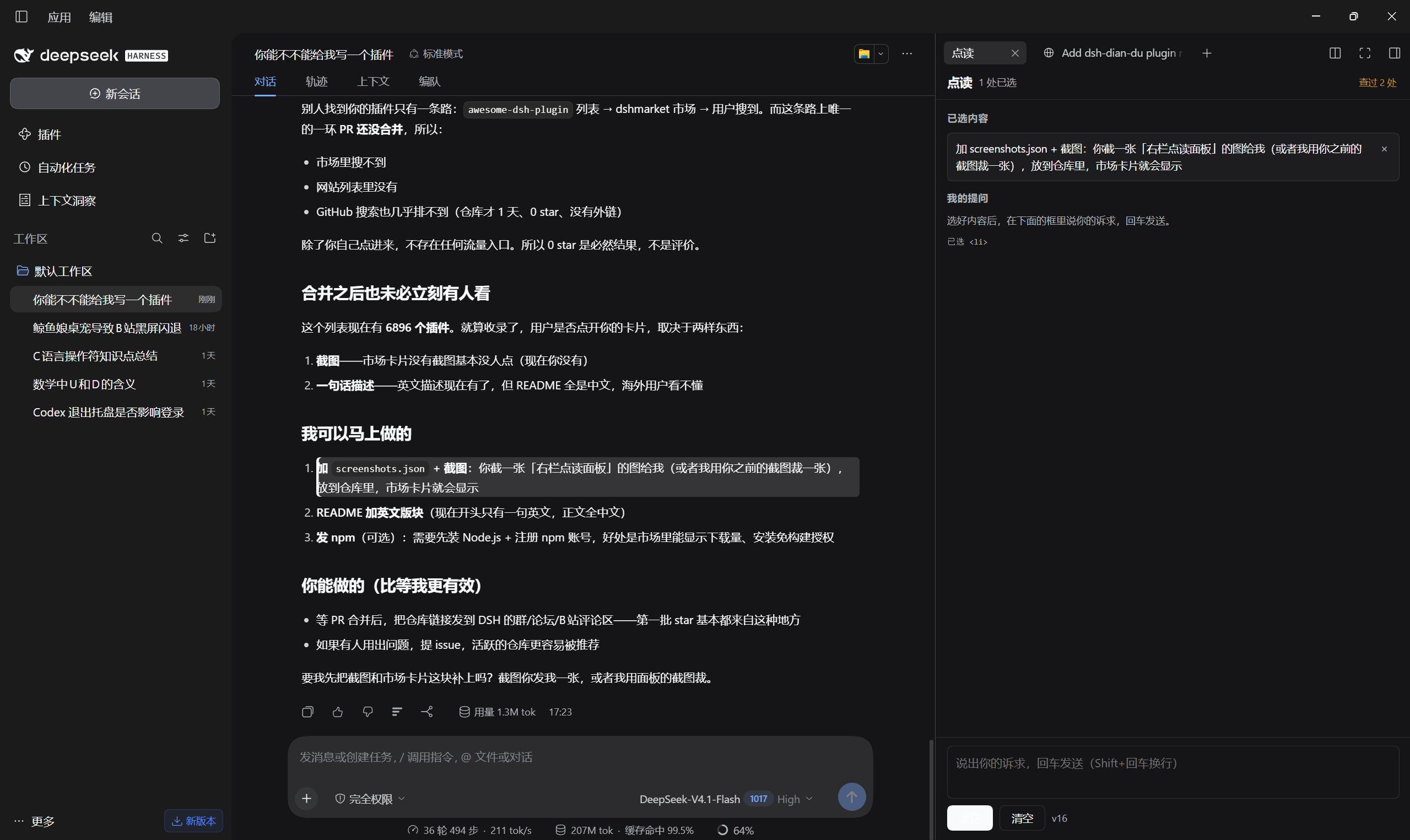
A reading-pen plugin for DeepSeek Harness (DSH). Drag over any sentence in an answer, click 「在侧边提问」in the floating toolbar, and read the explanation in a docked right-hand column — the conversation itself is never rewritten.
中文说明见下方 中文.
Ctrl once, or Ctrl+click anywhere; 「查过 N 处」 clears all traces.high.>= 0.2.0-rc.1 with the Web/Desktop client (the plugin registers a right-Sidebar tab and a Host command).# Desktop app profile
dsh plugin --profile desktop add github:2404376192/dsh-dian-du
# CLI / web profile
dsh plugin --profile web add github:2404376192/dsh-dian-duThen quit DSH completely and reopen it — client bundles are scanned at startup only.
Verify: open the right Sidebar; the「点读」tab is there, and its footer shows the plugin version.
| Part | Role |
|---|---|
client.js |
Selection, the floating toolbar, highlighting and the right-column panel; registers into sidebar.right.pane.tab, with a shell.overlay fallback |
index.js |
Host half: registers the /dian-du command and calls ctx.llm.stream |
| Flow | panel → ctx.remote.session.create (a dedicated side session) → ctx.remote.commands.execute('/dian-du …') → text rendered in the column |
cordis.patch.yml |
Bundle patch; provider, model, reasoningEffort can be overridden here |
Model calls happen on the Host: the browser never sees an API key, and explanations are not appended to the main conversation's log.
npm test        # node test/host.test.mjs && node test/client.test.mjs
node --check client.js && node --check index.js
client.js browser half: selection, highlight, right-column panel
index.js host half: /dian-du command, model call
cordis.patch.yml bundle patch and provider/model configuration
locale/{zh,en}.json plugin list title and description
icon.svg plugin icon
assets/ screenshotsMIT
DeepSeek Harness(DSH)插件:在对话里划选 AI 回答中的任意文字,点浮出的「在侧边提问」,然后在右侧独立栏里提问,让模型专门解释这一处。左侧原始回答不改动、不新增消息。
Ctrl,或 Ctrl + 点击任意位置;「查过 N 处」可清空全部痕迹high# 桌面端
dsh plugin --profile desktop add github:2404376192/dsh-dian-du
# 命令行 / web
dsh plugin --profile web add github:2404376192/dsh-dian-du装完完全退出 DSH 再打开(客户端 bundle 只在启动时扫描)。
| 部分 | 说明 |
|---|---|
client.js |
划词工具栏、点选、高亮、右栏面板;注册到 sidebar.right.pane.tab,另有 shell.overlay 兜底 |
index.js |
Host 半边:注册 /dian-du 命令,用 ctx.llm.stream 调模型 |
| 调用链 | 面板 → ctx.remote.session.create(独立「点读」会话)→ ctx.remote.commands.execute('/dian-du …') → 文本回显在右栏 |
cordis.patch.yml |
bundle 补丁;provider / model / reasoningEffort 可在这里改 |
模型调用只走 Host,浏览器端不接触 API key,解释也不会写进主对话的会话日志。
npm test
node --check client.js && node --check index.jsMIT
CLASSIFICATION EVIDENCE
系统优先读取 GitHub Topics,再与站内分类词典和词根规则比对。当前命中: deepseek-harness。
morluto
Reverse engineer anything with agents, from app behavior down to native binaries.

deepseek-ai
DeepSeek Harness: Everything is a Plugin.

nexu-io
The 1st Collaborative AI Design Agent Workspace. Local-first and open source. Create motion, prototypes, websites, apps, dashboards, presentations, images, and videos with your team and AI agents. Share work, exchange feedback, and iterate together in one workspace.