
其他
完整应用

deepseek-harness
deepseek-ai
DeepSeek Harness: Everything is a Plugin.
PROJECT TOPICS
PROJECT README
让 DSH Desktop 的对话交互接近 ChatGPT。
项目目标:复刻 ChatGPT 的两种引用对话形式。
- 主对话引用:在当前会话引用回答,输入问题后继续在原会话中回答。
- 侧边栏引用对话:把引用带到 Better Sidebar,在独立侧边会话中追问,主会话保持不变。
选择回答中的文字,或点击回答操作栏的“引用”。引用会保留为输入框中的注释胶囊;用户编辑完问题后再发送。
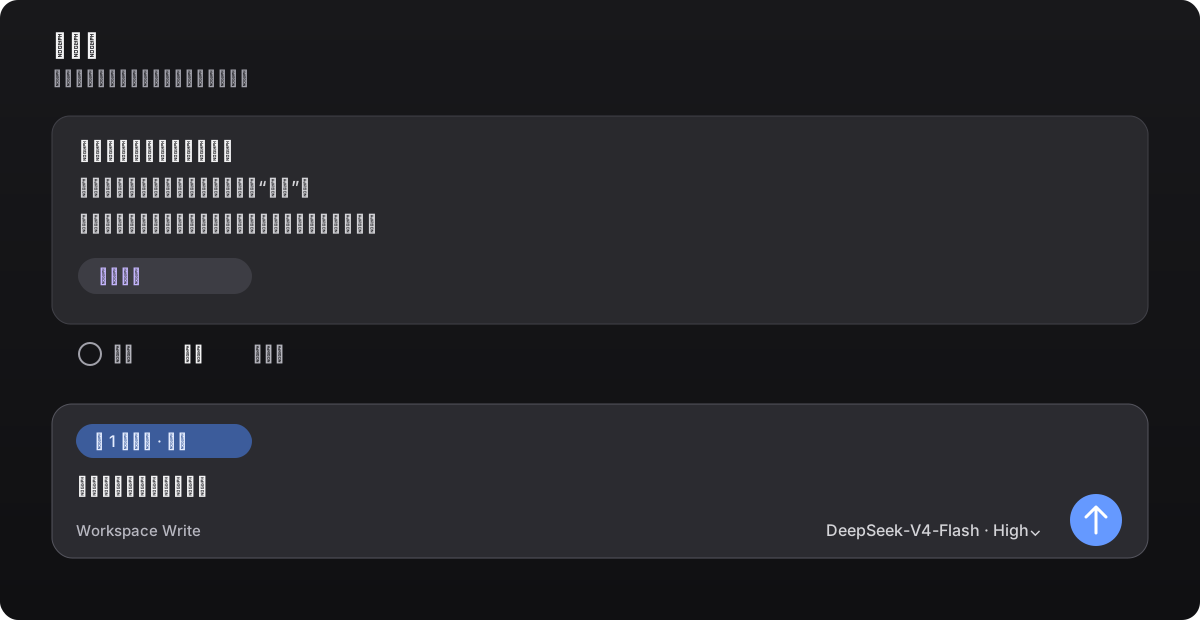
点击“侧栏问”或选中文字工具条中的“在侧边聊天中提问”。侧边栏沿用 Better Sidebar 的原生对话栏,可切换模型;引用胶囊之外的文字全部由用户输入,点击发送后才会开始回答。
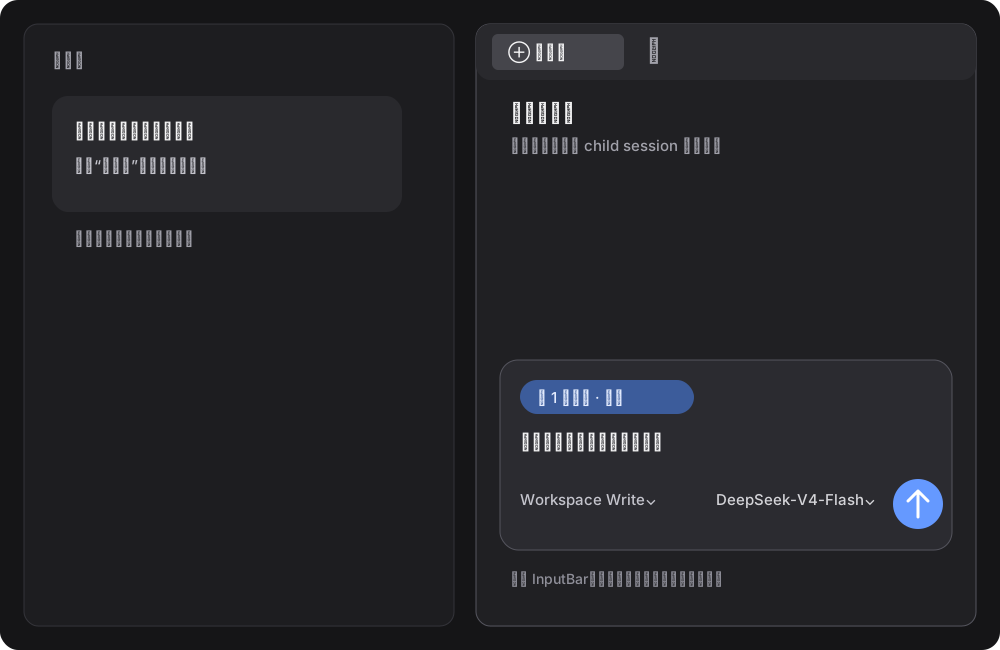
>、---)污染到正文。1 条注释 胶囊,用户可先编辑问题、移除引用,再决定是否发送。dsh-better-sidebar@0.17.1 的 SideChatView、转录映射和样式;未安装 Better Sidebar 时也能使用,已安装其他版本时仍由本项目的侧边实现生效。插件只增加引用胶囊、入口和会话路由;侧边栏的布局、转录和会话生命周期来自锁定的 Better Sidebar 0.17.1 源码,避免外部插件版本冲突。
| 组件 | 版本 |
|---|---|
| DSH Desktop(Windows) | 0.7.2 |
DeepSeek Harness / @deepseek-ai/dsh |
0.1.2-alpha.1 |
dsh-better-sidebar |
0.17.1 |
| Node.js | >=20 |
| pnpm | 10.x 或 11.x |
dsh-better-sidebar@0.18.x 面向 Harness 0.1.2-rc.1+,会读取 alpha.1 没有的 connection.state.getSnapshot()。使用 DSH Desktop 0.7.2 时请固定为 0.17.1,否则点击新对话可能出现 Cannot read properties of undefined (reading 'getSnapshot')。
统一使用 DSH 官方插件命令安装。先完全退出 DSH Desktop,在 Windows PowerShell 中执行:
$env:DSH_HOME = "$env:APPDATA\dsh-desktop\harness"
dsh plugin --profile web add --save-exact --allow-build=node-pty "git+https://github.com/1985899182/dsh-harness-chat-control.git#v0.2.64"
如果 dsh 不在 PATH,使用 DSH Desktop 自带的 CLI;底层仍是同一条 dsh plugin 安装命令:
$desktopNode = 'D:\DSH\DSH Desktop\resources\app\node_modules\node\bin\node.exe'
$desktopDsh = 'D:\DSH\DSH Desktop\resources\app\node_modules\@deepseek-ai\dsh\lib\bin.js'
$env:DSH_HOME = "$env:APPDATA\dsh-desktop\harness"
& $desktopNode $desktopDsh plugin --profile web add --save-exact --allow-build=node-pty "git+https://github.com/1985899182/dsh-harness-chat-control.git#v0.2.64"
命令使用显式 HTTPS Git 地址,避免 pnpm 将 GitHub 简写解析成 SSH。若本机通过代理联网,请在执行前设置 HTTP_PROXY、HTTPS_PROXY 或 ALL_PROXY。首次安装或当前插件尚未运行时,安装完成后请完全退出并重新打开 DSH Desktop;已运行插件的升级按 DSH 提示刷新页面即可。
如果 profile 中已经是 Sidebar 0.18.x,仍然使用同一个 dsh plugin 命令先固定兼容版本:
$desktopNode = 'D:\DSH\DSH Desktop\resources\app\node_modules\node\bin\node.exe'
$desktopDsh = 'D:\DSH\DSH Desktop\resources\app\node_modules\@deepseek-ai\dsh\lib\bin.js'
$env:DSH_HOME = "$env:APPDATA\dsh-desktop\harness"
& $desktopNode $desktopDsh plugin --profile web add --save-exact --allow-build=node-pty dsh-better-sidebar@0.17.1
然后重新执行上面的标准安装命令。
npm test校验清单、加载器声明、PowerShell 安装脚本和 JavaScript 语法。
当前里程碑:v0.2.64,适配上表中的 DSH Desktop 0.7.2 / Harness 0.1.2-alpha.1,并内置 dsh-better-sidebar@0.17.1 的侧边对话实现;本版本让侧边栏模型选择和图片发送都走 DSH 主对话的原生 InputBar/附件准入链路,并修复隔离加载路径下消息 ID 缺失造成的 undefined is already pending 请求失败。升级 DSH 或 Harness 主版本后,请重新验证原生 Slots、侧边对话 API 和状态接口。
MIT
CLASSIFICATION EVIDENCE
系统优先读取 GitHub Topics,再与站内分类词典和词根规则比对。当前命中: 无有效分类标签。
deepseek-ai
DeepSeek Harness: Everything is a Plugin.

anywhere-labs
为 DeepSeek Harness (DSH) 插件生态打造的现代化桌面端解决方案。万物皆「插件」,桌面本身也是「插件」。

awesome-dsh-plugin
A curated list of plugins for DeepSeek Harness (dsh) · DeepSeek Harness 插件精选列表