dsh-voice-input-web



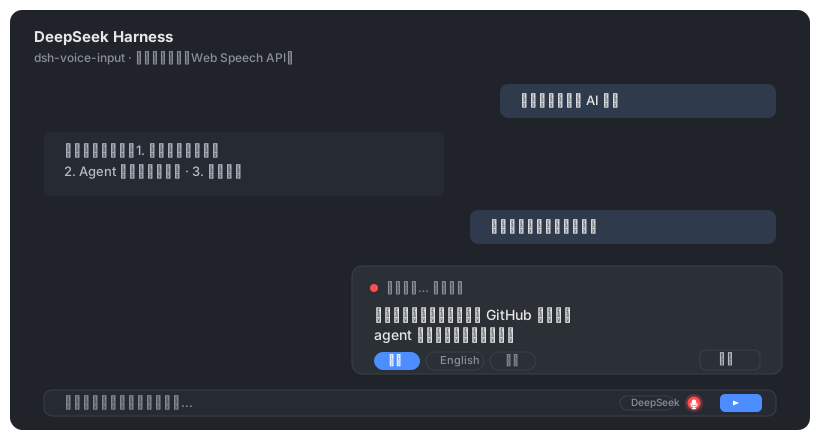
语音输入客户端插件(client plugin)——给 DeepSeek Harness Web GUI 的聊天输入框工具行加一个麦克风按钮:点击开始说话,浏览器 Web Speech API(Chrome / Edge 内置,免费、无需 API 密钥)把语音实时转成文字填入输入框。
功能
- 麦克风按钮位于输入框工具行右侧(发送按钮左侧,
conversation.input.right 插槽)
- 点击开始/停止聆听;聆听时按钮红色脉冲,上方浮层实时显示转写中间结果
- 每段识别完成的最终文本自动追加到输入框草稿,可继续编辑后发送
- 浮层内可一键切换识别语言:中文 / English / 自动
- 可选自动发送:
localStorage 设置 dsh-voice-input-web.autoSend = "1" 后,一段语音识别完成即自动发送
- 零依赖、零密钥、无服务端改动;识别完全在浏览器本地进行
与其他方案对比
安装
方式一:npm 包(推荐)
dsh plugin --profile web add dsh-voice-input-web
方式二:离线安装(GitHub 源码)
-
将本包放入 web profile 的 node_modules:
~/.dsh/profiles/web/node_modules/dsh-voice-input-web/
-
在 ~/.dsh/profiles/web/cordis.patch.yml 追加:
- insert:
    - id: dsh-voice-input-web
      name: 'dsh-voice-input-web'
-
重启 dsh --profile web,浏览器刷新页面。按钮出现在输入框工具行。
安装后插件 id / 包目录名 / localStorage key 统一使用 dsh-voice-input-web(dsh-voice-input 在 npm 上已被同名 SenseVoice 方案占用)。
配置(localStorage)
| key |
值 |
默认 |
说明 |
dsh-voice-input-web.lang |
zh-CN / en-US / auto |
zh-CN |
识别语言 |
dsh-voice-input-web.autoSend |
"1" / "0" |
"0" |
识别完成后自动发送 |
兼容性
- 需要 Chrome / Edge(或任何支持
webkitSpeechRecognition 的浏览器);Firefox 不支持 Web Speech API,会显示提示
- 页面需在
localhost / 127.0.0.1 或 HTTPS 下访问(浏览器安全限制)
- 语音识别需要联网(由浏览器调用系统语音服务)
License
MIT


